

介绍
Discord 集成会将支付、订阅、争议及其他 Dodo Payments 事件发送到您选择的 Discord 频道。您的团队可以在日常协作的位置查看每个事件,无需轮询 API 或检查仪表板。您需要在 Dodo Payments 仪表板中拥有 Developer → Webhooks 的访问权限,以及 Discord 服务器中的 Manage Webhooks 权限。
开始使用
1
Create a Discord Webhook
在 Discord 中,打开用于接收通知的频道,然后点击 Edit Channel。前往 Integrations → Webhooks → New Webhook,为 webhook 命名,确认频道,然后点击 Copy Webhook URL。
2
Open the Webhook Section
在 Dodo Payments 控制面板中,前往 开发者 → Webhooks,然后点击 添加 endpoint。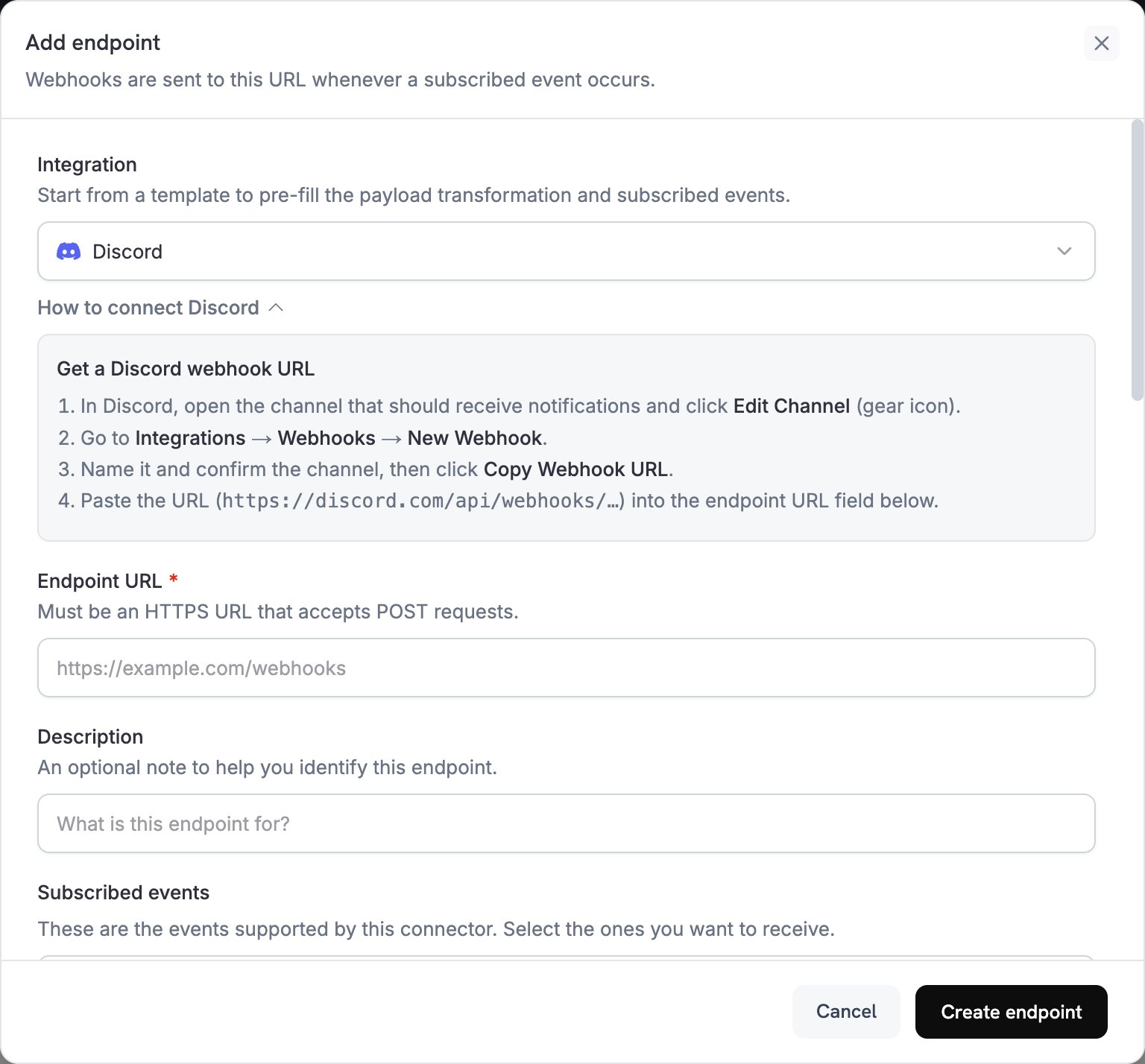
3
Select Discord
在 Integration 中选择 Discord。How to connect Discord 面板会再次显示创建 Discord webhook 的步骤。
4
Paste the Webhook URL
将以
https://discord.com/api/webhooks/ 开头的 Discord webhook URL 粘贴到 Endpoint URL 中。Discord 不需要 API key。5
Select Events
在 Subscribed events 中选择您的 transformation 处理的事件。Discord 会拒绝不包含
content 或 embeds 的消息,因此 transformation 未转换的事件将无法送达。6
Edit Transformation Code
在 Transformation code 下调整每个事件映射到 Discord embed 的方式,或从示例开始。
7
Test & Create
在 Test this code 下,点击 Simulate,预览示例 payload 的 embed。然后点击 Create endpoint。
8
Done
您的 Discord 频道现在会接收每个已订阅事件对应的消息。
Transformation Code 示例
每个 handler 都会将webhook.payload 替换为包含一个 embed 的 Discord 消息。Dodo Payments 金额使用最小货币单位表示,因此示例会除以 100 并显示货币代码。
最简 Payment Embed
当支付成功时发布一个 embed(payment.succeeded):
payment_embed.js
Subscription 事件
当订阅变为 active(subscription.active)或被取消(subscription.cancelled)时发布一个 embed:
subscription_embed.js
Dispute 提醒
为每个 dispute 事件发布一个 embed,例如dispute.opened、dispute.won 和 dispute.lost。标题和颜色遵循 dispute 的 dispute_status:
dispute_embed.js
提示
- 使用嵌入内容实现丰富的格式和颜色。
- 保持标题简短,将详细信息放在字段中。
- 使用能够表示结果的颜色:成功使用绿色,失败使用红色,警告使用橙色。
故障排除
No Messages in Discord
No Messages in Discord
- 确认 webhook 仍存在于频道的 Integrations → Webhooks 下,并且 Endpoint URL 与其 URL 匹配。
- 检查 transformation 是否返回带有
embeds的 JSON 对象。 - 检查 Subscribed events 是否包含你所需的事件。
- 在 开发者 → Webhooks 的 Logs 标签页中打开 endpoint 的投递尝试,查看 Discord 的响应代码。
Transformation Errors
Transformation Errors
- 在编辑器中验证你的代码。语法错误会阻止投递。
- 检查字段名称是否与 webhook payload 结构匹配。