通过 Microsoft Teams 中的实时支付通知,让您的业务团队保持信息同步。此集成将支付事件作为丰富的自适应卡片传递——非常适合 Teams 作为主要协作工具的企业环境。
本指南假设您具有在 Microsoft Teams 工作区中创建 Webhook 的管理员访问权限。
开始使用
打开 Webhook 部分
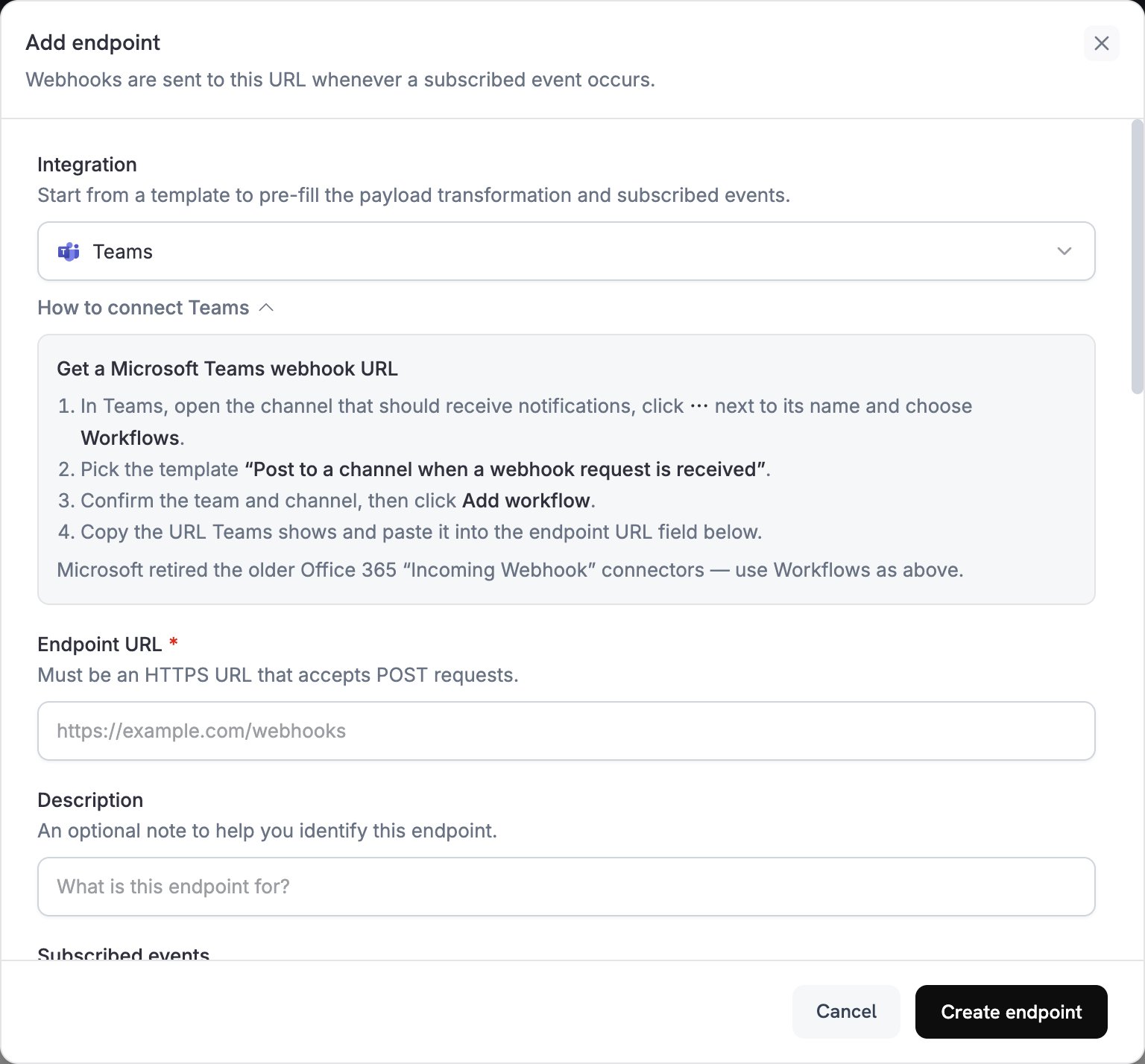
在您的 Dodo Payments 仪表板中,导航到 Webhooks → + 添加端点 并展开集成下拉菜单。 选择 Microsoft Teams
选择 Microsoft Teams 集成卡片。
创建 Teams Webhook
在 Teams 中,转到您的频道 → ⋯ → 连接器 → 传入 Webhook → 配置。复制 Webhook URL。
粘贴 Webhook URL
将 Teams Webhook URL 粘贴到端点配置中。
自定义转换
编辑转换代码,以将消息格式化为 Teams 的自适应卡片。
测试并创建
使用示例有效负载进行测试,然后单击 创建 以激活。
完成!
🎉 您的 Teams 渠道现在将以自适应卡片的形式接收 Dodo Payments 更新。
转换代码示例
基本支付卡
function handler(webhook) {
if (webhook.eventType === "payment.succeeded") {
const p = webhook.payload.data;
webhook.payload = {
type: "message",
attachments: [{
contentType: "application/vnd.microsoft.card.adaptive",
content: {
type: "AdaptiveCard",
body: [
{
type: "TextBlock",
text: "✅ Payment Successful",
weight: "Bolder",
size: "Medium"
},
{
type: "FactSet",
facts: [
{ title: "Amount", value: `$${(p.total_amount / 100).toFixed(2)}` },
{ title: "Customer", value: p.customer.email },
{ title: "Payment ID", value: p.payment_id }
]
}
]
}
}]
};
}
return webhook;
}
订阅管理
function handler(webhook) {
const s = webhook.payload.data;
switch (webhook.eventType) {
case "subscription.active":
webhook.payload = {
type: "message",
attachments: [{
contentType: "application/vnd.microsoft.card.adaptive",
content: {
type: "AdaptiveCard",
body: [
{
type: "TextBlock",
text: "📄 Subscription Activated",
weight: "Bolder",
color: "Good"
},
{
type: "FactSet",
facts: [
{ title: "Customer", value: s.customer.email },
{ title: "Product", value: s.product_id },
{ title: "Amount", value: `$${(s.recurring_pre_tax_amount / 100).toFixed(2)}/${s.payment_frequency_interval}` },
{ title: "Next Billing", value: new Date(s.next_billing_date).toLocaleDateString() }
]
}
]
}
}]
};
break;
case "subscription.cancelled":
webhook.payload = {
type: "message",
attachments: [{
contentType: "application/vnd.microsoft.card.adaptive",
content: {
type: "AdaptiveCard",
body: [
{
type: "TextBlock",
text: "⚠️ Subscription Cancelled",
weight: "Bolder",
color: "Warning"
},
{
type: "FactSet",
facts: [
{ title: "Customer", value: s.customer.email },
{ title: "Product", value: s.product_id },
{ title: "Cancelled At", value: new Date(s.cancelled_at).toLocaleDateString() }
]
}
]
}
}]
};
break;
}
return webhook;
}
争议警报
function handler(webhook) {
if (webhook.eventType.startsWith("dispute.")) {
const d = webhook.payload.data;
const color = d.dispute_status === "won" ? "Good" : d.dispute_status === "lost" ? "Attention" : "Warning";
const title = d.dispute_status === "won" ? "🏆 Dispute Won" : d.dispute_status === "lost" ? "❌ Dispute Lost" : "🚨 Dispute Update";
webhook.payload = {
type: "message",
attachments: [{
contentType: "application/vnd.microsoft.card.adaptive",
content: {
type: "AdaptiveCard",
body: [
{
type: "TextBlock",
text: title,
weight: "Bolder",
color: color
},
{
type: "FactSet",
facts: [
{ title: "Payment ID", value: d.payment_id },
{ title: "Amount", value: `$${(d.amount / 100).toFixed(2)}` },
{ title: "Status", value: d.dispute_status },
{ title: "Stage", value: d.dispute_stage }
]
}
]
}
}]
};
}
return webhook;
}
- 使用自适应卡片进行丰富的交互式格式化
- 选择适当的颜色:良好(绿色)、警告(黄色)、注意(红色)
- 保持事实集简洁易读
- 在部署之前使用 Teams Webhook 测试工具进行测试
故障排除
- 验证 Webhook URL 是否正确且有效
- 检查转换是否返回有效的自适应卡片 JSON
- 确保 Webhook 有权限在频道中发布
- 在 Teams Webhook 测试工具中验证自适应卡片架构
- 检查所有必需字段是否存在
- 确保颜色值有效(良好、警告、注意、默认)