

介绍
Customer.io 集成会将 Dodo Payments 事件发送到 Customer.io 的 Track API,因此付款和订阅变更可以触发营销活动和客户旅程。例如,新客户可以收到欢迎邮件,订阅变更可以发送更新通知,付款失败可以发送提醒。此集成需要您的 Customer.io Site ID 和 API key。Track API 使用 HTTP Basic 身份验证,其中 Site ID 作为用户名,API key 作为密码。
开始使用
1
Open the Webhook Section
在 Dodo Payments 控制面板中,前往 Developer → Webhooks,然后点击 Add endpoint。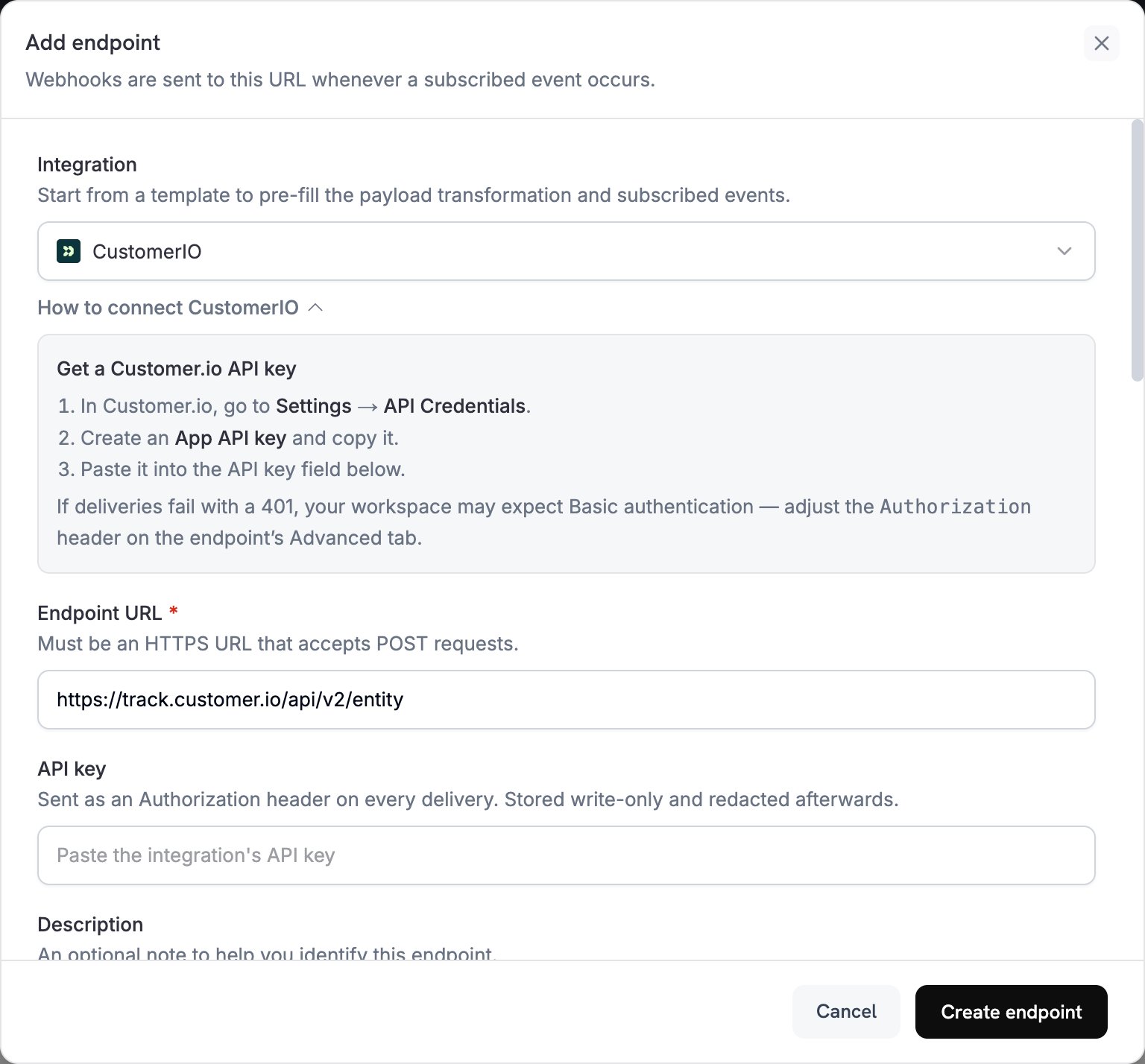
2
Select Customer.io
在 Integration 中选择 CustomerIO。
3
Enter Credentials
在 API key 中粘贴您的 Customer.io API key。Dodo Payments 会将该密钥作为 bearer token 放入
Authorization header 中。Track API 需要 Basic 身份验证。如果投递因 INLINE_CODE_PLACEHOLDER_f17098e03bba74a54914d25c81f5dbf413_END 失败,请打开 endpoint 的 Advanced 选项卡,并将 Authorization header 替换为 Basic,后跟 site_id:api_key 的 Base64 编码。4
Select Events
在 Subscribed events 中选择您的 transformation 处理的事件。本页面中的示例使用
payment.succeeded、subscription.active 和 subscription.cancelled。5
Configure Transformation
在 Transformation code 下编辑 handler,以便为 Customer.io 的 Track API 格式化事件。请从示例开始。
6
Test & Create
在 Test this code 下点击 Simulate,使用示例 payload 运行 handler。然后点击 Create endpoint。
7
Done
现在,订阅的事件会到达 Customer.io,并可触发您的电子邮件自动化流程。
Transformation Code 示例
每个 handler 都会向 Track API v2entity endpoint 发送一个请求,并使用其 Dodo Payments customer_id 标识用户。要记录事件,请求会将 action 设置为 event,并将事件名称放入 name。要更新用户的属性,请将 action 设置为 identify。Dodo Payments 的金额以最小货币单位表示,因此示例会将金额除以 100。
跟踪付款事件
付款成功时记录一个payment_completed 事件:
track_payments.js
跟踪订阅生命周期
订阅变为 active 时记录一个subscription_started 事件,订阅取消时记录一个 subscription_cancelled 事件:
track_subscriptions.js
跟踪客户属性
付款成功时更新用户的个人资料属性。每个identify 请求都会覆盖其发送的属性,因此 last_payment_amount 和 last_payment_date 始终保存最新的付款信息。
track_attributes.js
提示
- 在 transformation 和 Customer.io 营销活动触发器中使用相同的事件名称,例如
payment_completed。选择能够描述事件内容的名称。 - 包含消息个性化所需的属性。
- 在每个请求中使用相同的 ID 标识用户。示例使用 Dodo Payments
customer_id。 - 如需查看每个请求字段,请参阅 Customer.io Track API reference。
故障排除
Events Not Triggering Campaigns
Events Not Triggering Campaigns
- 确认 Site ID 和 API key 正确无误。
- 如果投递因 INLINE_CODE_PLACEHOLDER_f17098e03bba74a54914d25c81f5dbf413_END 失败,请按照入门指南中的说明,将
Authorizationheader 设置为 Basic 身份验证。 - 检查事件名称是否与 Customer.io 营销活动触发器匹配。
- 检查是否设置了客户标识符。
- 查看 Customer.io API 速率限制。
Transformation Errors
Transformation Errors
- 检查 payload 是否符合 Customer.io API 格式。
- 检查所有必填字段是否存在,并确认
action是 Track API 支持的操作,例如event或identify。 - 检查事件名称和属性的格式是否正确。