

介绍
每当 Dodo Payments 事件发生时,运行一次 Windmill 脚本或流程。你可以使用它更新数据库、将记录同步到其他系统、发送通知,或通过代码运行自己的业务逻辑。Windmill connector 会将每个事件发送到 Windmill 脚本或流程的 webhook URL。你需要一个已部署的脚本或流程、一个能够运行它的 Windmill token,以及 Dodo Payments 控制台中 Developer → Webhooks 的访问权限。
开始使用
1
Open the Webhook Section
在 Dodo Payments 仪表板中,前往 Developer → Webhooks,然后点击 Add endpoint。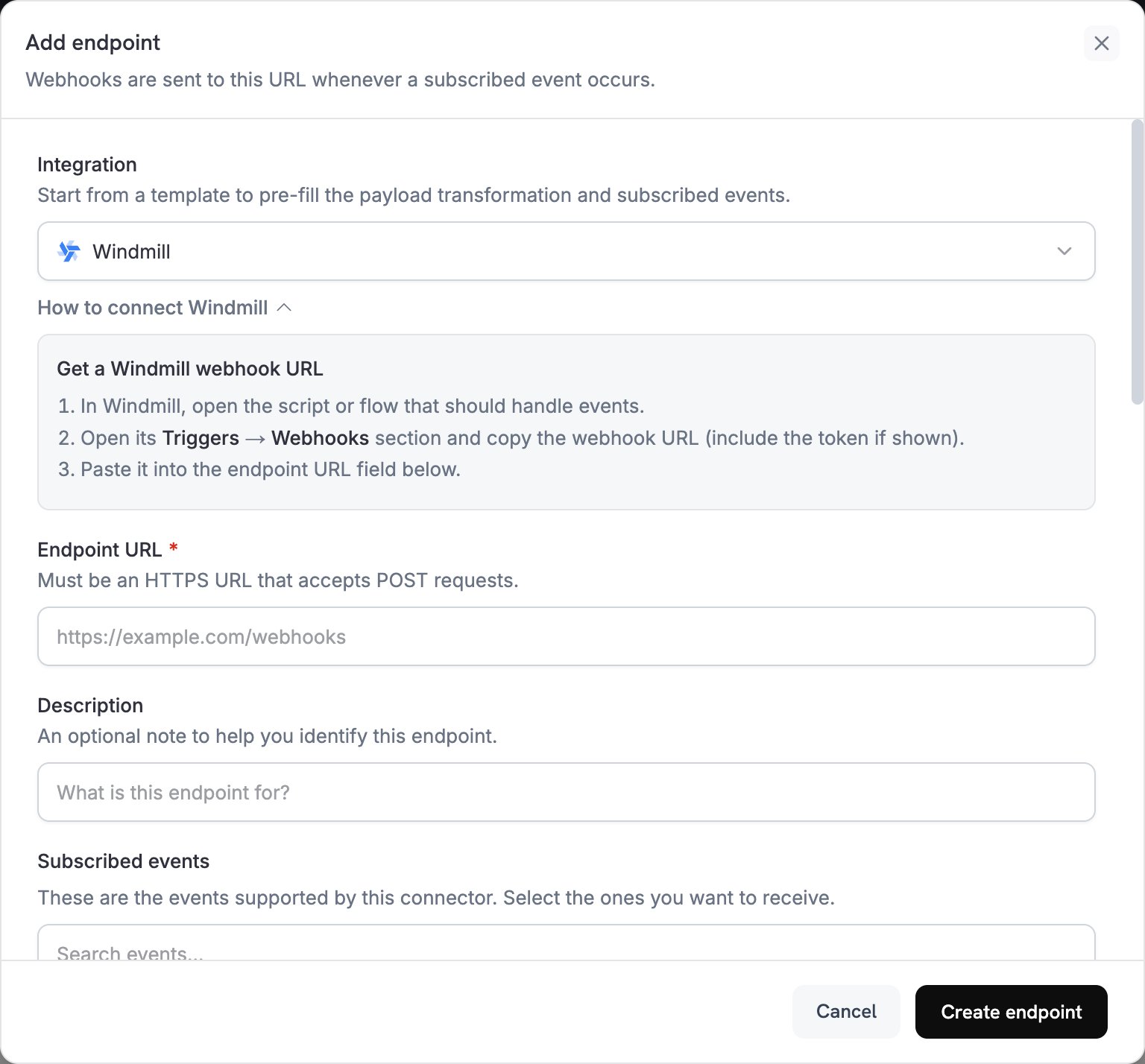
2
Select Windmill
在 Integration 中选择 Windmill。控制台会加载 Windmill transformation code,并在 How to connect Windmill 面板中显示设置步骤。
3
Copy the Windmill Webhook URL
在 Windmill 中,打开用于处理事件的脚本或流程。在其 Triggers 标签页中,打开 Webhooks,然后复制异步(UUID/Async)webhook URL。接着为该脚本或流程创建一个 webhook 专用 token 并复制它。此 token 只能运行该脚本或流程。
4
Paste Webhook URL
将 Windmill webhook URL 粘贴到 Endpoint URL 中。该 URL 必须使用 HTTPS,因此自托管的 Windmill 实例需要一个公开的 HTTPS 地址。Windmill connector 没有 API key 字段,因此需要在创建 endpoint 后添加 token。
5
Select Events
Subscribed events 会列出 Windmill connector 支持的事件。仅保留脚本或流程处理的事件。
6
Configure Transformation
在 Transformation code 下,编辑 handler,使 payload 的顶层键与脚本或流程的 inputs 匹配。请从示例开始。
7
Test & Create
在 Test this code 下,选择事件类型并点击 Simulate 以预览 payload。然后点击 Create endpoint。
8
Add the Windmill Token
创建 endpoint 后立即打开其 Advanced 标签页。在 Custom headers 下,点击 Add header。将
Authorization 作为名称,并将 Bearer、一个空格和你的 token 作为值。然后点击 Save。在保存 header 之前,Windmill 会拒绝 delivery,而 Dodo Payments 会按照重试计划重试。Windmill 也接受 URL 末尾的 token query parameter。Windmill 建议使用 header,因为任何能够看到包含 token 的 URL 的人都可以使用该 token。9
Done
现在,Subscribed events 会启动脚本或流程的 runs。要发送测试事件,请打开 endpoint 的 Testing 标签页,选择事件类型,然后点击 Send example。在 Windmill 中,该 run 会显示在 Runs 页面上,并带有
Webhook trigger。Transformation Code Examples
每个 handler 都会将webhook.payload 替换为一个扁平对象,并保留 webhook.url,即你的 Windmill webhook URL。Windmill 会将每个顶层键传递给名称相同的脚本或流程 input,因此,第一个示例的脚本会声明 event_type、payment_id 和 amount 等 inputs。Dodo Payments 的金额以最小货币单位表示,因此示例会除以 100,并将结果作为字符串发送,例如 "25.00"。对于 JPY 和 KRW 等零小数位货币,请直接使用金额。
Basic Workflow Payload
发送成功付款的详细信息:basic_workflow.js
Subscription Workflow Handler
当订阅变为 active 或被取消时,发送subscription_started 或 subscription_cancelled 事件:
subscription_workflow.js
Dispute Workflow Handler
发送每个 dispute 事件;当 dispute 开启时,将urgent 设置为 true:
dispute_workflow.js
Common Windmill Use Cases
Database Operations
Database Operations
- 更新 PostgreSQL 或 MySQL 中的 customer records
- 将 payment events 记录到 data warehouse
- 将数据同步到 external systems
- 更新 inventory levels
- 跟踪 analytics metrics
Business Logic
Business Logic
- 计算 revenue metrics
- 处理 refunds 和 adjustments
- 处理 subscription lifecycle changes
- 生成 reports 和 exports
- 验证 payment data
External Integrations
External Integrations
- 将数据发送到 analytics platforms
- 更新 CRM systems
- 启动 email campaigns
- 创建 calendar events
- 发送 SMS notifications
Tips
- 使用脚本或流程 input 的名称作为 payload 键名,因为 Windmill 会将每个顶层键映射到名称相同的 input。
- 在不同事件中使用相同的 field names,以便一个脚本处理多种事件类型。
- 包含事件类型和
timestamp。事件可能会乱序到达,而timestamp可以让脚本对事件排序。 - 使用异步 webhook URL。同步 URL 会等待 run 完成,而运行时间超过 delivery timeout 的 run 会被视为失败 delivery,Dodo Payments 会重试该 delivery。
- 确保脚本可以安全地为同一事件运行两次,因为重试可能导致同一事件被 delivery 多次。
- 要在代码中跳过事件,请在返回 webhook 前设置
webhook.cancel = true。日志会将跳过的 delivery 记录为成功。 - 使用 Windmill 的error handlers,以便在 run 失败时收到通知。
Troubleshooting
Workflows Not Triggering
Workflows Not Triggering
- 检查 Endpoint URL 是否为脚本或流程的 webhook URL,并确认 endpoint 已启用。
- 检查
Authorizationheader 是否包含Bearer和有效 token。webhook 专用 token 只能运行其对应的脚本或流程。 - 检查脚本或流程是否已部署。webhook 运行的是最新部署版本,而不是 draft。
- 在 Developer → Webhooks 中打开 Logs 标签页,查看 Windmill 对每次 delivery 的响应。
Data Processing Issues
Data Processing Issues
- 检查 payload 的顶层键是否按名称匹配脚本或流程 inputs。
- 检查每个值是否与其 input type 匹配。示例会将金额作为字符串发送。
- 在 Windmill Runs 页面上检查 run,并按
Webhooktrigger 进行筛选。异步 URL 会在 Windmill 将 run 加入队列后立即响应,因此即使 run 失败,Dodo Payments logs 也会显示 delivery 成功。 - 在 Windmill 中使用 Simulate 生成的 payload 运行脚本或流程。