

介绍
通过 Zapier 将 Dodo Payments 连接到数千个应用。每个 Dodo Payments 事件都可以启动一个 Zap,用于发送电子邮件、添加电子表格行、创建任务或更新 CRM 记录。Zapier 连接器会将每个事件发送到以 Webhooks by Zapier 开始的 Zap 的 webhook URL。Zapier 免费计划不提供 Webhooks by Zapier,因此你需要付费的 Zapier 计划。你还需要能够访问 Dodo Payments 控制面板中的 Developer → Webhooks。
开始使用
1
Open the Webhook Section
在 Dodo Payments 仪表板中,前往 Developer → Webhooks,然后点击 Add endpoint。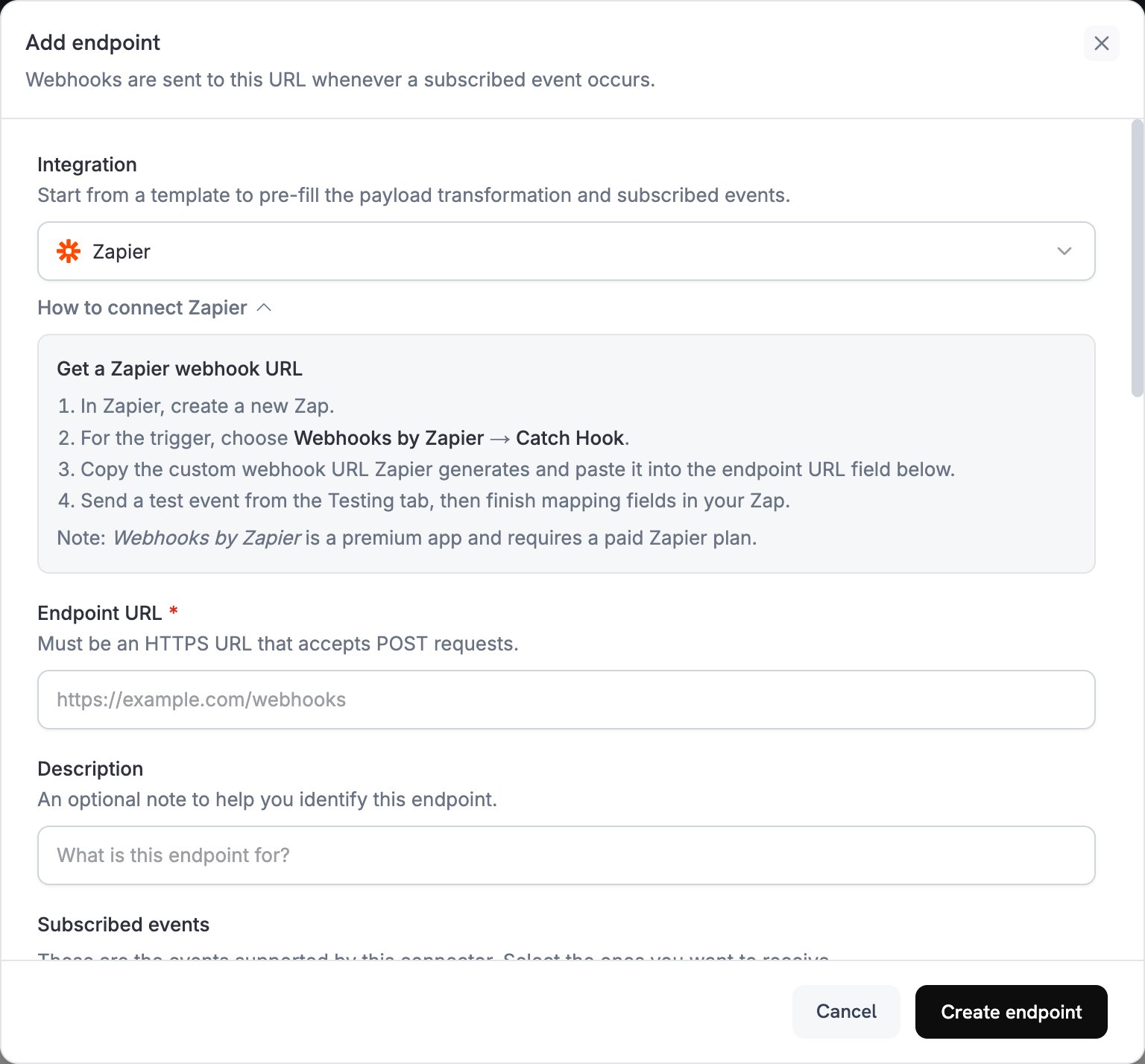
2
Select Zapier
在 Integration 中选择 Zapier。控制面板会加载 Zapier 转换代码,并在 How to connect Zapier 面板中显示设置步骤。
3
Create Zap in Zapier
在 Zapier 中创建一个 Zap。对于触发器,选择 Webhooks by Zapier,选择 Catch Hook 事件,然后点击 Continue。在触发器的 Test 标签页中,复制 webhook URL。
4
Paste Webhook URL
将 Zapier webhook URL 粘贴到 Endpoint URL。Zapier 连接器没有 API key 字段。
5
Select Events
Subscribed events 列出 Zapier 连接器支持的事件。仅保留你的转换所处理的事件。Zapier 接受任何 JSON,因此即使某个事件未被转换修改,它仍会启动你的 Zap,并使用原始的 Dodo Payments payload。
6
Configure Transformation
在 Transformation code 下,编辑处理程序以发送 Zap 使用的字段。请从示例开始。
7
Test & Create
在 Test this code 下,选择事件类型并点击 Simulate 预览 payload。然后点击 Create endpoint。
8
Done
现在,订阅的事件会到达你的 Zap。要将示例字段加载到 Zapier 中,请打开 endpoint 的 Testing 标签页,选择事件类型,然后点击 Send example。在 Zapier 中,点击 Test trigger,在操作步骤中映射字段,然后发布 Zap。
转换代码示例
每个处理程序都会将webhook.payload 替换为一个扁平对象,并保留 webhook.url,即你的 Zapier webhook URL。Dodo Payments 金额采用最小货币单位,因此示例会将金额除以 100,并将结果作为字符串发送,例如 "25.00"。对于 JPY 和 KRW 等零小数位货币,请直接使用金额。
基本 Webhook Payload
发送成功支付的详细信息:basic_webhook.js
订阅事件处理程序
当订阅变为活跃或被取消时,发送一个subscription_started 或 subscription_cancelled 事件:
subscription_webhook.js
争议提醒处理程序
发送每个争议事件;当争议开启时,将urgent 设置为 true:
dispute_webhook.js
常见 Zapier 使用场景
Email Notifications
Email Notifications
- 发送 Gmail 或 Outlook 电子邮件以确认支付
- 将客户添加到 Mailchimp 或 ConvertKit 的电子邮件序列
- 发送 Slack 或 Discord 通知
- 向 Google Sheets 添加行
CRM Updates
CRM Updates
- 将联系人添加到 HubSpot 或 Salesforce
- 在 Pipedrive 或 Close 中创建交易
- 更新 Airtable 中的客户记录
- 在 Monday.com 中记录活动
Task Management
Task Management
- 在 Asana 或 Trello 中创建任务
- 在 Notion 中添加待办事项
- 创建日历事件
- 通过 Twilio 发送 SMS 消息
提示
- 保持 payload 扁平化,以便在 Zapier 中映射时轻松找到每个字段。
- 在不同事件中使用相同的字段名称,以便一个 Zap 可以处理多种事件类型。
- 包含
timestamp,以便你的 Zap 可以记录每个事件发生的时间。 - 更改转换后,发送新的示例,并在 Zapier 中再次测试触发器,以便加载新字段。
- 若只想对部分事件运行后续步骤,请添加一个 Filter by Zapier 步骤,用于检查
event_type。 - 若要在代码中跳过某个事件,请在返回 webhook 之前设置
webhook.cancel = true。日志会将跳过的传送记录为成功。
故障排除
Zap Not Triggering
Zap Not Triggering
- 检查 Endpoint URL 是否与触发器 Test 标签页中的 webhook URL 匹配。当 Zap 转移给其他 Zapier 用户时,URL 会发生变化。
- 检查 Zap 是否已发布并启用。对于已关闭或已删除的 Zap,Zapier 会返回
404,但 URL 在更改后最多数小时内仍可能持续返回200。 - 在 Developer → Webhooks 中打开 Logs 标签页,查看 Zapier 对每次传送的响应。
- 检查是否已在 Subscribed events 中选择该事件。要更改选择,请打开 endpoint 并点击 Edit。
Data Not Mapping Correctly
Data Not Mapping Correctly
- 检查操作步骤中的字段名称是否与转换发送的键匹配。
- 检查每个值的类型是否符合操作的要求。示例会将金额作为字符串发送。
- 检查处理程序是否返回
webhook,并且webhook.payload是 JSON 对象。如果 payload 是数组,Zapier 会为每个项目运行一次 Zap。 - 在 Zapier 中使用 Test trigger 查看最新事件的字段。