

はじめに
SendGrid integrationは、Dodo Paymentsのイベント発生時に、SendGridのMail Send APIを通じてトランザクションメールを送信します。各メールにはSendGridのダイナミックテンプレートの1つが使用され、イベントのデータがテンプレートに入力されます。これにより、決済の確認、新規サブスクライバーへのウェルカムメール、決済失敗後のフォローアップを行えます。このintegrationには、Mail Send permissionを持つSendGrid API key、SendGridでverified senderに設定された送信者、送信する各メール用のダイナミックテンプレートが必要です。また、Dodo Payments dashboardのDeveloper → Webhooksにアクセスできる必要があります。
始め方
1
Open the Webhook Section
Dodo Payments ダッシュボードで、Developer → Webhooks に移動し、Add endpoint をクリックします。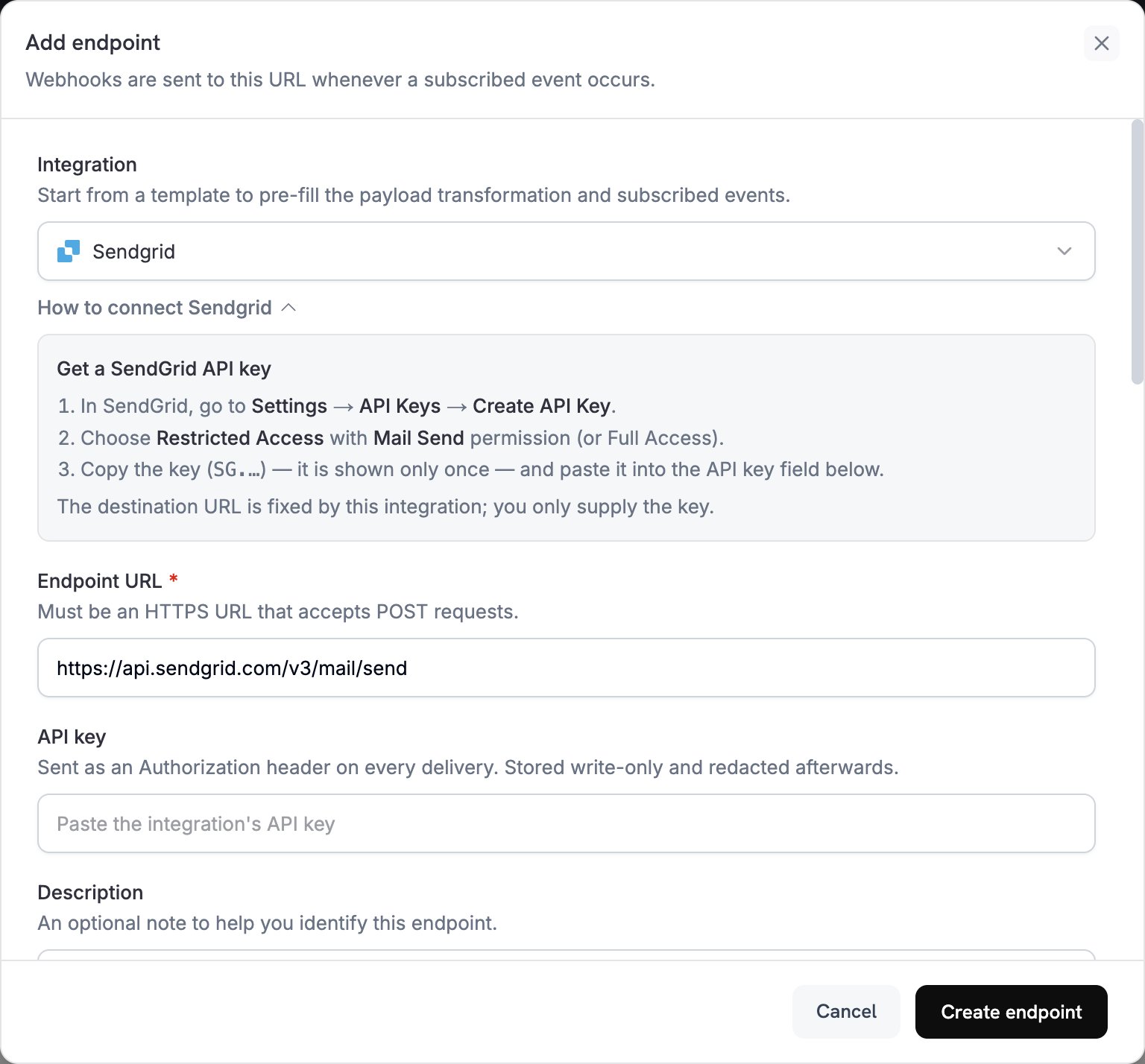
2
Select SendGrid
IntegrationでSendGridを選択します。dashboardにEndpoint URLとSendGrid用のtransformation codeが入力され、How to connect SendGridパネルにセットアップ手順が表示されます。
3
Enter API Key
SendGridでSettings → API Keysに移動し、Create API Keyをクリックします。Restricted AccessとMail Send permission、またはFull Accessを選択します。SendGridが表示するkeyは、
SG.で始まり、一度しか表示されません。これをAPI keyに貼り付けます。Dodo Paymentsは、SendGridへのすべてのrequestでAuthorization headerのbearer tokenとしてこのkeyを送信します。4
Select Events
Subscribed eventsで、transformationが処理するeventのみを選択します。transformationが変更せずに通過させたeventはDodo Payments形式のままSendGridに到達し、SendGridによって拒否されます。
5
Configure Transformation
Transformation codeでhandlerを編集し、SendGridのMail Send API用にメールをフォーマットします。examplesを参考に、各
template_idを独自のダイナミックテンプレートのIDに置き換えます。このIDはd-で始まります。6
Test & Create
Test this codeでevent typeを選択し、SimulateをクリックしてSendGridへのrequestをプレビューします。次にCreate endpointをクリックします。
7
Done
これでDodo Paymentsは、サブスクライブした各eventについてSendGrid経由でメールを送信します。各deliveryとSendGridのresponseを確認するには、Developer → WebhooksのLogs tabを開きます。
Transformation Codeの例
各handlerはwebhook.urlをMail Send endpointに設定し、dynamic_template_dataを通じてevent dataをダイナミックテンプレートに渡します。Dodo Paymentsの金額は最小通貨単位で表されるため、例では100で割っています。JPYやKRWなどの小数点以下の桁がない通貨では、金額をそのまま使用してください。
決済確認メール
決済が成功したときにreceiptを送信します(payment.succeeded):
payment_confirmation.js
サブスクリプションのウェルカムメール
サブスクリプションがactiveになったときにcustomerを歓迎します(subscription.active):
subscription_welcome.js
決済失敗通知
決済が失敗したときにcustomerへ再試行を促します(payment.failed):
payment_failure.js
ヒント
- SendGridのダイナミックテンプレートを使用してコンテンツをパーソナライズします。
- テンプレートに必要な決済データを
dynamic_template_dataに渡します。 - verified senderに一致する
fromaddressと、sendernameを設定します。 - template IDを再利用して、同じ種類のメールで同じ形式を維持します。
- marketing contentを含むメールにはunsubscribe linkを含めます。
- codeでeventをスキップするには、webhookをreturnする前に
webhook.cancel = trueを設定します。logsでは、スキップされたdeliveryも成功として記録されます。
トラブルシューティング
Emails Not Being Sent
Emails Not Being Sent
- API keyにMail Send permissionがあることを確認します。置き換えるには、endpointを編集し、API keyに新しいkeyを貼り付けます。
- 各
template_idがactiveなダイナミックテンプレートに属していることを確認します。 - recipientのemail addressが有効であることを確認します。
- ご利用のplanにおけるSendGridのsending limitsとquotasを確認します。
- Developer → WebhooksのLogs tabを開き、failed deliveryに対するSendGridのresponseを確認します。
Transformation Errors
Transformation Errors
- payloadがSendGridのMail Send formatと一致していることを確認します。
- 必須fieldがすべて存在することを確認します。
personalizationsには少なくとも1つのtoaddressが必要で、fromも必要です。 dynamic_template_dataのkeyが、{{customer_name}}など、template内のvariableと一致していることを確認します。- 各
fromaddressがSendGridでverifiedになっていることを確認します。