

はじめに
Resend integration は、Dodo Payments のイベント発生時に Resend 経由でトランザクションメールを送信します。これを使用して、支払いの確認、新しいサブスクライバーへのウェルカムメールの送信、支払い失敗時のお客様への通知を、ご自身の送信用ドメインから行えます。この integration には、Sending access を持つ Resend API key と、Resend で検証済みの送信用ドメインが必要です。また、Dodo Payments ダッシュボードの Developer → Webhooks にアクセスできる必要があります。
始め方
1
Open the Webhook Section
Dodo Payments ダッシュボードで、Developer → Webhooks に移動し、Add endpoint をクリックします。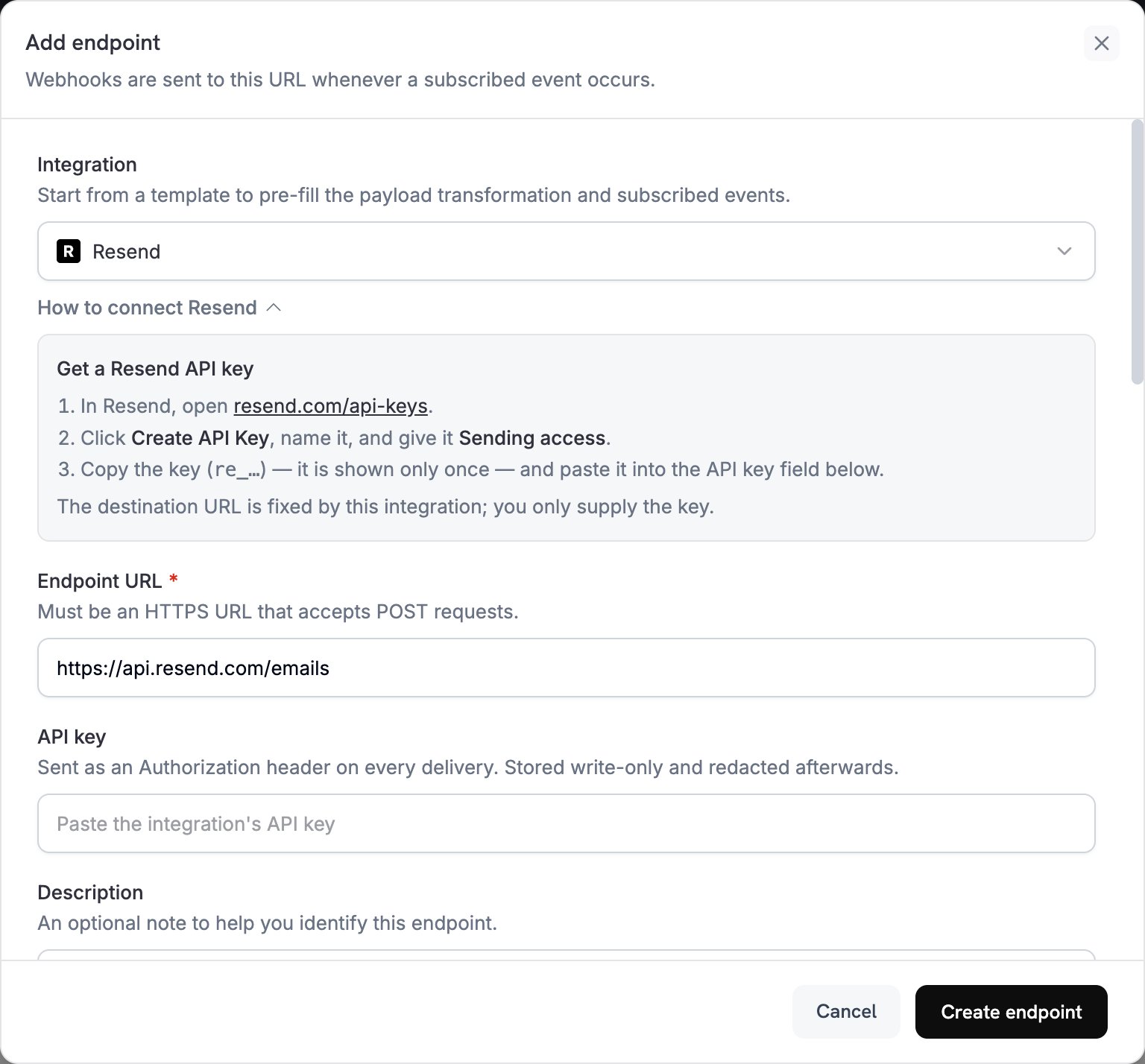
2
Select Resend
Integration で Resend を選択します。ダッシュボードに Endpoint URL と Resend 用の transformation code が入力され、How to connect Resend パネルにセットアップ手順が表示されます。
3
Enter API Key
Resend で API Keys を開き、Create API Key をクリックして、キーに Sending access を付与します。Resend に表示されるキー(
re_ で始まります)は一度しか表示されません。これを API key に貼り付けます。Dodo Payments は、Resend へのすべてのリクエストの Authorization header に bearer token として送信します。4
Select Events
Subscribed events で、transformation が処理するイベントのみを選択します。transformation が変更せずに通過させたイベントは Dodo Payments 形式のまま Resend に到達するため、Resend に拒否されます。
5
Configure Transformation
Transformation code で handler を編集し、サブスクライブした各イベントが Resend メールになるようにします。examples を参考にしてください。
6
Test & Create
Test this code でイベントタイプを選択し、Simulate をクリックして Resend へのリクエストをプレビューします。その後、Create endpoint をクリックします。
7
Done
これで Dodo Payments は、サブスクライブした各イベントについて Resend 経由でメールを送信します。各配信と Resend の response を確認するには、Developer → Webhooks の Logs タブを開きます。
Transformation Code の例
各 handler はwebhook.url を Resend の send-email endpoint に設定し、webhook.payload をメールに置き換えます。Dodo Payments の金額は通貨の最小単位で表されるため、例では 100 で割り、通貨コードを表示しています。JPY や KRW などの小数点以下の桁がない通貨では、金額をそのまま使用してください。
支払い確認メール
支払いが成功したときに領収書を送信します(payment.succeeded):
payment_confirmation.js
サブスクリプションのウェルカムメール
サブスクリプションが有効になったときにお客様を歓迎します(subscription.active):
subscription_welcome.js
支払い失敗通知
支払いが失敗したときに、お客様に支払い方法の更新を依頼します(payment.failed):
payment_failure.js
ヒント
- Resend で検証済みのドメインから送信すると、到達率が向上します。
- 各メールに
html版とtext版の両方を含めます。 customer.nameなど、payload の顧客データを使ってコンテンツをパーソナライズします。- 結果または必要なアクションがわかる件名を作成します。
- マーケティングコンテンツを含むメールには、配信停止リンクを含めます。
- endpoint を作成する前に、Simulate で各テンプレートをプレビューします。
- code でイベントをスキップするには、webhook を return する前に
webhook.cancel = trueを設定します。ログには、スキップされた配信が成功として記録されます。
トラブルシューティング
Emails Not Being Sent
Emails Not Being Sent
- API key が正しく、有効で、Sending access を持っていることを確認します。置き換えるには endpoint を編集し、API key に新しいキーを貼り付けます。
- sender domain が Resend で検証済みであることを確認します。
- recipient email address が有効であることを確認します。
- ご利用のプランにおける Resend の送信制限と quota を確認します。
- Developer → Webhooks の Logs タブを開き、失敗した配信に対する Resend の response を確認します。
Transformation Errors
Transformation Errors
- payload が Resend の send-email 形式と一致していることを確認します。Resend では
from、to、subjectが必要です。 - code が処理するすべてのイベントで、必要なフィールドがすべて設定されていることを確認します。
htmlの値が正しい形式の HTML であることを確認します。fromaddress が、Resend で検証済みのドメインを使用していることを確認します。