

はじめに
Customer.io integrationは、Dodo PaymentsのイベントをCustomer.ioのTrack APIに送信するため、支払いとサブスクリプションの変更をキャンペーンやカスタマージャーニーのトリガーにできます。たとえば、新しい顧客にウェルカムメールを送信したり、サブスクリプションの変更時に更新通知を送信したり、支払いが失敗したときに通知を送信したりできます。このintegrationにはCustomer.io Site IDとAPI keyが必要です。Track APIではHTTP Basic authenticationを使用し、ユーザー名にSite ID、パスワードにAPI keyを指定します。
始め方
1
Open the Webhook Section
Dodo Payments ダッシュボードで、Developer → Webhooks に移動し、Add endpoint をクリックします。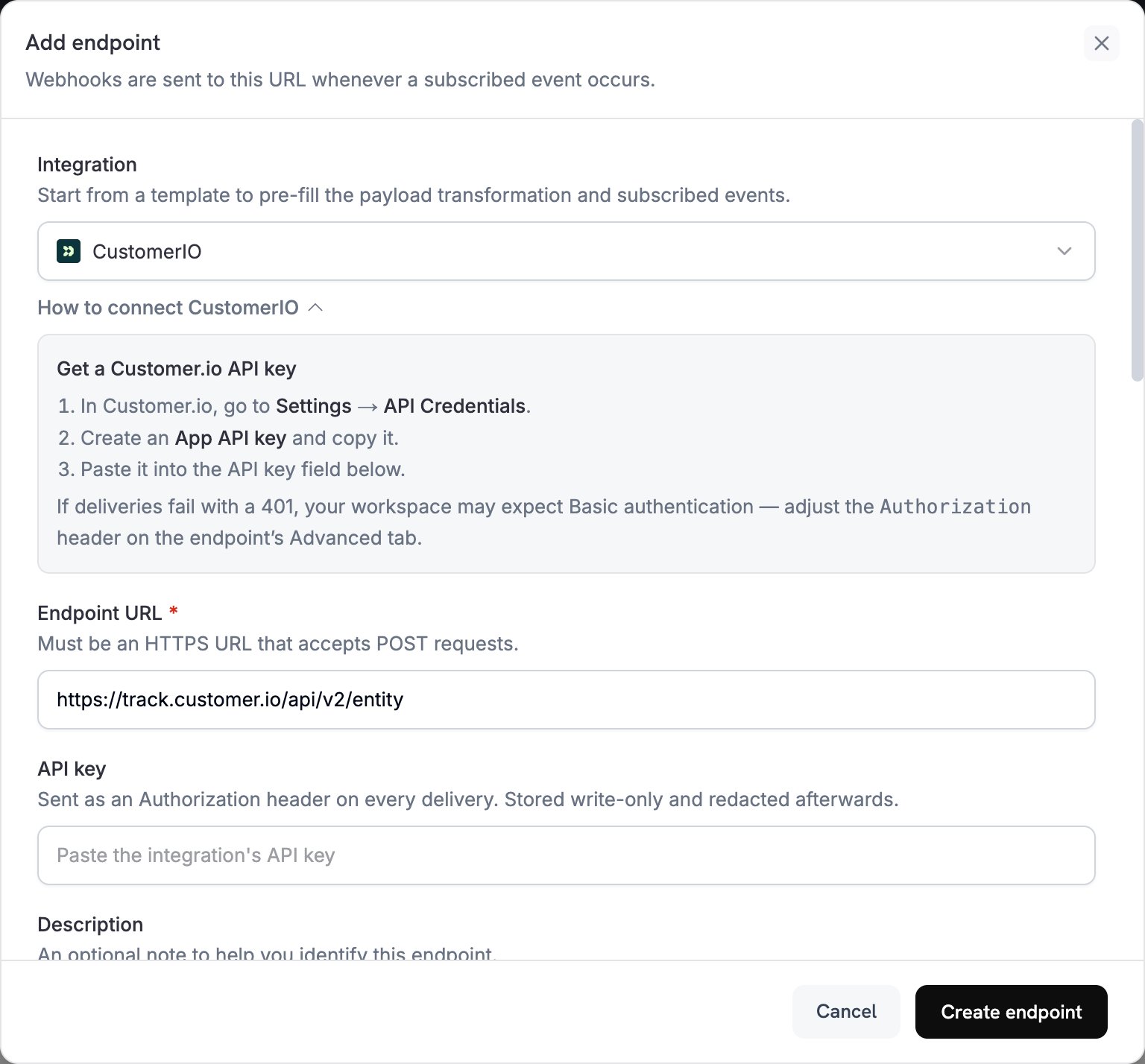
2
Select Customer.io
Integrationで、CustomerIOを選択します。
3
Enter Credentials
API keyに、Customer.io API keyを貼り付けます。Dodo Paymentsは、bearer tokenとして
Authorization headerにkeyを送信します。Track APIではBasic authenticationが必要です。401で配信が失敗した場合は、endpointのAdvancedタブを開き、Authorization headerを、site_id:api_keyのBase64 encodingを後に続けたBasicに置き換えます。4
Select Events
Subscribed eventsで、transformationが処理するイベントを選択します。このページの例では、
payment.succeeded、subscription.active、subscription.cancelledを使用します。5
Configure Transformation
Transformation codeで、Customer.ioのTrack API用にイベントをフォーマットするhandlerを編集します。examplesから始めることができます。
6
Test & Create
Test this codeでSimulateをクリックし、サンプルpayloadに対してhandlerを実行します。次にCreate endpointをクリックします。
7
Done
これでSubscribed eventsがCustomer.ioに届き、メールautomationをトリガーできるようになります。
Transformation Code Examples
各handlerはTrack API v2のentity endpointに1件のrequestを送信し、Dodo Paymentsのcustomer_idでpersonを識別します。イベントを記録するには、requestのactionにeventを設定し、イベント名をnameに指定します。personの属性を更新するには、actionにidentifyを設定します。Dodo Paymentsの金額は最小通貨単位で指定されるため、例では100で割っています。
Track Payment Events
支払いが成功したときにpayment_completedイベントを記録します:
track_payments.js
Track Subscription Lifecycle
サブスクリプションがactiveになったときにsubscription_startedイベントを、キャンセルされたときにsubscription_cancelledイベントを記録します:
track_subscriptions.js
Track Customer Attributes
支払いが成功したときにpersonのprofile属性を更新します。各identify requestは送信した属性を上書きするため、last_payment_amountとlast_payment_dateには常に最新の支払い情報が保持されます。
track_attributes.js
Tips
- transformationとCustomer.io campaign triggersで同じイベント名を使用します。たとえば
payment_completedです。発生した内容を表す名前を選択してください。 - メッセージのパーソナライズに使用する属性を含めます。
- すべてのrequestで、同じIDを使って各personを識別します。例ではDodo Paymentsの
customer_idを使用しています。 - 各request fieldについては、Customer.io Track API referenceを参照してください。
Troubleshooting
Events Not Triggering Campaigns
Events Not Triggering Campaigns
- Site IDとAPI keyが正しいことを確認します。
401で配信が失敗した場合は、Getting Startedの説明に従い、AuthorizationheaderをBasic authenticationに設定します。- イベント名がCustomer.io campaign triggersと一致していることを確認します。
- customer identifiersが設定されていることを確認します。
- Customer.io APIのrate limitsを確認します。
Transformation Errors
Transformation Errors
- payloadがCustomer.io API formatと一致していることを確認します。
- 必須fieldがすべて存在し、
actionがeventやidentifyなど、Track APIがサポートするactionであることを確認します。 - イベント名と属性が正しくフォーマットされていることを確認します。