

Introduzione
L’integrazione con Segment invia gli eventi di Dodo Payments alla HTTP Tracking API di Segment come chiamate Track e Identify. Segment inoltra quindi i dati relativi a pagamenti, abbonamenti e clienti agli strumenti di analisi, marketing e data warehouse collegati al tuo workspace, da un catalogo di oltre 300 destinazioni.Questa integrazione richiede la Write Key di una sorgente HTTP API nel tuo workspace Segment. Devi inoltre avere accesso a Developer → Webhooks nella dashboard di Dodo Payments.
Iniziare
1
Open the Webhook Section
Nella dashboard di Dodo Payments, vai a Developer → Webhooks e fai clic su Add endpoint.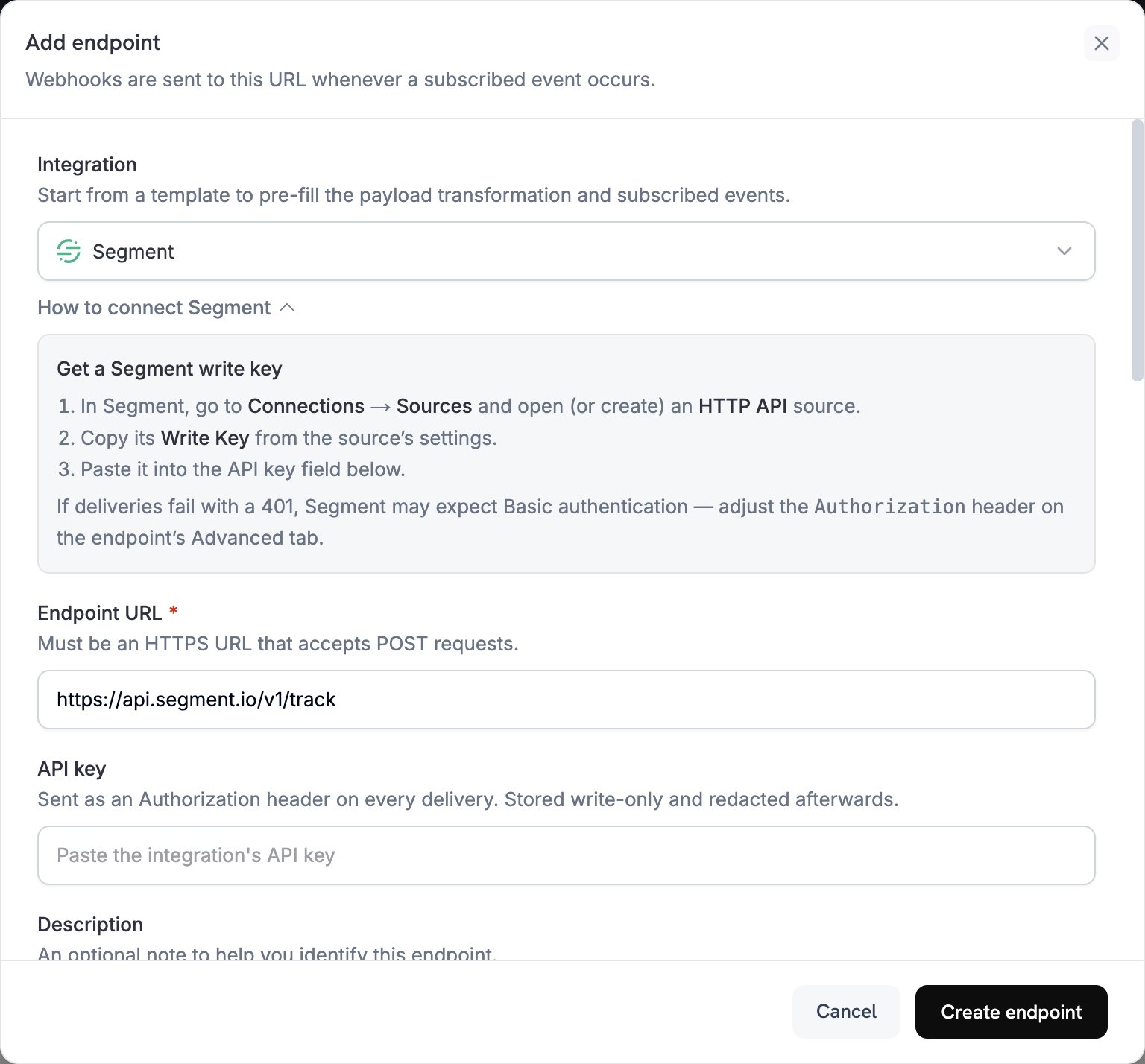
2
Select Segment
In Integration, seleziona Segment. La dashboard compila l’Endpoint URL e il codice di trasformazione per Segment.
3
Enter Write Key
In Segment, vai a Connections → Sources e apri o crea una sorgente HTTP API. Copia la Write Key dalle impostazioni della sorgente e incollala in API key.
4
Select Events
In Subscribed events, seleziona solo gli eventi gestiti dalla tua trasformazione. Gli esempi in questa pagina usano
payment.succeeded, subscription.active e subscription.cancelled.5
Configure Transformation
In Transformation code, modifica l’handler per formattare gli eventi per la Track o Identify API di Segment. Parti dagli esempi.
6
Test & Create
In Test this code, seleziona un tipo di evento e fai clic su Simulate per visualizzare in anteprima la chiamata a Segment. Quindi fai clic su Create endpoint.
7
Switch to Basic Authentication
Dodo Payments invia il valore di API key come bearer token, ma l’HTTP API di Segment accetta una Write Key tramite l’autenticazione Basic o un campo
writeKey nel body. Subito dopo aver creato l’endpoint, apri la scheda Advanced. In Custom headers, inserisci un nuovo valore nella riga nascosta Authorization: Basic, uno spazio e la codifica Base64 della tua Write Key con i due punti aggiunti alla fine. Quindi fai clic su Save. Ad esempio, echo -n 'YOUR_WRITE_KEY:' | base64 stampa il valore codificato.8
Done
Gli eventi sottoscritti ora raggiungono Segment, che li inoltra alle destinazioni collegate.
Esempi di transformation code
Ogni handler impostawebhook.url su un endpoint API di Segment e sostituisce webhook.payload con la chiamata. Gli importi di Dodo Payments sono espressi nell’unità più piccola della valuta, quindi gli esempi li dividono per 100. Per le valute senza decimali, come JPY e KRW, usa l’importo così com’è.
Monitorare gli eventi di pagamento con Track
Registra un eventoPayment Completed quando un pagamento va a buon fine:
track_payments.js
Monitorare il ciclo di vita degli abbonamenti con Track
Registra gli eventiSubscription Started e Subscription Cancelled:
track_subscriptions.js
Identificare le proprietà del cliente
Aggiorna le caratteristiche del cliente dopo ogni pagamento completato. Ogni chiamata Identify imposta le caratteristiche sui valori inviati, quindi queste caratteristiche descrivono il pagamento più recente:identify_customer.js
Suggerimenti
- Usa nomi di evento coerenti nella tua integrazione, ad esempio il formato oggetto e azione di Segment in
Payment Completed. - Includi le proprietà necessarie per l’analisi e la segmentazione.
- Imposta
timestampdal valoretimestampdell’evento, in modo che Segment registri quando si è verificato l’evento anziché quando è arrivato. - Usa
customer_iddi Dodo Payments comeuserId, così ogni chiamata per un cliente viene associata allo stesso utente Segment.
Risoluzione dei problemi
Events Not Appearing in Segment
Events Not Appearing in Segment
- Verifica che la Write Key appartenga a una sorgente HTTP API e che l’header
Authorizationutilizzi l’autenticazione Basic. - Segment restituisce
200per la maggior parte delle richieste, comprese quelle che non accetta, quindi una consegna riuscita nei log di Dodo Payments non dimostra che l’evento sia arrivato. Controlla il Debugger della sorgente in Segment. - Verifica che i nomi degli eventi seguano le convenzioni di denominazione di Segment.
- Verifica che ogni chiamata imposti
userId. Segment rifiuta una chiamata che non contiene né unuserIdné unanonymousId. - Controlla i limiti di frequenza di Segment per l’HTTP API. Segment consiglia di rimanere al di sotto di 1.000 richieste al secondo per workspace.
- Se il tuo workspace utilizza la regione UE di Segment, invia le chiamate a
https://events.eu1.segmentapis.com/v1/trackehttps://events.eu1.segmentapis.com/v1/identify.
Transformation Errors
Transformation Errors
- Verifica che il payload corrisponda al formato API di Segment.
- Verifica che siano presenti tutti i campi obbligatori. Track richiede
event, mentre sia Track sia Identify richiedono unuserIdo unanonymousId. - Verifica che i nomi degli eventi siano stringhe, non oggetti.