

Introduzione
L’integrazione con Customer.io invia gli eventi di Dodo Payments all’API Track di Customer.io, così i pagamenti e le modifiche agli abbonamenti possono attivare campagne e percorsi cliente. Ad esempio, un nuovo cliente può ricevere un’email di benvenuto, una modifica dell’abbonamento può inviare un aggiornamento e un pagamento non riuscito può inviare una notifica.Questa integrazione richiede il tuo Site ID e la tua API key di Customer.io. L’API Track utilizza l’autenticazione HTTP Basic, con il Site ID come username e la API key come password.
Iniziare
1
Open the Webhook Section
Nella dashboard di Dodo Payments, vai a Developer → Webhooks e fai clic su Add endpoint.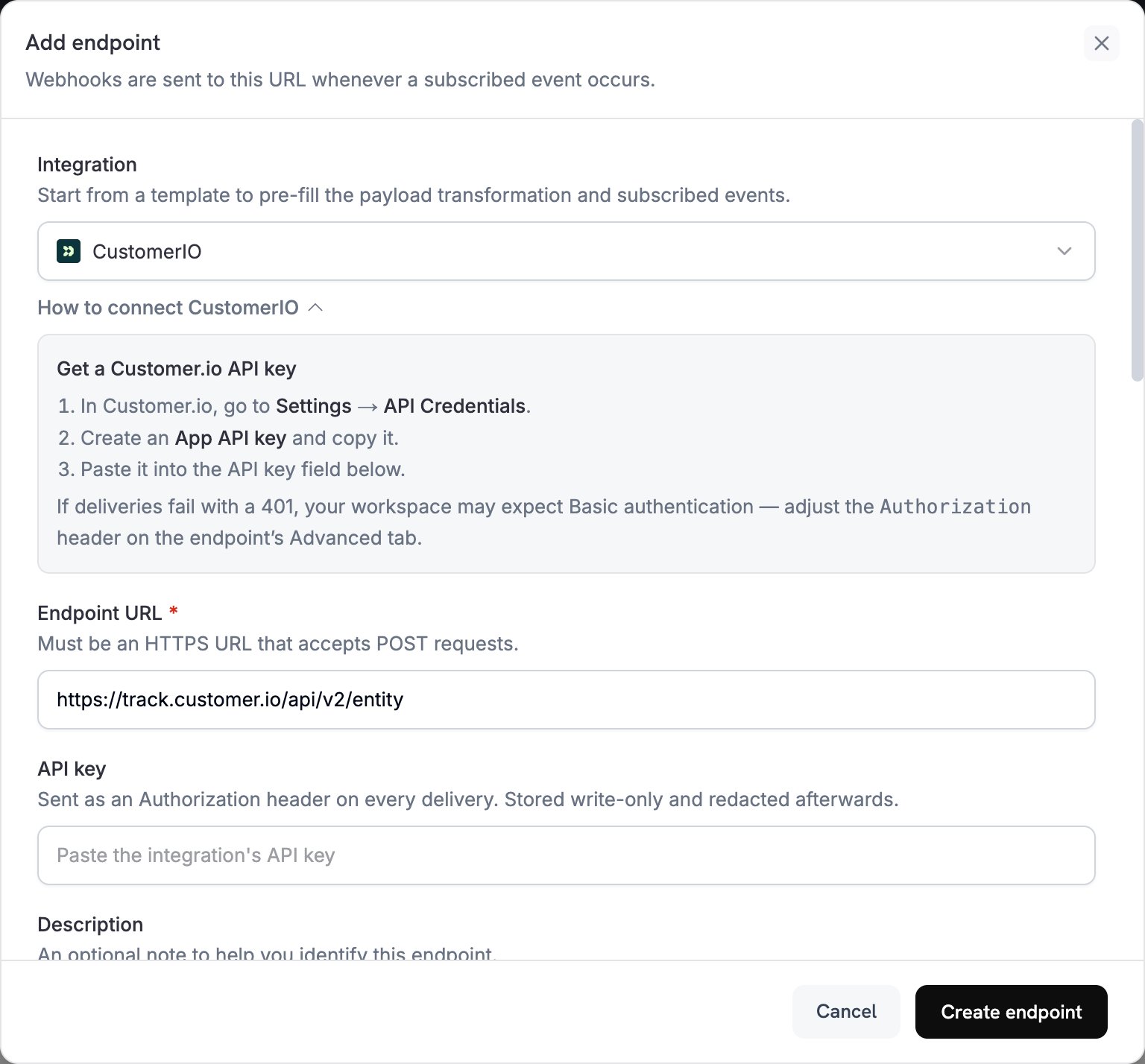
2
Select Customer.io
In Integration, seleziona CustomerIO.
3
Enter Credentials
In API key, incolla la tua API key di Customer.io. Dodo Payments invia la chiave nell’header
Authorization come bearer token.L’API Track prevede l’autenticazione Basic. Se le consegne non riescono con un 401, apri la scheda Advanced dell’endpoint e sostituisci l’header Authorization con Basic seguito dalla codifica Base64 di site_id:api_key.4
Select Events
In Subscribed events, seleziona gli eventi gestiti dalla tua trasformazione. Gli esempi in questa pagina utilizzano
payment.succeeded, subscription.active e subscription.cancelled.5
Configure Transformation
In Transformation code, modifica l’handler per formattare gli eventi per l’API Track di Customer.io. Parti dagli esempi.
6
Test & Create
In Test this code, fai clic su Simulate per eseguire l’handler su un payload di esempio. Quindi fai clic su Create endpoint.
7
Done
Gli eventi sottoscritti ora raggiungono Customer.io, dove possono attivare le tue automazioni email.
Esempi di codice di trasformazione
Ogni handler invia una richiesta all’endpoint dell’API Track v2entity e identifica la persona tramite il customer_id di Dodo Payments. Per registrare un evento, la richiesta imposta action su event e inserisce il nome dell’evento in name. Per aggiornare gli attributi di una persona, imposta action su identify. Gli importi di Dodo Payments sono espressi nell’unità più piccola della valuta, quindi gli esempi li dividono per 100.
Monitoraggio degli eventi di pagamento
Registra un eventopayment_completed quando un pagamento va a buon fine:
track_payments.js
Monitoraggio del ciclo di vita dell’abbonamento
Registra un eventosubscription_started quando un abbonamento diventa attivo e un evento subscription_cancelled quando viene annullato:
track_subscriptions.js
Monitoraggio degli attributi cliente
Aggiorna gli attributi del profilo della persona quando un pagamento va a buon fine. Ogni richiestaidentify sovrascrive gli attributi inviati, quindi last_payment_amount e last_payment_date contengono sempre i dati dell’ultimo pagamento.
track_attributes.js
Suggerimenti
- Usa gli stessi nomi degli eventi nella trasformazione e nei trigger delle campagne Customer.io, ad esempio
payment_completed. Scegli nomi che descrivano ciò che è accaduto. - Includi gli attributi utilizzati dai tuoi messaggi per la personalizzazione.
- Identifica ogni persona con lo stesso ID in ogni richiesta. Gli esempi utilizzano il
customer_iddi Dodo Payments. - Per ogni campo della richiesta, consulta la documentazione di riferimento dell’API Track di Customer.io.
Risoluzione dei problemi
Events Not Triggering Campaigns
Events Not Triggering Campaigns
- Verifica che il Site ID e la API key siano corretti.
- Se le consegne non riescono con un
401, imposta l’headerAuthorizationsull’autenticazione Basic, come descritto in Introduzione. - Verifica che i nomi degli eventi corrispondano ai trigger delle tue campagne Customer.io.
- Verifica che gli identificatori cliente siano impostati.
- Esamina i limiti di frequenza dell’API di Customer.io.
Transformation Errors
Transformation Errors
- Verifica che il payload corrisponda al formato dell’API di Customer.io.
- Verifica che siano presenti tutti i campi obbligatori e che
actionsia un’azione supportata dall’API Track, comeeventoidentify. - Verifica che i nomi degli eventi e gli attributi siano formattati correttamente.