

Pendahuluan
Integrasi Segment mengirim event Dodo Payments ke HTTP Tracking API milik Segment sebagai panggilan Track dan Identify. Segment kemudian meneruskan data pembayaran, subscription, dan customer ke alat analitik, marketing, dan warehouse yang terhubung ke workspace Anda, dari katalog yang berisi lebih dari 300 destination.Integrasi ini memerlukan Write Key dari source HTTP API di workspace Segment Anda. Anda juga memerlukan akses ke Developer → Webhooks di dashboard Dodo Payments.
Memulai
1
Open the Webhook Section
Di dashboard Dodo Payments, buka Developer → Webhooks dan klik Add endpoint.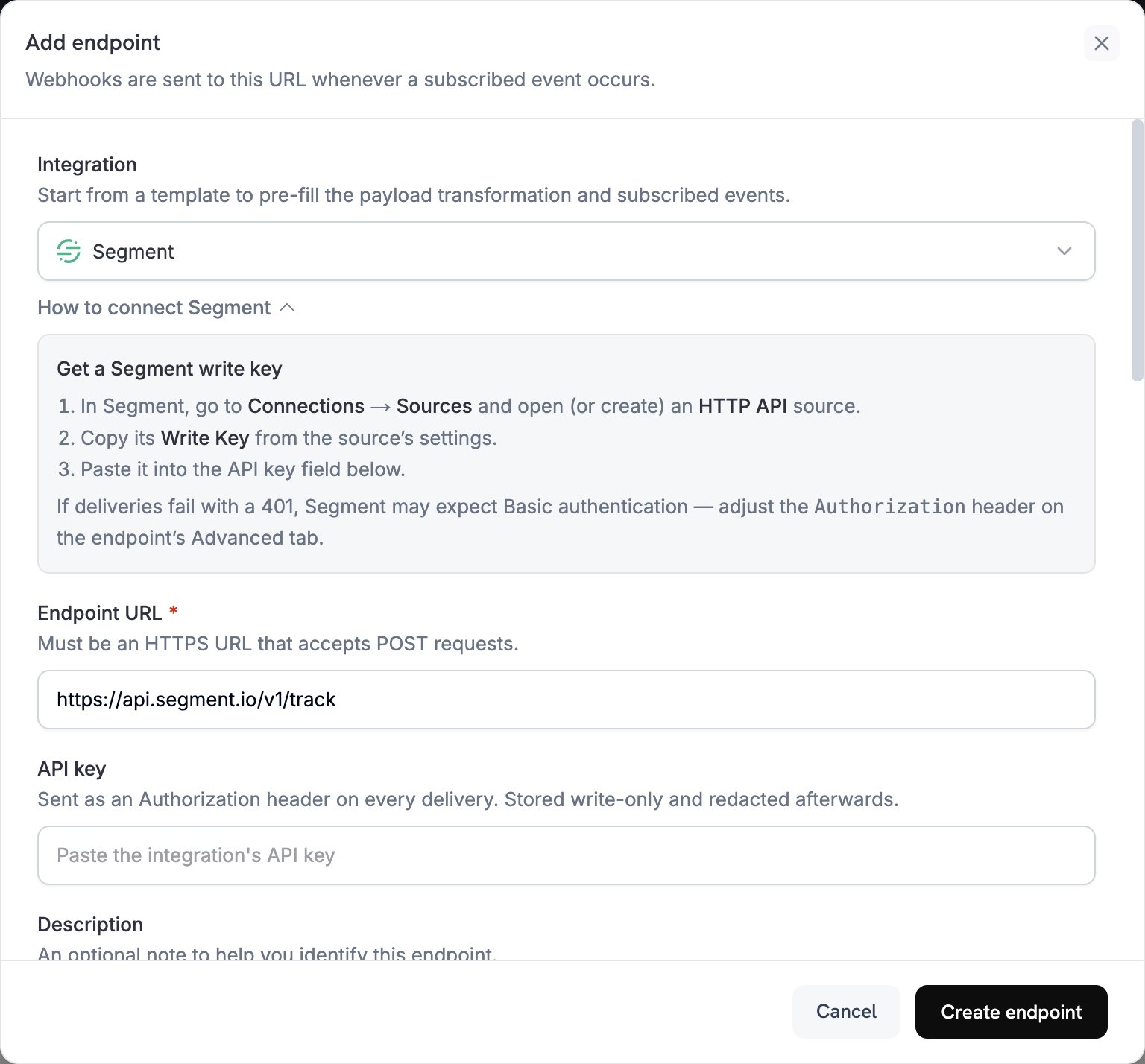
2
Select Segment
Di Integration, pilih Segment. Dashboard akan mengisi Endpoint URL dan kode transformasi untuk Segment.
3
Enter Write Key
Di Segment, buka Connections → Sources, lalu buka atau buat source HTTP API. Salin Write Key dari pengaturan source dan tempelkan ke API key.
4
Select Events
Di Subscribed events, pilih hanya event yang ditangani oleh transformasi Anda. Contoh di halaman ini menggunakan
payment.succeeded, subscription.active, dan subscription.cancelled.5
Configure Transformation
Di bawah Transformation code, edit handler untuk memformat event untuk Track atau Identify API milik Segment. Mulai dari contoh.
6
Test & Create
Di bawah Test this code, pilih jenis event dan klik Simulate untuk melihat pratinjau panggilan ke Segment. Lalu klik Create endpoint.
7
Switch to Basic Authentication
Dodo Payments mengirim nilai API key sebagai bearer token, tetapi HTTP API Segment menerima Write Key melalui autentikasi Basic atau field
writeKey di body. Tepat setelah membuat endpoint, buka tab Advanced. Di bawah Custom headers, masukkan nilai baru pada baris Authorization yang tersembunyi: Basic, spasi, lalu encoding Base64 dari Write Key Anda dengan titik dua di akhir. Kemudian klik Save. Sebagai contoh, echo -n 'YOUR_WRITE_KEY:' | base64 mencetak nilai yang telah dienkode.8
Done
Event yang telah disubscribe kini sampai ke Segment, yang meneruskannya ke destination yang terhubung.
Contoh Kode Transformasi
Setiap handler menetapkanwebhook.url ke endpoint API Segment dan mengganti webhook.payload dengan panggilan tersebut. Jumlah Dodo Payments menggunakan unit mata uang terkecil, sehingga contoh-contoh ini membaginya dengan 100. Untuk mata uang tanpa desimal seperti JPY dan KRW, gunakan jumlah tersebut apa adanya.
Melacak Event Pembayaran
Catat eventPayment Completed saat pembayaran berhasil:
track_payments.js
Melacak Siklus Hidup Subscription
Catat eventSubscription Started dan Subscription Cancelled:
track_subscriptions.js
Mengidentifikasi Properti Customer
Perbarui traits customer setelah setiap pembayaran berhasil. Setiap panggilan Identify menetapkan traits ke nilai yang dikirimnya, sehingga traits ini menjelaskan pembayaran terbaru:identify_customer.js
Tips
- Gunakan nama event yang konsisten di seluruh integrasi Anda, seperti format object dan action milik Segment dalam
Payment Completed. - Sertakan properti yang Anda perlukan untuk analitik dan segmentasi.
- Tetapkan
timestampdaritimestampmilik event, sehingga Segment mencatat kapan event terjadi, bukan kapan event tersebut tiba. - Gunakan
customer_idDodo Payments sebagaiuserId, sehingga setiap panggilan untuk customer terhubung ke user Segment yang sama.
Pemecahan Masalah
Events Not Appearing in Segment
Events Not Appearing in Segment
- Pastikan Write Key berasal dari source HTTP API dan header
Authorizationmenggunakan autentikasi Basic. - Segment mengembalikan
200untuk sebagian besar request, termasuk request yang tidak diterimanya, sehingga pengiriman yang berhasil di log Dodo Payments tidak membuktikan bahwa event telah tiba. Periksa Debugger source di Segment. - Pastikan nama event mengikuti konvensi penamaan Segment.
- Pastikan setiap panggilan menetapkan
userId. Segment menolak panggilan yang tidak memilikiuserIdmaupunanonymousId. - Periksa rate limit Segment untuk HTTP API. Segment menyarankan agar jumlah request tetap di bawah 1.000 request per detik untuk setiap workspace.
- Jika workspace Anda menggunakan region EU Segment, kirim panggilan ke
https://events.eu1.segmentapis.com/v1/trackdanhttps://events.eu1.segmentapis.com/v1/identify.
Transformation Errors
Transformation Errors
- Pastikan payload sesuai dengan format API Segment.
- Pastikan semua field wajib tersedia. Track memerlukan
event, sedangkan Track dan Identify memerlukanuserIdatauanonymousId. - Pastikan nama event berupa string, bukan object.