

Pendahuluan
Integrasi Customer.io mengirim event Dodo Payments ke Track API milik Customer.io, sehingga pembayaran dan perubahan subscription dapat memicu kampanye dan customer journey. Misalnya, customer baru dapat menerima email sambutan, perubahan subscription dapat mengirim pembaruan, dan pembayaran yang gagal dapat mengirim pemberitahuan.Integrasi ini memerlukan Site ID dan API key Customer.io Anda. Track API menggunakan autentikasi HTTP Basic, dengan Site ID sebagai username dan API key sebagai password.
Memulai
1
Open the Webhook Section
Di dashboard Dodo Payments, buka Developer → Webhooks dan klik Add endpoint.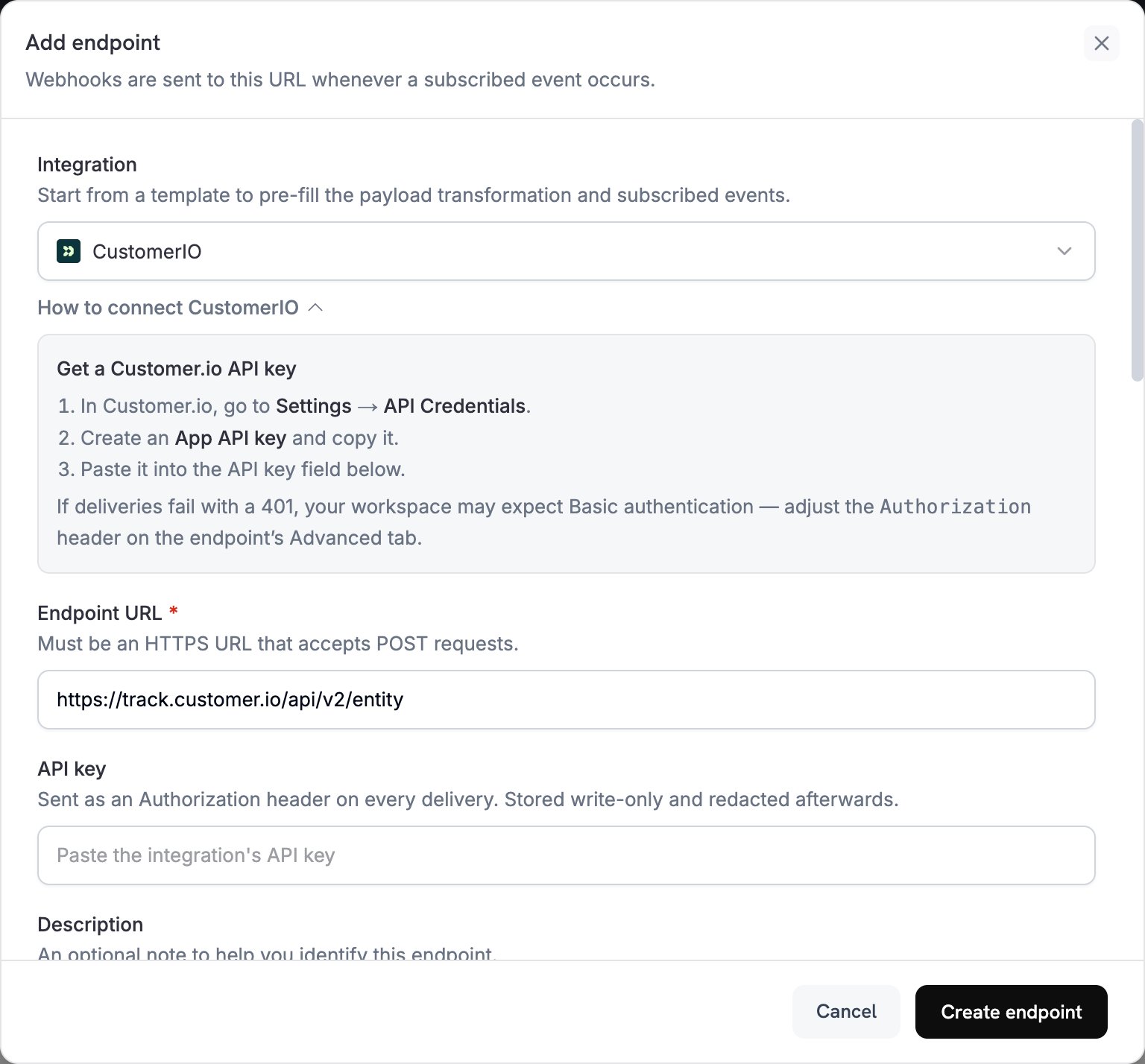
2
Select Customer.io
Di Integration, pilih CustomerIO.
3
Enter Credentials
Di API key, tempel API key Customer.io Anda. Dodo Payments mengirim key tersebut di header
Authorization sebagai bearer token.Track API mengharapkan autentikasi Basic. Jika pengiriman gagal dengan 401, buka tab Advanced endpoint tersebut dan ganti header Authorization dengan Basic yang diikuti encoding Base64 dari site_id:api_key.4
Select Events
Di Subscribed events, pilih event yang ditangani oleh transformation Anda. Contoh di halaman ini menggunakan
payment.succeeded, subscription.active, dan subscription.cancelled.5
Configure Transformation
Di bawah Transformation code, edit handler untuk memformat event untuk Track API Customer.io. Mulai dari contoh.
6
Test & Create
Di bawah Test this code, klik Simulate untuk menjalankan handler terhadap sample payload. Lalu klik Create endpoint.
7
Done
Event yang telah dipilih kini sampai ke Customer.io, tempat event tersebut dapat memicu automasi email Anda.
Contoh Transformation Code
Setiap handler mengirim satu request ke endpoint Track API v2entity dan mengidentifikasi orang tersebut berdasarkan customer_id Dodo Payments mereka. Untuk mencatat event, request menetapkan action ke event dan menempatkan nama event di name. Untuk memperbarui atribut seseorang, request menetapkan action ke identify. Jumlah Dodo Payments menggunakan unit mata uang terkecil, sehingga contoh-contoh ini membaginya dengan 100.
Melacak Event Pembayaran
Catat eventpayment_completed saat pembayaran berhasil:
track_payments.js
Melacak Siklus Hidup Subscription
Catat eventsubscription_started saat subscription menjadi aktif, dan event subscription_cancelled saat subscription dibatalkan:
track_subscriptions.js
Melacak Atribut Customer
Perbarui atribut profil orang tersebut saat pembayaran berhasil. Setiap requestidentify menimpa atribut yang dikirimkannya, sehingga last_payment_amount dan last_payment_date selalu berisi pembayaran terbaru.
track_attributes.js
Tips
- Gunakan nama event yang sama dalam transformation dan pemicu kampanye Customer.io Anda, misalnya
payment_completed. Pilih nama yang menjelaskan apa yang terjadi. - Sertakan atribut yang digunakan pesan Anda untuk personalisasi.
- Identifikasi setiap orang dengan ID yang sama dalam setiap request. Contoh-contoh ini menggunakan
customer_idDodo Payments. - Untuk setiap field request, lihat referensi Customer.io Track API.
Pemecahan Masalah
Events Not Triggering Campaigns
Events Not Triggering Campaigns
- Pastikan Site ID dan API key sudah benar.
- Jika pengiriman gagal dengan
401, tetapkan headerAuthorizationke autentikasi Basic, seperti yang dijelaskan di Memulai. - Periksa apakah nama event cocok dengan pemicu kampanye Customer.io Anda.
- Periksa apakah identifier customer telah ditetapkan.
- Tinjau batas laju API Customer.io.
Transformation Errors
Transformation Errors
- Periksa apakah payload sesuai dengan format API Customer.io.
- Periksa apakah semua field wajib tersedia dan
actionmerupakan action yang didukung Track API, sepertieventatauidentify. - Periksa apakah nama event dan atribut diformat dengan benar.