

Pending grant बनाता है, जो तब तक प्रतीक्षा करता है जब तक आप स्वयं key value उपलब्ध नहीं करा देते। इसके बजाय कि Dodo Payments payment के समय key generate करे। Key आपके अपने system, किसी third-party vendor या codes के सीमित pool से आ सकती है।
इस guide को पूरा करने के बाद आपके पास ये चीज़ें होंगी:
- A product with a License Key entitlement set to
manualfulfillment. - A webhook listener that detects when a customer is waiting for a key.
- A fulfillment call that delivers the key and notifies the customer automatically.
License Keys Overview
पूरा license key lifecycle और
fulfillment_mode setting।Fulfill License Key Grant API
वह endpoint का API reference जिसे आप key deliver करने के लिए call करते हैं।
How It Works
नीचे दिया गया sequence checkout से key delivery तक एक purchase दिखाता है: Manual fulfillment केवल issuance step को बदलता है। Deliver होने के बाद key activation, validation, deactivation, expiry और revocation के लिए auto-generated key की तरह व्यवहार करती है। कई units की purchase से प्रत्येक unit के लिए एकPending grant बनता है और प्रत्येक grant को अपनी key की आवश्यकता होती है।
Prerequisites
इस guide को follow करने के लिए आपको इन चीज़ों की आवश्यकता है:- Dodo Payments merchant account।
- एक API key, जिसे Developer → API Keys के अंतर्गत बनाया गया हो और
DODO_PAYMENTS_API_KEYमें stored हो, तथा Developer → Webhooks से webhook signing secret, जोDODO_PAYMENTS_WEBHOOK_KEYमें stored हो। API key generation guide देखें। - ऐसा backend endpoint जो webhooks receive कर सके।
Build करते समय
https://test.dodopayments.com और test mode credentials का उपयोग करें। Production पर जाने पर https://live.dodopayments.com और live mode keys पर switch करें।Step 1 — Manual Mode में License Key Entitlement बनाएँ
entitlement इस बात की reusable definition है कि आप क्या deliver करते हैं। एक License Key entitlement बनाएँ और इसकीfulfillment_mode को manual पर set करें।
- Dashboard
- API
1
Open Entitlements
Dashboard में Entitlements पर जाएँ और entitlement बनाने के लिए + पर click करें।
2
Choose License Key
License Keys select करें और Name दर्ज करें। Form में ये fields हैं: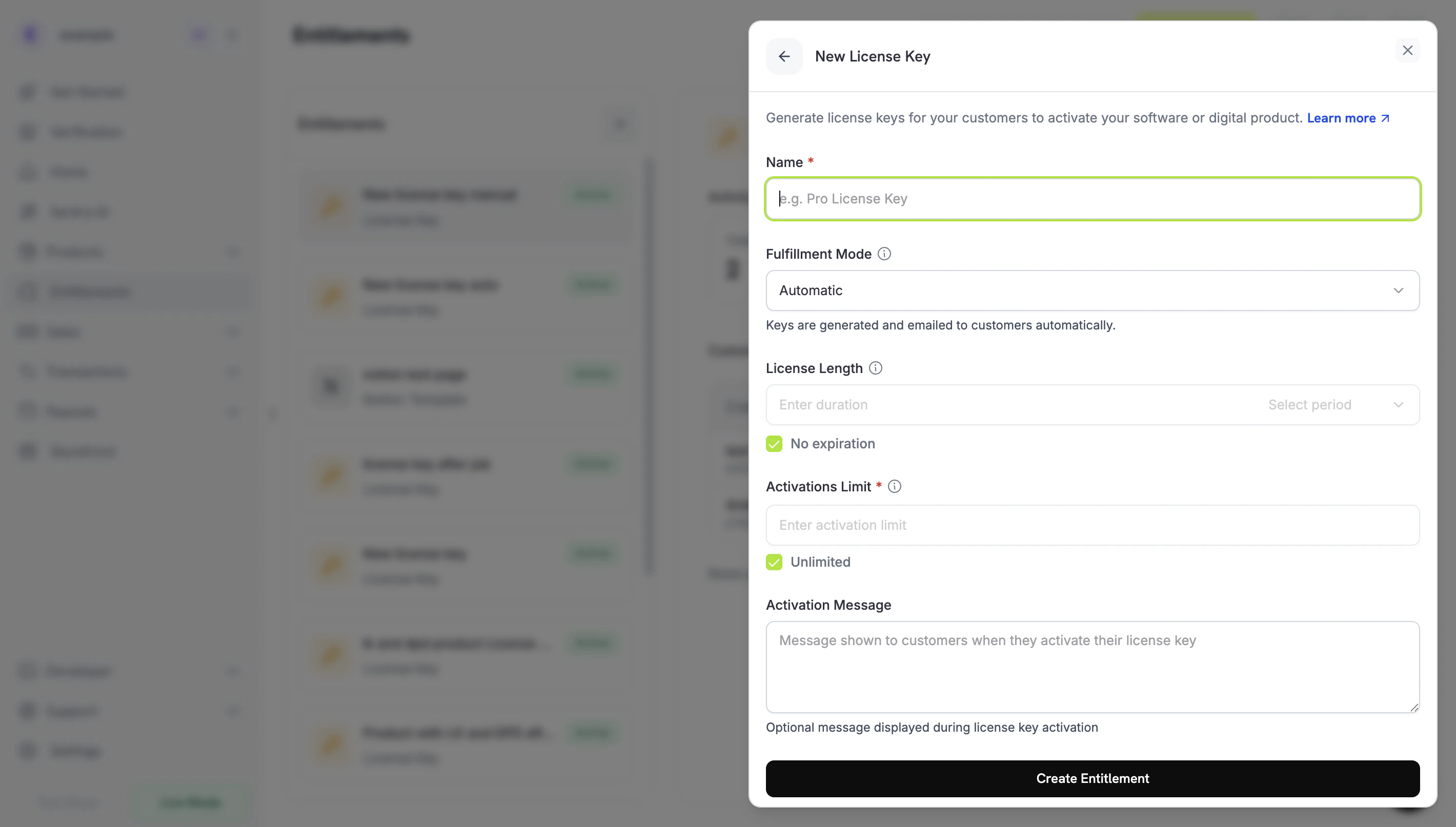
- Fulfillment Mode: default रूप से Automatic। यही वह setting है जो manual fulfillment enable करती है और जिसे आप अगले step में बदलेंगे।
- License Length: प्रत्येक issued key कितने समय तक valid रहती है, या No expiration।
- Activations Limit: प्रत्येक key के लिए activations की maximum संख्या, या Unlimited।
- Activation Message: customer-facing optional message, जो customer के key activate करने पर दिखता है और license key email में शामिल होता है।
3
Set Fulfillment Mode to Manual
Fulfillment Mode dropdown खोलें और इसे Automatic से Manual में बदलें। इस guide का बाकी हिस्सा इसी setting पर निर्भर करता है: इसके बिना Dodo Payments keys automatically generate और email करता है तथा कोई pending grant नहीं बनाता। Manual select करने पर प्रत्येक purchase आपके द्वारा fulfill किए जाने वाला एक
Pending grant बनाता है। Save करने के लिए Create Entitlement पर click करें।fulfillment_mode का default auto है। यदि आप इसे omit करते हैं या किसी existing entitlement को unchanged छोड़ देते हैं, तो entitlement automatic fulfillment रखता है। केवल manual पर explicitly set किए गए entitlements pending grants बनाते हैं।Step 2 — Entitlement को Product से Attach करें
जिस product को आप बेचना चाहते हैं उसे खोलें, उसके Entitlements section में जाएँ और Step 1 में Manual पर set किया गया License Key entitlement select करें। एक product एक ही purchase पर इस license key को अन्य entitlements के साथ deliver कर सकता है। यदि आपके पास अभी product नहीं है, तो पहले one-time या subscription product बनाएँ। इसे checkout के ज़रिए बेचने के लिए Integration Guide देखें।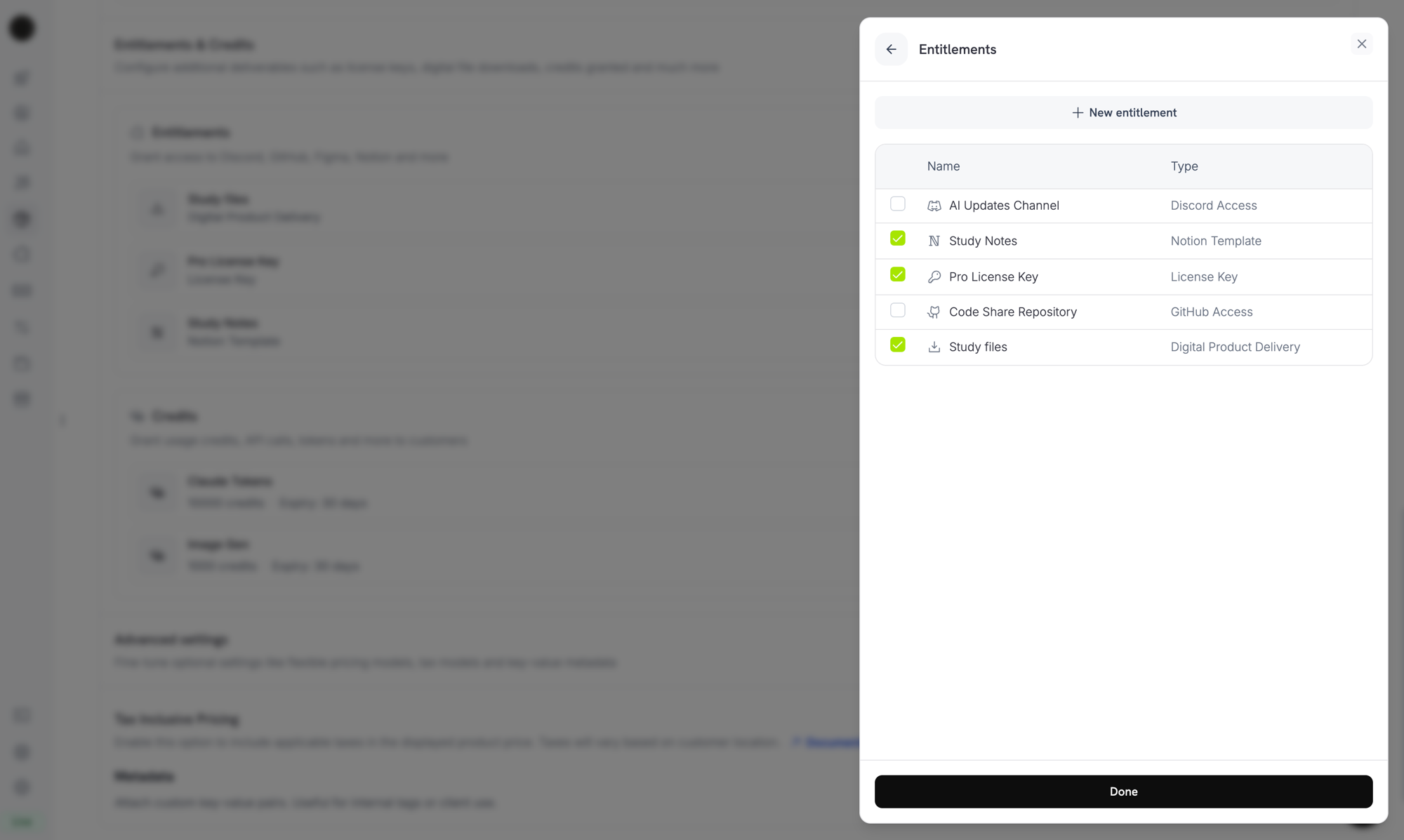
Selecting the License Key entitlement in the product entitlements panel.
Fulfillment mode entitlement की property है, product की नहीं। क्योंकि आपने Step 1 में इसे Manual पर set किया है, इस entitlement से attached प्रत्येक product purchase पर
Pending license-key grants बनाता है। Product पर आपको और कुछ configure करने की आवश्यकता नहीं है।Step 3 — Pending Grants का पता लगाएँ
जब कोई customer product खरीदता है, तो Dodo PaymentsPending status में, बिना attached key के, एक grant बनाता है और entitlement_grant.created webhook भेजता है। यह event आपका संकेत है कि कोई customer key की प्रतीक्षा कर रहा है।
Webhook को Listen करें
Dashboard में Developer → Webhooks के अंतर्गत webhook endpoint जोड़ें, फिर pending license-key grants पर action लें। Webhooks Standard Webhooks specification का पालन करते हैं, इसलिए आप उन्हेंstandardwebhooks library से verify कर सकते हैं:
integration_type: "license_key" होता है, इसलिए आप अतिरिक्त lookup के बिना license-key grant पहचान सकते हैं। Webhook deliveries दोहराई जा सकती हैं, इसलिए जिन events का webhook-id header आप पहले process कर चुके हैं, उन्हें skip करें। Full payload के लिए Entitlement Grant webhook reference देखें।
या List Grants API को Poll करें
यदि आप webhooks पर निर्भर नहीं रहना चाहते, तो अपने License Key entitlement के grants list करें औरstatus के आधार पर filter करें। License Key entitlement का प्रत्येक grant license-key grant होता है, इसलिए आपको integration_type filter की आवश्यकता नहीं है:
Step 4 — Key Deliver करें
अपने system से key value प्राप्त करें, फिर उसे Fulfill License Key Grant endpoint पर submit करें। इस call के लिए Editor permission वाली आपकी secret API key आवश्यक है। यह public license endpoints में से एक नहीं है। SDKs भी इसे expose करते हैं, जैसे TypeScript मेंclient.entitlements.grants.fulfillLicenseKey() और Python में client.entitlements.grants.fulfill_license_key()।
Request Fields
string
आवश्यक
Customer को deliver की जाने वाली license key string, अधिकतम 255 characters तक। आसपास का whitespace trim किया जाता है और empty या केवल whitespace वाला value reject कर दिया जाता है।
integer
प्रत्येक key की activation limit, कम से कम 1। Omit किए जाने पर entitlement की Activations Limit लागू होती है।
string
प्रत्येक key की expiry (ISO 8601)। Omit किए जाने पर one-time grant की key entitlement के License Length के अनुसार expire होती है और subscription grant की key की कोई expiry नहीं होती, इसलिए उसकी validity subscription का अनुसरण करती है।
Delivered में चला जाता है, Dodo Payments customer को key email करता है (वही email जो automatic fulfillment के अंतर्गत मिलता है), और license_key.created तथा entitlement_grant.delivered webhook events fire होते हैं।
Email में license key, product, activation limit, expiry और आपके activation instructions शामिल होते हैं:
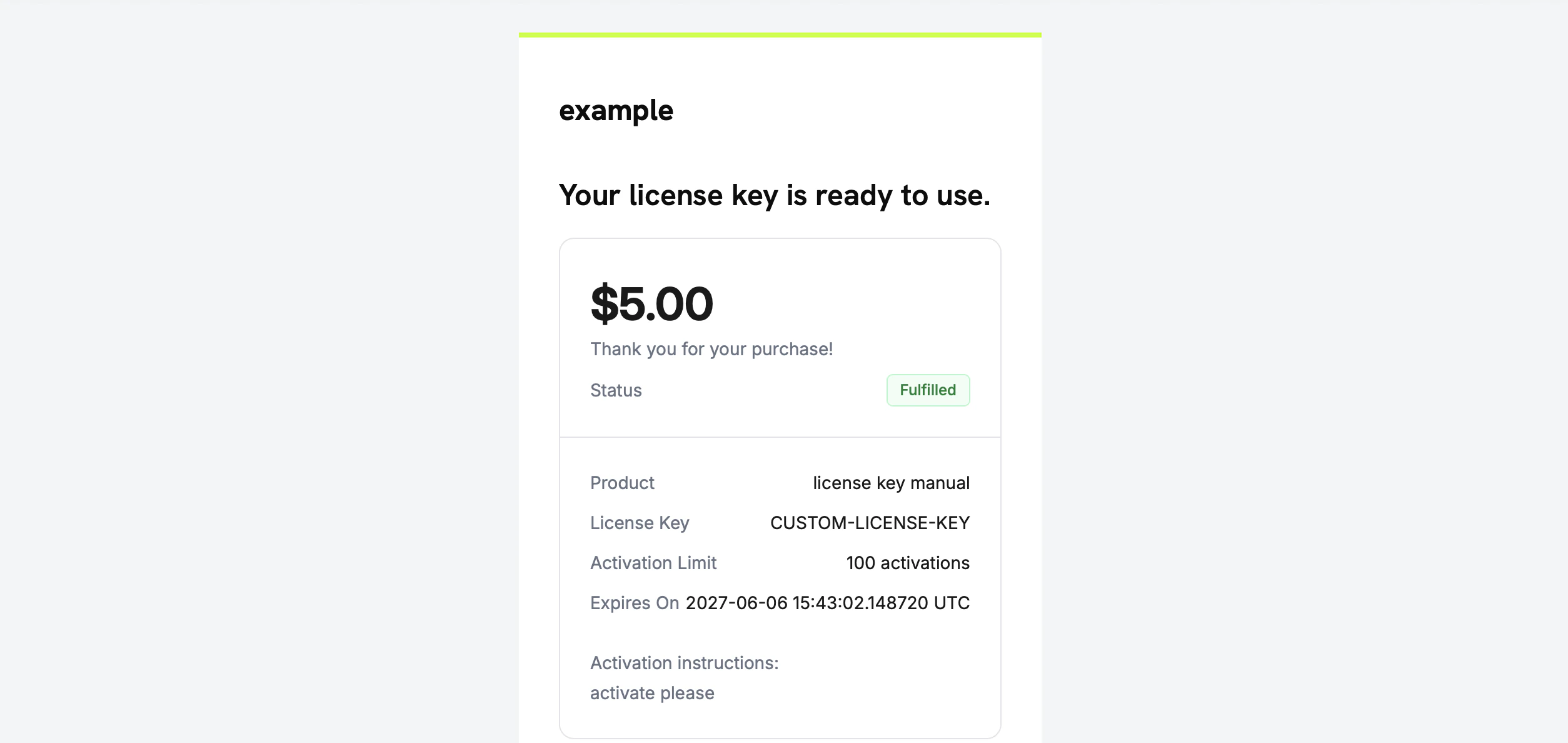
The license key email the customer receives once you fulfill the grant.
आपको key स्वयं email करने की आवश्यकता नहीं है। Grant fulfill होने पर delivery automatically होती है।
Step 5 — Errors और Retries को Handle करें
Endpoint कुछ deliver करने से पहले grant को validate करता है। इन responses को handle करें:Flow Verify करें
Flow को end to end test करने के लिए:- Test mode में product खरीदें। checkout guides देखें।
- Confirm करें कि आपके webhook को
entitlement_grant.createdमिला है, जिसमेंstatus: "Pending"औरintegration_type: "license_key"हैं, या grantstatus=Pendingसे filtered List Grants response में दिखाई देता है। - Test key के साथ fulfill endpoint को call करें।
- Confirm करें कि response में populated
license_keyके साथstatus: "Delivered"दिखता है, customer को key email मिलती है औरentitlement_grant.deliveredfire होता है।
Key deliver होने के बाद customer इसे auto-generated key की तरह public license endpoints के विरुद्ध activate और validate कर सकता है।
Related API Reference
Create Entitlement
fulfillment_mode: manual के साथ License Key entitlement बनाएँ।List Grants
Pending grants खोजने के लिए
status और customer_id के आधार पर filter करें।Fulfill License Key Grant
Key value deliver करें और grant को
Delivered में ले जाएँ।Entitlement Grant Webhooks
वे
entitlement_grant.* events जो pending और delivered grants का संकेत देते हैं।