

नई सुविधाएँ
1. Analytics v3 — पूरी तरह से पुनर्निर्मित Dashboard
हमने analytics को पूरी तरह से नए सिरे से बनाया है। आपका dashboard अब नए real-time data engine (Analytics v3) द्वारा संचालित होकर, महत्वपूर्ण सभी metrics को एक ही स्थान पर लाता है।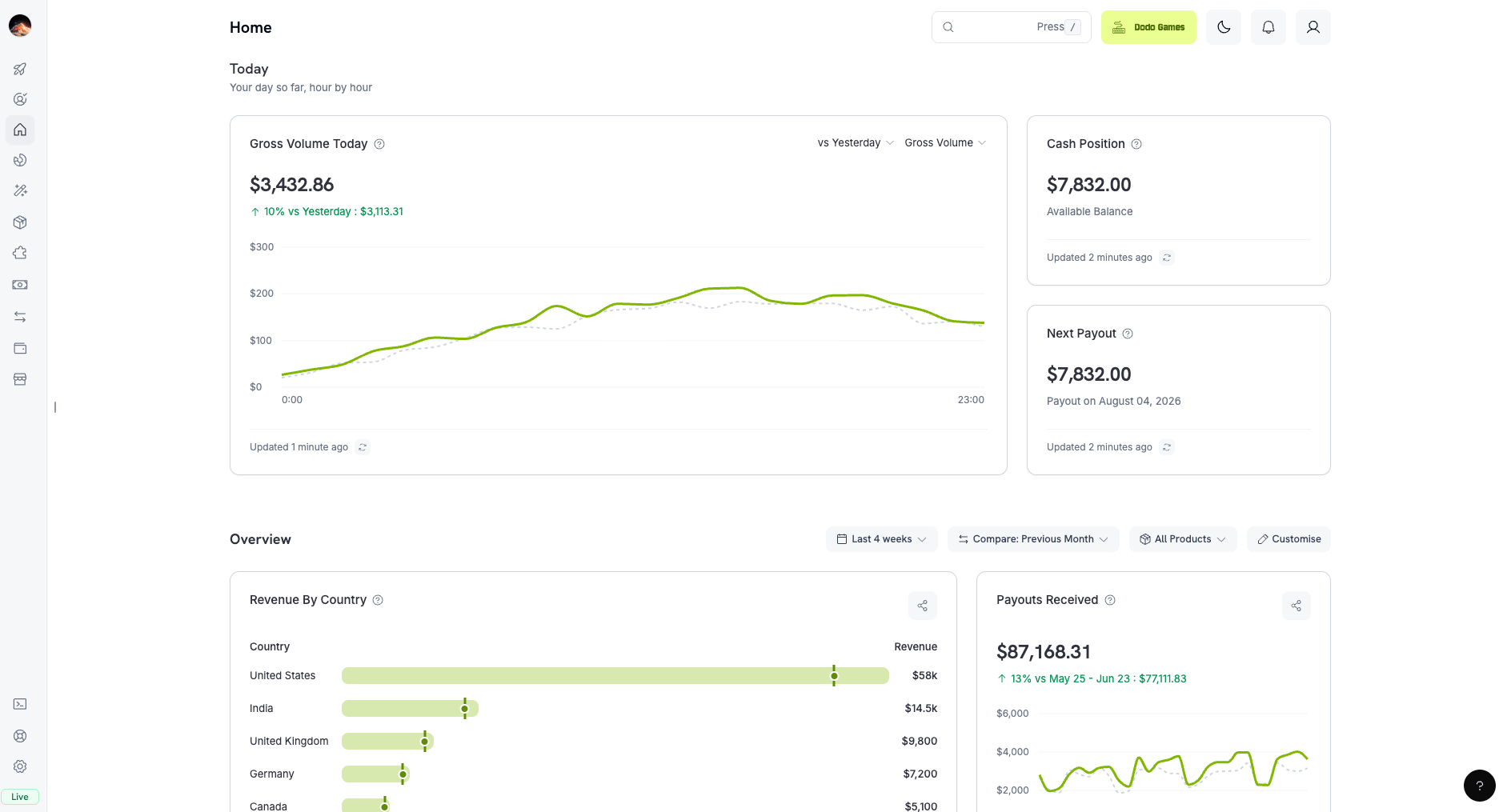
- Real-time revenue — आज का revenue आते ही, घंटे-दर-घंटे देखें।
- One-click comparisons — किसी भी metric की तुलना पिछले period, जैसे पिछले महीने, से एक ही click में करें।
- Revenue by country — ठीक-ठीक देखें कि आपका revenue किन देशों से आता है।
- Payments health — failed payments, refunds और recovery को एक ही view में track करें।
- Subscription insights — built-in retention cohorts, MRR और churn tracking।
- Customizable layout. Widgets को drag करके स्थान बदलें और चुनें कि कौन-से metrics दिखाई दें — आपका dashboard, आपके तरीके से। आपका layout अपने-आप save हो जाता है।
- Shareable chart cards. किसी भी metric पर Share click करें, color theme चुनें, अपना logo जोड़ें और post करने के लिए तैयार image download करें — investor updates या team reports के लिए एकदम सही, बिना किसी design tool की आवश्यकता के।
2. Subscriptions और Checkout के लिए Paid Trials
Trials का free होना अब आवश्यक नहीं है। अब आप subscription product की recurring price पर trial amount charge कर सकते हैं, ताकि full price पहले renewal पर लागू होने से पहले customers trial window के लिए कम upfront fee का भुगतान करें।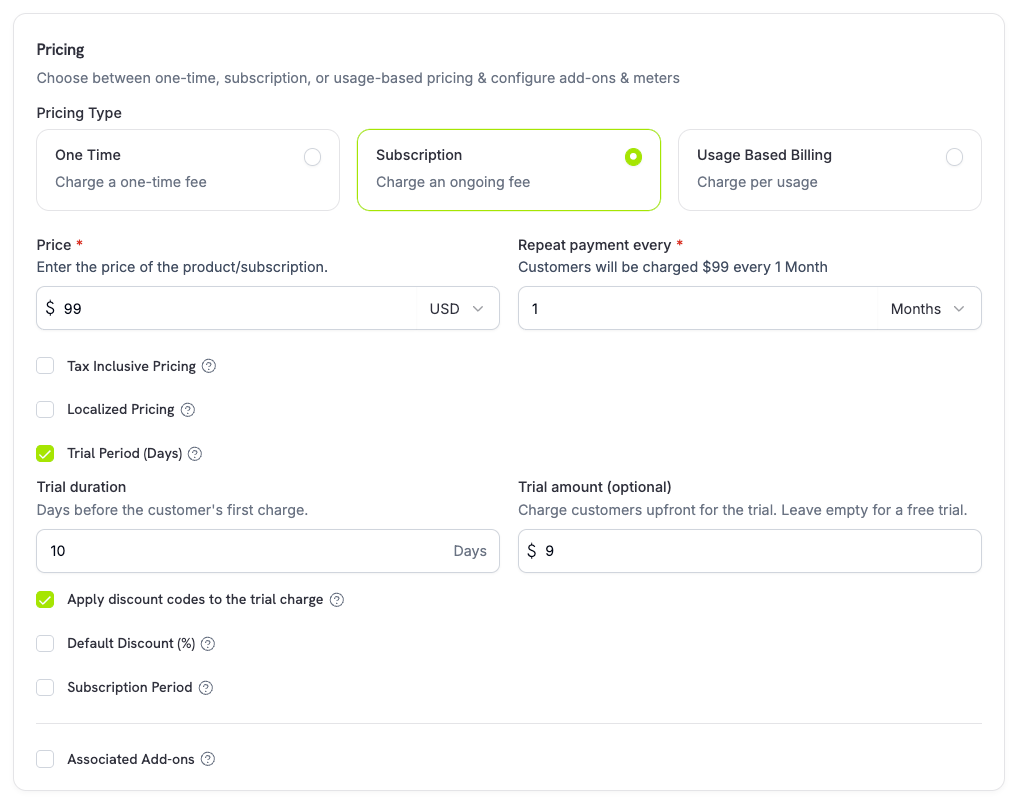
- Recurring price पर
trial_amountकोtrial_period_daysके साथ set करें — paid trial के लिए positive trial period आवश्यक है। - चुनें कि checkout discounts trial charge पर लागू हों या नहीं (
trial_apply_discounts), ताकि recurring price से स्वतंत्र रूप से paid-trial amount पर discount दिया जा सके या पूरी राशि charge की जा सके। - Paid trials checkout के माध्यम से भी process होते हैं: trial amount पर tax लगाया जाता है और इसे checkout-session calculations तथा payment-link pricing में दिखाया जाता है, जिसमें प्रत्येक currency के अनुसार adaptive currency markup लागू होता है।
0 होता है और trial समाप्त होने पर लिया जाता है।
और जानें: Subscriptions | Checkout Session
3. Subscriptions पर Trial Misuse रोकें
एक नई opt-in Prevent Trial Misuse setting customers को उसी business के लिए बार-बार trials claim करने से रोकती है। सक्षम होने पर, जिस customer ने पहले ही कोई trial redeem किया है — normalized email (plus-aliases हटाकर) से match किया जाता है — उसे fresh trial देने के बजाय अपने-आप paid, no-trial purchase में बदल दिया जाता है।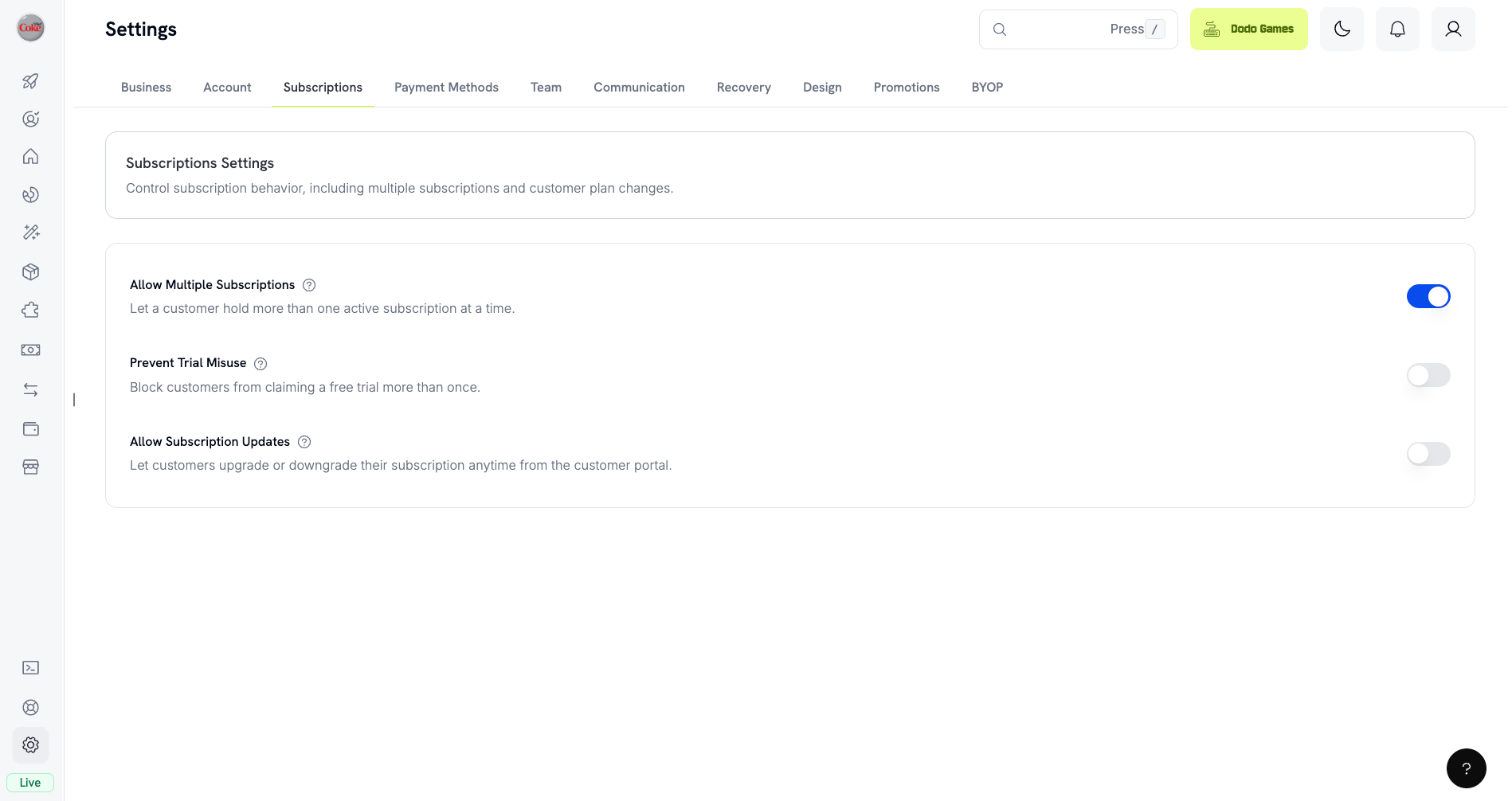
4. Payout Accounts
अब आप single fixed account के बजाय dashboard से multiple payout bank accounts manage कर सकते हैं। प्रत्येक currency और transfer method के लिए accounts जोड़ें, drafts save करें, hold पर रखे गए accounts को resubmit करें और active account के साथ किसी भी hold या failure reason को inline देखें।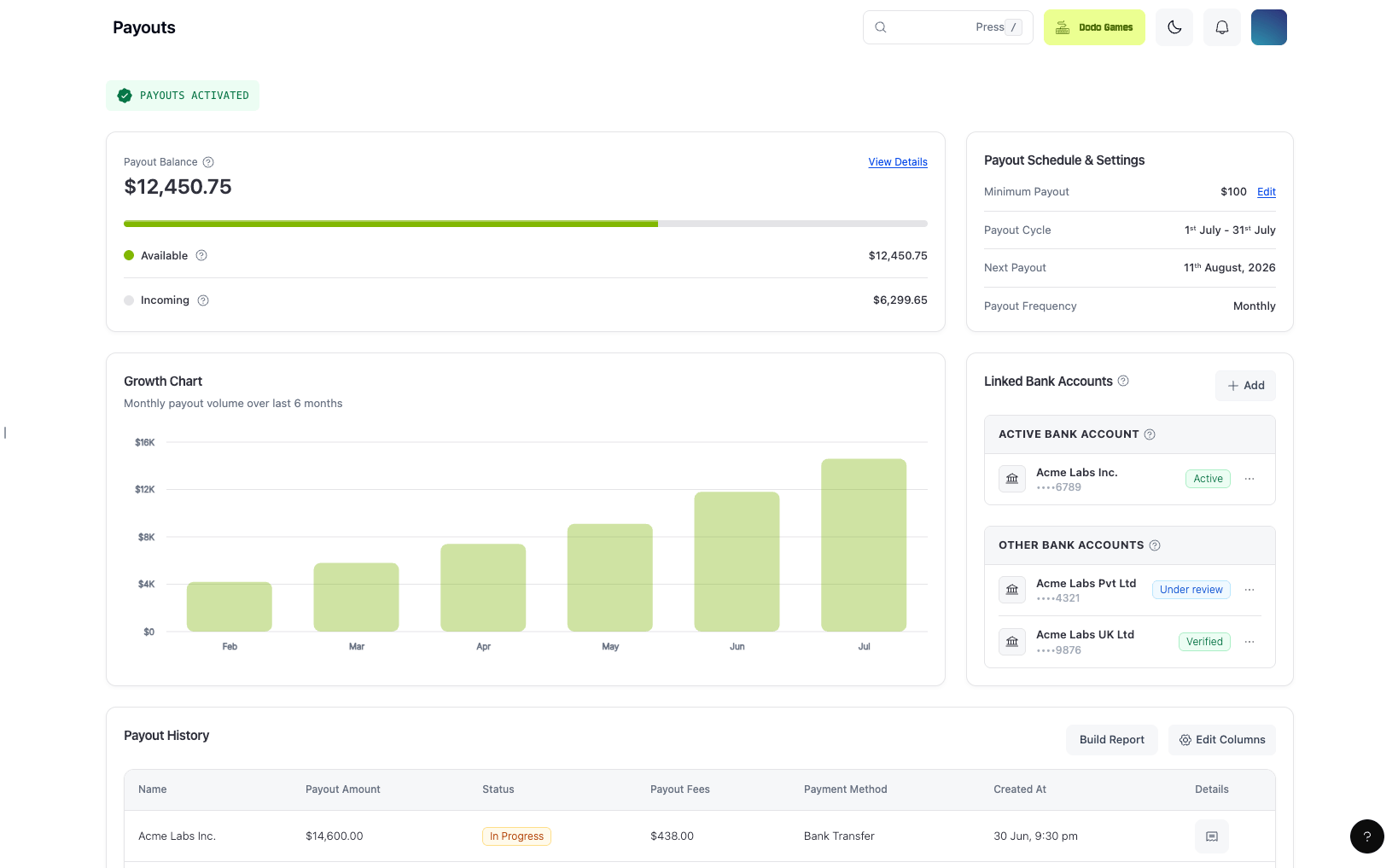
- पहला approved account अपने-आप activate हो जाता है, और hold पर रखे या failed accounts reason को inline resubmit action के साथ दिखाते हैं।
- Business onboarding के दौरान bank verification अब उसी payout-accounts flow से संचालित होता है, जिससे एक समान experience मिलता है।
5. किसी भी Chargeable Currency में Product और Add-on Pricing
अब product और add-on की base prices केवल USD में नहीं, बल्कि किसी भी ऐसी currency में set की जा सकती हैं जिसे Dodo Payments charge कर सकता है। Pricing forms में country flags के साथ searchable currency selector शामिल है, और सबसे सामान्य currencies — USD, GBP, EUR और INR — dropdown के शीर्ष पर pinned हैं। आपकी base currency के बाहर के सभी customers से अभी भी Adaptive Currency के माध्यम से billing की जाती है, लेकिन अब आपको अपने market के लिए सबसे उपयुक्त currency में prices बनाने की पूरी स्वतंत्रता है। और जानें: Products | Add-ons | Adaptive Currency6. नया Webhook: subscription.update_payment_method
जब भी किसी subscription का payment method बदलता है — उदाहरण के लिए, जब कोई customer किसी दूसरे saved card पर switch करता है — तब एक नया subscription.update_payment_method webhook event fire होता है। इसमें Subscription payload होता है, इसलिए polling किए बिना आप अपने records को sync रख सकते हैं।
यह event additive है और existing webhook endpoints पर अपने-आप दिखाई देता है।
और जानें: Webhook Events
7. Mobile App में Native Social Login
Dodo Payments mobile app अब native social login support करता है — email और password type करने के बजाय अपने device के secure system auth session के माध्यम से Google या GitHub से sign in करें। OAuth exchange PKCE (S256) का उपयोग करता है, जो per-request state nonce से bound है, इसलिए sign-in तेज़ होने के साथ code-injection और CSRF से भी सुरक्षित है। यही flow desktop app में भी उपलब्ध है।Improvements और Bug Fixes
8. Checkout Session Preview में next_billing_date
जब cart में subscription product होता है, तो checkout session का preview अब एक next_billing_date return करता है, जिससे subscription create होने से पहले upcoming billing date दिखाई जा सकती है। इसकी गणना वर्तमान समय के सापेक्ष की जाती है (trial लागू होने पर now + trial period, अन्यथा now + one payment frequency) और इसे केवल one-time carts के लिए omit किया जाता है।
और जानें: Previewing Checkout Sessions | Preview Checkout
9. Subscriptions को cancel_at_next_billing_date से Filter करें
GET /subscriptions अब cancel_at_next_billing_date filter स्वीकार करता है, इसलिए आप केवल उन subscriptions की list बना सकते हैं जिन्हें उनके वर्तमान period के अंत में cancel करने के लिए schedule किया गया है (या उन्हें exclude कर सकते हैं)।
और जानें: List Subscriptions
10. Test से Live Mode में Checkout Design Copy करें
अब आप एक ही step में अपने custom checkout design को test mode से live mode में copy कर सकते हैं, जिसमें सभी design surfaces और storefront branding शामिल हैं — live होने पर अपनी theme को हाथ से फिर से बनाने की आवश्यकता नहीं रही। और जानें: Storefront11. Per-Mode Product Drafts
अब product creation test और live mode के लिए अलग-अलग drafts रखता है, जिसमें Clear Draft option भी है, इसलिए एक mode में progress में मौजूद product अब दूसरे mode में दिखाई नहीं देता। Product और collection form pages में तेज़ी से save करने के लिए header action buttons भी जोड़े गए हैं। और जानें: Products12. सभी List-API Fields को Selectable Table Columns के रूप में उपयोग करें
Dashboard tables अब underlying list API द्वारा return किए गए प्रत्येक field को selectable column के रूप में दिखाती हैं, जिसमें scrollable column-visibility menu और humanized labels शामिल हैं — इसलिए प्रत्येक record खोले बिना आप ठीक वही data दिखा सकते हैं जिसकी आवश्यकता है।13. Dashboard और Checkout में Keyboard Accessibility
हमने dashboard, checkout और checkout SDK में व्यापक accessibility improvements किए हैं: consistent keyboard access और focus visibility, icon controls और inputs पर accessible names, तथा form controls, checkboxes, radios, switches, tabs और buttons के लिए unified focus/error convention।अन्य Fixes और Improvements
- Checkout crash को ठीक किया गया जो in-browser page translation (जैसे Google Translate) से trigger हो सकता था और उन DOM nodes को हटा सकता था जिनका ownership React के पास था।
- Checkout में address autofill को बेहतर बनाया गया, जिसे Google Places API (New) पर फिर से बनाया गया है, ताकि dropdown selections blur, keyboard collapse और repositioning के बाद भी बनी रहें।
- पूरे platform में छोटे bug fixes और stability improvements।