メインコンテンツへスキップ

Documentation Index

Fetch the complete documentation index at: https://docs.dodopayments.com/llms.txt

Use this file to discover all available pages before exploring further.

Sentraにインテグレーションコードを書かせましょう。
VS Code、Cursor、WindsurfでAIアシスタントを使用し、必要な内容を説明するだけでSDK/APIコード、Webhookハンドラなどを生成できます。
Sentraを試す: AIによるインテグレーション →
このチュートリアルでは、顧客がメールクレジットのプールを前払いするトランザクションメールプラットフォームであるMailKitを構築します。このプランは毎月のメール許容量を提供し、顧客が残量不足になった際は次のサイクルを待たずに追加パックを購入できます。送信ごとにクレジットが自動で1つ差し引かれます。
このチュートリアルではメールプロバイダーとしてResendを使用します。無料プラン(3,000メール/月)は、有料アカウントなしで全フローを構築・テストするのに十分です。このパターンは他のプロバイダーでも機能します。SendGrid、Postmark、SES、または独自のSMTPリレーに置き換えてください。
このチュートリアルの終わりには、次のことができるようになります:
  • ダッシュボードでカスタムクレジット権利(メール)を作成する
  • クレジットをサブスクリプションプランと一回限りのトップアップ製品に添付する
  • Resend経由で実際のメールを送信し、台帳エントリ経由で1送信ごとにクレジットを差し引く
  • フロントエンドからライブクレジット残高を照会する
  • Dodo Webhookを正しく確認し、残高がゼロに達する前に顧客に通知する

構築するもの

MailKitの料金モデルは以下の通りです:
製品価格メール数
MailKitプラン$19/月5,000 メール/サイクル
トップアップパック$9 一回限り+5,000 メール
単位は1メール = 1クレジットです。顧客はトークン、バッチ、加重単位を考える必要はありません。「今月はあと4,231メール残っています」と表示されるだけです。
始める前に、以下を確認してください:
  • Dodo Paymentsのアカウント(テストモードで構いません)
  • 無料のResendアカウントおよびAPIキー
  • Node.js 18+と基本的なTypeScriptの知識

ステップ1: メールクレジット権利の作成

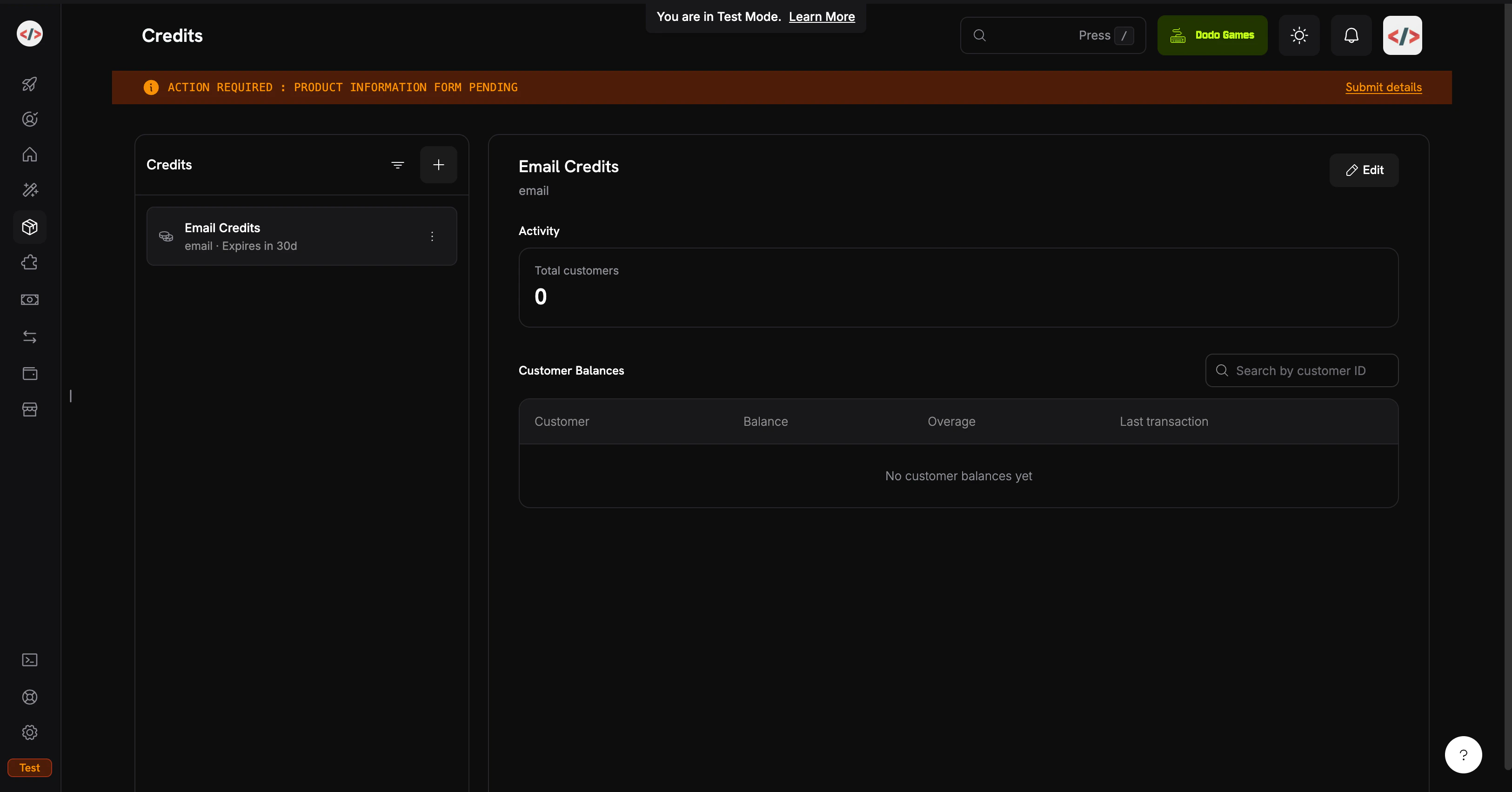
クレジット権利はプラットフォームが販売する単位を定義します: この場合、1回のメール送信です。
Credits listing page
  1. Dodo Paymentsのダッシュボードにログインしてください 2. 左側のサイドバーでProductsをクリック 3. Creditsタブを選択 4. Create Creditをクリック
クレジットの詳細を記入してください: クレジット名: Email Credits クレジットタイプ: Custom Unitを選択 ユニット名: email 精度: 0(メールは常に全体の単位です;半分のメールを送信することはできません) クレジット有効期限: 30 days(各サイクルの許容量はリセットされます) 精度は作成後に変更できません。メール、メッセージ、セッションなどの個別単位の場合、0が正しいです。 このクックブックではロールオーバーや超過を有効にしません; 目標は可能な限り簡単なCBBフローです。クレジットアタッチメントについては後で再訪できます。 Create Creditをクリックしてください。クレジットを開き、そのIDをコピーしてください。バックエンドの残高照会で必要になります。これは cent_xxxxxxxxxxxx のように見えます。 あなたのEmail Creditsエンタイトルメントが準備できました。次は顧客にクレジットを与える製品です。

ステップ2: プランとトップアップパックの作成

2つの製品を作成します: 定期的なサブスクリプションプランと一回限りの支払いトップアップ。プランは各サイクルに5,000メールを提供し、トップアップは要求に応じて追加の5,000を追加します。両方とも同じEmail Creditsエンタイトルメントを添付します。 このクックブックでは、使用量に基づくメーターではなく、直接の台帳項目でクレジットを差し引きます。台帳エントリは即時(残高はミリ秒で更新されます)で、追加設定が不要で、1つのユーザーアクションが正確に1クレジットに相当する場合に適しています。インジェストされた使用量イベントからの自動差し引きを好む場合(「トークン」や「MB処理済み」などの重み付け単位に便利です)、メーターベースのパターンについてはCredit-Based Billing → Usage Billing with Creditsをご覧ください。

MailKitプラン ($19/月, 5,000メール)

  1. Products → Create Productに移動 2. 製品の詳細を入力:
製品名: MailKit Plan 説明: 5,000 transactional emails per month.
  1. 製品タイプとしてサブスクリプションを選択 4. 定期価格を設定:
定期価格: 19.00 請求サイクル: Monthly 通貨: USD スクロールしてEntitlements → Credits → Attachを設定: クレジットエンタイトルメント: Email Credits 請求サイクルごとに発行されるクレジット: 5000 低残高閾値: 20(パーセント; 残高がサイクル許容量の20%未満になるとcredit.balance_lowが発動します。例: 1,000メール) デフォルトクレジット設定をインポート: 有効(ステップ1からの30日間の有効期限を使用) Add to Productをクリックし、製品を保存してください。製品IDをコピーしてください(pdt_xxxxxxxxxxxx)。 プラン: $19/月 → 各サイクルで5,000メールが更新されます。

トップアップパック ($9 一回限り, 5,000メール)

  1. Products → Create Productに移動 2. 製品の詳細を入力:
製品名: Email Top-Up Pack 説明: Add 5,000 emails to your MailKit balance instantly.
  1. 製品タイプとして一回限りの支払いを選択 4. 価格設定を行う:
価格: 9.00 通貨: USD Entitlements → Credits → Attachで:
  • クレジットエンタイトルメント: Email Credits
  • 発行されるクレジット: 5000
一回限りの製品は、独自の有効期限(購入から30日以内)を持つクレジットを付与します。トップアップはサブスクリプションクレジットの上に積み重なり、置き換えません。 保存して製品IDをコピーしてください。 トップアップパック: $9 → +5,000メール、すぐに利用可能。

ステップ3: バックエンドを設定

チェックアウト、送信、残高のクエリ、Webhookを処理するExpressサーバーを構築します。
mkdir mailkit && cd mailkit
npm init -y
npm install dodopayments resend express dotenv
npm install -D tsx @types/node @types/express
dev scriptpackage.jsonに追加してください:
{
  "scripts": {
    "dev": "tsx watch server.ts"
  }
}
tsx は、ビルドステップやtsconfig.jsonなしでTypeScriptを直接実行します。チュートリアルに最適です。本番環境向けにはtsconfig.jsonbuildスクリプトを追加してください。 .envを作成:
.env
# Dodo Payments
DODO_PAYMENTS_API_KEY=your_dodo_test_api_key
DODO_WEBHOOK_KEY=your_dodo_webhook_signing_key
CREDIT_ENTITLEMENT_ID=cent_xxxxxxxxxxxx
PLAN_PRODUCT_ID=pdt_xxxxxxxxxxxx
TOPUP_PRODUCT_ID=pdt_xxxxxxxxxxxx

# Resend
RESEND_API_KEY=re_xxxxxxxxxxxx

# App
BASE_URL=http://localhost:3000
PORT=3000
エンドポイントを作成した後でステップ4にてDODO_WEBHOOK_KEYを埋めます。Resend APIキーはresend.com/api-keysから取得します。 .envをすぐに.gitignoreに追加してください。APIキーを決してコミットしないでください。 プロジェクトルートでserver.tsを作成:
server.ts
import 'dotenv/config';
import express, { Request, Response } from 'express';
import DodoPayments from 'dodopayments';
import { Resend } from 'resend';

const app = express();

const dodo = new DodoPayments({
  bearerToken: process.env.DODO_PAYMENTS_API_KEY!,
  webhookKey: process.env.DODO_WEBHOOK_KEY!,
  environment: 'test_mode',
});

const resend = new Resend(process.env.RESEND_API_KEY!);

const CREDIT_ENTITLEMENT_ID = process.env.CREDIT_ENTITLEMENT_ID!;
const BASE_URL = process.env.BASE_URL!;

// ---------------------------------------------------------------
// Webhook endpoint MUST receive the raw body for signature
// verification. Register it BEFORE express.json().
// ---------------------------------------------------------------
app.post(
  '/webhooks/dodo',
  express.raw({ type: 'application/json' }),
  async (req: Request, res: Response) => {
    const headers = {
      'webhook-id': req.headers['webhook-id'] as string,
      'webhook-signature': req.headers['webhook-signature'] as string,
      'webhook-timestamp': req.headers['webhook-timestamp'] as string,
    };

    let event: any;
    try {
      event = await dodo.webhooks.unwrap(req.body.toString('utf8'), { headers });
    } catch (err) {
      console.error('Webhook signature verification failed:', err);
      return res.status(401).json({ error: 'invalid signature' });
    }

    switch (event.type) {
      case 'credit.balance_low': {
        const { customer_id, credit_entitlement_name, available_balance, threshold_percent } =
          event.data;
        console.log(
          `[low-balance] ${customer_id} has ${available_balance} ${credit_entitlement_name} ` +
            `left (under ${threshold_percent}%)`
        );
        await notifyCustomerLowBalance(customer_id, Number(available_balance));
        break;
      }
      case 'credit.added':
        console.log('[credit.added]', event.data);
        break;
      case 'credit.rolled_over':
        console.log('[rolled_over]', event.data);
        break;
    }

    res.json({ received: true });
  }
);

// JSON parsing for everything else.
app.use(express.json());

// ---------------------------------------------------------------
// POST /checkout/subscribe → start the MailKit subscription.
// ---------------------------------------------------------------
app.post('/checkout/subscribe', async (req, res) => {
  const { email, name } = req.body as { email: string; name: string };

  const session = await dodo.checkoutSessions.create({
    product_cart: [{ product_id: process.env.PLAN_PRODUCT_ID!, quantity: 1 }],
    customer: { email, name },
    return_url: `${BASE_URL}/?subscribed=1`,
  });

  res.json({ checkout_url: session.checkout_url });
});

// ---------------------------------------------------------------
// POST /checkout/topup → buy a 5,000-email top-up for an existing
// customer. In a real app, customer_id is resolved from the
// authenticated session, never trusted from request input.
// ---------------------------------------------------------------
app.post('/checkout/topup', async (req, res) => {
  const { customer_id } = req.body as { customer_id: string };

  const session = await dodo.checkoutSessions.create({
    product_cart: [{ product_id: process.env.TOPUP_PRODUCT_ID!, quantity: 1 }],
    customer: { customer_id },
    return_url: `${BASE_URL}/?topped_up=1`,
  });

  res.json({ checkout_url: session.checkout_url });
});

// ---------------------------------------------------------------
// GET /credits/:customerId → live balance for the dashboard widget.
// ---------------------------------------------------------------
app.get('/credits/:customerId', async (req, res) => {
  const balance = await dodo.creditEntitlements.balances.retrieve(req.params.customerId, {
    credit_entitlement_id: CREDIT_ENTITLEMENT_ID,
  });

  res.json({ balance: balance.balance });
});

// ---------------------------------------------------------------
// POST /send → send an email via Resend, then write a ledger entry
// to debit 1 credit from the customer's balance. The deduction is
// instant; the next /credits call reflects it.
// ---------------------------------------------------------------
app.post('/send', async (req, res) => {
  const { customer_id, to, subject, html } = req.body as {
    customer_id: string;
    to: string;
    subject: string;
    html: string;
  };

  // 1. Pre-flight balance check: refuse to send if the balance is at zero.
  const balance = await dodo.creditEntitlements.balances.retrieve(customer_id, {
    credit_entitlement_id: CREDIT_ENTITLEMENT_ID,
  });

  if (Number(balance.balance) <= 0) {
    return res.status(402).json({
      error: 'No email credits remaining. Buy a top-up pack or upgrade your plan.',
    });
  }

  // 2. Send via Resend.
  const { data, error } = await resend.emails.send({
    from: 'MailKit <onboarding@resend.dev>', // swap for your verified domain
    to: [to],
    subject,
    html,
  });

  if (error) {
    return res.status(500).json({ error: error.message });
  }

  // 3. Debit 1 credit. Resend's message id is the idempotency key, so if
  //    the client retries this request, Dodo deduplicates and the
  //    customer is only debited once for that send.
  await dodo.creditEntitlements.balances.createLedgerEntry(customer_id, {
    credit_entitlement_id: CREDIT_ENTITLEMENT_ID,
    amount: '1',
    entry_type: 'debit',
    reason: `email send ${data!.id}`,
    idempotency_key: data!.id,
  });

  res.json({ id: data!.id });
});

async function notifyCustomerLowBalance(customerId: string, available: number) {
  // In production: send an email to the account owner, push a banner,
  // open an in-app modal, etc. For the demo we just log.
  console.log(`[NOTIFY] ${customerId}: ${available} emails left. Consider topping up.`);
}

app.use(express.static('public'));

const port = Number(process.env.PORT) || 3000;
app.listen(port, () => {
  console.log(`MailKit running on http://localhost:${port}`);
});
Webhookのボディは生のままでなければなりません。 express.json()はボディを解析して再シリアル化し、署名検証を破壊します。/webhooks/dodoapp.use(express.json())行のに定義します。 バックエンド準備完了:サブスクライブ、トップアップ、残高、送信、Webhookハンドラがすべて接続されます。 public/index.htmlを作成:
public/index.html
<!doctype html>
<html>
  <head>
    <title>MailKit Demo</title>
    <style>
      body {
        font-family: system-ui, -apple-system, sans-serif;
        max-width: 720px;
        margin: 40px auto;
        padding: 0 20px;
        color: #1a1a2e;
      }
      h1 { font-size: 28px; margin-bottom: 4px; }
      h2 { font-size: 16px; margin-top: 32px; padding-bottom: 6px; border-bottom: 1px solid #eee; }
      label { display: block; font-size: 13px; font-weight: 600; margin: 12px 0 4px; }
      input, select, textarea {
        width: 100%;
        padding: 10px;
        border: 1px solid #ddd;
        border-radius: 6px;
        font-family: inherit;
        font-size: 14px;
        box-sizing: border-box;
      }
      button {
        background: #1a1a2e;
        color: white;
        padding: 10px 18px;
        border: none;
        border-radius: 6px;
        cursor: pointer;
        font-size: 14px;
        margin-top: 12px;
      }
      button:hover { background: #2d2d4a; }
      .out {
        background: #f6f6fa;
        padding: 12px;
        border-radius: 6px;
        margin-top: 12px;
        font-size: 13px;
        font-family: ui-monospace, monospace;
        white-space: pre-wrap;
        word-break: break-all;
      }
      .balance { font-size: 36px; font-weight: 700; color: #4f46e5; }
      .balance-sub { color: #888; font-size: 13px; margin-top: 4px; }
    </style>
  </head>
  <body>
    <h1>MailKit</h1>
    <p>Prepaid transactional email, billed per send.</p>

    <h2>1. Subscribe to MailKit ($19/mo, 5,000 emails)</h2>
    <label>Email</label>
    <input id="subEmail" type="email" placeholder="you@example.com" />
    <label>Name</label>
    <input id="subName" type="text" placeholder="Your name" />
    <button onclick="subscribe()">Get checkout link</button>
    <div id="subOut" class="out" hidden></div>

    <h2>2. Check your balance</h2>
    <label>Customer ID</label>
    <input id="balCust" type="text" placeholder="cus_xxxxxxxxxxxx" />
    <button onclick="checkBalance()">Refresh</button>
    <div id="balOut" class="out" hidden></div>

    <h2>3. Send a transactional email</h2>
    <label>Customer ID</label>
    <input id="sendCust" type="text" placeholder="cus_xxxxxxxxxxxx" />
    <label>To (Resend's sandbox accepts delivered@resend.dev)</label>
    <input id="sendTo" type="email" value="delivered@resend.dev" />
    <label>Subject</label>
    <input id="sendSubj" type="text" value="Hello from MailKit" />
    <label>HTML body</label>
    <textarea id="sendBody" rows="3">&lt;strong&gt;It works!&lt;/strong&gt;</textarea>
    <button onclick="sendEmail()">Send</button>
    <div id="sendOut" class="out" hidden></div>

    <h2>4. Run low? Buy a top-up pack</h2>
    <label>Customer ID</label>
    <input id="topCust" type="text" placeholder="cus_xxxxxxxxxxxx" />
    <button onclick="topup()">Buy 5,000 emails ($9)</button>
    <div id="topOut" class="out" hidden></div>

    <script>
      const show = (id, content) => {
        const el = document.getElementById(id);
        el.hidden = false;
        el.innerHTML = content;
      };

      async function subscribe() {
        const r = await fetch('/checkout/subscribe', {
          method: 'POST',
          headers: { 'Content-Type': 'application/json' },
          body: JSON.stringify({
            email: document.getElementById('subEmail').value,
            name: document.getElementById('subName').value,
          }),
        });
        const data = await r.json();
        show('subOut', r.ok
          ? `<a href="${data.checkout_url}" target="_blank">Open checkout →</a>`
          : `Error: ${data.error}`);
      }

      async function checkBalance() {
        const id = document.getElementById('balCust').value;
        const r = await fetch(`/credits/${id}`);
        const data = await r.json();
        show('balOut', r.ok
          ? `<div class="balance">${Number(data.balance).toLocaleString()}</div>
             <div class="balance-sub">emails available</div>`
          : `Error: ${data.error}`);
      }

      async function sendEmail() {
        const r = await fetch('/send', {
          method: 'POST',
          headers: { 'Content-Type': 'application/json' },
          body: JSON.stringify({
            customer_id: document.getElementById('sendCust').value,
            to: document.getElementById('sendTo').value,
            subject: document.getElementById('sendSubj').value,
            html: document.getElementById('sendBody').value,
          }),
        });
        const data = await r.json();
        show('sendOut', r.ok ? `Sent. Message id: ${data.id}` : `Error: ${data.error}`);
      }

      async function topup() {
        const r = await fetch('/checkout/topup', {
          method: 'POST',
          headers: { 'Content-Type': 'application/json' },
          body: JSON.stringify({ customer_id: document.getElementById('topCust').value }),
        });
        const data = await r.json();
        show('topOut', r.ok
          ? `<a href="${data.checkout_url}" target="_blank">Open top-up checkout →</a>`
          : `Error: ${data.error}`);
      }
    </script>
  </body>
</html>

ステップ4: Webhookエンドポイントを接続

credit.balance_lowイベントは、顧客がなくなる前に促すものです。これなしでは、メール送信が失敗したときに初めて問題に気づきます。 Webhooksは公開URLが必要です。ngrok(または任意のトンネル)を使用して開発中に:
ngrok http 3000
HTTPS転送URLをコピー(例:https://1234abcd.ngrok-free.app)。
  1. Developers → Webhooks → Add Endpointに移動 2. URL: https://1234abcd.ngrok-free.app/webhooks/dodo 3. イベント: credit.addedcredit.balance_lowcredit.rolled_overに登録 4. 保存し、署名キー.envDODO_WEBHOOK_KEYとしてコピー 5. サーバーを再起動

ステップ5: フルフローをテスト

npm run dev
MailKit running on http://localhost:3000が見えるはずです。ブラウザで開いてください。
  1. セクション1でテストメールと名前を入力し、Get checkout linkをクリック 2. リンクを開き、テストカードでチェックアウトを完了 3. 支払い後、ダッシュボードでCustomersにてcustomer_idを見つけてください
顧客は現在5,000メールの残高があります。[Customer] → Creditsで確認。
  1. セクション3にcustomer_idをペースト 2. todelivered@resend.dev(Resendのすべて受け入れるサンドボックスインボックス)に設定したまま 3. Sendをクリック
ResendのメッセージIDが返されます。セクション2で残高を更新するとすぐに4,999に減ります。各台帳の引き落としは記録されるとすぐにライブバランスに反映されます。 閾値は20%(5,000メール許容量の1,000メール)です。4,000メールを実際に送信せずにトリガーするために、ダッシュボードから残高を手動で引き落とししてください:
  1. Customers → [Customer] → Credits → Email Creditsに移動 2. 残高を調整をクリックし、4000を引き落とし 3. デモを通じてもう一通のメールを送信
あなたのサーバーは数秒以内にログを記録するはずです:
[low-balance] cus_xxx has 999 Email Credits left (under 20%)
[NOTIFY] cus_xxx: 999 emails left. Consider topping up.
サーバーはWebhookを受信し検証しました。本番環境では、ここで顧客にメールを送信するか、アプリ内バナーを表示します。
  1. セクション4にcustomer_idをペースト 2. Buy 5,000 emailsをクリックし、テストチェックアウトを完了 3. 残高を更新すると5,000増加します
credit.addedイベントがgrant_source: one_timeで発火します。トップアップはサブスクリプションクレジットに積み重なり、プラン変更なしで両方のプールがFIFO(最古の未失効グラントから順に)で消費されます。 残高をゼロに手動で引き落とし、その後もう一通のメールを送信してください。以下が表示されます:
{ "error": "No email credits remaining. Buy a top-up pack or upgrade your plan." }
この402はアプリケーションレベルの強制です。Dodoの残高APIが真の情報源です;クライアントにキャッシュしないでください。

トラブルシューティング

署名は生のHTTPボディを用いて計算されます。express.json()はペイロードを解析しシリアル化し直します、HMACを破壊します。/webhooks/dodoapp.use(express.json())行のに登録し、DODO_WEBHOOK_KEYがエンドポイント詳細ページに表示される署名キーと一致するようにしてください。 まず確認すべき3点:
  1. 顧客がチェックアウトを完了したか(クレジットは支払い成功時に発行され、セッション作成時ではありません) 2. CREDIT_ENTITLEMENT_ID.envで製品に添付されたクレジットと一致するか(IDの不一致は、間違ったクレジットに書き込まれます) 3. 渡すcustomer_idがDodoから来たものか(ダッシュボードのcustomersテーブル)、あなたのデータベースではないか
サンドボックス送信者onboarding@resend.devは、Resendアカウントのメールまたはdelivered@resend.devにのみ配信します。誰にでも送信するには、ドメインを確認し、そこにあるfromアドレスを使用してください。

あなたが構築したもの

Email Credits、1回定義してサブスクリプションプランとトップアップパックに添付。 $19/月は1サイクルごとに5,000メールを提供します。顧客は何に支払っているかを知り、あなたは最悪の場合のコストを把握します。 一回限りの製品で5,000メールを提供。サブスクリプションクレジットに追加積みされ、プラン変更は不要。 各送信後の単一のcreateLedgerEntry呼び出し。メーター不要、集約遅延なし、ResendのメッセージIDを介してリトライ時に冪等性。 ロールオーバー、超過モード、台帳管理、完全なAPIサーフェスについてはCBBドキュメント全体をお読みください。 ヘルプが必要ですか?
Last modified on May 14, 2026