

Quick Start
Platform Examples
Checkout Customization
Mobile Recipes
Dodo Paymentsは、Android、iOS、React Native、Flutter向けの公式checkout SDKを提供しています。各SDKはcheckout URLを開き、復帰を取得し、1回の型付き
start(...)呼び出しの背後で結果を解析します。また、それぞれに放棄されたsessionの復旧機能が含まれています。SDKがどれもスタックに適合しない場合にのみ、フローを手動で構築してください。前提条件
始める前に、次のものが必要です。- Dodo Paymentsアカウント。
- Developer → API Keysから取得したAPI keyと、Developer → Webhooksから取得したwebhook signing secret。
- Android、iOS、React Native、またはFlutterアプリ。
- checkout sessionを作成するバックエンドサーバー。API keyはこのサーバーに保存します。
統合ワークフロー
すべてのDodo Payments API呼び出しはバックエンドから行います。アプリはバックエンドにcheckout URLを要求し、それを開いて結果を表示するだけです。ディープリンク内の
statusは、顧客に何を表示するかをアプリに伝えます。これは支払いの証明ではありません。アクセス権はモバイルの結果ではなく、バックエンドで受信したpayment.succeededまたはsubscription.active webhookから付与してください。1
Backend: Create Checkout Session
バックエンドはAPI keyを使ってcheckout sessionを作成し、その
checkout_urlをアプリに返します。sessionのreturn_urlには、アプリが登録するディープリンクを設定します。例:myapp://checkout/return。Checkout Session API Docs
Security:checkout sessionはモバイルアプリではなく、必ずバックエンドサーバーで作成してください。アプリのバイナリからAPI keyを抽出することは誰にでも可能です。
2
Mobile: Get Checkout URL
アプリはバックエンドを呼び出してcheckout URLを取得します。このリクエストは、サインイン中のユーザー自身のsession tokenで認証してください。各例では、
userSessionTokenがそのtokenで、CheckoutResponseが独自のレスポンスタイプです。- iOS (Swift)
- Android (Kotlin)
- React Native (JavaScript)
- Flutter (Dart)
Security:アプリはDodo Payments APIを直接呼び出さず、必ずバックエンドとのみ通信します。
3
Mobile: Open Checkout in Browser
checkout URLをプラットフォームのシステムブラウザー画面で開きます。公式checkout SDKを使えば、この処理が自動的に行われ、型付きの結果が返されます。
Pick your mobile SDK
4
Backend: Handle Payment Completion
バックエンドが
payment.succeededまたはsubscription.active webhookを受信したら、アクセス権を付与します。復帰URLの結果は、アプリの画面を更新する目的にのみ使用してください。SDKを選択する
すべてのモバイルSDKは同じ契約に従います。1回のstart(...)呼び出しで、Dodo Paymentsのホスト型checkoutをプラットフォームのシステムブラウザー画面で開き、型付きCheckoutResultを返します。そのstatusはsucceeded、failed、cancelled、pending、またはexpiredになります。SDKがAPI keyを保持したりDodo Payments APIを呼び出したりすることはありません。4つすべてが放棄されたsessionの復旧に対応しています。
Android
iOS
React Native
Flutter
Callback URL Schemeの登録
4つのSDKはすべて、例としてmyapp://checkout/returnのように、選択したcustom URL schemeを通じてアプリへ制御を戻します。プラットフォームごとに1回登録してください。
- Android
- iOS
- Expo
android/app/build.gradle
returnUrlのschemeと一致させる必要があります。フローを自分で構築するには、
checkout_urlをプラットフォームのシステムブラウザー画面(AndroidではCustom Tab、iOSではSFSafariViewController)で開き、return_urlへのナビゲーションをインターセプトして、クエリパラメータstatusとpayment_idを読み取ります。これらはSDKが自動的に行います。外観のカスタマイズ
すべてのSDKは、start(...)またはCheckoutParamsで任意のcustomizationパラメータを受け取ります。これはシステムブラウザー画面のtoolbar、button、ブラウザーの表示方法を制御します。checkoutページ独自のthemeは別に設定します。checkout session作成時に、サーバー上でcustomization.theme_configを使って設定します。
オプションはプラットフォームごとに分類されています。AndroidのCustom TabとiOSのSFSafariViewControllerでは、利用できるnative controlが異なるためです。すべてのfieldは任意です。未設定のfieldには、プラットフォーム独自のデフォルト値が使用されます。
Android - Custom Tab
Android - Custom Tab
Color
Toolbarの背景色。
Navigation barの色。
Navigation barの上に表示されるdividerの色。
'default' | 'back'
defaultはシステムの「X」アイコンを表示し、backは代わりに戻る矢印を描画します。'start' | 'end'
Toolbarのどちら側にclose buttonを表示するか。
Toolbarのshare iconを表示します。
boolean
ToolbarでURLの下にpage titleを表示します。
boolean
ページのスクロールに合わせてtoolbarを自動的に非表示にします。
boolean
オーバーフローメニューに「このページをブックマーク」を表示します。
boolean
オーバーフローメニューに「ページをダウンロード」を表示します。
'system' | 'light' | 'dark'
デバイスのシステム設定にかかわらず、lightまたはdark appearanceを強制します。
iOS - SFSafariViewController
iOS - SFSafariViewController
'done' | 'close' | 'cancel'
dismiss buttonのlabelまたはicon。
'pageSheet' | 'fullScreen'
デフォルト:"pageSheet"
pageSheetは、顧客がスワイプして閉じられるcardとしてcheckoutを表示します。fullScreenは画面全体を覆います。boolean
スクロール時にtoolbarを折りたたみます。効果があるのは
presentationStyleがfullScreenの場合のみです。pageSheetでは、barは固定されたままです。'system' | 'light' | 'dark'
デバイスのシステム設定にかかわらず、lightまたはdark appearanceを強制します。
androidおよびios option groupを使用します。native SDKでは各プラットフォーム固有のoptionのみを使用します。
- React Native
- Flutter
- Android (Kotlin)
- iOS (Swift)
Checkoutページのカスタマイズ
checkoutページ自体(表示するfield、theme、表示する決済手段)は、checkout session作成時にサーバーで設定します。外観のカスタマイズで説明するのは、その周囲のブラウザー画面だけです。以下のパラメータは、モバイルでのコンバージョンに最も大きな効果があります。 これらのパラメータは、checkout session のリクエスト内の3か所、つまりトップレベル、customization、または feature_flags に配置します。配置先列には、それぞれのパラメータを配置するオブジェクトが示されています。各パラメータは表示されたオブジェクトに配置してください。誤ったオブジェクトに配置しても効果はありません。
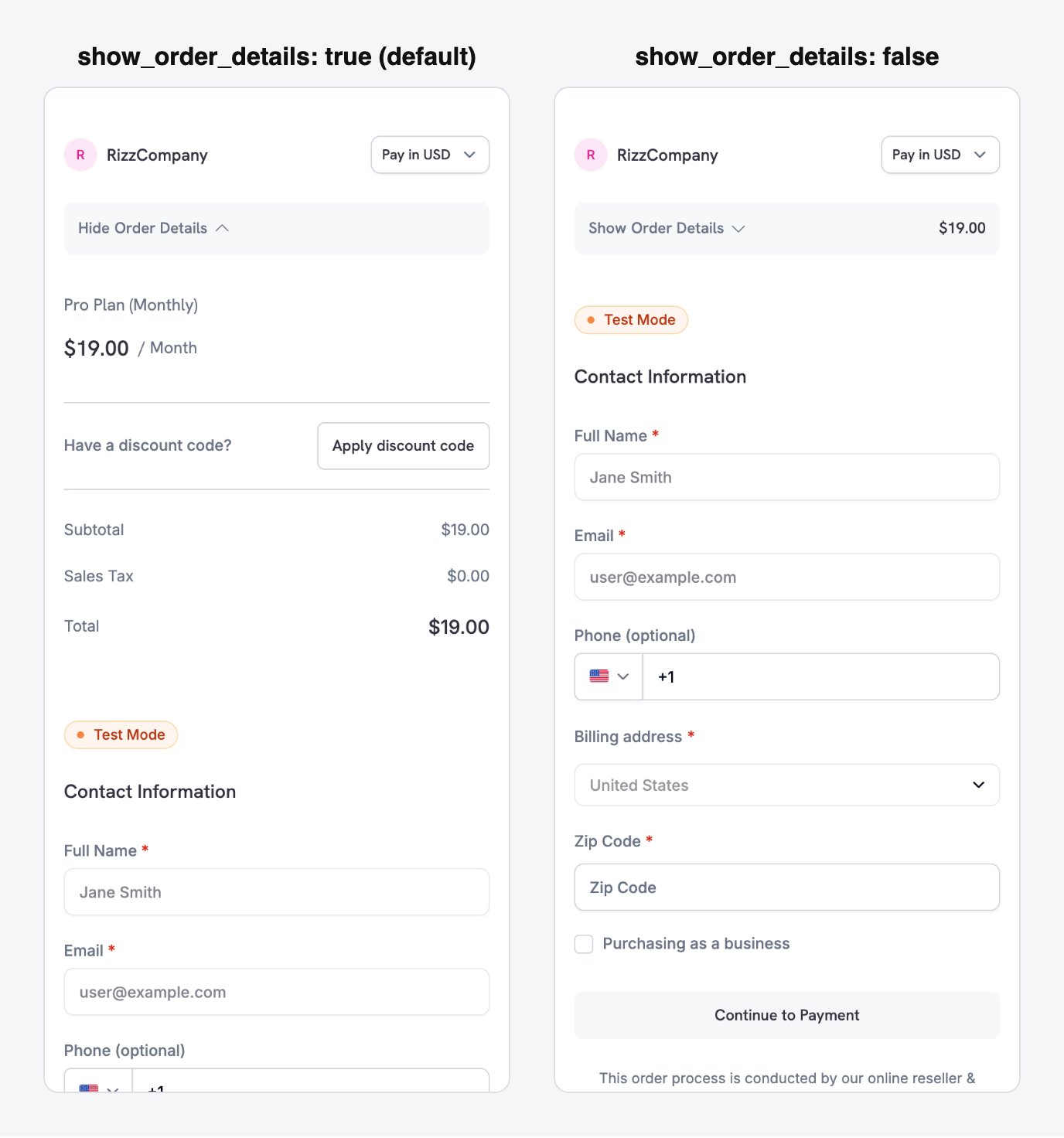
show_order_details: false moves the contact and payment fields above the fold, instead of behind the order summary.
minimal_address: trueを設定します。
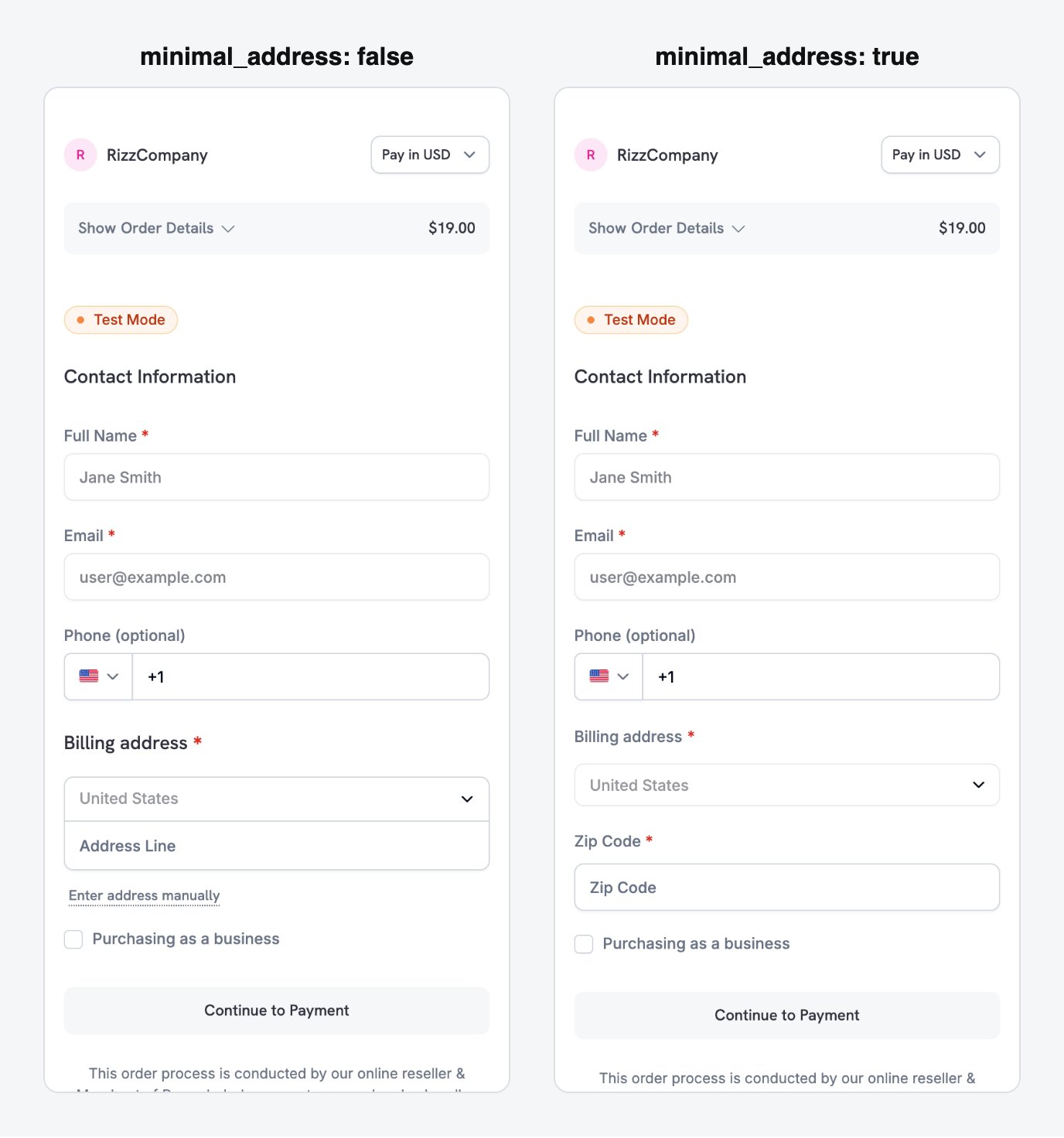
minimal_address: true reduces the billing address to a single postcode field.
theme: "system"を設定します。
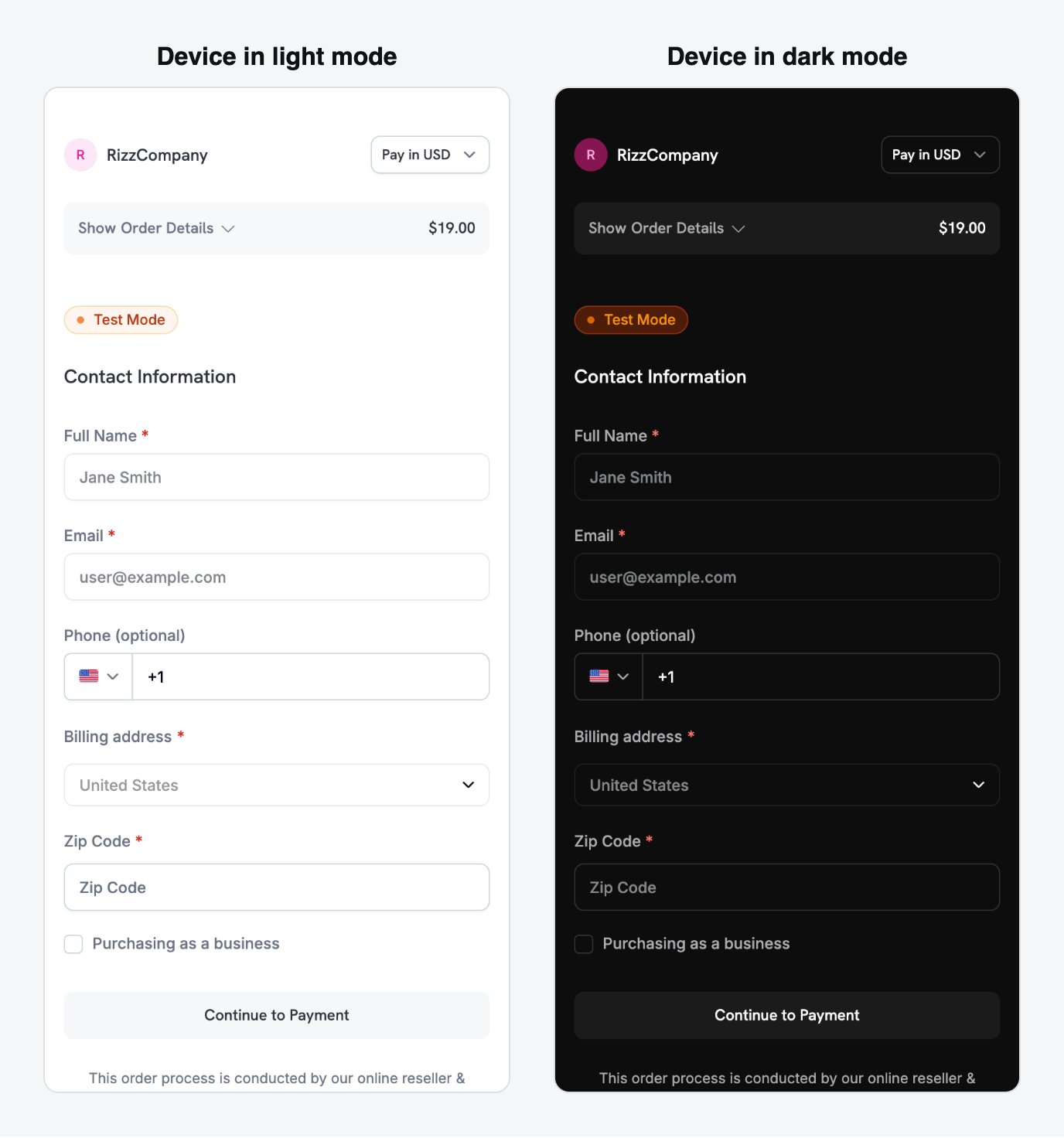
With theme: system, the checkout follows the device's light or dark appearance automatically.
**利用できる決済手段は商品タイプによって異なります。**Apple PayとCash App Payは、ゼロではない金額のrecurring subscriptionに対応しています。one-time paymentでは、ビジネスで有効にしたすべての決済手段を利用できます。Payment Methodsを参照してください。
Full checkout session parameter reference
モバイル最適化レシピ
各レシピは、バックエンドから送信する完全なcheckout session requestです。シナリオに合うものを選び、product IDを自分のものに置き換えてください。Node.jsとPythonのclientは最初のレシピで設定し、その他のレシピで再利用します。Minimal Mobile Checkout - fastest path to payment
Minimal Mobile Checkout - fastest path to payment
最も短いフォームにする場合は、このレシピを使用します。決済手段を上部に表示し、住所はpostcodeのみ、discount fieldは表示せず、themeはデバイスに従います。
- Node.js SDK
- Python SDK
利用可能なすべてのparameterとdefaultについては、Checkout Sessionsを参照してください。
checkoutページをアプリの一部のように見せる必要がある場合は、このレシピを使用します。brand color、border radius、custom pay button labelを設定します。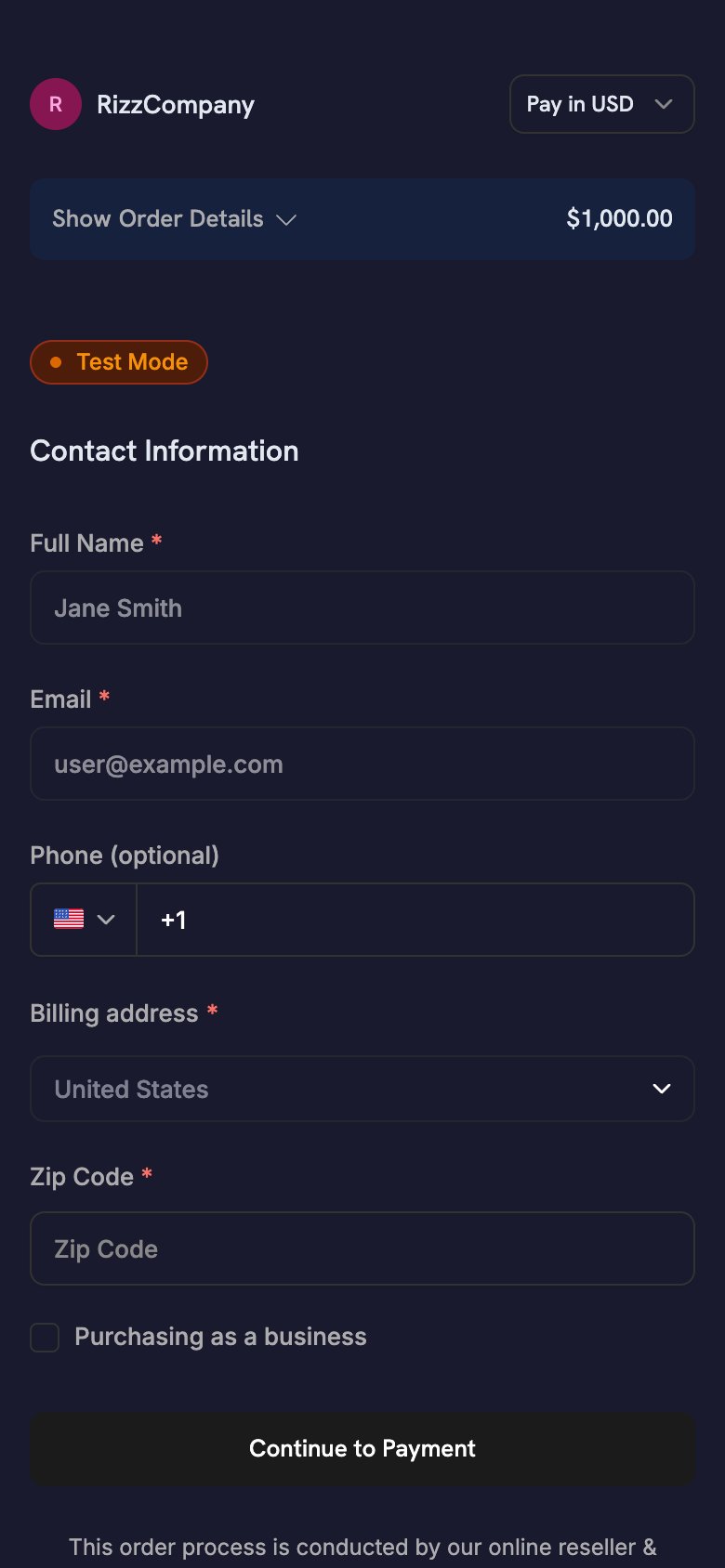
- Node.js SDK
- Python SDK
theme_configは、darkとlightの別々のobjectを受け取るため、paletteはデバイスのappearanceに従います。すべてのcolor keyとfont optionについては、Checkout Sessionsを参照してください。One-Click Returning Customer - saved card, instant confirmation
One-Click Returning Customer - saved card, instant confirmation
過去に支払ったことのあるサインイン済み顧客には、このレシピを使用します。顧客の
customer_id、保存済みのpayment_method_id、confirm: trueを渡してcheckout formを省略します。payment_method_idを指定すると、sessionは保存済みのmethodに直接課金し、checkout_urlを返さないため、アプリで開くものはありません。結果はwebhookから取得します。- Node.js SDK
- Python SDK
バックエンドが
payment.succeeded webhookを受信したら、アクセス権を付与します。アプリが表示するstatusはUI上のヒントにすぎません。Subscription with Free Trial - trial before first charge
Subscription with Free Trial - trial before first charge
初回請求前に無料trialを提供するsubscription productには、このレシピを使用します。
trial_period_daysで、このsessionのtrial期間を設定します。- Node.js SDK
- Python SDK
モバイルSDKが返ったときではなく、バックエンドが
subscription.active webhookを受信したときにアクセス権を付与します。完全なwebhookフローについては、Subscription Integration Guideを参照してください。On-Demand Mandate - save a card for future variable charges
On-Demand Mandate - save a card for future variable charges
wallet top-up、pay-as-you-go、BNPLなど、後で請求するために顧客の決済手段を保存する場合は、このレシピを使用します。subscription labelは表示しません。顧客は一度決済手段を承認し、後から変動する金額を請求します。
使用量に応じて課金するアプリは、このパターンに従います。例えば、占星術アプリは固定スケジュールではなく、各セッションのたびに事前承認済みカードへ請求します。
- Node.js SDK
- Python SDK
完全な請求フロー、webhook event、retry policyについては、On-Demand Subscriptionsを参照してください。
モバイルからのサブスクリプションフロー
モバイルアプリは、one-time paymentと同じcheckout sessionフローでsubscriptionを開始します。SDKがホスト型checkoutを開き、顧客がsubscribeし、アプリがディープリンクからの復帰を処理します。subscription lifecycleの残りはバックエンドが管理します。通常のRecurring Subscription
月次や年次など固定間隔で請求するには、subscription productとディープリンクreturn_urlを指定してcheckout sessionを作成します。subscription開始時に、バックエンドがsubscription.activeを受信します。
Apple PayとCash App Payは、ゼロではない金額のrecurring subscriptionに対応しています。
On-Demand Subscription
on-demand subscriptionは顧客の決済手段を一度承認し、後から変動する金額を請求できるようにします。wallet top-up、pay-as-you-go、事前に金額が分からない請求に使用します。完全なrequest bodyについては、On-Demand Mandateレシピを参照してください。 モバイルでは、次の点に注意してください。show_on_demand_tag: falseを設定し、checkoutページにsubscriptionまたはon-demandの文言を表示しないようにします。top-up用にカードを保存する顧客は、subscription termsを想定していません。- 顧客がmandateを承認した後、バックエンドは
subscription.activeを受信します。後続の請求ではすべてsubscription_idを使用するため、保存してください。
Free Trial付きSubscription
初回請求前にtrialを提供するには、checkout sessionでsubscription_data.trial_period_daysを渡します。顧客はsignup時に決済手段を承認し、Dodo Paymentsはtrial終了時にその手段へ請求します。完全なrequest bodyについては、Subscription with Free Trialレシピを参照してください。
UpgradeとDowngrade
バックエンドは新しいcheckout sessionではなく、APIを通じてplanを変更します。Dodo Paymentsは、選択したproration modeで日割り計算を行います。顧客が自分でplanを変更できるようにするには、Customer Portalへリンクしてください。Subscription Integration Guide
On-Demand Subscriptions
Upgrade / Downgrade
Customer Portal
Checkout離脱の削減
小さな画面では、すべてのフォームフィールドへの入力により多くの手間がかかります。以下の checkout session 設定により、フォームを短くして離脱を減らせます。Formの最適化
次の設定で、モバイルのcheckout formを短縮できます。顧客データの事前入力
事前入力する各fieldは、顧客が入力する必要のないfieldになります。- 新規顧客:auth sessionから
customer.emailとcustomer.nameを設定します。 - Returning customer:顧客の保存済みdetailsを使用するために
customer.customer_idを設定します。 - Currency:
billing_currencyとbilling_address.countryを一緒に渡します。
Recovery Tools
Recovery toolは、checkoutまたはrenewalが完了しなかった顧客を呼び戻します。Abandoned Cart Recovery
Payment Retries
Subscription Dunning
Recovery Overview
ベストプラクティス
- セキュリティ: API key をアプリに含めないでください。バックエンドで checkout session を作成し、
checkout_urlのみをアプリに渡します。 - 権限:
CheckoutResult.statusは UI のヒントとして扱ってください。バックエンドで決済を確認した後にのみアクセスを許可します。 - ユーザー体験: バックエンドが session を作成している間は、読み込み状態を表示します。
cancelledを失敗として扱わないでください。決済がすでに成功している可能性があります。 - テスト: test mode と test cards を使用し、シミュレーターだけでなく実機でも return URL の往復を確認します。
- コンバージョン:
show_order_details: falseとminimal_address: trueを設定します。これらを組み合わせることで、支払い方法がスクロールせずに表示され、住所フィールドの大部分が削除されます。 - 通貨:
billing_currencyとbilling_address.countryの両方を渡します。どちらか一方を省略すると、Adaptive Currency が顧客の IP アドレスから請求通貨を選択することがあります。 - オンデマンド請求: オンデマンドサブスクリプションでカードの保存のみを行う場合は、
show_on_demand_tag: falseを設定します。ウォレットにチャージする顧客は、サブスクリプションに関する文言を想定していません。 - リカバリー: ダッシュボードで Abandoned Cart Recovery を有効にすると、checkout を完了しなかった顧客にメールを送信できます。
トラブルシューティング
よくある問題
- Callback が届かない:
returnUrlの scheme は、登録した scheme と一致している必要があります。Android では、これはdodoCallbackSchemeの manifest placeholder です。iOS では、Info.plistの URL type です。React Native と Flutter のアプリでは両方が必要で、Expo では config plugin が両方を設定します。 - checkout がアプリではなくブラウザーに戻る(iOS): アプリが受信した URL を転送していません。
.onOpenURL、scene(_:openURLContexts:)、または React Native のLinkinglistener からDodoCheckout.handleOpenURL(url)を呼び出してください。 - Android で
PLATFORM_ERROR: 最も一般的な原因は scheme の不一致です。また、MainActivityがandroid:taskAffinity=""(flutter createのデフォルト値)を設定している場合にも発生します。この設定により、一部の Android OEM ビルドで進行中の checkout が失われることがあります。 ALREADY_IN_PROGRESS: checkout がまだ開いています。別の checkout を開始する前に、前の checkout が完了するまで待つか、閉じてください。- 未解決の placeholder によりビルドが失敗する: Android SDK を追加しましたが、
manifestPlaceholders["dodoCallbackScheme"]を設定していません。 - 決済は成功したがアクセスが許可されない: アプリがモバイルの結果からアクセスを許可しています。代わりに
payment.succeededまたはsubscription.activewebhook からアクセスを許可してください。 - モバイルで Apple Pay または Google Pay が表示されない: checkout が埋め込み WebView(
WKWebViewまたは AndroidWebView)内で読み込まれていないか確認してください。SDK、またはシステムのブラウザー画面で開きます。Android では Custom Tab、iOS ではSFSafariViewControllerまたはASWebAuthenticationSessionを使用してください。
追加リソース
- 決済インテグレーションガイド
- Webhook ドキュメント
- テスト手順
- 技術 FAQ
- Checkout Session のカスタマイズ
- オンデマンドサブスクリプション
- サブスクリプションのアップグレード/ダウングレード
- Abandoned Cart Recovery
- Customer Portal