

Introducción
La integración con Microsoft Teams publica eventos de Dodo Payments en un canal de Teams como Adaptive Cards, para que tu equipo vea pagos, cambios en suscripciones y disputas en el momento en que ocurren. Úsala cuando Teams sea el espacio de trabajo de tu equipo empresarial.Esta guía asume que tienes acceso de administrador para crear webhooks en tu espacio de trabajo de Microsoft Teams.
Comenzando
1
Open the Webhook Section
En el dashboard de Dodo Payments, ve a Desarrollador → Webhooks y haz clic en Añadir endpoint.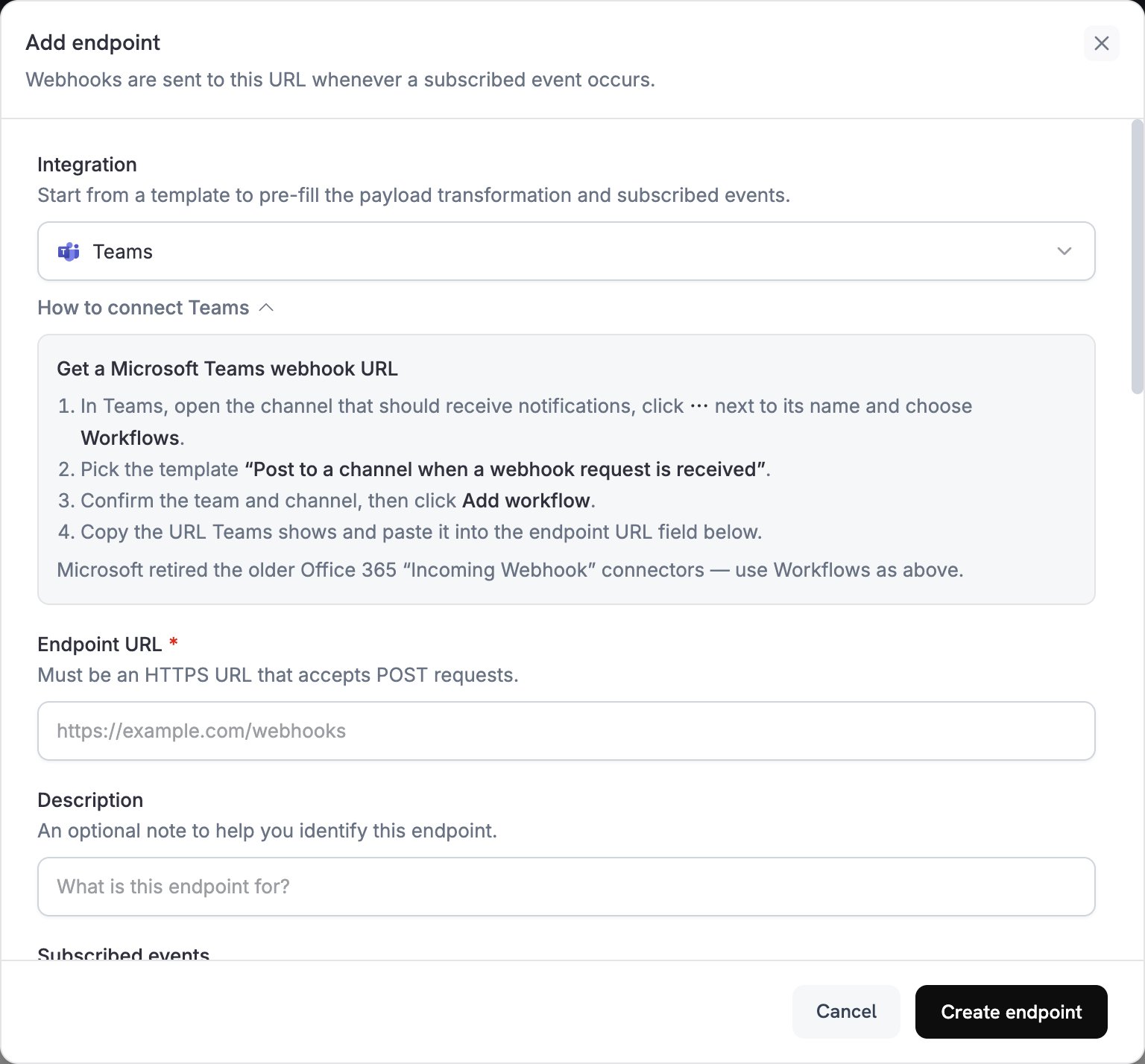
2
Select Microsoft Teams
En la lista de Integration, selecciona Teams.
3
Create Teams Webhook
Microsoft retiró los conectores Incoming Webhook de Office 365 en Teams, así que crea el webhook con la aplicación Workflows:
- En Teams, abre el canal que debe recibir las notificaciones.
- Haz clic en ⋯ junto al nombre del canal y selecciona Workflows.
- Elige la plantilla Post to a channel when a webhook request is received.
- Confirma el equipo y el canal, y haz clic en Add workflow.
- Copia la URL del webhook que muestra Teams.
4
Paste Webhook URL
Pega la URL del webhook de Teams en el campo Endpoint URL.
5
Customize Transformation
Edita el código en Transformation code para dar formato a cada evento como una Adaptive Card. Comienza con los ejemplos siguientes.
6
Test & Create
En Test this code, ejecuta la transformación con un payload de ejemplo y, a continuación, haz clic en Create endpoint.
7
Done
Tu canal de Teams ahora recibe eventos de Dodo Payments como Adaptive Cards.
Ejemplos de código de transformación
Cada ejemplo reemplaza el payload del evento por un mensaje de Teams que contiene un archivo adjunto con una Adaptive Card.Tarjeta de pago básica
Este ejemplo publica el importe, el correo electrónico del cliente y el ID de pago cuando un pago se completa correctamente.payment_card.js
Gestión de suscripciones
Este ejemplo publica una tarjeta cuando una suscripción se activa y otra cuando se cancela.subscription_card.js
Alertas de disputas
Este ejemplo publica una tarjeta para cada eventodispute.*. El título y el color cambian cuando una disputa se gana o se pierde.
dispute_card.js
Consejos
- Usa Adaptive Cards para obtener un formato enriquecido e interactivo.
- Elige los colores según su significado:
Good(verde),Warning(amarillo) yAttention(rojo). - Mantén los conjuntos de datos breves y fáciles de leer.
- Antes de depender del endpoint, abre su pestaña Testing y haz clic en Send example para publicar una tarjeta de ejemplo en tu canal.
Solución de problemas
No Messages in Teams
No Messages in Teams
- Comprueba que la URL del webhook sea correcta y que el flujo de trabajo esté activado.
- Comprueba que la transformación devuelva un JSON de Adaptive Card válido.
- Comprueba que el flujo de trabajo tenga permiso para publicar en el canal.
Card Formatting Issues
Card Formatting Issues
- Ejecuta la transformación en Test this code y comprueba el resultado con el esquema de Adaptive Card.
- Comprueba que todos los campos obligatorios estén presentes.
- Comprueba que los valores de color sean válidos, como
Default,Good,WarningoAttention.