Chuyển đến nội dung chính

Giới thiệu

Tích hợp Dodo Payments với Slack cho phép bạn nhận thông báo thời gian thực về các khoản thanh toán của mình trực tiếp trong không gian làm việc Slack. Tích hợp này giúp bạn cập nhật tình trạng của các khoản thanh toán, theo dõi giao dịch và quản lý các khoản thanh toán của mình một cách hiệu quả hơn.
Tích hợp này sử dụng cổng quản lý webhook của chúng tôi để tự động chuyển đổi các sự kiện webhook của Dodo Payments thành các tin nhắn tương thích với Slack. Không cần mã hóa thêm - chỉ cần cấu hình kết nối và bắt đầu nhận thông báo.

Bắt đầu

1

Mở phần Webhook

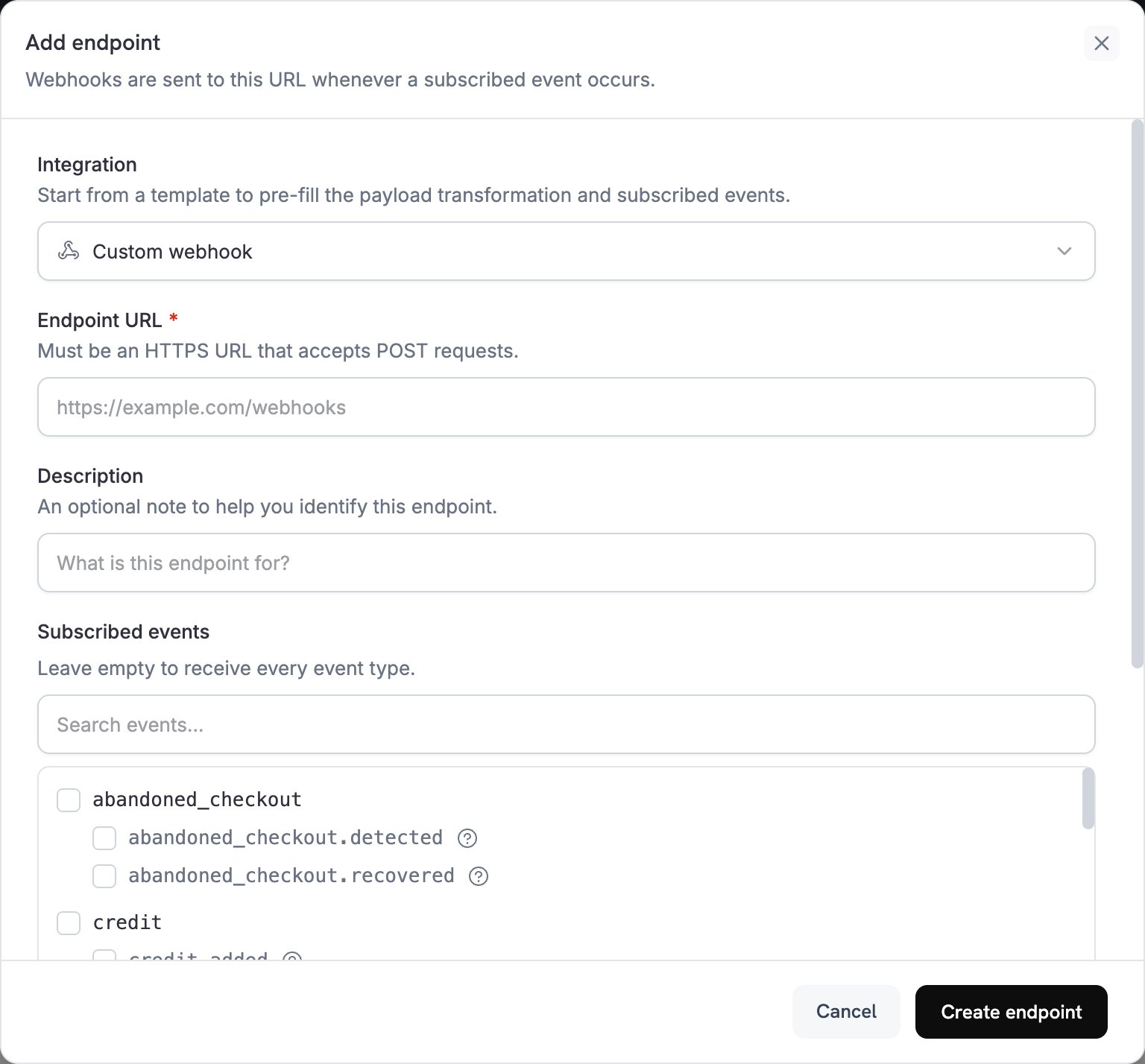
Đi đến phần Webhook trong bảng điều khiển Dodo Payments của bạn. Nhấp vào nút + Thêm Điểm Kết Nối, sau đó mở menu thả xuống webhook để hiện các tích hợp khác.
Bảng điều khiển Dodo Payments hiển thị nút Thêm Điểm Kết Nối và menu thả xuống tích hợp
2

Chọn Tích Hợp Slack

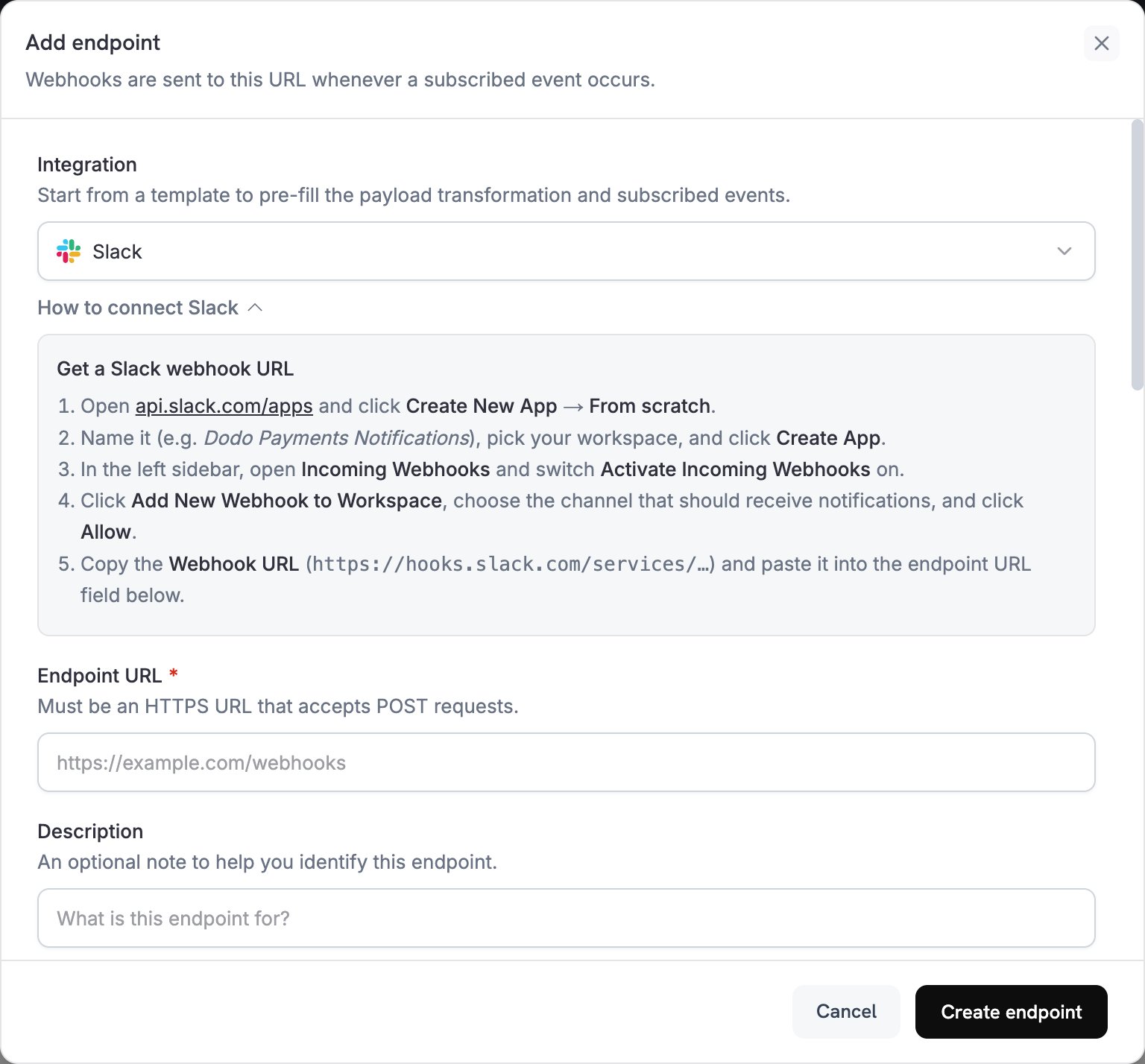
Chọn tích hợp Slack và nhấp vào Kết nối không gian làm việc Slack của bạn.
Thẻ tích hợp Slack và nút kết nối
3

Cấp Quyền cho Slack

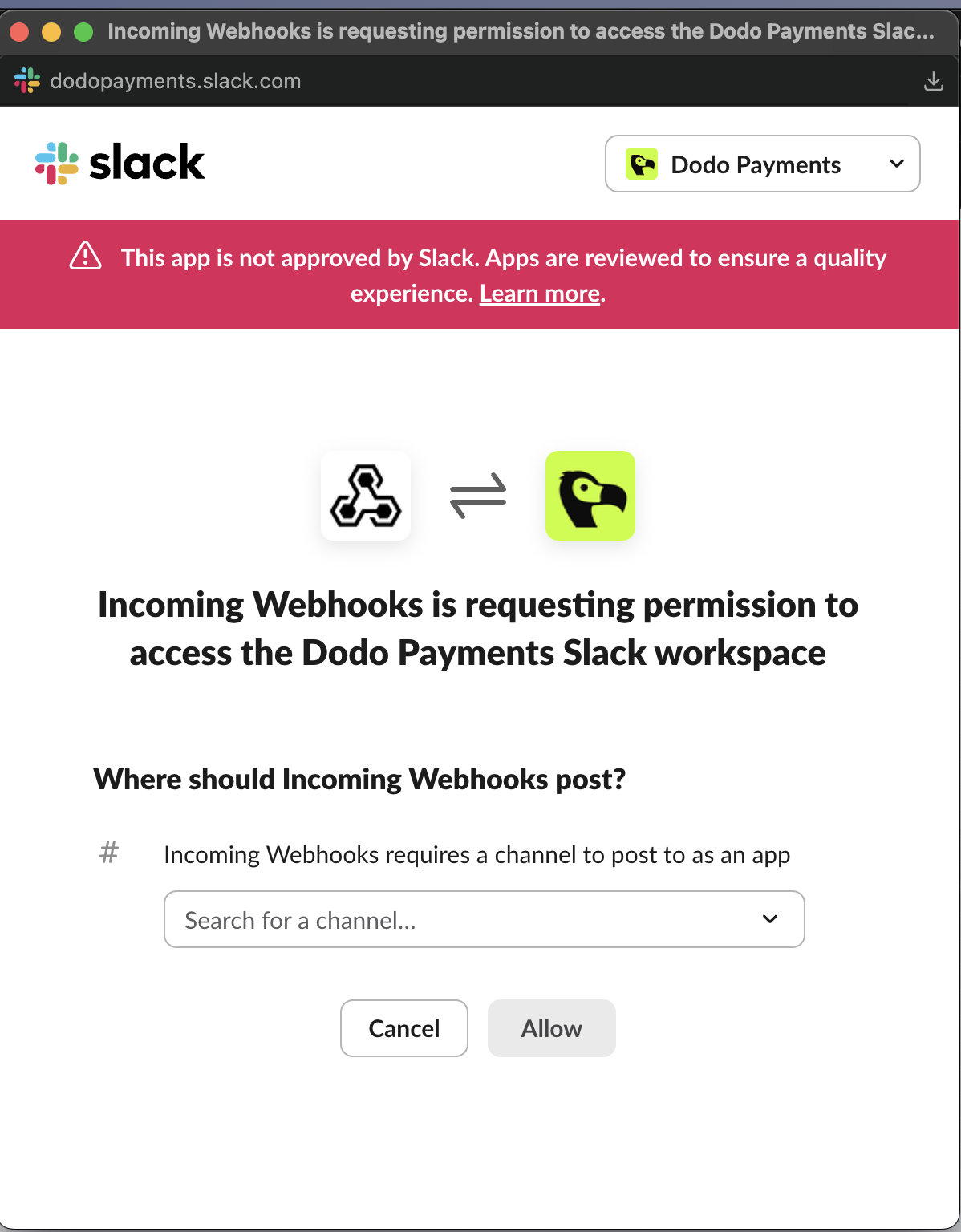
Cấp quyền cần thiết cho Ứng dụng Incoming Webhooks của Slack để nó có thể đăng tin nhắn trong kênh bạn đã chọn.
Màn hình quyền OAuth của Slack cho ứng dụng Incoming Webhooks
4

Tùy Chỉnh Mã Chuyển Đổi

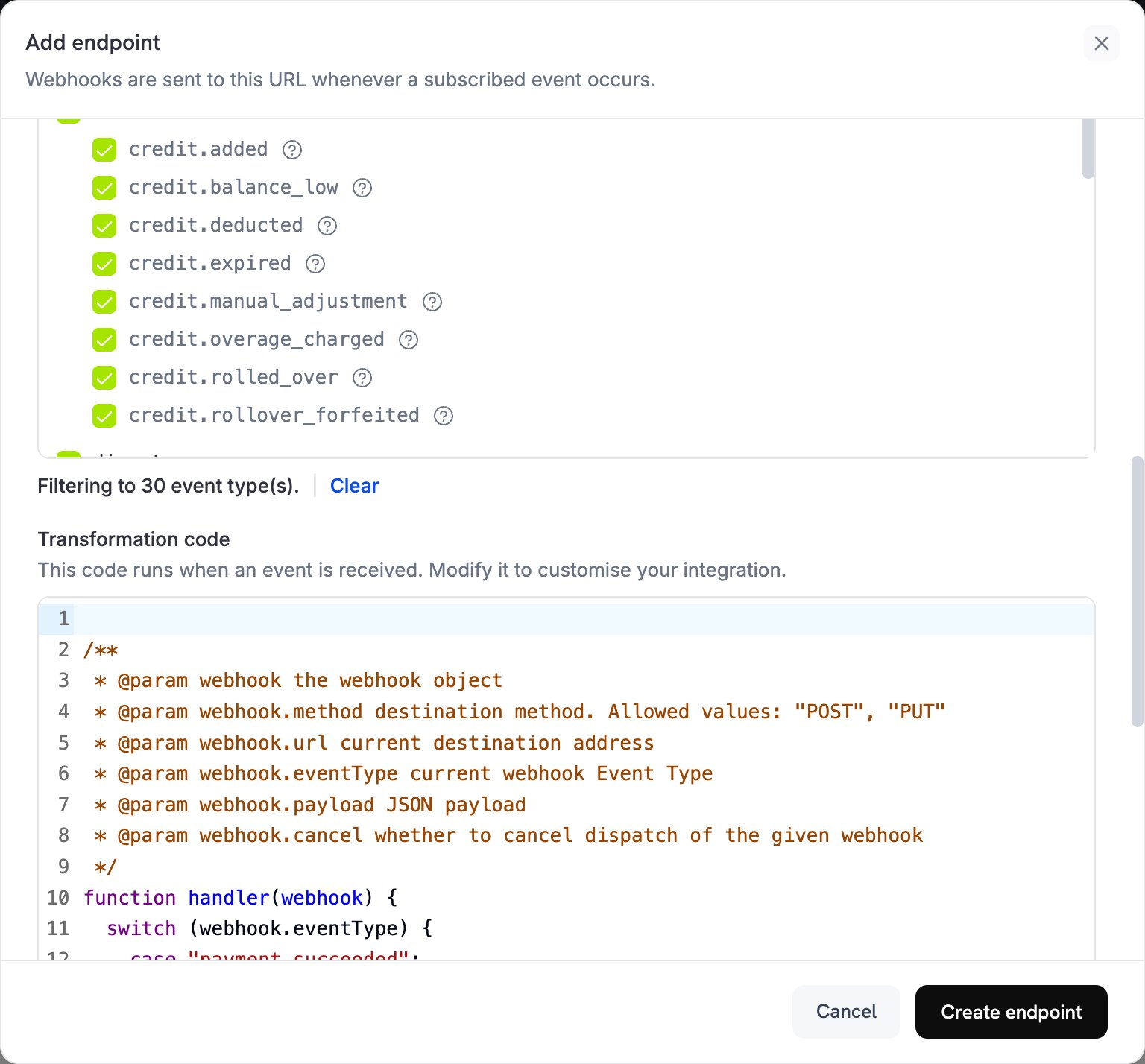
Thêm hoặc chỉnh sửa mã chuyển đổi để tùy chỉnh thông báo Slack của bạn cho trường hợp sử dụng của bạn. Bạn có thể sử dụng các mẫu có sẵn hoặc viết logic của riêng mình.
Trình chỉnh sửa mã chuyển đổi cho tích hợp Slack
5

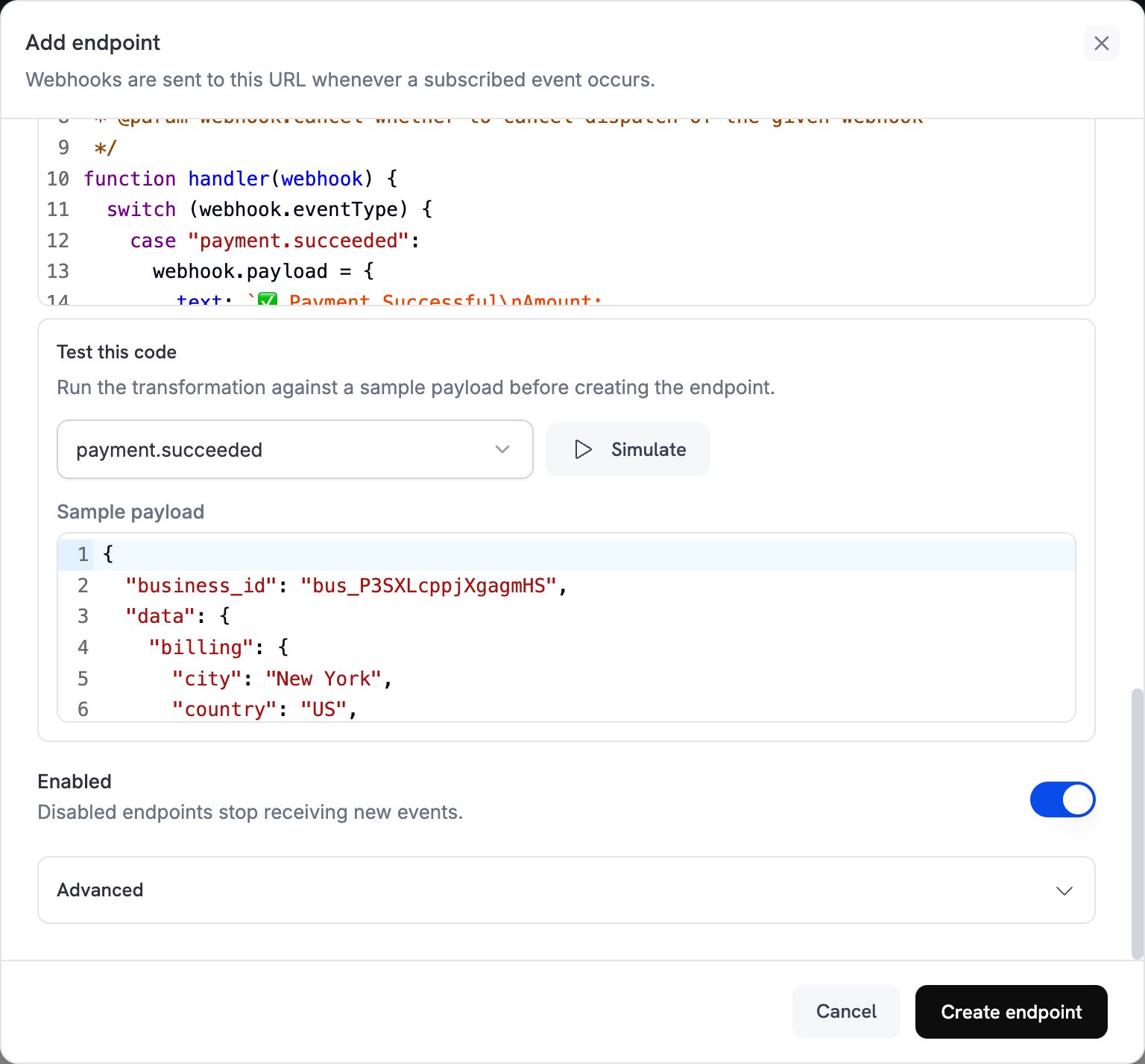
Kiểm Tra và Tạo

Kiểm tra mã chuyển đổi của bạn với các payload sự kiện tùy chỉnh hoặc có sẵn. Khi bạn hài lòng, nhấp vào Tạo để kích hoạt tích hợp.
Kiểm tra chuyển đổi và nút tạo
6

Tích Hợp Hoàn Tất!

🎉 Bạn đã tạo thành công tích hợp Slack! Các sự kiện Dodo Payments của bạn sẽ được gửi đến kênh Slack đã chọn của bạn theo thời gian thực.

Ví Dụ Mã Chuyển Đổi

Thông Báo Thanh Toán Cơ Bản

Chuyển đổi này gửi các tin nhắn văn bản đơn giản cho các sự kiện thanh toán:
payment_notifs.js
function handler(webhook) {
  switch (webhook.eventType) {
    case "payment.succeeded":
      webhook.payload = {
        text: `✅ Payment Successful\nAmount: $${(webhook.payload.data.total_amount / 100).toFixed(2)}\nCustomer: ${webhook.payload.data.customer.email}\nPayment ID: ${webhook.payload.data.payment_id}`
      };
      break;
      
    case "payment.failed":
      webhook.payload = {
        text: `❌ Payment Failed\nAmount: $${(webhook.payload.data.total_amount / 100).toFixed(2)}\nCustomer: ${webhook.payload.data.customer.email}\nReason: ${webhook.payload.data.error_message || 'Unknown'}`
      };
      break;
      
    case "payment.processing":
      webhook.payload = {
        text: `⏳ Payment Processing\nAmount: $${(webhook.payload.data.total_amount / 100).toFixed(2)}\nCustomer: ${webhook.payload.data.customer.email}`
      };
      break;
  }

  return webhook;
}

Thông Báo Đăng Ký Đầy Đủ

Chuyển đổi này tạo ra các tin nhắn Slack phong phú với các tệp đính kèm cho các sự kiện đăng ký:
subscription_notifs.js
function handler(webhook) {
  switch (webhook.eventType) {
    case "subscription.active":
      webhook.payload = {
        attachments: [{
          color: "good",
          title: "🎉 Subscription Activated",
          fields: [
            {
              title: "Customer",
              value: webhook.payload.data.customer.email,
              short: true
            },
            {
              title: "Product ID",
              value: webhook.payload.data.product_id,
              short: true
            },
            {
              title: "Amount",
              value: `$${(webhook.payload.data.recurring_pre_tax_amount / 100).toFixed(2)}/${webhook.payload.data.payment_frequency_interval}`,
              short: true
            },
            {
              title: "Next Billing",
              value: new Date(webhook.payload.data.next_billing_date).toLocaleDateString(),
              short: true
            }
          ],
          footer: "Dodo Payments",
          ts: Math.floor(new Date(webhook.payload.timestamp).getTime() / 1000)
        }]
      };
      break;
      
    case "subscription.cancelled":
      webhook.payload = {
        attachments: [{
          color: "warning",
          title: "⚠️ Subscription Cancelled",
          fields: [
            {
              title: "Customer",
              value: webhook.payload.data.customer.email,
              short: true
            },
            {
              title: "Product ID",
              value: webhook.payload.data.product_id,
              short: true
            },
            {
              title: "Cancellation Date",
              value: new Date(webhook.payload.data.cancelled_at).toLocaleDateString(),
              short: true
            },
            {
              title: "Cancel at Next Billing",
              value: webhook.payload.data.cancel_at_next_billing_date ? "Yes" : "No",
              short: true
            }
          ],
          footer: "Dodo Payments",
          ts: Math.floor(new Date(webhook.payload.timestamp).getTime() / 1000)
        }]
      };
      break;
      
    case "subscription.renewed":
      webhook.payload = {
        attachments: [{
          color: "good",
          title: "🔄 Subscription Renewed",
          fields: [
            {
              title: "Customer",
              value: webhook.payload.data.customer.email,
              short: true
            },
            {
              title: "Product ID",
              value: webhook.payload.data.product_id,
              short: true
            },
            {
              title: "Amount",
              value: `$${(webhook.payload.data.recurring_pre_tax_amount / 100).toFixed(2)}`,
              short: true
            },
            {
              title: "Next Billing",
              value: new Date(webhook.payload.data.next_billing_date).toLocaleDateString(),
              short: true
            }
          ],
          footer: "Dodo Payments",
          ts: Math.floor(new Date(webhook.payload.timestamp).getTime() / 1000)
        }]
      };
      break;
  }

  return webhook;
}

Thông Báo Quản Lý Tranh Chấp

Chuyển đổi này xử lý các sự kiện tranh chấp với màu sắc và độ khẩn cấp phù hợp:
dispute_notifs.js
function handler(webhook) {
  switch (webhook.eventType) {
    case "dispute.opened":
      webhook.payload = {
        attachments: [{
          color: "danger",
          title: "🚨 New Dispute Opened",
          fields: [
            {
              title: "Payment ID",
              value: webhook.payload.data.payment_id,
              short: true
            },
            {
              title: "Amount",
              value: `$${(webhook.payload.data.amount / 100).toFixed(2)}`,
              short: true
            },
            {
              title: "Status",
              value: webhook.payload.data.dispute_status,
              short: true
            },
            {
              title: "Stage",
              value: webhook.payload.data.dispute_stage,
              short: true
            },
            {
              title: "Remarks",
              value: webhook.payload.data.remarks || "No remarks",
              short: false
            }
          ],
          footer: "Dodo Payments - Action Required",
          ts: Math.floor(new Date(webhook.payload.timestamp).getTime() / 1000)
        }]
      };
      break;
      
    case "dispute.won":
      webhook.payload = {
        attachments: [{
          color: "good",
          title: "✅ Dispute Won",
          fields: [
            {
              title: "Payment ID",
              value: webhook.payload.data.payment_id,
              short: true
            },
            {
              title: "Amount",
              value: `$${(webhook.payload.data.amount / 100).toFixed(2)}`,
              short: true
            },
            {
              title: "Status",
              value: webhook.payload.data.dispute_status,
              short: true
            },
            {
              title: "Resolution",
              value: "Dispute resolved in your favor",
              short: false
            }
          ],
          footer: "Dodo Payments",
          ts: Math.floor(new Date(webhook.payload.timestamp).getTime() / 1000)
        }]
      };
      break;
      
    case "dispute.lost":
      webhook.payload = {
        attachments: [{
          color: "danger",
          title: "❌ Dispute Lost",
          fields: [
            {
              title: "Payment ID",
              value: webhook.payload.data.payment_id,
              short: true
            },
            {
              title: "Amount",
              value: `$${(webhook.payload.data.amount / 100).toFixed(2)}`,
              short: true
            },
            {
              title: "Status",
              value: webhook.payload.data.dispute_status,
              short: true
            },
            {
              title: "Impact",
              value: "Funds will be debited from your account",
              short: false
            }
          ],
          footer: "Dodo Payments - Review Required",
          ts: Math.floor(new Date(webhook.payload.timestamp).getTime() / 1000)
        }]
      };
      break;
  }

  return webhook;
}

Trình Xử Lý Tất Cả Các Sự Kiện Toàn Diện

Chuyển đổi này xử lý tất cả các loại sự kiện với định dạng nhất quán:
all_events_notifs.js
function handler(webhook) {
  const event = webhook.payload.data;
  const timestamp = new Date(webhook.payload.timestamp).toLocaleString();
  
  let color, emoji, title, fields = [];
  
  switch (webhook.eventType) {
    case "payment.succeeded":
      color = "good";
      emoji = "✅";
      title = "Payment Successful";
      fields = [
        { title: "Amount", value: `$${(event.total_amount / 100).toFixed(2)}`, short: true },
        { title: "Customer", value: event.customer.email, short: true },
        { title: "Payment ID", value: event.payment_id, short: true },
        { title: "Method", value: event.payment_method || "Unknown", short: true }
      ];
      break;
      
    case "payment.failed":
      color = "danger";
      emoji = "❌";
      title = "Payment Failed";
      fields = [
        { title: "Amount", value: `$${(event.total_amount / 100).toFixed(2)}`, short: true },
        { title: "Customer", value: event.customer.email, short: true },
        { title: "Reason", value: event.error_message || "Unknown", short: false }
      ];
      break;
      
    case "subscription.active":
      color = "good";
      emoji = "🎉";
      title = "Subscription Activated";
      fields = [
        { title: "Customer", value: event.customer.email, short: true },
        { title: "Product ID", value: event.product_id, short: true },
        { title: "Amount", value: `$${(event.recurring_pre_tax_amount / 100).toFixed(2)}/${event.payment_frequency_interval}`, short: true },
        { title: "Next Billing", value: new Date(event.next_billing_date).toLocaleDateString(), short: true }
      ];
      break;
      
    case "subscription.cancelled":
      color = "warning";
      emoji = "⚠️";
      title = "Subscription Cancelled";
      fields = [
        { title: "Customer", value: event.customer.email, short: true },
        { title: "Product ID", value: event.product_id, short: true },
        { title: "Cancellation Date", value: new Date(event.cancelled_at).toLocaleDateString(), short: true },
        { title: "Cancel at Next Billing", value: event.cancel_at_next_billing_date ? "Yes" : "No", short: true }
      ];
      break;
      
    case "refund.succeeded":
      color = "good";
      emoji = "💰";
      title = "Refund Processed";
      fields = [
        { title: "Amount", value: `$${(event.amount / 100).toFixed(2)}`, short: true },
        { title: "Refund ID", value: event.refund_id, short: true },
        { title: "Payment ID", value: event.payment_id, short: true },
        { title: "Reason", value: event.reason || "Not specified", short: true }
      ];
      break;
      
    case "dispute.opened":
      color = "danger";
      emoji = "🚨";
      title = "New Dispute Opened";
      fields = [
        { title: "Payment ID", value: event.payment_id, short: true },
        { title: "Amount", value: `$${(event.amount / 100).toFixed(2)}`, short: true },
        { title: "Status", value: event.dispute_status, short: true },
        { title: "Stage", value: event.dispute_stage, short: true },
        { title: "Remarks", value: event.remarks || "No remarks", short: false }
      ];
      break;
      
    case "license_key.created":
      color = "good";
      emoji = "🔑";
      title = "License Key Created";
      fields = [
        { title: "License ID", value: event.id, short: true },
        { title: "Product ID", value: event.product_id, short: true },
        { title: "License Key", value: event.key.substring(0, 8) + "...", short: true },
        { title: "Expires", value: event.expires_at ? new Date(event.expires_at).toLocaleDateString() : "Never", short: true }
      ];
      break;
      
    default:
      // Handle any other events with a generic format
      color = "warning";
      emoji = "ℹ️";
      title = webhook.eventType.replace(/_/g, ' ').replace(/\b\w/g, l => l.toUpperCase());
      fields = [
        { title: "Event Type", value: webhook.eventType, short: true },
        { title: "Timestamp", value: timestamp, short: true }
      ];
  }
  
  webhook.payload = {
    attachments: [{
      color: color,
      title: `${emoji} ${title}`,
      fields: fields,
      footer: "Dodo Payments",
      ts: Math.floor(new Date(webhook.payload.timestamp).getTime() / 1000)
    }]
  };

  return webhook;
}

Thực Hành Tốt Nhất

Để làm cho thông báo Slack của bạn hiệu quả:
  • Sử dụng các tệp đính kèm tin nhắn phong phú với màu sắc, trường và định dạng để rõ ràng và có thể hành động.
  • Luôn bao gồm dữ liệu quan trọng như số tiền, email khách hàng và ID để dễ dàng nhận diện.
  • Chọn màu sắc phù hợp với loại sự kiện: xanh lá cây (good) cho thành công, đỏ (danger) cho tranh chấp hoặc thất bại, vàng (warning) cho hủy bỏ, và xanh dương (#36a64f) cho các sự kiện thông tin.
  • Thêm dấu thời gian để giúp theo dõi khi mỗi sự kiện xảy ra.
Xử Lý Dữ Liệu Nhạy Cảm: Hãy cẩn thận không bao gồm thông tin nhạy cảm như khóa cấp phép đầy đủ hoặc dữ liệu cá nhân trong các tin nhắn Slack. Hãy xem xét việc cắt ngắn hoặc che giấu các giá trị nhạy cảm.

Khắc Phục Sự Cố

  • Xác minh rằng URL webhook Slack là chính xác và đang hoạt động
  • Kiểm tra rằng mã chuyển đổi là JavaScript hợp lệ
  • Đảm bảo rằng các loại sự kiện đã chọn đang được kích hoạt
  • Xác minh rằng ứng dụng Slack của bạn có các quyền cần thiết
  • Kiểm tra cổng quản lý webhook để xem nhật ký lỗi chuyển đổi
  • Xác minh rằng cấu trúc payload webhook khớp với mã chuyển đổi của bạn
  • Kiểm tra mã chuyển đổi của bạn với dữ liệu mẫu
  • Đảm bảo tất cả các trường cần thiết có mặt trong payload webhook
  • Xác nhận rằng các sự kiện bạn muốn nhận đã được bật trong cấu hình webhook Dodo Payments của bạn
  • Kiểm tra rằng các loại sự kiện đã được chọn trong cấu hình kết nối Slack của bạn
  • Xác minh rằng điểm kết nối của bạn được cấu hình đúng để nhận các sự kiện