

Introduction
Dub là một nền tảng link attribution dành cho short link, conversion tracking và affiliate program. Với integration này, Dub ghi nhận một sale conversion event mỗi khi khách hàng thanh toán qua Dodo Payments, giúp bạn đo lường hiệu quả của các chiến dịch marketing và chương trình referral. Dub ghi nhận một giao dịch bán hàng khi khách hàng:- Hoàn tất một khoản thanh toán một lần
- Đăng ký một paid plan
- Thực hiện khoản thanh toán định kỳ cho subscription
Integration này yêu cầu tài khoản Dub đã bật conversion tracking cho các link của bạn. Conversion tracking của Dub yêu cầu gói Business trở lên.
How It Works
Khi visitor nhấp vào một short link Dub của bạn, Dub lưu một click ID duy nhất trong cookiedub_id. Để ghi nhận giao dịch bán hàng cho link của bạn:
- Lấy click ID của Dub từ cookie
dub_idkhi bạn tạo checkout. - Lưu click ID trong
metadatacủa payment, cùng với ID của customer trong hệ thống của bạn (external ID). - Gửi giao dịch bán hàng đến Dub qua Track API khi payment thành công.
Prerequisites
Trước khi thiết lập integration này, bạn cần:- Một tài khoản Dub có workspace.
- Bật conversion tracking cho các link của bạn.
- Một Dub API key, được tạo trong Dub dashboard tại Settings → API Keys.
Getting Started
1
Enable Conversion Tracking in Dub
Trong Dub dashboard, hãy bật conversion tracking cho các link mà bạn muốn theo dõi giao dịch bán hàng. Sau đó Dub sẽ ghi nhận sale event cho những customer truy cập qua các link đó.
Để bật conversion tracking, hãy xem tài liệu Dub.
2
Get Your Dub API Key
Trong Dub dashboard, đi đến Settings → API Keys và tạo API key có scope
conversions.write.3
Capture Click ID in Checkout
Khi tạo checkout, đọc Dub click ID từ cookie và thêm ID đó vào
metadata của payment. Xem Bước 1.4
Send Sale Data via Webhook
Tạo webhook endpoint gửi từng giao dịch bán hàng đến Track API của Dub khi payment thành công. Xem Bước 2.
5
Done
Sale conversion event sẽ xuất hiện trong Dub analytics dashboard và được ghi nhận cho các link của bạn.
Implementation Guide
Step 1: Add Click ID and Customer ID to Checkout Metadata
Khi tạo checkout, hãy đọc Dub click ID từ cookie và đưa ID đó vàometadata của payment, cùng với external ID của customer.
Các ví dụ bên dưới sử dụng
POST /payments, hiện đã deprecated. Tính năng này vẫn hoạt động với các integration hiện có, nhưng integration mới nên sử dụng Checkout Sessions (POST /checkouts), vốn chấp nhận metadata theo cùng cách.Bước 2: Gửi dữ liệu giao dịch đến Dub
Tạo webhook endpoint gửi dữ liệu giao dịch bán hàng đến Track API của Dub khi payment thành công.1
Open the Webhook Section
Trong dashboard Dodo Payments, đi đến Developer → Webhooks và nhấp vào Add endpoint.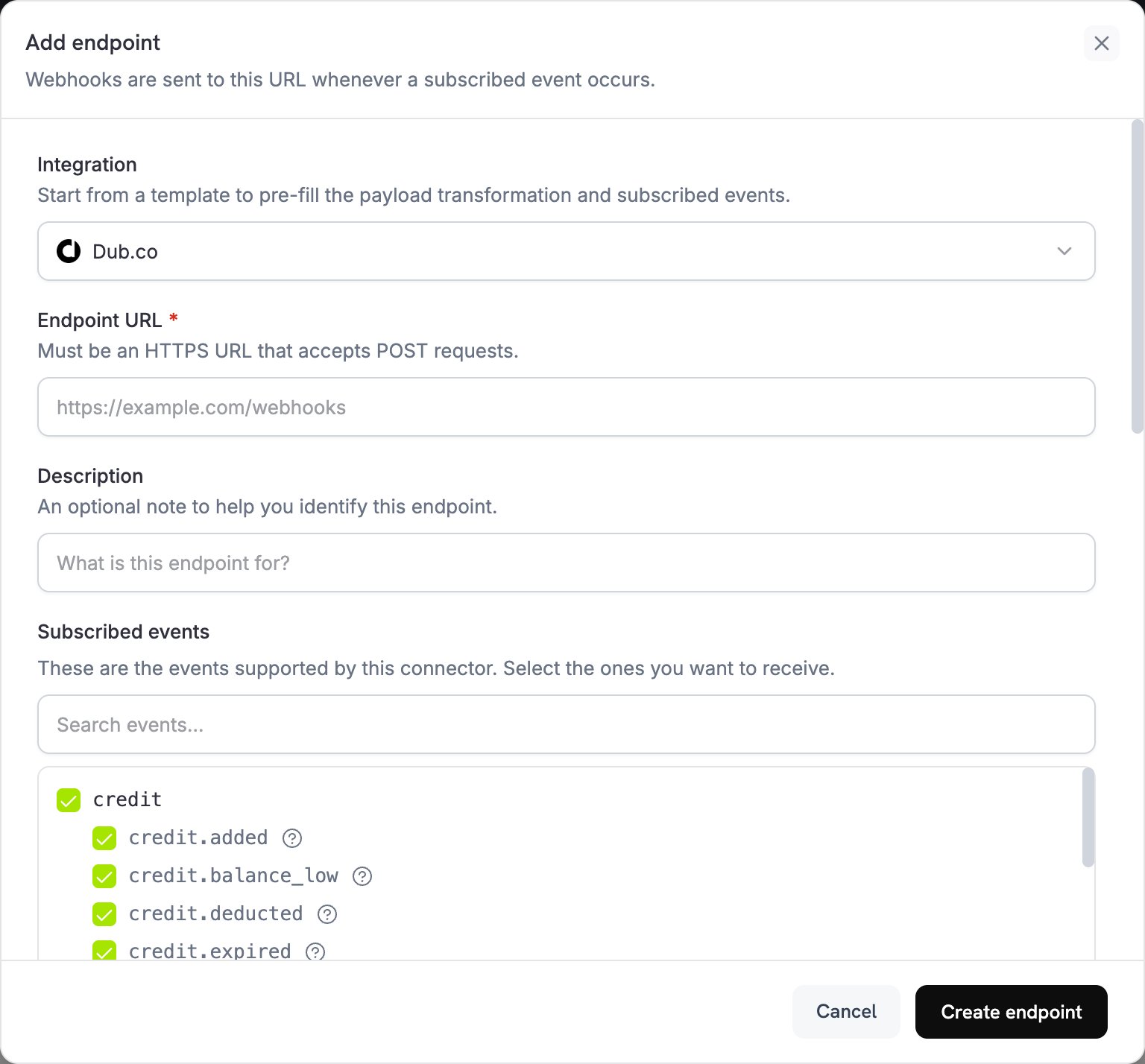
2
Select Dub
Trong Integration, chọn Dub.co.
3
Enter API Key
Trong API key, dán API key Dub của bạn. Dodo Payments gửi key này trong header 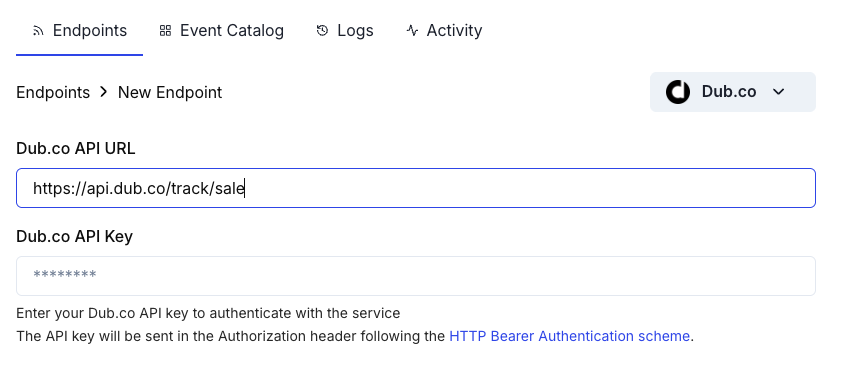
Authorization của mỗi lần gửi.4
Check the URL and Events
Nếu Endpoint URL trống, nhập
https://api.dub.co/track/sale. Trong Subscribed events, chọn các event mà transformation của bạn xử lý, chẳng hạn như payment.succeeded.5
Configure Transformation
Trong Transformation code, chỉnh sửa handler để định dạng dữ liệu thanh toán cho Track Sale API của Dub. Bắt đầu từ các ví dụ.
6
Test & Create
Trong Test this code, nhấp vào Simulate để chạy handler với payload mẫu. Sau đó nhấp vào Create endpoint.
Ví dụ về Transformation Code
Mỗi handler chỉ gửi một giao dịch bán đến Dub khimetadata có click ID. Đối với traffic tự nhiên, khi không có click ID, handler đặt webhook.cancel = true, vì vậy không có request nào được gửi đến Dub; delivery bị hủy vẫn hiển thị là thành công trong log webhook.
Request body tuân theo Track Sale API của Dub: customerExternalId và amount là bắt buộc, còn paymentProcessor là custom vì danh sách payment processor của Dub không có giá trị Dodo Payments. Dub nhận amount theo cùng đơn vị với số tiền của Dodo Payments: cent đối với currency có hai chữ số thập phân và số nguyên đầy đủ đối với currency không có chữ số thập phân như JPY. Các ví dụ giữ nguyên số tiền.
Theo dõi giao dịch bán cơ bản
Theo dõi một giao dịch bán khi thanh toán thành công:basic_sale.js
Theo dõi giao dịch bán từ Subscription
Theo dõi cả subscription ban đầu và các khoản thanh toán định kỳ. Sử dụng handler này cho subscription thay vì các handlerpayment.succeeded, không sử dụng đồng thời: mỗi khoản thanh toán subscription cũng kích hoạt payment.succeeded, vì vậy việc xử lý cả hai event sẽ ghi nhận mỗi giao dịch bán hai lần. Xem Subscription Integration Guide.
Handler đọc click ID từ metadata của subscription, vì vậy hãy truyền cùng metadata khi tạo subscription. Đối với các lần gia hạn, invoiceId kết hợp ID subscription với previous_billing_date, thời điểm bắt đầu của kỳ billing hiện tại, để delivery được retry sử dụng lại cùng invoiceId.
subscription_sale.js
Theo dõi giao dịch bán không bao gồm thuế
Chỉ gửi số tiền trước thuế đến Dub để doanh thu trong Dub không bao gồm thuế:sale_without_tax.js
Theo dõi giao dịch bán với tên Event tùy chỉnh
Sử dụng tên event tùy chỉnh để phân loại các loại giao dịch bán khác nhau. Ví dụ đọc một flagis_upgrade mà bạn thiết lập trong metadata của payment:
custom_events.js
Phương án thay thế: Triển khai phía Client
Để theo dõi giao dịch bán từ server của bạn thay vì thông qua webhook transformation, hãy gọi trực tiếp Track API của Dub sau khi thanh toán thành công, chẳng hạn như từ webhook handlerpayment.succeeded của bạn. Code sử dụng API key Dub của bạn, vì vậy hãy chạy code trên server, không bao giờ chạy trong browser.
Phương pháp hay nhất
- Đưa click ID vào metadata: Nếu không có click ID, Dub không thể gán doanh thu cho các link của bạn.
- Sử dụng external ID nhất quán: Mỗi lần hãy truyền cùng customer ID từ hệ thống của bạn dưới dạng
customerExternalIdđể có analytics chính xác ở cấp độ khách hàng. - Xử lý traffic tự nhiên: Đặt
webhook.cancel = truekhi không có click ID để tránh các API call không cần thiết. - Kiểm thử với payment mẫu: Chạy handler bằng Test this code và xác nhận integration hoạt động trước khi đưa vào production.
- Theo dõi dashboard Dub: Kiểm tra để đảm bảo các giao dịch bán xuất hiện với attribution như mong đợi.
Lưu ý quan trọng
- Định dạng số tiền: Dub yêu cầu số tiền tính theo cent đối với currency có hai chữ số thập phân (ví dụ, $10.00 là
1000) và số nguyên đầy đủ đối với currency không có chữ số thập phân như JPY. - Currency: Sử dụng mã currency ISO 4217, chẳng hạn như USD, EUR và GBP. Dub chuyển đổi mỗi giao dịch bán sang USD theo tỷ giá hối đoái mới nhất.
- Free trial: Track Sale API của Dub chấp nhận
amountcó giá trị0, và các ví dụ không bỏ qua payment $0, vì vậy mỗi payment $0 đều được gửi đến Dub dưới dạng một giao dịch bán. Để bỏ qua payment $0, hãy đặtwebhook.cancel = truekhitotal_amountlà0. - Refund: Nếu cần báo cáo doanh thu chính xác, hãy theo dõi refund riêng.
Xử lý sự cố
Sales Not Appearing in Dub
Sales Not Appearing in Dub
- Xác minh API key Dub của bạn chính xác và có scope
conversions.write. - Kiểm tra rằng
dub_click_idđã được thu thập và lưu trong metadata của payment. - Kiểm tra rằng webhook transformation định dạng payload chính xác.
- Xác minh endpoint đã subscribe vào
payment.succeeded. - Xác nhận conversion tracking đã được bật cho các link Dub của bạn.
- Mở các lần delivery của endpoint trong tab Logs của Developer → Webhooks để xem response của Dub. Payment không có click ID sẽ bị hủy và hiển thị là thành công.
Revenue Attribution Not Working
Revenue Attribution Not Working
- Xác nhận khách hàng nhấp qua short link Dub của bạn trước khi checkout.
- Xác minh cookie
dub_idđược thiết lập trên domain của bạn. - Kiểm tra click ID trong metadata của payment khớp với lượt nhấp mà khách hàng đã thực hiện.
- Thu thập click ID trước khi tạo checkout.
Transformation Errors
Transformation Errors
- Kiểm tra payload khớp với định dạng Track Sale API của Dub.
- Kiểm tra các field bắt buộc,
customerExternalIdvàamount, có tồn tại vàclickIdđược thiết lập cho attribution. - Kiểm tra số tiền là số nguyên theo đơn vị currency nhỏ nhất, không phải số thập phân.
- Xác minh URL endpoint là
https://api.dub.co/track/sale. - Kiểm thử transformation với các webhook payload mẫu.
Duplicate Sales Being Tracked
Duplicate Sales Being Tracked
- Chỉ theo dõi giao dịch bán trên các event
payment.succeeded, không theo dõi trênpayment.processing. - Sử dụng một
invoiceIdduy nhất cho mỗi giao dịch bán. Dub chỉ ghi nhận một giao dịch bán cho mỗiinvoiceId. - Đối với các lần gia hạn, tạo
invoiceIdtừ ID subscription và kỳ billing, như trong Track Subscription Sales. Giá trị thay đổi trong mỗi lần delivery, chẳng hạn như thời gian hiện tại, sẽ ghi nhận giao dịch bán trùng lặp khi delivery được retry.
Tài nguyên bổ sung
Dub Conversions Documentation
Tìm hiểu về các tính năng conversion tracking và analytics của Dub.
Dub Track Sale API
Xem tài liệu API đầy đủ cho endpoint Track Sale của Dub.
Dub Dashboard
Xem analytics chuyển đổi và dữ liệu attribution trong dashboard Dub của bạn.
Webhook Events Guide
Duyệt qua tất cả event webhook của Dodo Payments.
Để được hỗ trợ về integration này, hãy liên hệ bộ phận hỗ trợ Dodo Payments tại support@dodopayments.com.