

Giới thiệu
Tích hợp SendGrid gửi email giao dịch qua Mail Send API của SendGrid khi một sự kiện Dodo Payments xảy ra. Mỗi email sử dụng một trong các dynamic template của SendGrid, được điền dữ liệu từ sự kiện, để bạn có thể xác nhận thanh toán, chào mừng người đăng ký mới và nhắc lại các khoản thanh toán thất bại.Tích hợp này yêu cầu API key của SendGrid có quyền Mail Send, một sender đã được xác minh trong SendGrid và một dynamic template cho mỗi email bạn gửi. Bạn cũng cần có quyền truy cập Developer → Webhooks trong dashboard Dodo Payments.
Bắt đầu
1
Open the Webhook Section
Trong bảng điều khiển Dodo Payments, đi tới Developer → Webhooks và nhấp vào Add endpoint.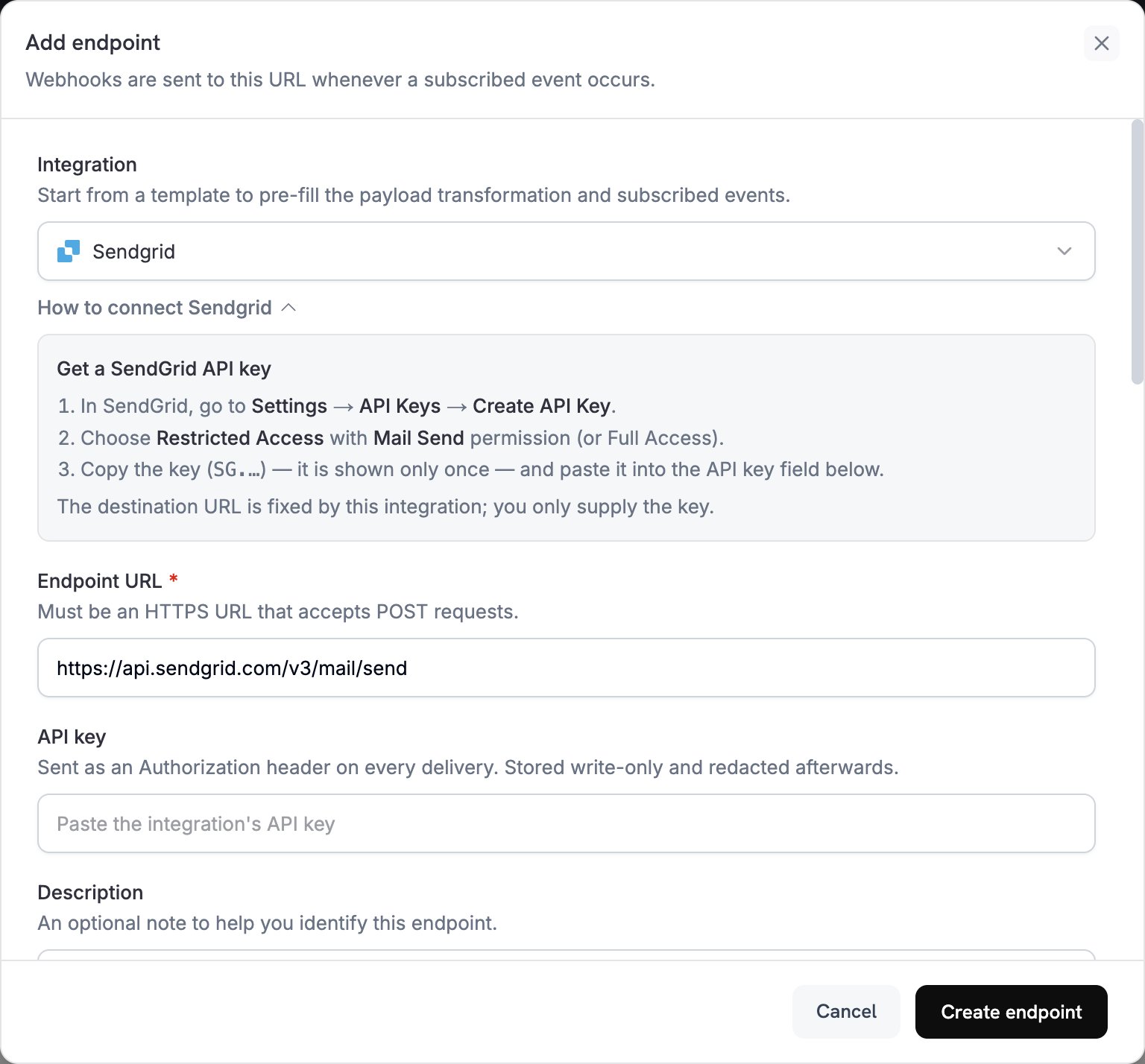
2
Select SendGrid
Trong Integration, chọn SendGrid. Dashboard tự điền Endpoint URL và mã chuyển đổi cho SendGrid, đồng thời bảng How to connect SendGrid hiển thị các bước thiết lập.
3
Enter API Key
Trong SendGrid, đi đến Settings → API Keys và nhấp vào Create API Key. Chọn Restricted Access với quyền Mail Send, hoặc Full Access. SendGrid chỉ hiển thị key bắt đầu bằng
SG. một lần duy nhất. Dán key đó vào API key. Dodo Payments gửi key này dưới dạng bearer token trong header Authorization của mọi request đến SendGrid.4
Select Events
Trong Subscribed events, chỉ chọn các sự kiện mà quá trình chuyển đổi của bạn xử lý. Một sự kiện không được quá trình chuyển đổi thay đổi sẽ đến SendGrid ở định dạng Dodo Payments, khiến SendGrid từ chối sự kiện đó.
5
Configure Transformation
Trong Transformation code, chỉnh sửa handler để định dạng email cho Mail Send API của SendGrid. Bắt đầu từ các ví dụ, rồi thay thế từng
template_id bằng ID của dynamic template riêng, bắt đầu bằng d-.6
Test & Create
Trong Test this code, chọn một loại sự kiện và nhấp vào Simulate để xem trước request gửi đến SendGrid. Sau đó nhấp vào Create endpoint.
7
Done
Dodo Payments giờ đây sẽ gửi email qua SendGrid cho mỗi sự kiện đã đăng ký. Để xem từng lần gửi và phản hồi của SendGrid, mở tab Logs trong Developer → Webhooks.
Ví dụ về mã chuyển đổi
Mỗi handler đặtwebhook.url thành endpoint Mail Send và truyền dữ liệu sự kiện đến dynamic template thông qua dynamic_template_data. Số tiền của Dodo Payments được tính theo đơn vị tiền tệ nhỏ nhất, vì vậy các ví dụ chia cho 100. Đối với các loại tiền tệ không có chữ số thập phân như JPY và KRW, hãy sử dụng nguyên giá trị số tiền.
Email xác nhận thanh toán
Gửi biên lai khi thanh toán thành công (payment.succeeded):
payment_confirmation.js
Email chào mừng người đăng ký
Chào mừng khách hàng khi subscription trở nên active (subscription.active):
subscription_welcome.js
Thông báo thanh toán thất bại
Yêu cầu khách hàng thử lại khi thanh toán thất bại (payment.failed):
payment_failure.js
Mẹo
- Sử dụng dynamic template của SendGrid để cá nhân hóa nội dung.
- Truyền dữ liệu thanh toán mà template cần trong
dynamic_template_data. - Đặt địa chỉ
fromkhớp với một sender đã được xác minh và đặt sendername. - Tái sử dụng ID template để các email cùng loại giữ nguyên định dạng.
- Thêm liên kết hủy đăng ký vào mọi email có nội dung marketing.
- Để bỏ qua một sự kiện trong code, hãy đặt
webhook.cancel = truetrước khi return webhook. Logs ghi nhận một lần gửi bị bỏ qua là thành công.
Khắc phục sự cố
Emails Not Being Sent
Emails Not Being Sent
- Kiểm tra API key có quyền Mail Send. Để thay thế key, chỉnh sửa endpoint và dán key mới vào API key.
- Kiểm tra từng
template_idcó thuộc về một dynamic template đang active hay không. - Kiểm tra địa chỉ email người nhận có hợp lệ hay không.
- Kiểm tra giới hạn gửi và quota SendGrid theo gói của bạn.
- Mở tab Logs trong Developer → Webhooks và đọc phản hồi của SendGrid đối với lần gửi thất bại.
Transformation Errors
Transformation Errors
- Kiểm tra payload có khớp với định dạng Mail Send của SendGrid hay không.
- Kiểm tra tất cả các trường bắt buộc đã có:
personalizationsvới ít nhất một địa chỉtovàfrom. - Kiểm tra các key trong
dynamic_template_datacó khớp với các biến trong template của bạn, chẳng hạn như{{customer_name}}. - Kiểm tra từng địa chỉ
fromđã được xác minh trong SendGrid.