

Quick Start
Platform Examples
Checkout Customization
Mobile Recipes
Dodo Payments fournit un SDK de checkout officiel pour Android, iOS, React Native et Flutter. Chaque SDK ouvre l’URL de checkout, intercepte le retour et analyse le résultat derrière un seul appel typé
start(...), et chacun inclut la récupération des sessions abandonnées. Ne construisez le parcours manuellement que si aucun SDK ne convient à votre stack.Prérequis
Avant de commencer, vous avez besoin de :- Un compte Dodo Payments.
- Une clé API disponible dans Developer → API Keys et un secret de signature de webhook disponible dans Developer → Webhooks.
- Une application Android, iOS, React Native ou Flutter.
- Un serveur backend qui crée les sessions de checkout. La clé API reste sur ce serveur.
Workflow d’intégration
Votre backend effectue tous les appels à l’API Dodo Payments. Votre application demande uniquement une URL de checkout à votre backend, l’ouvre et affiche le résultat.Le
status du deep link indique à votre application ce qu’elle doit afficher au client. Il ne constitue pas une preuve de paiement. Accordez l’accès à partir du payment.succeeded ou du webhook subscription.active reçu par votre backend, et non à partir du résultat mobile.1
Backend: Create Checkout Session
Votre backend crée une session de checkout avec votre clé API et renvoie son
checkout_url à l’application. Définissez le return_url de la session sur le deep link enregistré par votre application, par exemple myapp://checkout/return.Checkout Session API Docs
Sécurité : créez les sessions de checkout sur votre serveur backend, jamais dans l’application mobile. N’importe qui peut extraire une clé API d’un binaire d’application.
2
Mobile: Get Checkout URL
Votre application appelle votre backend pour obtenir l’URL de checkout. Authentifiez cette requête avec le propre token de session de l’utilisateur connecté. Dans chaque exemple,
userSessionToken correspond à ce token et CheckoutResponse à votre propre type de réponse.- iOS (Swift)
- Android (Kotlin)
- React Native (JavaScript)
- Flutter (Dart)
Sécurité : l’application communique uniquement avec votre backend, jamais directement avec l’API Dodo Payments.
3
Mobile: Open Checkout in Browser
Ouvrez l’URL de checkout dans la surface de navigateur système de la plateforme. Le SDK de checkout officiel de votre plateforme s’en charge pour vous et renvoie un résultat typé.
Pick your mobile SDK
4
Backend: Handle Payment Completion
Accordez l’accès lorsque votre backend reçoit le webhook
payment.succeeded ou subscription.active. Utilisez le résultat de l’URL de retour uniquement pour mettre à jour l’écran de l’application.Choisissez votre SDK
Tous les SDK mobiles suivent le même contrat. Un appelstart(...) ouvre le checkout hébergé de Dodo Payments dans la surface de navigateur système de la plateforme et renvoie un CheckoutResult typé dont le status est succeeded, failed, cancelled, pending ou expired. Aucun SDK ne contient de clé API ni n’appelle l’API Dodo Payments, et les quatre prennent en charge la récupération des sessions abandonnées.
Android
iOS
React Native
Flutter
Enregistrement d’un schéma d’URL de callback
Les quatre SDK rendent le contrôle à votre application via un schéma d’URL personnalisé de votre choix, par exemplemyapp://checkout/return. Enregistrez-le une fois par plateforme :
- Android
- iOS
- Expo
android/app/build.gradle
returnUrl.Pour construire vous-même le parcours, ouvrez le
checkout_url dans la surface de navigateur système de la plateforme (un Custom Tab sur Android, SFSafariViewController sur iOS), interceptez la navigation vers votre return_url et lisez les paramètres de requête status et payment_id. Les SDK s’en chargent pour vous.Personnalisation de l’apparence
Chaque SDK accepte un paramètrecustomization facultatif sur start(...) ou CheckoutParams. Il contrôle la surface de navigateur système : la barre d’outils, les boutons et le mode de présentation du navigateur. Le thème propre à la page de checkout est distinct. Définissez-le sur votre serveur avec customization.theme_config lors de la création de la session de checkout.
Les options sont regroupées par plateforme, car un Custom Tab sur Android et SFSafariViewController sur iOS exposent des contrôles natifs différents. Chaque champ est facultatif. Un champ non défini conserve la valeur par défaut de la plateforme.
Android - Custom Tab
Android - Custom Tab
Color
Couleur d’arrière-plan de la barre d’outils.
Couleur de la barre de navigation.
Couleur du séparateur au-dessus de la barre de navigation.
'default' | 'back'
default affiche l’icône système « X » ; back affiche plutôt une flèche de retour.'start' | 'end'
Côté de la barre d’outils où apparaît le bouton de fermeture.
Affiche l’icône de partage de la barre d’outils.
boolean
Affiche le titre de la page sous l’URL dans la barre d’outils.
boolean
Permet à la barre d’outils de se masquer automatiquement lorsque la page défile.
boolean
Affiche « Ajouter cette page aux favoris » dans le menu Plus.
boolean
Affiche « Télécharger la page » dans le menu Plus.
'system' | 'light' | 'dark'
Force l’apparence claire ou sombre, indépendamment du réglage système de l’appareil.
iOS - SFSafariViewController
iOS - SFSafariViewController
'done' | 'close' | 'cancel'
Libellé ou icône du bouton de fermeture.
'pageSheet' | 'fullScreen'
défaut:"pageSheet"
pageSheet présente le checkout sous forme de carte que le client peut balayer pour le fermer. fullScreen couvre tout l’écran.boolean
Permet à la barre d’outils de se réduire lors du défilement. Cela n’a d’effet que lorsque
presentationStyle vaut fullScreen. Avec pageSheet, les barres restent fixes.'system' | 'light' | 'dark'
Force l’apparence claire ou sombre, indépendamment du réglage système de l’appareil.
android et ios distincts. Les SDK natifs n’acceptent que les options de leur propre plateforme.
- React Native
- Flutter
- Android (Kotlin)
- iOS (Swift)
Personnalisation de la page de checkout
La page de checkout elle-même (les champs affichés, le thème et les moyens de paiement proposés) est définie sur votre serveur lors de la création de la session de checkout. La personnalisation de l’apparence concerne uniquement la surface de navigateur qui l’entoure. Les paramètres ci-dessous ont le plus d’effet sur la conversion mobile. Ces paramètres se trouvent à trois endroits dans la requête de session de paiement : au niveau supérieur, danscustomization ou dans feature_flags. La colonne Emplacement indique l’objet correspondant à chacun d’eux. Placez chaque paramètre dans l’objet indiqué, car un paramètre placé dans le mauvais objet n’a aucun effet.
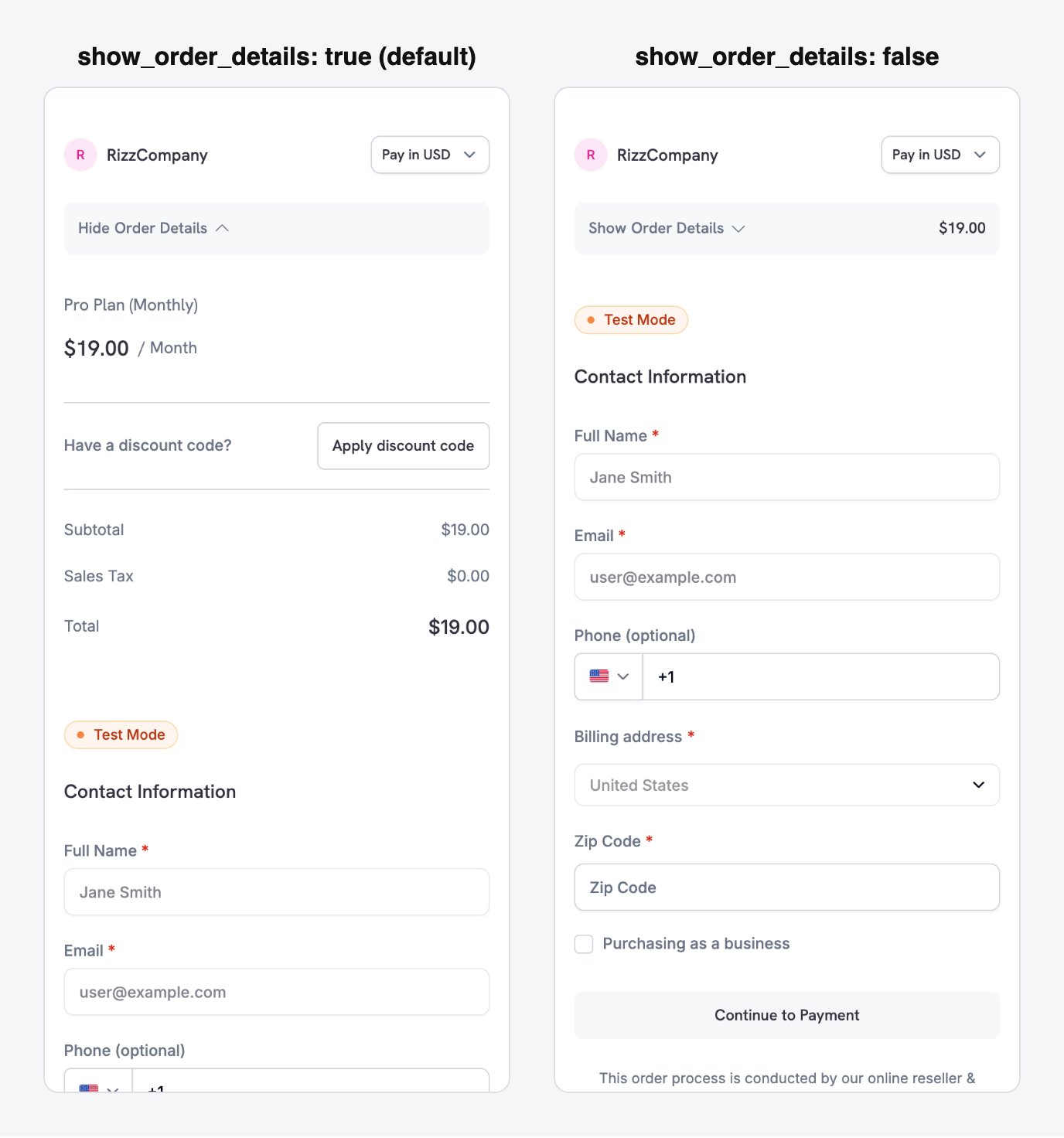
show_order_details: false moves the contact and payment fields above the fold, instead of behind the order summary.
minimal_address: true pour demander uniquement un code postal au lieu des champs complets d’adresse, de ville et d’État :
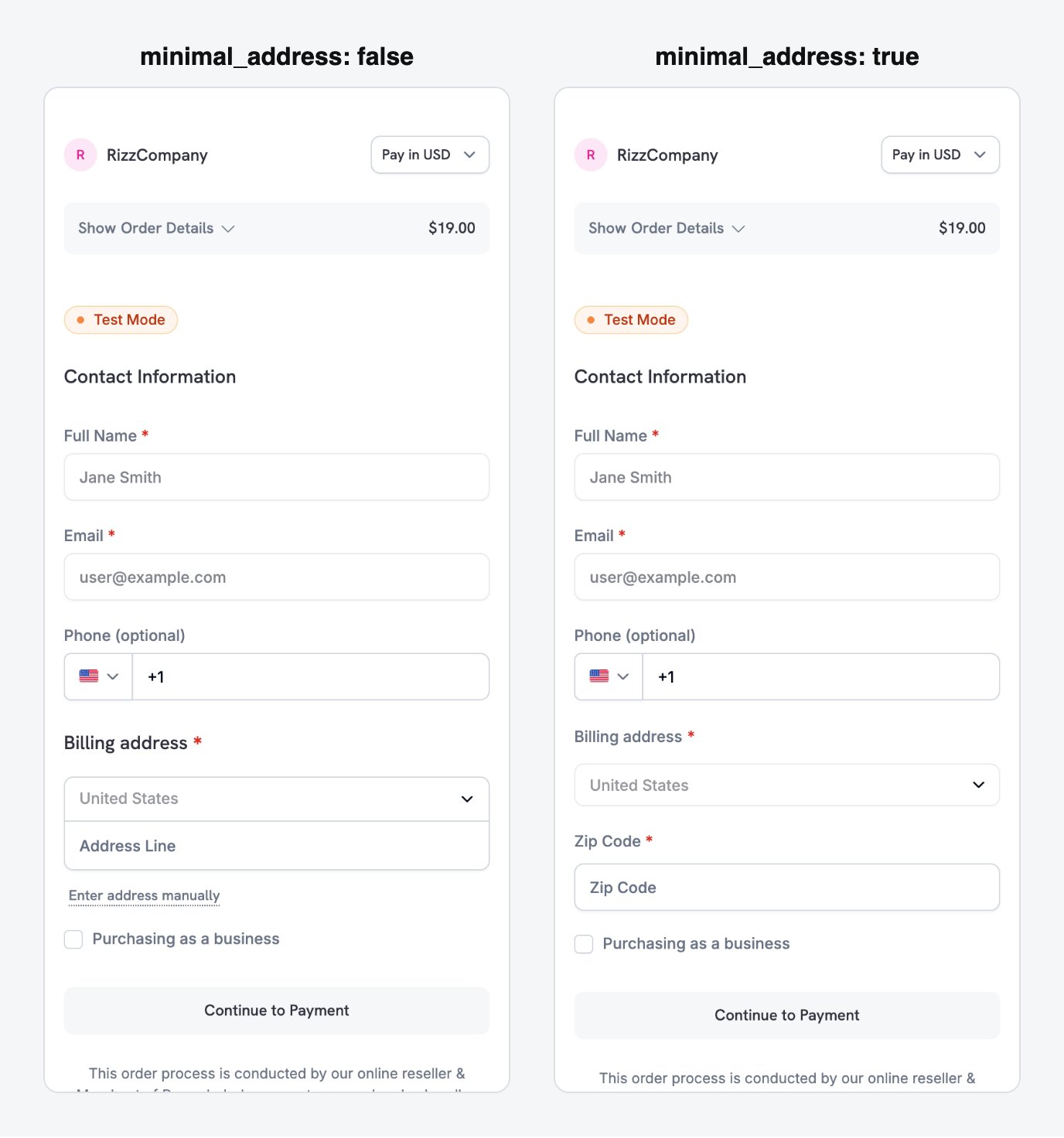
minimal_address: true reduces the billing address to a single postcode field.
theme: "system" afin que le checkout suive la préférence claire ou sombre de l’appareil :
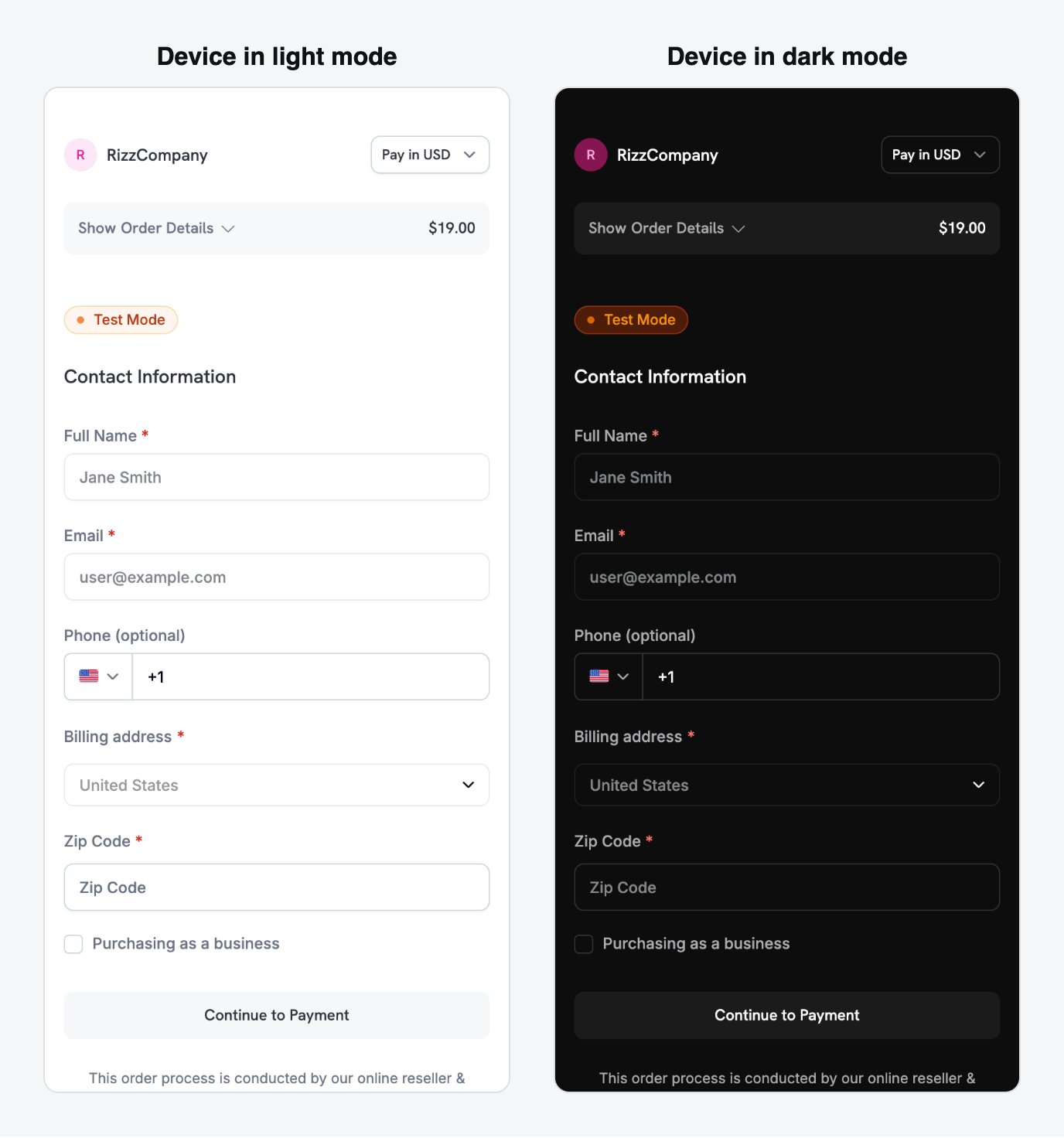
With theme: system, the checkout follows the device's light or dark appearance automatically.
Les moyens de paiement dépendent du type de produit. Apple Pay et Cash App Pay prennent en charge les abonnements récurrents non nuls. Les paiements ponctuels peuvent utiliser tous les moyens de paiement activés pour votre entreprise. Consultez Payment Methods.
Full checkout session parameter reference
Recettes optimisées pour mobile
Chaque recette est une requête complète de session de checkout envoyée par votre backend. Choisissez celle qui correspond à votre scénario et remplacez l’ID du produit par le vôtre. Les clients Node.js et Python sont configurés dans la première recette ; les autres les réutilisent.Minimal Mobile Checkout - fastest path to payment
Minimal Mobile Checkout - fastest path to payment
Utilisez cette recette pour obtenir le formulaire le plus court : moyens de paiement en haut, uniquement un code postal pour l’adresse, aucun champ de réduction et un thème qui suit l’appareil.
- Node.js SDK
- Python SDK
Consultez Checkout Sessions pour connaître tous les paramètres disponibles et leurs valeurs par défaut.
Utilisez cette recette lorsque la page de checkout doit sembler intégrée à votre application. Elle définit les couleurs de votre marque, un rayon de bordure et un libellé personnalisé pour le bouton de paiement.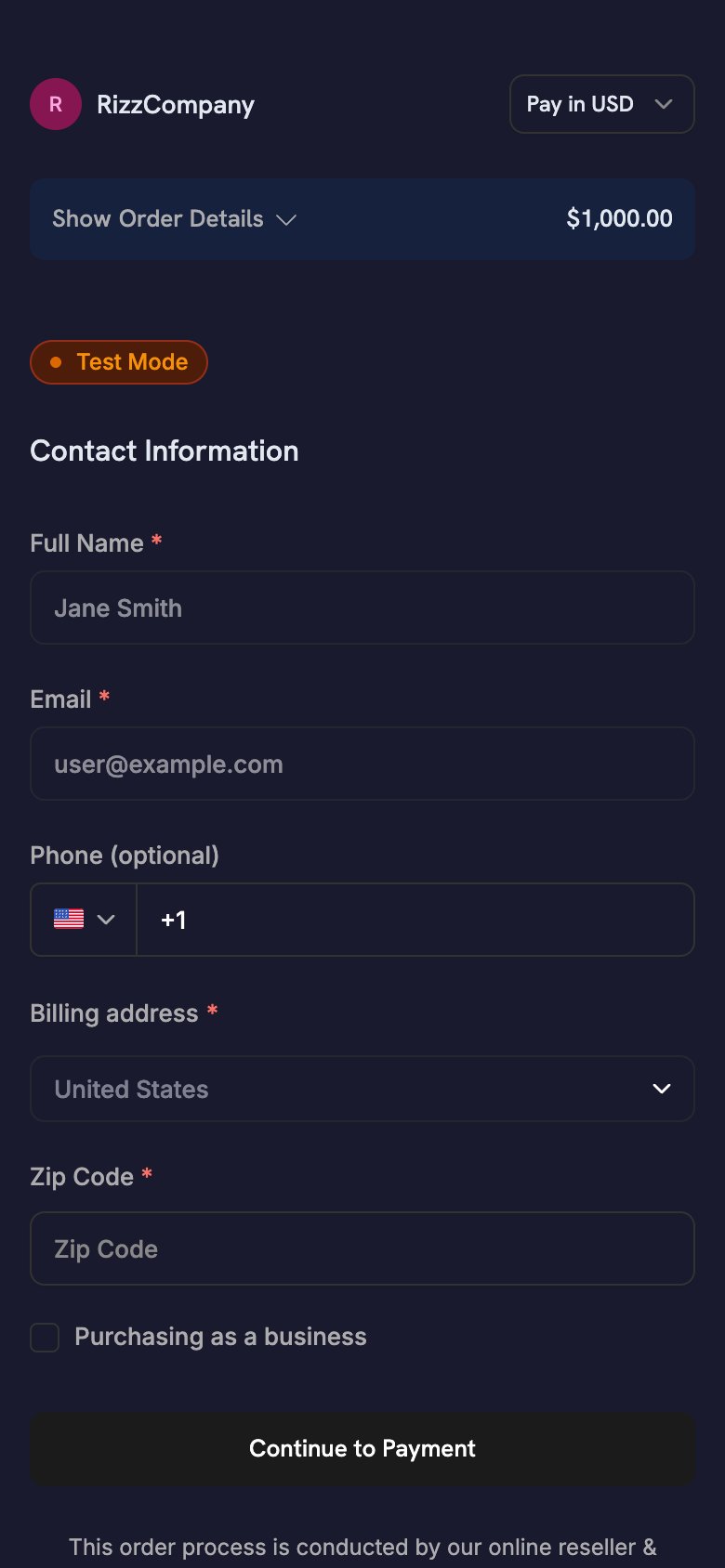
- Node.js SDK
- Python SDK
theme_config accepte des objets dark et light distincts afin que la palette suive l’apparence de l’appareil. Pour connaître toutes les clés de couleur et l’option de police, consultez Checkout Sessions.One-Click Returning Customer - saved card, instant confirmation
One-Click Returning Customer - saved card, instant confirmation
Utilisez cette recette pour les clients connectés ayant déjà effectué un paiement. Transmettez le
customer_id du client, leur payment_method_id enregistré et confirm: true pour ignorer le formulaire de checkout. Avec un payment_method_id, la session débite directement le moyen enregistré et ne renvoie aucun checkout_url ; votre application n’a donc rien à ouvrir. Découvrez le résultat grâce aux webhooks.- Node.js SDK
- Python SDK
Accordez l’accès lorsque votre backend reçoit le webhook
payment.succeeded. Tout status affiché par votre application n’est qu’un indice d’interface.Subscription with Free Trial - trial before first charge
Subscription with Free Trial - trial before first charge
Utilisez cette recette pour un produit d’abonnement avec une période d’essai gratuite avant le premier prélèvement.
trial_period_days définit la durée de l’essai pour cette session.- Node.js SDK
- Python SDK
Accordez l’accès lorsque votre backend reçoit le webhook
subscription.active, et non lorsque le SDK mobile renvoie son résultat. Pour connaître le workflow complet des webhooks, consultez le Subscription Integration Guide.On-Demand Mandate - save a card for future variable charges
On-Demand Mandate - save a card for future variable charges
Utilisez cette recette pour enregistrer le moyen de paiement d’un client en vue de prélèvements ultérieurs, comme les recharges de portefeuille, le pay-as-you-go ou le BNPL, sans afficher de libellé d’abonnement. Le client autorise le moyen de paiement une fois, puis vous prélevez des montants variables ultérieurement.
Les applications qui facturent selon l’utilisation suivent ce modèle. Par exemple, une application d’astrologie débite une carte préautorisée pour chaque session plutôt qu’à intervalles fixes.
- Node.js SDK
- Python SDK
Pour connaître le workflow complet des prélèvements, les événements webhook et les politiques de nouvelle tentative, consultez On-Demand Subscriptions.
Parcours d’abonnement depuis un mobile
Une application mobile démarre un abonnement avec le même workflow de session de checkout qu’un paiement ponctuel. Le SDK ouvre le checkout hébergé, le client s’abonne et votre application gère le retour par deep link. Votre backend gère le reste du cycle de vie de l’abonnement.Abonnements récurrents classiques
Pour une facturation à intervalle fixe, par exemple mensuelle ou annuelle, créez une session de checkout avec un produit d’abonnement et unreturn_url deep link. Votre backend reçoit subscription.active lorsque l’abonnement commence.
Apple Pay et Cash App Pay prennent en charge les abonnements récurrents non nuls.
Abonnements à la demande
Un abonnement à la demande autorise une fois le moyen de paiement d’un client afin que vous puissiez prélever ultérieurement des montants variables. Utilisez-le pour les recharges de portefeuille, le pay-as-you-go et tout prélèvement dont vous ne connaissez pas le montant à l’avance. Pour le corps de requête complet, consultez la recette On-Demand Mandate. Sur mobile, gardez les points suivants à l’esprit :- Définissez
show_on_demand_tag: falseafin que la page de checkout n’affiche ni formulation d’abonnement ni formulation à la demande. Les clients qui enregistrent une carte pour effectuer des recharges ne s’attendent pas à voir des conditions d’abonnement. - Après l’autorisation du mandat par le client, votre backend reçoit
subscription.active. Enregistrezsubscription_id, car chaque prélèvement ultérieur l’utilise.
Abonnement avec période d’essai gratuite
Pour proposer une période d’essai avant le premier prélèvement, transmettezsubscription_data.trial_period_days dans la session de checkout. Le client autorise un moyen de paiement lors de l’inscription et Dodo Payments le débite à la fin de l’essai. Pour le corps de requête complet, consultez la recette Subscription with Free Trial.
Montées et descentes en gamme
Votre backend modifie les forfaits via l’API, et non via une nouvelle session de checkout. Dodo Payments calcule le prorata avec le mode de proratisation que vous choisissez. Pour permettre aux clients de modifier eux-mêmes leur forfait, créez un lien vers le Customer Portal.Subscription Integration Guide
On-Demand Subscriptions
Upgrade / Downgrade
Customer Portal
Réduire les abandons du checkout
Sur un petit écran, chaque champ de formulaire demande plus d’efforts à remplir. Les paramètres de session de paiement ci-dessous raccourcissent le formulaire et réduisent les abandons.Optimiser le formulaire
Ces paramètres raccourcissent le formulaire de checkout sur mobile :Préremplir les données client
Chaque champ que vous préremplissez est un champ que le client n’a pas à saisir :- Nouveaux clients : définissez
customer.emailetcustomer.nameà partir de votre session d’authentification. - Clients existants : définissez
customer.customer_idpour utiliser les informations enregistrées du client. - Devise : transmettez
billing_currencyetbilling_address.countryensemble.
Outils de récupération
Les outils de récupération font revenir les clients dont le checkout ou le renouvellement n’a pas abouti :Abandoned Cart Recovery
Payment Retries
Subscription Dunning
Recovery Overview
Bonnes pratiques
- Sécurité : ne distribuez jamais de clé API dans votre application. Créez les sessions de paiement sur votre backend et transmettez uniquement l’
checkout_urlà l’application. - Autorité : considérez
CheckoutResult.statuscomme un simple indice d’interface utilisateur. N’accordez l’accès qu’après confirmation du paiement par votre backend. - Expérience utilisateur : affichez un état de chargement pendant que votre backend crée la session. Ne considérez pas
cancelledcomme un échec, car le paiement peut malgré tout avoir été effectué. - Tests : utilisez le mode test et des cartes de test, puis vérifiez le parcours aller-retour de l’URL de retour sur un appareil réel ainsi que sur un simulateur.
- Conversion : définissez
show_order_details: falseetminimal_address: true. Ensemble, ils placent les moyens de paiement au-dessus de la ligne de flottaison et suppriment la plupart des champs d’adresse. - Devise : transmettez à la fois
billing_currencyetbilling_address.country. Si vous omettez l’un des deux, Adaptive Currency peut sélectionner la devise de facturation à partir de l’adresse IP du client. - Facturation à la demande : définissez
show_on_demand_tag: falselorsque vous utilisez des abonnements à la demande uniquement pour enregistrer une carte. Les clients qui rechargent un portefeuille ne s’attendent pas à voir un texte faisant référence à un abonnement. - Récupération : activez Abandoned Cart Recovery dans le tableau de bord pour envoyer un e-mail aux clients qui ne terminent pas leur paiement.
Dépannage
Problèmes courants
- Le callback n’arrive jamais : le schéma dans
returnUrldoit correspondre au schéma que vous avez enregistré. Sur Android, il s’agit du placeholder de manifestedodoCallbackScheme. Sur iOS, il s’agit du type d’URLInfo.plist. Les applications React Native et Flutter ont besoin des deux et, dans Expo, le plugin de configuration définit les deux. - Le paiement revient au navigateur au lieu de revenir à votre application (iOS) : votre application ne transmet pas l’URL entrante. Appelez
DodoCheckout.handleOpenURL(url)depuis.onOpenURL,scene(_:openURLContexts:)ou un listener React NativeLinking. PLATFORM_ERRORsur Android : la cause la plus courante est une incompatibilité de schéma. Cela se produit également lorsque votreMainActivitydéfinitandroid:taskAffinity=""(la valeur par défautflutter create), ce qui peut faire perdre le paiement en cours à certaines versions Android des fabricants.ALREADY_IN_PROGRESS: un paiement est toujours ouvert. Attendez la fin du précédent ou fermez-le avant d’en démarrer un autre.- La compilation échoue à cause d’un placeholder non résolu : vous avez ajouté le SDK Android, mais vous n’avez pas défini
manifestPlaceholders["dodoCallbackScheme"]. - Le paiement a été effectué, mais l’accès n’a pas été accordé : votre application accorde l’accès à partir du résultat mobile. Accordez plutôt l’accès à partir du webhook
payment.succeededousubscription.active. - Apple Pay ou Google Pay n’apparaît pas sur mobile : vérifiez si le paiement se charge dans une WebView intégrée (
WKWebViewou AndroidWebView). Ouvrez-le avec le SDK ou dans le navigateur système : dans un Custom Tab sur Android, ou dansSFSafariViewControllerouASWebAuthenticationSessionsur iOS.
Ressources supplémentaires
- Guide d’intégration des paiements
- Documentation des webhooks
- Processus de test
- FAQ techniques
- Personnalisation de la session de paiement
- Abonnements à la demande
- Mise à niveau/rétrogradation d’un abonnement
- Abandoned Cart Recovery
- Customer Portal