

Pending grant,等待您提供密钥值,而不是由 Dodo Payments 在付款时生成密钥。密钥可以来自您自己的系统、第三方供应商或有限的代码池。
完成本指南后,您将拥有:
- 一个产品的许可证密钥授权设置为
manual履行。 - 一个 webhooks 监听器,用于检测客户何时等待密钥。
- 一个交付调用,用于传递密钥并自动通知客户。
License Keys Overview
完整的许可证密钥生命周期以及
fulfillment_mode 设置。Fulfill License Key Grant API
用于交付密钥的 endpoint 的 API reference。
工作原理
下面的流程展示了一次购买从 checkout 到密钥交付的过程: 手动履行只会改变签发步骤。交付后,该密钥在激活、验证、停用、过期和撤销方面的行为与自动生成的密钥相同。购买多个单位时,每个单位会创建一个Pending grant,并且每个 grant 都需要自己的密钥。
前提条件
要按照本指南操作,您需要:- 一个 Dodo Payments merchant account。
- 一个在 Developer → API Keys 下创建并存储在
DODO_PAYMENTS_API_KEY中的 API key,以及从 Developer → Webhooks 获取并存储在DODO_PAYMENTS_WEBHOOK_KEY中的 webhook signing secret。请参阅 API key generation guide。 - 一个可以接收 webhooks 的 backend endpoint。
构建期间请使用
https://test.dodopayments.com 和 test mode credentials。上线 production 时,切换到 https://live.dodopayments.com 和 live mode keys。步骤 1 — 在手动模式下创建 License Key Entitlement
entitlement 是对您所交付内容的可复用定义。创建一个 License Key entitlement,并将其fulfillment_mode 设置为 manual。
- Dashboard
- API
1
Open Entitlements
前往 dashboard 中的 Entitlements,点击 + 创建 entitlement。
2
Choose License Key
选择 License Keys 并输入 Name。表单包含以下字段: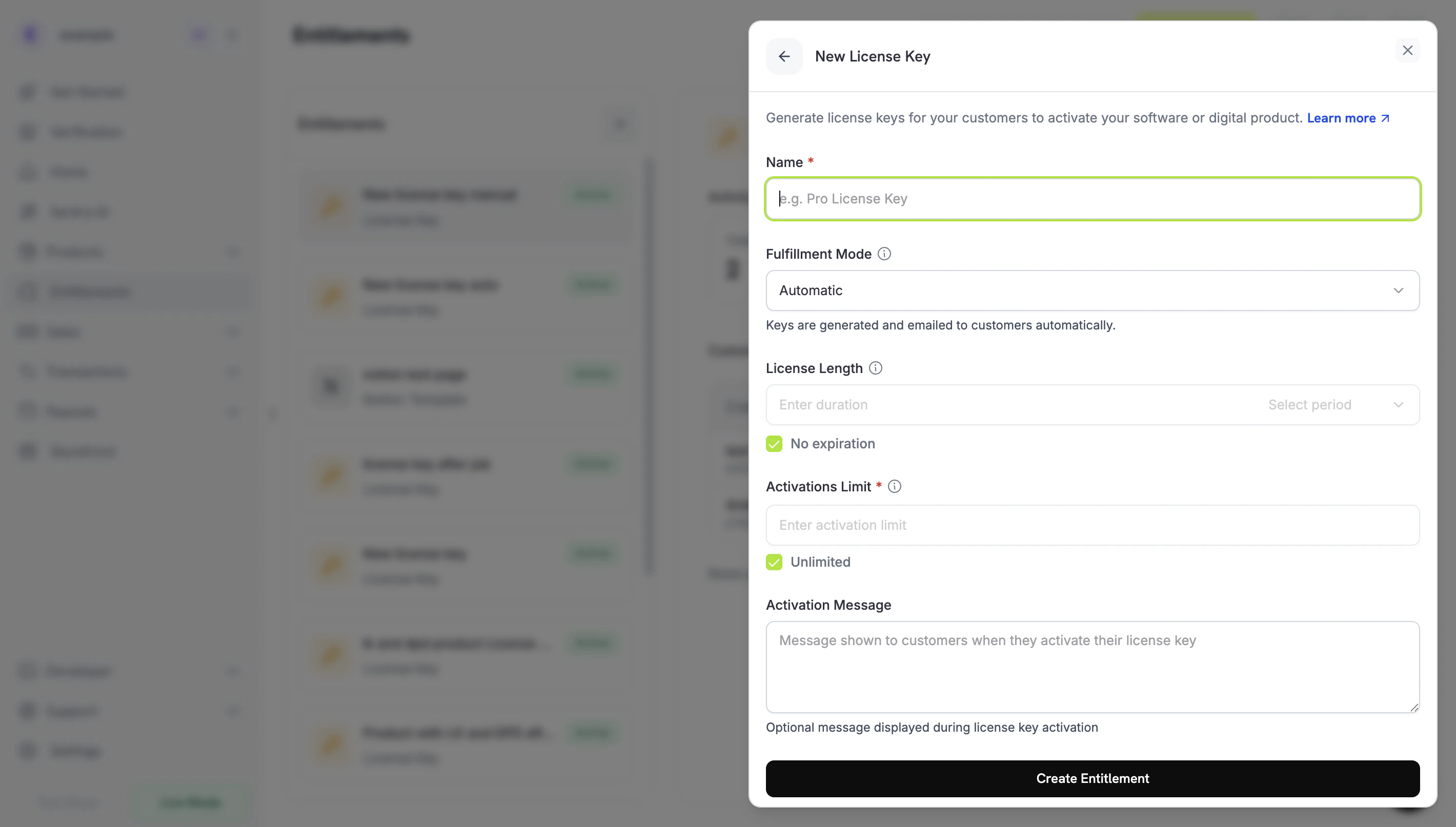
- Fulfillment Mode:默认为 Automatic。此设置用于启用手动履行,您将在下一步中进行更改。
- License Length:每个已签发密钥保持有效的时长,或 No expiration。
- Activations Limit:每个密钥允许的最大激活次数,或 Unlimited。
- Activation Message:可选的面向客户的消息,在客户激活密钥时显示,并包含在 license key email 中。
3
Set Fulfillment Mode to Manual
打开 Fulfillment Mode 下拉菜单,将其从 Automatic 更改为 Manual。本指南的其余部分都依赖此设置:如果不启用该设置,Dodo Payments 会自动生成并通过 email 发送密钥,也不会创建 pending grant。选择 Manual 后,每次购买都会创建一个
Pending grant,供您履行。点击 Create Entitlement 保存。fulfillment_mode 默认值为 auto。如果省略该字段,或不修改现有 entitlement,该 entitlement 会继续使用自动履行。只有明确设置为 manual 的 entitlements 才会创建 pending grants。步骤 2 — 将 Entitlement 附加到 Product
打开您要销售的 product,进入其 Entitlements 部分,然后选择步骤 1 中设置为 Manual 的 License Key entitlement。一次购买中,一个 product 可以将此 license key 与其他 entitlements 一起交付。 如果您还没有 product,请先创建一次性 product 或 subscription product。要通过 checkout 销售,请参阅 Integration Guide。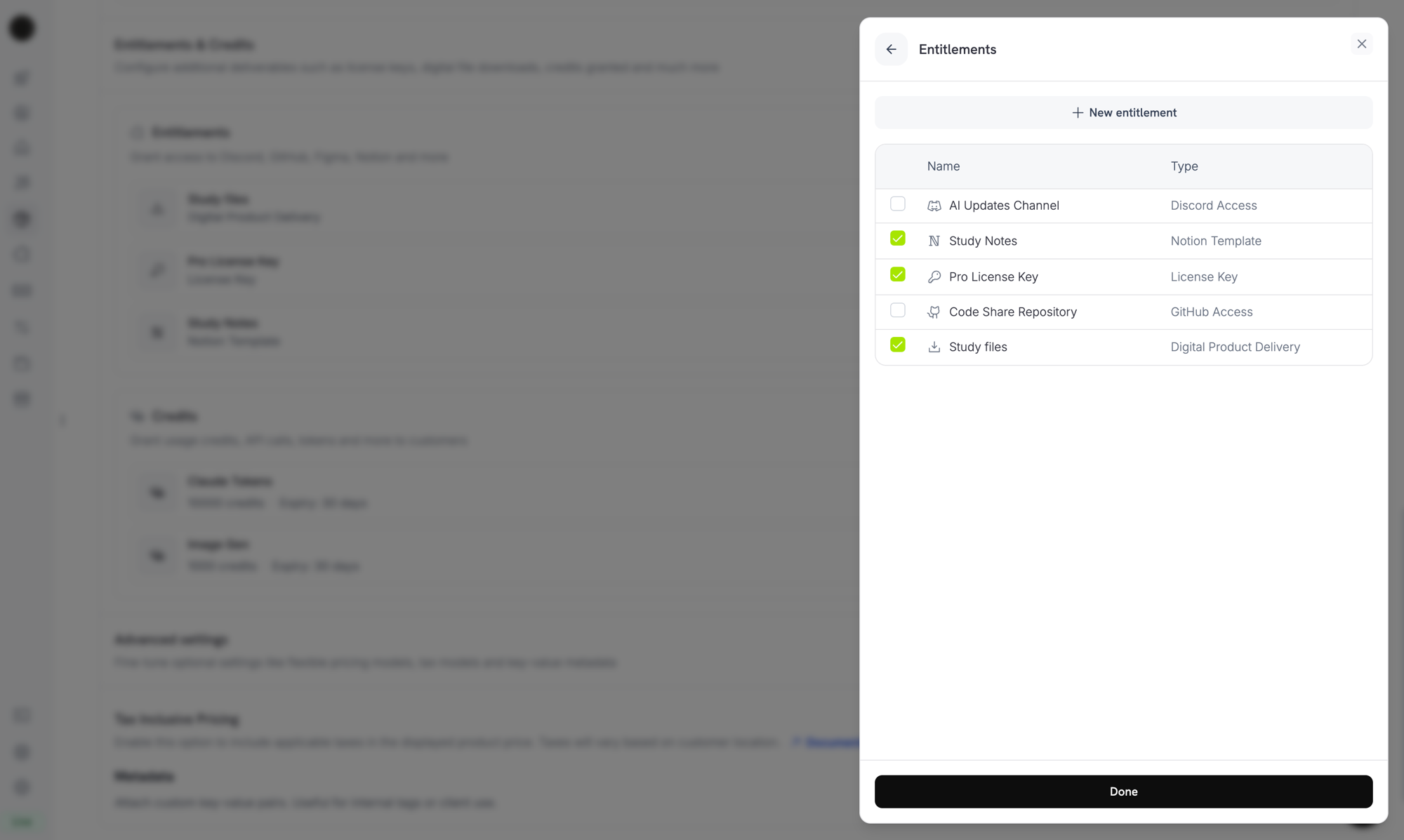
Selecting the License Key entitlement in the product entitlements panel.
履行模式是 entitlement 的属性,而不是 product 的属性。由于您在步骤 1 中将其设置为 Manual,每个附加了此 entitlement 的 product 在购买时都会创建
Pending license-key grants。您无需在 product 上配置其他内容。步骤 3 — 检测 Pending Grants
客户购买 product 后,Dodo Payments 会创建一个状态为Pending 且未附加密钥的 grant,并发送 entitlement_grant.created webhook。此事件表示有客户正在等待密钥。
监听 Webhook
在 dashboard 的 Developer → Webhooks 下添加 webhook endpoint,然后处理 pending license-key grants。webhooks 遵循 Standard Webhooks 规范,因此您可以使用standardwebhooks library 对其进行验证:
integration_type: "license_key",因此无需额外 lookup 即可识别 license-key grant。Webhook deliveries 可能会重复,因此请跳过您已经处理过其 webhook-id header 的事件。完整 payload 请参阅 Entitlement Grant webhook reference。
或轮询 List Grants API
如果您不想依赖 webhooks,可以列出 License Key entitlement 的 grants,并按status 进行筛选。License Key entitlement 上的每个 grant 都是 license-key grant,因此无需使用 integration_type 筛选条件:
步骤 4 — 交付密钥
从您自己的系统获取密钥值,然后将其提交到 Fulfill License Key Grant endpoint。该调用需要具有 Editor permission 的 secret API key。它不是 public license endpoints 之一。SDKs 也提供了此功能,例如在 TypeScript 中为client.entitlements.grants.fulfillLicenseKey(),在 Python 中为 client.entitlements.grants.fulfill_license_key()。
Request Fields
string
必填
要交付给客户的 license key 字符串,最多 255 个字符。首尾空白会被去除,空值或仅包含空白的值会被拒绝。
integer
每个密钥的 activation limit,至少为 1。省略时使用 entitlement 的 Activations Limit。
string
每个密钥的 expiry(ISO 8601)。省略时,一次性 grant 的密钥根据 entitlement 的 License Length 过期;subscription grant 的密钥没有 expiry,其有效性遵循 subscription。
Delivered,Dodo Payments 会将密钥通过 email 发送给客户(客户收到的 email 与自动履行时相同),并触发 license_key.created 和 entitlement_grant.delivered webhook events。
email 包含 license key、product、activation limit、expiry 以及您的激活说明:
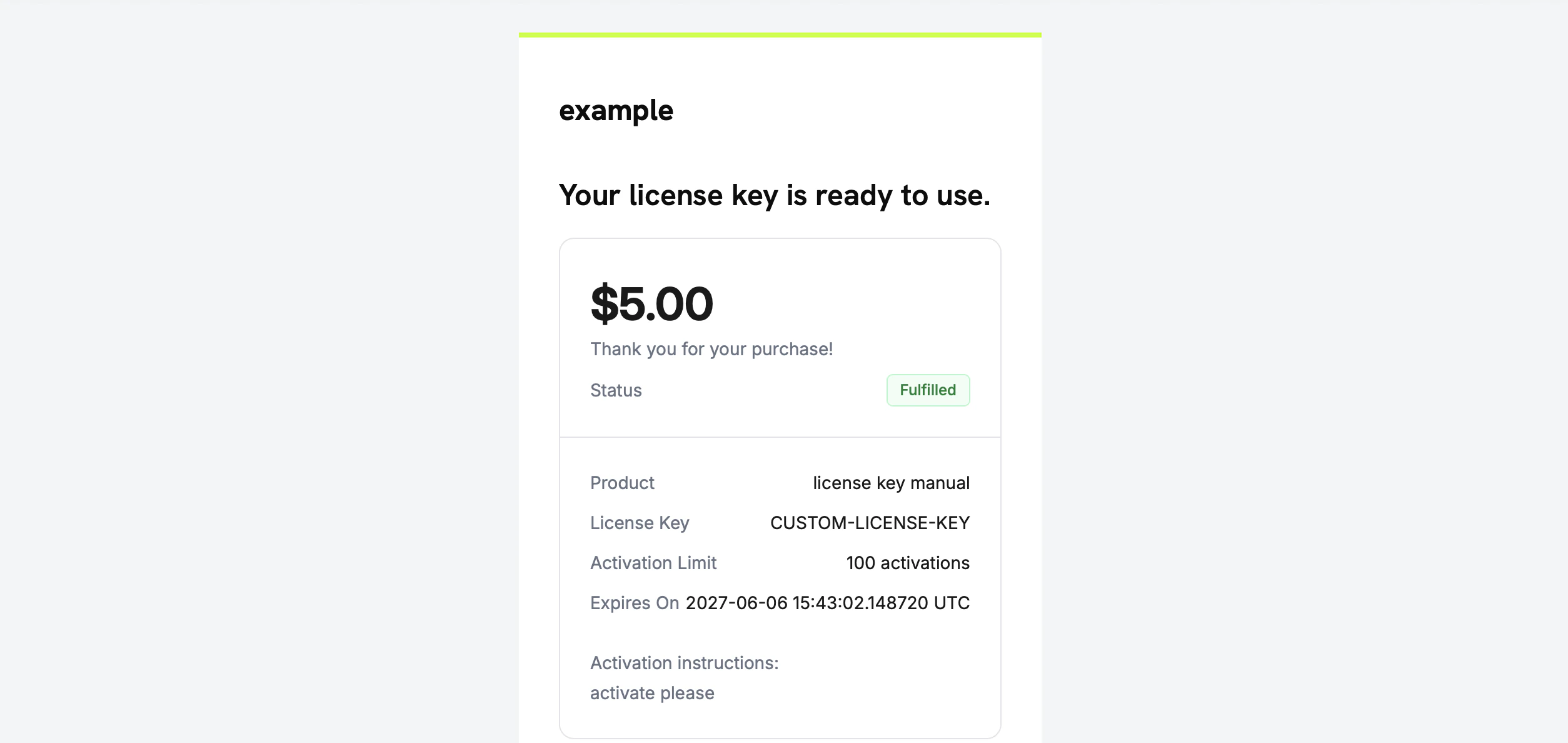
The license key email the customer receives once you fulfill the grant.
您无需自行通过 email 发送密钥。grant 履行后会自动完成交付。
步骤 5 — 处理错误和重试
endpoint 会在交付任何内容前验证 grant。请处理以下响应:验证流程
要端到端测试此流程:- 在 test mode 中购买 product。请参阅 checkout guides。
- 确认 webhook 收到了包含
status: "Pending"和integration_type: "license_key"的entitlement_grant.created,或者 grant 出现在按status=Pending筛选的 List Grants response 中。 - 使用 test key 调用 fulfill endpoint。
- 确认 response 显示
status: "Delivered",且license_key已填充;同时确认客户收到 key email,并且entitlement_grant.delivered被触发。
密钥交付后,客户可以像使用自动生成的密钥一样,通过 public license endpoints 对其进行激活和验证。
相关 API Reference
Create Entitlement
使用
fulfillment_mode: manual 创建 License Key entitlement。List Grants
按
status 和 customer_id 筛选,以查找 pending grants。Fulfill License Key Grant
交付密钥值,并将 grant 移至
Delivered。Entitlement Grant Webhooks
用于表示 pending 和 delivered grants 的
entitlement_grant.* events。