跳转到主要内容

Documentation Index

Fetch the complete documentation index at: https://docs.dodopayments.com/llms.txt

Use this file to discover all available pages before exploring further.

让 Sentra 为您编写集成代码。
在 VS Code、Cursor 或 Windsurf 中使用我们的 AI 助手,只需描述您的需求即可生成 SDK/API 代码、webhook 处理程序等。
尝试 Sentra:AI 驱动的集成 →
在本教程中,您将构建 MailKit,这是一个交易邮件平台,客户可以预先购买一组电子邮件信用。该计划提供每月的电子邮件额度;当客户余额不足时,他们可以购买充值包,而不是等待下一个周期。每次发送会自动扣除一个信用。
本教程使用 Resend 作为电子邮件提供商。其免费套餐(每月 3,000 封邮件)足以在没有付费账户的情况下构建和测试整个流程。该模式适用于任何提供商;可以用 SendGrid、Postmark、SES 或您自己的 SMTP 中继替换 resend.emails.send
在本教程结束时,您将了解如何:
  • 在您的仪表板中创建自定义信用权利(电子邮件)
  • 将信用附加到订阅计划和一次性充值产品上
  • 通过 Resend 发送真实电子邮件,并通过账本条目每发送一次扣减一个信用
  • 从您的前端查询实时信用余额
  • 正确验证 Dodo webhooks,并在客户接近零之前处理 credit.balance_low 发出信号

我们正在构建的内容

以下是 MailKit 的定价模型:
产品价格电子邮件数
MailKit 计划$19/月5,000 封邮件/周期
充值包$9 一次性+5,000 封邮件
单位为 一封电子邮件 = 一信用。客户无需考虑令牌、批量或加权单位。他们只需看到“您本月还剩 4,231 封邮件”。
在开始之前,请确保您有:
  • 一个 Dodo Payments 账户(测试模式即可)
  • 一个免费的 Resend 账户和 API 密钥
  • Node.js 18+ 和基本的 TypeScript 知识

第 1 步:创建您的电子邮件信用权利

信用权利定义了您的平台出售的单位:在这种情况下为一次电子邮件发送。
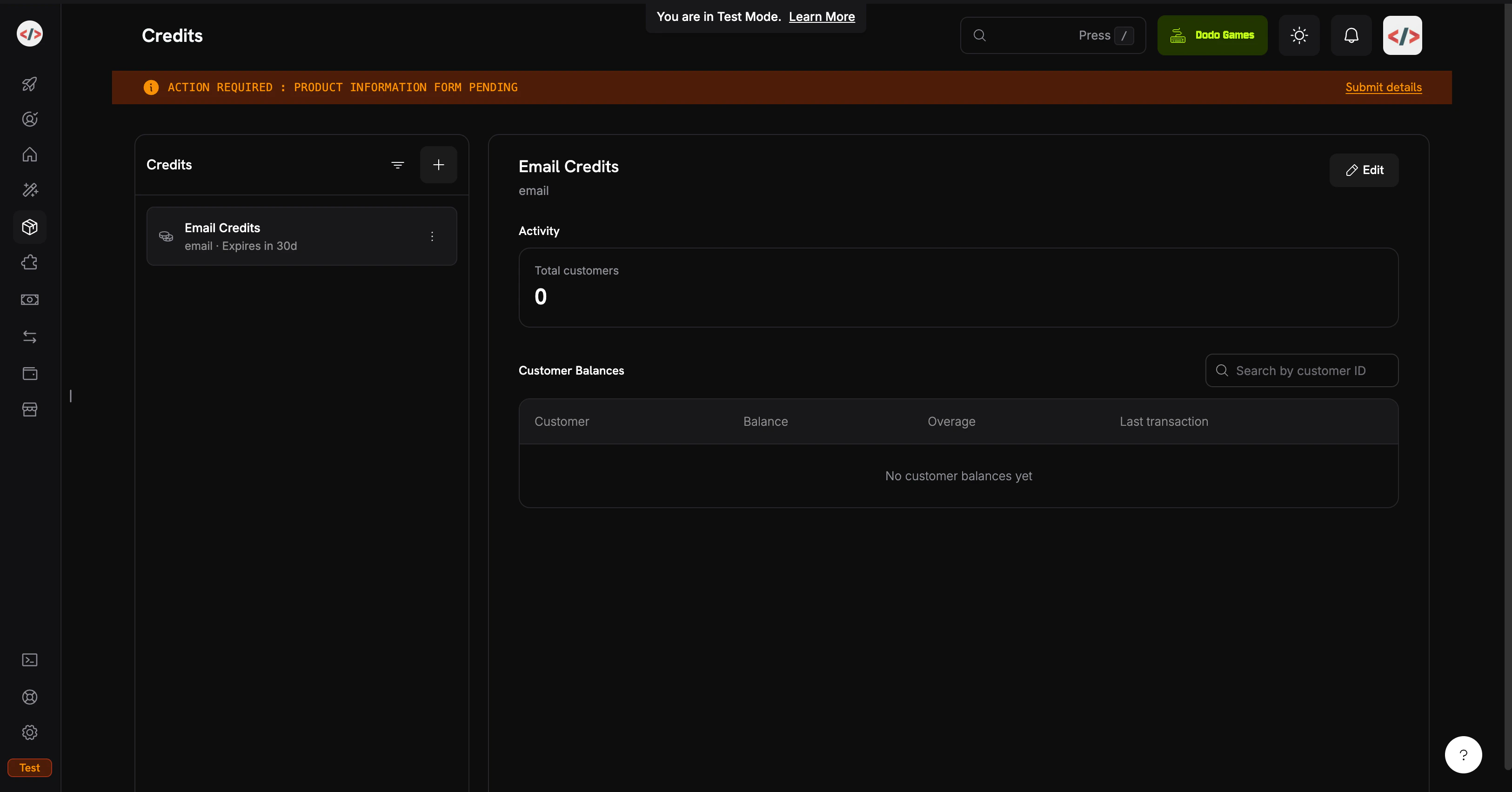
信用列表页面
1

Open the Credits section

  1. 登录您的 Dodo Payments 仪表板
  2. 点击左侧边栏中的 产品
  3. 选择 信用 标签
  4. 点击 创建信用
2

Configure the credit unit

填写信用详情:信用名称: Email Credits信用类型: 选择 Custom Unit单位名称: email精度: 0(电子邮件始终为整单位;您无法发送半封邮件)信用过期: 30 days(每个周期的额度重置)
精度在创建后不能更改。对于离散单位如电子邮件、消息或会话,0 是正确的。
3

Leave the other defaults as-is

在本食谱中我们不会启用滚动或超量;目标是实现最简单的 CBB 流程。您可以稍后在信用附件上重新访问这些选项。
4

Save and copy the credit ID

点击 创建信用。打开信用并复制其 ID。您需要它用于后端余额查询。看起来像 cent_xxxxxxxxxxxx
您的 Email Credits 权利已准备好。接下来:授予客户信用的产品。

第 2 步:创建计划和充值包

您将创建两个产品:一个定期的 订阅 计划和一个 一次性付款 充值。该计划授予每个周期 5,000 封电子邮件;充值可按需增加 5,000 封。两者都附加相同的 Email Credits 权利。
此食谱通过直接账本条目而非基于使用的计量器来扣除信用。账本条目是即时的(余额在毫秒内更新),无需额外设置,当一个用户动作等于准确一个信用时这是合适的选择。如果您更喜欢从摄取的使用事件中自动扣除(适用于加权单位如“令牌”或“已处理 MB”),请参阅 Credit-Based Billing → Usage Billing with Credits 获取基于计量器的模式。

MailKit 计划 ($19/月,5,000 封邮件)

1

Create the subscription

  1. 进入 产品 → 创建产品
  2. 填写产品详情:
产品名称: MailKit Plan描述: 5,000 transactional emails per month.
  1. 选择 订阅 作为产品类型
  2. 设置经常性价格:
经常性价格: 19.00计费周期: Monthly货币: USD
2

Attach the email credit entitlement

滚动到 权利 → 信用 → 附加 并配置:信用权利: Email Credits每个计费周期发行的信用: 5000低余额阈值: 20(百分比;当余额低于周期额度的 20% 时触发 credit.balance_low,即 1,000 封邮件)导入默认信用设置: 启用(使用第 1 步的 30 天到期)点击 添加到产品,然后 保存 产品。复制产品 ID (pdt_xxxxxxxxxxxx)。
计划:$19/月 → 每个周期刷新 5,000 封邮件。

充值包 ($9 一次性,5,000 封邮件)

1

Create a one-time product

  1. 进入 产品 → 创建产品
  2. 填写产品详情:
产品名称: Email Top-Up Pack描述: Add 5,000 emails to your MailKit balance instantly.
  1. 选择 一次性付款 作为产品类型
  2. 设置价格:
价格: 9.00货币: USD
2

Attach the credit grant

权利 → 信用 → 附加
  • 信用权利: Email Credits
  • 发放的信用: 5000
一次性产品根据其自身的到期(购买后 30 天,从第 1 步开始)授予信用。充值在订阅信用之上叠加;它们不会替代它们。
保存并复制产品 ID。
充值包:$9 → +5,000 封邮件,立即可用。

第 3 步:设置后端

现在构建处理结账、发送、余额查询和 webhooks 的 Express 服务器。
1

Initialize the project

mkdir mailkit && cd mailkit
npm init -y
npm install dodopayments resend express dotenv
npm install -D tsx @types/node @types/express
将一个开发脚本添加到 package.json
{
  "scripts": {
    "dev": "tsx watch server.ts"
  }
}
tsx 直接运行 TypeScript,无需构建步骤或 tsconfig.json,这对于教程是完美的。对于生产环境,添加一个 tsconfig.json 和一个 build 脚本。
2

Configure environment variables

创建 .env
.env
# Dodo Payments
DODO_PAYMENTS_API_KEY=your_dodo_test_api_key
DODO_WEBHOOK_KEY=your_dodo_webhook_signing_key
CREDIT_ENTITLEMENT_ID=cent_xxxxxxxxxxxx
PLAN_PRODUCT_ID=pdt_xxxxxxxxxxxx
TOPUP_PRODUCT_ID=pdt_xxxxxxxxxxxx

# Resend
RESEND_API_KEY=re_xxxxxxxxxxxx

# App
BASE_URL=http://localhost:3000
PORT=3000
您将在第 4 步创建端点后填充 DODO_WEBHOOK_KEY。Resend API 密钥来自 resend.com/api-keys
立即在 .gitignore 中添加 .env。切勿提交 API 密钥。
3

Build the server

在项目根目录中创建 server.ts
import 'dotenv/config';
import express, { Request, Response } from 'express';
import DodoPayments from 'dodopayments';
import { Resend } from 'resend';

const app = express();

const dodo = new DodoPayments({
  bearerToken: process.env.DODO_PAYMENTS_API_KEY!,
  webhookKey: process.env.DODO_WEBHOOK_KEY!,
  environment: 'test_mode',
});

const resend = new Resend(process.env.RESEND_API_KEY!);

const CREDIT_ENTITLEMENT_ID = process.env.CREDIT_ENTITLEMENT_ID!;
const BASE_URL = process.env.BASE_URL!;

// ---------------------------------------------------------------
// Webhook endpoint MUST receive the raw body for signature
// verification. Register it BEFORE express.json().
// ---------------------------------------------------------------
app.post(
  '/webhooks/dodo',
  express.raw({ type: 'application/json' }),
  async (req: Request, res: Response) => {
    const headers = {
      'webhook-id': req.headers['webhook-id'] as string,
      'webhook-signature': req.headers['webhook-signature'] as string,
      'webhook-timestamp': req.headers['webhook-timestamp'] as string,
    };

    let event: any;
    try {
      event = await dodo.webhooks.unwrap(req.body.toString('utf8'), { headers });
    } catch (err) {
      console.error('Webhook signature verification failed:', err);
      return res.status(401).json({ error: 'invalid signature' });
    }

    switch (event.type) {
      case 'credit.balance_low': {
        const { customer_id, credit_entitlement_name, available_balance, threshold_percent } =
          event.data;
        console.log(
          `[low-balance] ${customer_id} has ${available_balance} ${credit_entitlement_name} ` +
            `left (under ${threshold_percent}%)`
        );
        await notifyCustomerLowBalance(customer_id, Number(available_balance));
        break;
      }
      case 'credit.added':
        console.log('[credit.added]', event.data);
        break;
      case 'credit.rolled_over':
        console.log('[rolled_over]', event.data);
        break;
    }

    res.json({ received: true });
  }
);

// JSON parsing for everything else.
app.use(express.json());

// ---------------------------------------------------------------
// POST /checkout/subscribe → start the MailKit subscription.
// ---------------------------------------------------------------
app.post('/checkout/subscribe', async (req, res) => {
  const { email, name } = req.body as { email: string; name: string };

  const session = await dodo.checkoutSessions.create({
    product_cart: [{ product_id: process.env.PLAN_PRODUCT_ID!, quantity: 1 }],
    customer: { email, name },
    return_url: `${BASE_URL}/?subscribed=1`,
  });

  res.json({ checkout_url: session.checkout_url });
});

// ---------------------------------------------------------------
// POST /checkout/topup → buy a 5,000-email top-up for an existing
// customer. In a real app, customer_id is resolved from the
// authenticated session, never trusted from request input.
// ---------------------------------------------------------------
app.post('/checkout/topup', async (req, res) => {
  const { customer_id } = req.body as { customer_id: string };

  const session = await dodo.checkoutSessions.create({
    product_cart: [{ product_id: process.env.TOPUP_PRODUCT_ID!, quantity: 1 }],
    customer: { customer_id },
    return_url: `${BASE_URL}/?topped_up=1`,
  });

  res.json({ checkout_url: session.checkout_url });
});

// ---------------------------------------------------------------
// GET /credits/:customerId → live balance for the dashboard widget.
// ---------------------------------------------------------------
app.get('/credits/:customerId', async (req, res) => {
  const balance = await dodo.creditEntitlements.balances.retrieve(req.params.customerId, {
    credit_entitlement_id: CREDIT_ENTITLEMENT_ID,
  });

  res.json({ balance: balance.balance });
});

// ---------------------------------------------------------------
// POST /send → send an email via Resend, then write a ledger entry
// to debit 1 credit from the customer's balance. The deduction is
// instant; the next /credits call reflects it.
// ---------------------------------------------------------------
app.post('/send', async (req, res) => {
  const { customer_id, to, subject, html } = req.body as {
    customer_id: string;
    to: string;
    subject: string;
    html: string;
  };

  // 1. Pre-flight balance check: refuse to send if the balance is at zero.
  const balance = await dodo.creditEntitlements.balances.retrieve(customer_id, {
    credit_entitlement_id: CREDIT_ENTITLEMENT_ID,
  });

  if (Number(balance.balance) <= 0) {
    return res.status(402).json({
      error: 'No email credits remaining. Buy a top-up pack or upgrade your plan.',
    });
  }

  // 2. Send via Resend.
  const { data, error } = await resend.emails.send({
    from: 'MailKit <onboarding@resend.dev>', // swap for your verified domain
    to: [to],
    subject,
    html,
  });

  if (error) {
    return res.status(500).json({ error: error.message });
  }

  // 3. Debit 1 credit. Resend's message id is the idempotency key, so if
  //    the client retries this request, Dodo deduplicates and the
  //    customer is only debited once for that send.
  await dodo.creditEntitlements.balances.createLedgerEntry(customer_id, {
    credit_entitlement_id: CREDIT_ENTITLEMENT_ID,
    amount: '1',
    entry_type: 'debit',
    reason: `email send ${data!.id}`,
    idempotency_key: data!.id,
  });

  res.json({ id: data!.id });
});

async function notifyCustomerLowBalance(customerId: string, available: number) {
  // In production: send an email to the account owner, push a banner,
  // open an in-app modal, etc. For the demo we just log.
  console.log(`[NOTIFY] ${customerId}: ${available} emails left. Consider topping up.`);
}

app.use(express.static('public'));

const port = Number(process.env.PORT) || 3000;
app.listen(port, () => {
  console.log(`MailKit running on http://localhost:${port}`);
});
Webhook 消息体必须是原始的。 express.json() 解析并重新序列化消息体,这会导致签名验证失败。定义 /webhooks/dodoexpress.raw() app.use(express.json()) 之前。
后端准备就绪:订阅、充值、余额、发送以及 webhook 处理程序已全部连接。
4

Add a demo UI

创建 public/index.html
<!doctype html>
<html>
  <head>
    <title>MailKit Demo</title>
    <style>
      body {
        font-family: system-ui, -apple-system, sans-serif;
        max-width: 720px;
        margin: 40px auto;
        padding: 0 20px;
        color: #1a1a2e;
      }
      h1 { font-size: 28px; margin-bottom: 4px; }
      h2 { font-size: 16px; margin-top: 32px; padding-bottom: 6px; border-bottom: 1px solid #eee; }
      label { display: block; font-size: 13px; font-weight: 600; margin: 12px 0 4px; }
      input, select, textarea {
        width: 100%;
        padding: 10px;
        border: 1px solid #ddd;
        border-radius: 6px;
        font-family: inherit;
        font-size: 14px;
        box-sizing: border-box;
      }
      button {
        background: #1a1a2e;
        color: white;
        padding: 10px 18px;
        border: none;
        border-radius: 6px;
        cursor: pointer;
        font-size: 14px;
        margin-top: 12px;
      }
      button:hover { background: #2d2d4a; }
      .out {
        background: #f6f6fa;
        padding: 12px;
        border-radius: 6px;
        margin-top: 12px;
        font-size: 13px;
        font-family: ui-monospace, monospace;
        white-space: pre-wrap;
        word-break: break-all;
      }
      .balance { font-size: 36px; font-weight: 700; color: #4f46e5; }
      .balance-sub { color: #888; font-size: 13px; margin-top: 4px; }
    </style>
  </head>
  <body>
    <h1>MailKit</h1>
    <p>Prepaid transactional email, billed per send.</p>

    <h2>1. Subscribe to MailKit ($19/mo, 5,000 emails)</h2>
    <label>Email</label>
    <input id="subEmail" type="email" placeholder="you@example.com" />
    <label>Name</label>
    <input id="subName" type="text" placeholder="Your name" />
    <button onclick="subscribe()">Get checkout link</button>
    <div id="subOut" class="out" hidden></div>

    <h2>2. Check your balance</h2>
    <label>Customer ID</label>
    <input id="balCust" type="text" placeholder="cus_xxxxxxxxxxxx" />
    <button onclick="checkBalance()">Refresh</button>
    <div id="balOut" class="out" hidden></div>

    <h2>3. Send a transactional email</h2>
    <label>Customer ID</label>
    <input id="sendCust" type="text" placeholder="cus_xxxxxxxxxxxx" />
    <label>To (Resend's sandbox accepts delivered@resend.dev)</label>
    <input id="sendTo" type="email" value="delivered@resend.dev" />
    <label>Subject</label>
    <input id="sendSubj" type="text" value="Hello from MailKit" />
    <label>HTML body</label>
    <textarea id="sendBody" rows="3">&lt;strong&gt;It works!&lt;/strong&gt;</textarea>
    <button onclick="sendEmail()">Send</button>
    <div id="sendOut" class="out" hidden></div>

    <h2>4. Run low? Buy a top-up pack</h2>
    <label>Customer ID</label>
    <input id="topCust" type="text" placeholder="cus_xxxxxxxxxxxx" />
    <button onclick="topup()">Buy 5,000 emails ($9)</button>
    <div id="topOut" class="out" hidden></div>

    <script>
      const show = (id, content) => {
        const el = document.getElementById(id);
        el.hidden = false;
        el.innerHTML = content;
      };

      async function subscribe() {
        const r = await fetch('/checkout/subscribe', {
          method: 'POST',
          headers: { 'Content-Type': 'application/json' },
          body: JSON.stringify({
            email: document.getElementById('subEmail').value,
            name: document.getElementById('subName').value,
          }),
        });
        const data = await r.json();
        show('subOut', r.ok
          ? `<a href="${data.checkout_url}" target="_blank">Open checkout →</a>`
          : `Error: ${data.error}`);
      }

      async function checkBalance() {
        const id = document.getElementById('balCust').value;
        const r = await fetch(`/credits/${id}`);
        const data = await r.json();
        show('balOut', r.ok
          ? `<div class="balance">${Number(data.balance).toLocaleString()}</div>
             <div class="balance-sub">emails available</div>`
          : `Error: ${data.error}`);
      }

      async function sendEmail() {
        const r = await fetch('/send', {
          method: 'POST',
          headers: { 'Content-Type': 'application/json' },
          body: JSON.stringify({
            customer_id: document.getElementById('sendCust').value,
            to: document.getElementById('sendTo').value,
            subject: document.getElementById('sendSubj').value,
            html: document.getElementById('sendBody').value,
          }),
        });
        const data = await r.json();
        show('sendOut', r.ok ? `Sent. Message id: ${data.id}` : `Error: ${data.error}`);
      }

      async function topup() {
        const r = await fetch('/checkout/topup', {
          method: 'POST',
          headers: { 'Content-Type': 'application/json' },
          body: JSON.stringify({ customer_id: document.getElementById('topCust').value }),
        });
        const data = await r.json();
        show('topOut', r.ok
          ? `<a href="${data.checkout_url}" target="_blank">Open top-up checkout →</a>`
          : `Error: ${data.error}`);
      }
    </script>
  </body>
</html>

第 4 步:连接 Webhook 端点

credit.balance_low 事件是让您在客户用完之前提示他们的重要事件。没有它,他们第一次注意到问题是在发送邮件失败时。
1

Expose your local server

Webhooks 需要一个公共 URL。使用 ngrok(或任何隧道)在开发时运行:
ngrok http 3000
复制 HTTPS 转发 URL(例如 https://1234abcd.ngrok-free.app)。
2

Register the endpoint in Dodo

  1. 进入 开发者 → Webhooks → 添加端点
  2. URL: https://1234abcd.ngrok-free.app/webhooks/dodo
  3. 事件: 订阅 credit.added, credit.balance_lowcredit.rolled_over
  4. 保存,然后将 签名密钥 复制到您的 .env 作为 DODO_WEBHOOK_KEY
  5. 重启服务器

第 5 步:测试完整流程

1

Start the server

npm run dev
您应该会看到 MailKit running on http://localhost:3000。在浏览器中打开它。
2

Subscribe a test customer

  1. 在第 1 节中输入测试电子邮件和名称,点击 获取结账链接
  2. 打开链接,用测试卡完成结账
  3. 付款后,在仪表板下的 客户 中找到 customer_id
客户现在应该在其余额中有 5,000 封电子邮件。检查 客户 → [客户] → 信用
3

Send a real email

  1. customer_id 粘贴到第 3 节
  2. 保持 to 设置为 delivered@resend.dev(Resend 的沙盒邮箱,接受所有内容)
  3. 点击 发送
您将获得返回的 Resend 消息 ID。在第 2 节中刷新余额,数量会立即下降到 4,999。每次账本扣款都会立即反映在实时余额中。
4

Trigger the low-balance webhook

阈值为 20%(5,000 封邮件额度的 1,000 封)。要触发它而无需发送 4,000 封真实邮件,手动从仪表板扣减余额
  1. 进入 客户 → [客户] → 信用 → 邮件信用
  2. 点击 调整余额 并扣减 4000
  3. 再通过演示发送一封邮件
您的服务器应在几秒钟内记录:
[low-balance] cus_xxx has 999 Email Credits left (under 20%)
[NOTIFY] cus_xxx: 999 emails left. Consider topping up.
您的服务器已接收到并验证了 webhook。在生产中,这就是您向客户发送电子邮件或显示应用内横幅的地方。
5

Buy a top-up pack

  1. customer_id 粘贴到第 4 节
  2. 点击 购买 5,000 封邮件,完成测试结账
  3. 刷新余额,它会跳增 5,000
grant_source: one_time 触发 credit.added 事件。充值叠加在订阅信用之上;两个池按 FIFO 消耗(最早的未过期供给首先使用)。
6

Test the hard stop

手动扣减余额到零,然后尝试再发送一封电子邮件。您将收到:
{ "error": "No email credits remaining. Buy a top-up pack or upgrade your plan." }
那个 402 是您的应用程序级别的强制。Dodo 余额 API 是事实来源;切勿在客户端缓存它。

故障排除

签名是通过原始 HTTP 消息体计算的。express.json() 解析并重新序列化有效负载,这会打破 HMAC。确保 /webhooks/dodo 使用 express.raw({ type: 'application/json' }) app.use(express.json()) 行上注册,并且 DODO_WEBHOOK_KEY 匹配端点详情页面上显示的签名密钥。
需要验证的三件事,按以下顺序:
  1. 客户 完成结账(信用在成功付款时发放,而不是在会话创建时)
  2. CREDIT_ENTITLEMENT_ID 在您的 .env 中与产品附加的信用匹配(不匹配的 ID 会静默写入错误的信用)
  3. 您传递的 customer_id 来自 Dodo(仪表板中的 customers 表),而不是您自己的数据库
沙盒发件人 onboarding@resend.dev 仅传递到您 Resend 账户上的电子邮件或 delivered@resend.dev。要发送给其他人,验证一个域名 并使用其上的 from 地址。

您构建了什么

One reusable credit unit

Email Credits,一次定义并附加到订阅计划和充值包上。

Subscription with prepaid allowance

$19/月授予每个周期 5,000 封邮件。客户知道他们的支出,您知道您的最坏成本。

Top-up pack

一个一次性产品,授予 5,000 封邮件。无需更改计划即可叠加订阅信用。

Instant ledger debits

每次发送后的一个简单 createLedgerEntry 调用。没有计量器,没有聚合滞后,通过 Resend 的消息 ID 在重试时具备幂等性。

Credit-Based Billing Reference

阅读完整的 CBB 文档,了解滚动、超量模式、账本管理和完整的 API 资源。
需要帮助?
Last modified on May 14, 2026