

المقدمة
يرسل تكامل Resend رسالة بريد إلكتروني للمعاملات عبر Resend عند وقوع حدث في Dodo Payments. استخدمه لتأكيد عمليات الدفع، والترحيب بالمشتركين الجدد، وإبلاغ العملاء عند فشل عملية دفع، وذلك من نطاق الإرسال الخاص بك.يتطلب هذا التكامل مفتاح Resend API يتضمن Sending access ونطاق إرسال تم التحقق منه في Resend. كما تحتاج إلى الوصول إلى Developer → Webhooks في لوحة تحكم Dodo Payments.
البدء
1
Open the Webhook Section
في لوحة معلومات Dodo Payments، انتقل إلى Developer → Webhooks وانقر على Add endpoint.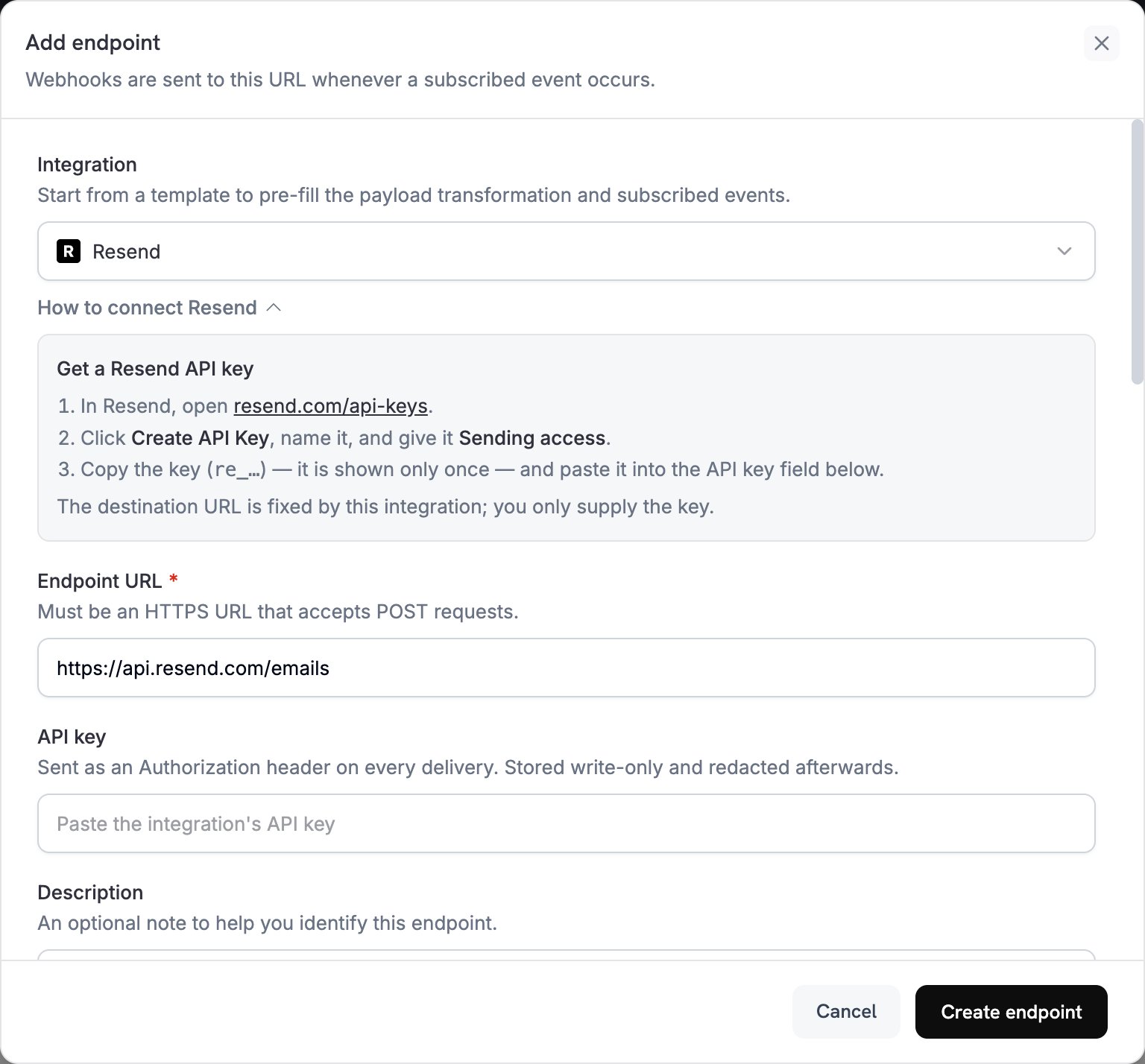
2
Select Resend
في Integration، اختر Resend. تُكمل لوحة التحكم Endpoint URL ورمز التحويل الخاص بـ Resend، وتعرض لوحة How to connect Resend خطوات الإعداد.
3
Enter API Key
في Resend، افتح API Keys، وانقر على Create API Key، وامنح المفتاح Sending access. يعرض Resend المفتاح، الذي يبدأ بـ
re_، مرة واحدة فقط. الصقه في API key. يرسله Dodo Payments كرمز bearer في ترويسة Authorization لكل طلب إلى Resend.4
Select Events
في Subscribed events، اختر الأحداث التي يعالجها التحويل فقط. يصل أي حدث يتركه التحويل دون تغيير إلى Resend بتنسيق Dodo Payments، ويرفضه Resend.
5
Configure Transformation
ضمن Transformation code، عدّل handler بحيث يصبح كل حدث مشترك رسالة بريد إلكتروني في Resend. ابدأ من الأمثلة.
6
Test & Create
ضمن Test this code، اختر نوع حدث وانقر على Simulate لمعاينة الطلب المرسل إلى Resend. ثم انقر على Create endpoint.
7
Done
يرسل Dodo Payments الآن رسالة بريد إلكتروني عبر Resend لكل حدث مشترك. لعرض كل عملية تسليم واستجابة Resend، افتح علامة التبويب Logs ضمن Developer → Webhooks.
أمثلة على Transformation Code
يعيّن كل handlerwebhook.url إلى نقطة نهاية send-email في Resend، ويستبدل webhook.payload برسالة البريد الإلكتروني. تكون مبالغ Dodo Payments بوحدة العملة الأصغر، لذلك تقسم الأمثلة المبلغ على 100 وتعرض رمز العملة. بالنسبة إلى العملات ذات المنازل العشرية الصفرية مثل JPY وKRW، استخدم المبلغ كما هو.
رسالة تأكيد الدفع
أرسل إيصالًا عند نجاح عملية الدفع (payment.succeeded):
payment_confirmation.js
رسالة ترحيب بالاشتراك
رحّب بالعميل عند تفعيل الاشتراك (subscription.active):
subscription_welcome.js
إشعار فشل الدفع
اطلب من العميل تحديث طريقة الدفع عند فشل عملية دفع (payment.failed):
payment_failure.js
نصائح
- أرسل من نطاق تحققت منه في Resend، فهذا يحسّن قابلية التسليم.
- ضمّن إصدار
htmlوإصدارtextمن كل رسالة بريد إلكتروني. - خصّص المحتوى باستخدام بيانات العميل من payload، مثل
customer.name. - اكتب عناوين موضوع توضّح النتيجة أو الإجراء المطلوب.
- ضمّن رابط إلغاء الاشتراك في أي رسالة بريد إلكتروني تحتوي على محتوى تسويقي.
- عاين كل قالب باستخدام Simulate قبل إنشاء نقطة النهاية.
- لتخطي حدث في code، عيّن
webhook.cancel = trueقبل إرجاع webhook. تسجّل السجلات عملية التسليم المتخطاة على أنها ناجحة.
استكشاف الأخطاء وإصلاحها
Emails Not Being Sent
Emails Not Being Sent
- تحقق من صحة API key ونشاطه واحتوائه على Sending access. لاستبداله، عدّل نقطة النهاية والصق مفتاحًا جديدًا في API key.
- تحقق من أن نطاق المرسل تم التحقق منه في Resend.
- تحقق من صحة عناوين البريد الإلكتروني للمستلمين.
- تحقق من حدود الإرسال والحصص في Resend ضمن خطتك.
- افتح علامة التبويب Logs ضمن Developer → Webhooks واقرأ استجابة Resend لعملية التسليم الفاشلة.
Transformation Errors
Transformation Errors
- تحقق من أن payload يطابق تنسيق send-email في Resend. يتطلب Resend
fromوtoوsubject. - تحقق من أن كل حدث يعالجه code يعيّن جميع الحقول المطلوبة.
- تحقق من أن قيمة
htmlهي HTML صالح. - تحقق من أن عنوان
fromيستخدم نطاقًا تم التحقق منه في Resend.