

المقدمة
ينشر تكامل Discord أحداث Dodo Payments المتعلقة بالمدفوعات والاشتراكات والنزاعات وغيرها في قناة Discord تختارها. يرى فريقك كل حدث في المكان الذي يتعاون فيه بالفعل، من دون الاستعلام المتكرر من API أو التحقق من لوحة المعلومات.تحتاج إلى الوصول إلى Developer → Webhooks في لوحة معلومات Dodo Payments، وإلى إذن Manage Webhooks في خادم Discord.
البدء
1
Create a Discord Webhook
في Discord، افتح القناة التي ينبغي أن تتلقى الإشعارات وانقر على Edit Channel. انتقل إلى Integrations → Webhooks → New Webhook، وسمِّ webhook، وأكّد القناة، ثم انقر على Copy Webhook URL.
2
Open the Webhook Section
في لوحة تحكم Dodo Payments، انتقل إلى Developer → Webhooks وانقر على Add endpoint.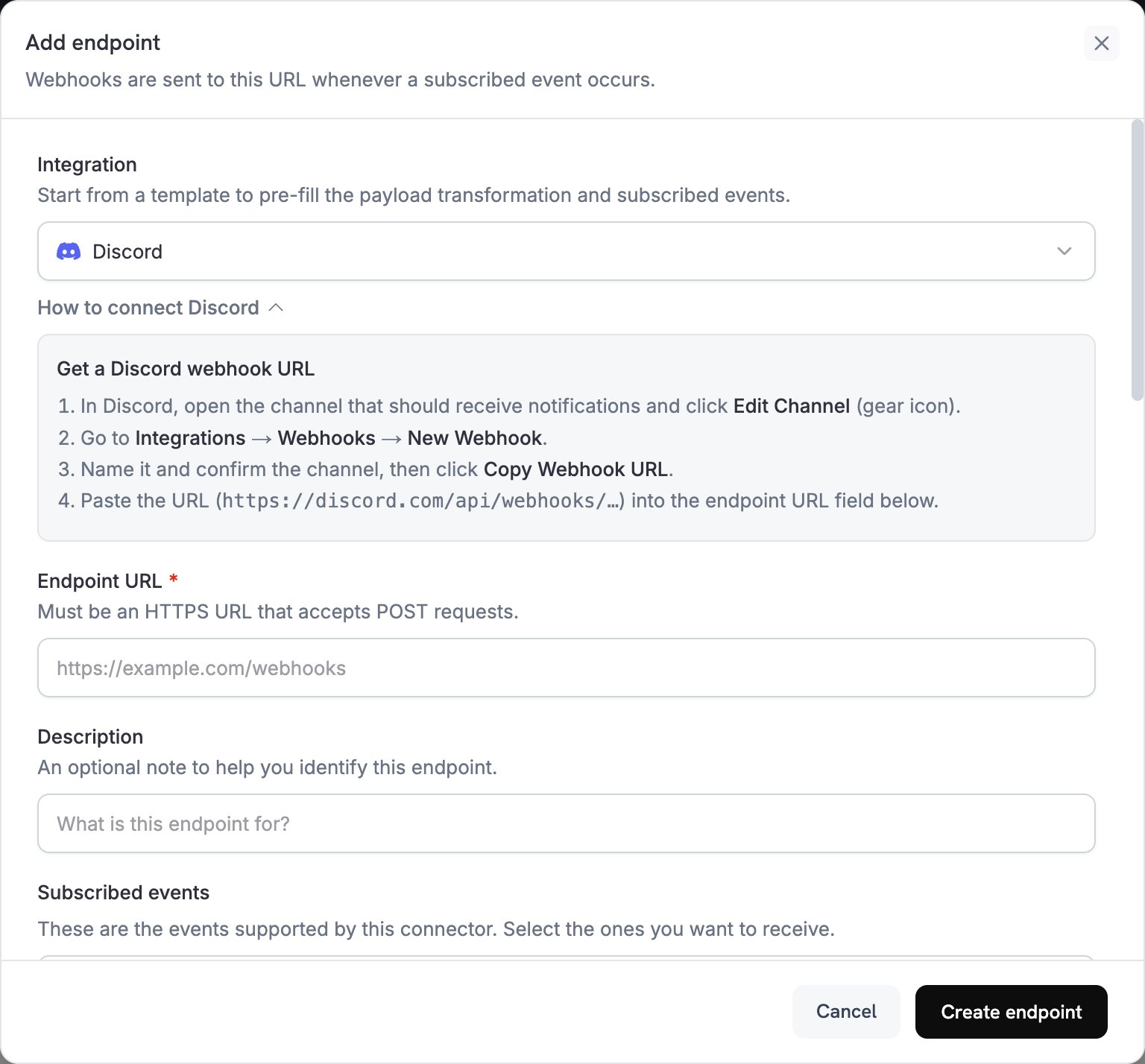
3
Select Discord
ضمن Integration، اختر Discord. تكرّر لوحة How to connect Discord خطوات إنشاء Discord webhook.
4
Paste the Webhook URL
الصق عنوان URL الخاص بـ Discord webhook، الذي يبدأ بـ
https://discord.com/api/webhooks/، في Endpoint URL. لا يحتاج Discord إلى API key.5
Select Events
ضمن Subscribed events، اختر الأحداث التي يتعامل معها التحويل. يرفض Discord رسالة لا تحتوي على
content أو embeds، لذلك يفشل تسليم أي حدث لا يحوّله التحويل.6
Edit Transformation Code
ضمن Transformation code، خصّص طريقة تعيين كل حدث إلى embed في Discord، أو ابدأ من الأمثلة.
7
Test & Create
ضمن Test this code، انقر على Simulate لمعاينة embed لحمولة نموذجية. ثم انقر على Create endpoint.
8
Done
ستتلقى قناة Discord لديك الآن رسالة لكل حدث مشترك فيه.
أمثلة على Transformation Code
يستبدل كل handler القيمةwebhook.payload برسالة Discord تحتوي على embed واحد. تكون مبالغ Dodo Payments بوحدة العملة الأصغر، لذلك تقسم الأمثلة المبلغ على 100 وتعرض رمز العملة.
Minimal Payment Embed
انشر embed عند نجاح دفعة (payment.succeeded):
payment_embed.js
أحداث الاشتراك
انشر embed عند تفعيل اشتراك (subscription.active) أو إلغائه (subscription.cancelled):
subscription_embed.js
تنبيهات النزاعات
انشر embed لكل حدث من أحداث النزاع، مثلdispute.opened وdispute.won وdispute.lost. يتبع العنوان واللون قيمة dispute_status الخاصة بالنزاع:
dispute_embed.js
نصائح
- استخدم التضمينات للتنسيق المتقدم والألوان.
- اجعل العناوين قصيرة، وضع التفاصيل في الحقول.
- استخدم ألوانًا تشير إلى النتيجة: الأخضر للنجاح، والأحمر للفشل، والبرتقالي للتحذيرات.
استكشاف الأخطاء وإصلاحها
No Messages in Discord
No Messages in Discord
- تأكد من أن webhook لا يزال موجودًا ضمن Integrations → Webhooks للقناة، وأن Endpoint URL يطابق عنوان URL الخاص به.
- تحقق من أن التحويل يُرجع كائن JSON مع
embeds. - تحقق من أن Subscribed events تتضمن الأحداث التي تتوقعها.
- افتح محاولات تسليم نقطة النهاية ضمن علامة التبويب Logs في Developer → Webhooks للاطلاع على رمز استجابة Discord.
Transformation Errors
Transformation Errors
- تحقّق من صحة التعليمات البرمجية في المحرر. تمنع أخطاء بناء الجملة التسليم.
- تحقق من تطابق أسماء الحقول مع بنية حمولة webhook.