

المقدمة
تضيف تكامل MailerLite عملاءك الذين أجروا عمليات دفع إلى MailerLite عند وقوع أحداث الدفع. ويمكنه إضافة العملاء إلى المجموعات، وتخزين بيانات الدفع في حقول المشتركين، وبدء سير عمل الأتمتة، بحيث تعكس قوائم البريد الإلكتروني نشاط الدفع الفعلي. MailerLite منصة للتسويق عبر البريد الإلكتروني مخصصة للنشرات الإخبارية والحملات وعمليات الأتمتة. استخدم هذا التكامل لإدارة المشتركين استنادًا إلى نشاط الدفع، مثل تسلسلات الإعداد الأولي، وتقسيم العملاء، والحملات المستهدفة.يتولى هذا التكامل المصادقة باستخدام مفتاح API من MailerLite. لإنشاء مفتاح، افتح صفحة Integrations في MailerLite وانقر على Generate new token.
البدء
1
Open the Webhook Section
في لوحة تحكم Dodo Payments، انتقل إلى Developer → Webhooks وانقر على Add endpoint.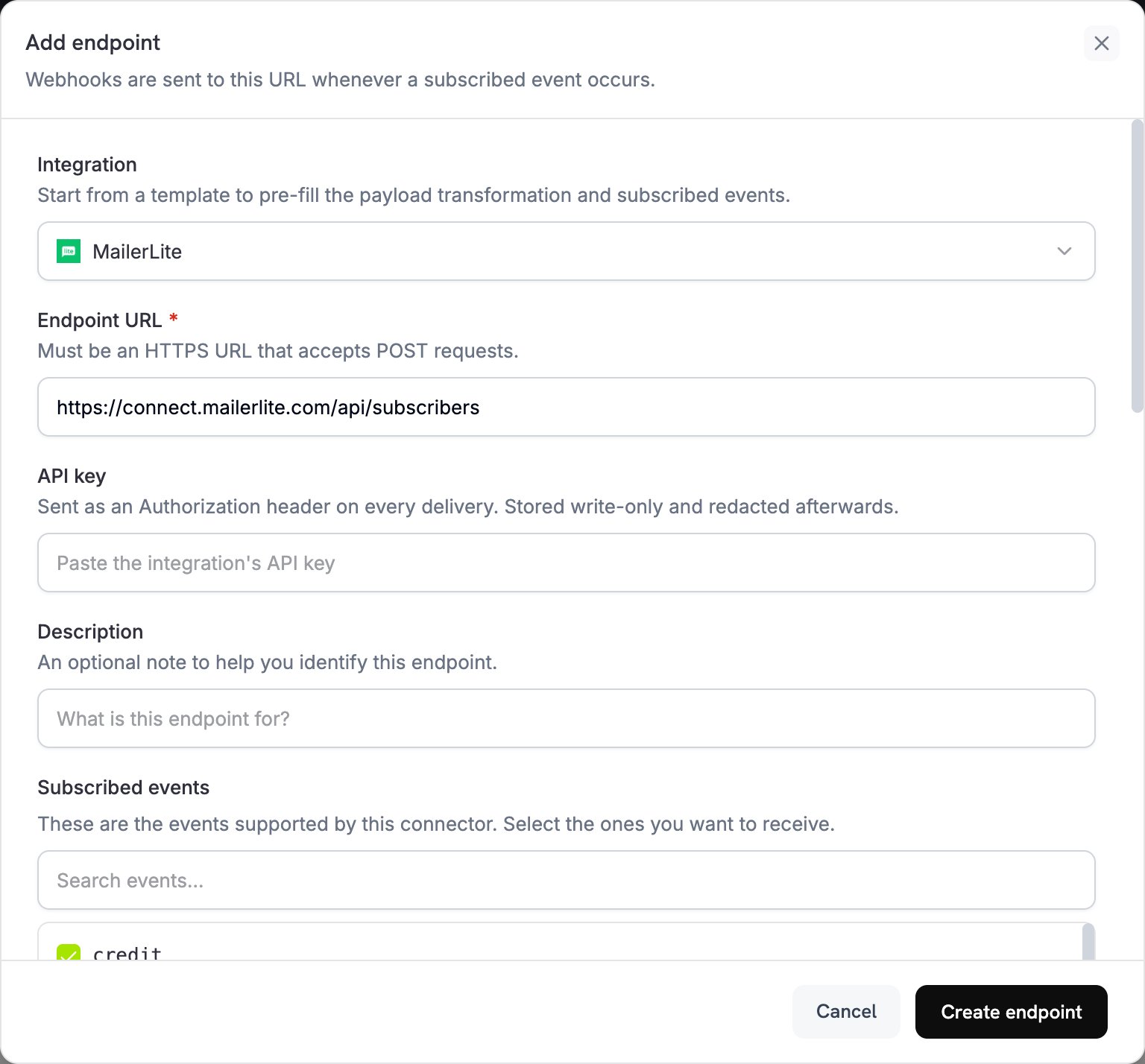
2
Select MailerLite
من قائمة Integration، حدّد MailerLite.
3
Enter API Key
الصق مفتاح API الخاص بـ MailerLite في حقل API key. يرسله Dodo Payments كعنوان
Authorization في كل عملية تسليم.4
Configure Transformation
عدّل الشيفرة الموجودة ضمن Transformation code بحيث يتحول كل حدث إلى طلب مشترك في MailerLite. ابدأ باستخدام الأمثلة أدناه.
5
Test & Create
ضمن Test this code، شغّل التحويل باستخدام حمولة نموذجية، ثم انقر على Create endpoint.
6
Done
تضيف أحداث الدفع الآن المشتركين وتحدّثهم في مجموعات MailerLite.
أمثلة كود التحويل
ترسل معظم الأمثلة طلبPOST إلى API المشتركين في MailerLite. ينشئ MailerLite المشترك أو يحدّث المشترك الحالي الذي يملك عنوان البريد الإلكتروني نفسه. لا تزيل عملية upsert هذه الحقول أو المجموعات التي تتركها دون تحديد.
إضافة عميل عند نجاح الدفع
يضيف هذا المثال العميل إلى مجموعة واحدة عند نجاح عملية الدفع. استبدلyour-group-id-here بمعرّف مجموعة في MailerLite.
add_customer.js
إضافة مشترك إلى مجموعات متعددة استنادًا إلى المنتج
يضيف هذا المثال كل عميل يدفع إلى مجموعة العملاء، ويضيف أيضًا العملاء الذين يدفعونPOST دولارًا أو أكثر إلى مجموعة مميزة.
product_segmentation.js
إضافة مشترك جديد عند تفعيل الاشتراك
يضيف هذا المثال العميل إلى مجموعتي مشتركين ويخزّن تفاصيل الخطة عند تفعيل الاشتراك.subscription_subscriber.js
تحديث مشترك عند إلغاء الاشتراك
يحدّث هذا المثال مشتركًا موجودًا عند إلغاء الاشتراك. ويرسل طلبPOST من نوع upsert باستخدام عنوان البريد الإلكتروني كمفتاح، لأن نقطة نهاية التحديث PUT في MailerLite تتطلب معرّف مشترك MailerLite، وهو غير موجود في حمولة Dodo Payments. يضيف طلب upsert المشترك إلى مجموعة العملاء الذين ألغوا اشتراكهم، ويحافظ على مجموعاته الأخرى.
subscription_cancelled.js
إضافة عميل باستخدام حقول مخصصة
يخزّن هذا المثال بيانات الموقع وبيانات الاتصال والدفع في حقول المشترك. أنشئ الحقول المخصصة في MailerLite أولًا، كما هو موضح في إعداد الحقول المخصصة.custom_fields.js
تشغيل Automation عبر حدث
يحدّث هذا المثال حقل تشغيل عند كل عملية دفع ناجحة. أنشئ Automation في MailerLite يبدأ عند تغيّرlast_payment_trigger.
trigger_automation.js
نصائح
- أنشئ الحقول المخصصة في MailerLite قبل استخدامها في عملية تحويل.
- استخدم المجموعات لتقسيم العملاء حسب المنتج أو مستوى الخطة أو سلوك الشراء.
- أعد إعداد مسارات عمل Automation في MailerLite تبدأ عند تحديث أحد الحقول.
- أرسل طلب
POSTإلى/subscribersلإجراء upsert، مما يمنع أخطاء المشتركين المكررين. - خزّن بيانات الدفع الوصفية في الحقول المخصصة لمعرفة المزيد عن عملائك.
- اختبر التكامل باستخدام مجموعة صغيرة قبل تفعيله لجميع عمليات الدفع.
إعداد الحقول المخصصة
أنشئ كل حقل مخصص في MailerLite قبل أن تكتب عملية التحويل البيانات فيه:- افتح لوحة تحكم MailerLite.
- انتقل إلى Subscribers → Fields.
- انقر على Create field وأضف حقولًا مثل:
total_spent(Number)customer_since(Date)subscription_plan(Text)payment_method(Text)last_payment_amount(Number)
استكشاف الأخطاء وإصلاحها
Subscribers Not Being Added
Subscribers Not Being Added
- تحقّق من أن API key صحيحة ونشطة.
- تحقّق من أن عنوان البريد الإلكتروني صالح وفق RFC 2821.
- تحقّق من صحة كل معرّف مجموعة ومن وجود المجموعة في حسابك.
- لا تعيد MailerLite تفعيل المشتركين الذين ارتدت رسائلهم أو صُنّفت رسائلهم كرسائل غير مرغوب فيها عبر API. لإعادة اشتراك مشترك ألغى اشتراكه سابقًا، أضف
resubscribe: trueإلى نص طلبPOST.
Custom Fields Not Updating
Custom Fields Not Updating
- تحقّق من وجود كل حقل مخصص في MailerLite.
- تحقّق من تطابق أسماء الحقول تمامًا. فهي حساسة لحالة الأحرف.
- تحقّق من توافق كل قيمة مع نوع الحقل: نص أو رقم أو تاريخ.
Rate Limit Errors
Rate Limit Errors
- تسمح MailerLite API بإجراء 120 طلبًا في الدقيقة.
- استخدم نقطة نهاية batch عند معالجة عدد كبير من المشتركين.
- أضف استراتيجية backoff للسيناريوهات ذات الحجم الكبير.
Group Assignment Not Working
Group Assignment Not Working
- تحقّق من أن معرّفات المجموعات عبارة عن سلاسل رقمية.
- تحقّق من وجود المجموعات في حساب MailerLite الخاص بك.
- يزيل طلب
PUTالذي يتضمنgroupsالمشترك من كل مجموعة لا يدرجها. أما طلبPOSTفيضيف المجموعات فقط.
مرجع API
تقبل نقطة نهاية إنشاء المشترك أو إجراء upsert في MailerLite المعلمات الأساسية التالية:
للاطلاع على وثائق API الكاملة، راجع Mailerlite Developers.