الانتقال إلى المحتوى الرئيسي

المقدمة

ابقِ فريق عملك على اطلاع دائم بإشعارات المدفوعات في الوقت الفعلي على مايكروسوفت تيمز. توفر هذه التكاملات أحداث المدفوعات كبطاقات تفاعلية غنية - مثالية للبيئات المؤسسية حيث يُعتبر تيمز أداة التعاون الأساسية.
يفترض هذا الدليل أن لديك حق الوصول الإداري لإنشاء الويب هوكس في مساحة عمل مايكروسوفت تيمز الخاصة بك.

البدء

1

فتح قسم الويب هوك

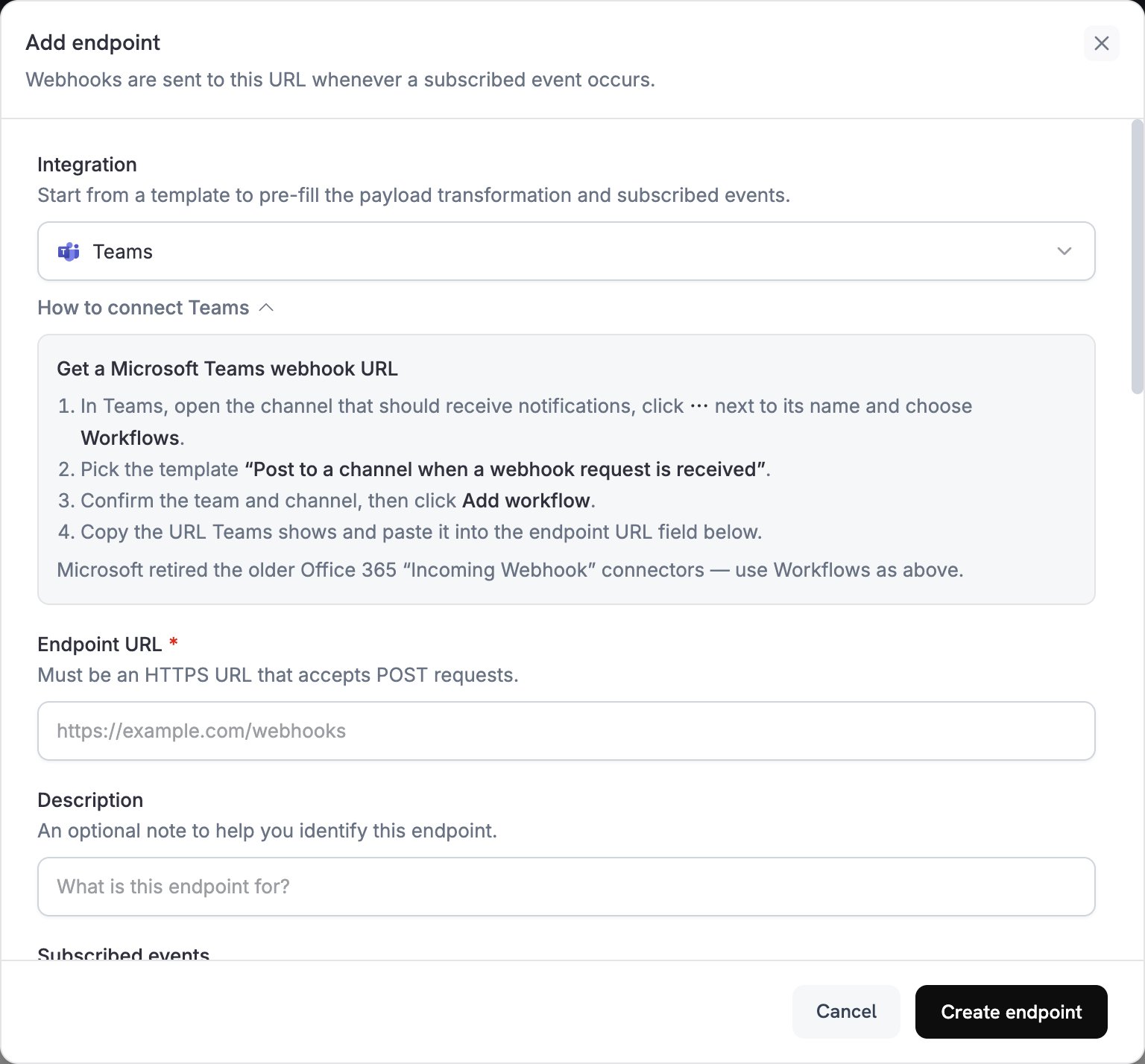
في لوحة معلومات مدفوعات دودي، انتقل إلى الويب هوكس → + إضافة نقطة نهاية وقم بتوسيع قائمة التكاملات.
إضافة نقطة نهاية وقائمة التكاملات
2

اختيار مايكروسوفت تيمز

اختر بطاقة تكامل مايكروسوفت تيمز.
3

إنشاء ويب هوك تيمز

في تيمز، انتقل إلى قناتك → ⋯ → الموصلات → ويب هوك الوارد → تكوين. انسخ عنوان URL للويب هوك.
4

لصق عنوان URL للويب هوك

ألصق عنوان URL للويب هوك الخاص بتيمز في تكوين نقطة النهاية.
5

تخصيص التحويل

قم بتحرير كود التحويل لتنسيق الرسائل كبطاقات تفاعلية لتيمز.
6

اختبار وإنشاء

اختبر باستخدام حمولات عينة وانقر على إنشاء لتفعيلها.
7

تم!

🎉 ستتلقى قناتك في تيمز الآن تحديثات مدفوعات دودي كبطاقات تفاعلية.

أمثلة على كود التحويل

بطاقة الدفع الأساسية

payment_card.js
function handler(webhook) {
  if (webhook.eventType === "payment.succeeded") {
    const p = webhook.payload.data;
    webhook.payload = {
      type: "message",
      attachments: [{
        contentType: "application/vnd.microsoft.card.adaptive",
        content: {
          type: "AdaptiveCard",
          body: [
            {
              type: "TextBlock",
              text: "✅ Payment Successful",
              weight: "Bolder",
              size: "Medium"
            },
            {
              type: "FactSet",
              facts: [
                { title: "Amount", value: `$${(p.total_amount / 100).toFixed(2)}` },
                { title: "Customer", value: p.customer.email },
                { title: "Payment ID", value: p.payment_id }
              ]
            }
          ]
        }
      }]
    };
  }
  return webhook;
}

إدارة الاشتراكات

subscription_card.js
function handler(webhook) {
  const s = webhook.payload.data;
  switch (webhook.eventType) {
    case "subscription.active":
      webhook.payload = {
        type: "message",
        attachments: [{
          contentType: "application/vnd.microsoft.card.adaptive",
          content: {
            type: "AdaptiveCard",
            body: [
              {
                type: "TextBlock",
                text: "📄 Subscription Activated",
                weight: "Bolder",
                color: "Good"
              },
              {
                type: "FactSet",
                facts: [
                  { title: "Customer", value: s.customer.email },
                  { title: "Product", value: s.product_id },
                  { title: "Amount", value: `$${(s.recurring_pre_tax_amount / 100).toFixed(2)}/${s.payment_frequency_interval}` },
                  { title: "Next Billing", value: new Date(s.next_billing_date).toLocaleDateString() }
                ]
              }
            ]
          }
        }]
      };
      break;
    case "subscription.cancelled":
      webhook.payload = {
        type: "message",
        attachments: [{
          contentType: "application/vnd.microsoft.card.adaptive",
          content: {
            type: "AdaptiveCard",
            body: [
              {
                type: "TextBlock",
                text: "⚠️ Subscription Cancelled",
                weight: "Bolder",
                color: "Warning"
              },
              {
                type: "FactSet",
                facts: [
                  { title: "Customer", value: s.customer.email },
                  { title: "Product", value: s.product_id },
                  { title: "Cancelled At", value: new Date(s.cancelled_at).toLocaleDateString() }
                ]
              }
            ]
          }
        }]
      };
      break;
  }
  return webhook;
}

تنبيهات النزاع

dispute_card.js
function handler(webhook) {
  if (webhook.eventType.startsWith("dispute.")) {
    const d = webhook.payload.data;
    const color = d.dispute_status === "won" ? "Good" : d.dispute_status === "lost" ? "Attention" : "Warning";
    const title = d.dispute_status === "won" ? "🏆 Dispute Won" : d.dispute_status === "lost" ? "❌ Dispute Lost" : "🚨 Dispute Update";
    
    webhook.payload = {
      type: "message",
      attachments: [{
        contentType: "application/vnd.microsoft.card.adaptive",
        content: {
          type: "AdaptiveCard",
          body: [
            {
              type: "TextBlock",
              text: title,
              weight: "Bolder",
              color: color
            },
            {
              type: "FactSet",
              facts: [
                { title: "Payment ID", value: d.payment_id },
                { title: "Amount", value: `$${(d.amount / 100).toFixed(2)}` },
                { title: "Status", value: d.dispute_status },
                { title: "Stage", value: d.dispute_stage }
              ]
            }
          ]
        }
      }]
    };
  }
  return webhook;
}

نصائح

  • استخدم بطاقات تفاعلية لتنسيق غني وتفاعلي
  • اختر الألوان المناسبة: جيد (أخضر)، تحذير (أصفر)، انتباه (أحمر)
  • اجعل مجموعات الحقائق مختصرة وقابلة للقراءة
  • اختبر باستخدام أداة اختبار ويب هوك تيمز قبل النشر

استكشاف الأخطاء وإصلاحها

  • تحقق من أن عنوان URL للويب هوك صحيح ونشط
  • تحقق من أن التحويل يعيد JSON صالح لبطاقة تفاعلية
  • تأكد من أن الويب هوك لديه إذن للنشر في القناة
  • تحقق من صحة مخطط بطاقة التفاعل في أداة اختبار ويب هوك تيمز
  • تحقق من أن جميع الحقول المطلوبة موجودة
  • تأكد من أن قيم الألوان صالحة (جيد، تحذير، انتباه، افتراضي)