

Quick Start
Platform Examples
Checkout Customization
Mobile Recipes
Dodo Payments tillhandahåller ett officiellt checkout-SDK för Android, iOS, React Native och Flutter. Varje SDK öppnar checkout-URL:en, fångar returen och tolkar resultatet bakom ett typat
start(...)-anrop. Alla SDK:n innehåller även återställning av övergivna sessioner. Bygg flödet manuellt endast om inget av SDK:n passar din stack.Förutsättningar
Innan du börjar behöver du:- Ett Dodo Payments-konto.
- En API-nyckel från Developer → API Keys och en webhook-signaturhemlighet från Developer → Webhooks.
- En Android-, iOS-, React Native- eller Flutter-app.
- En backend-server som skapar checkout-sessioner. API-nyckeln ska finnas kvar på denna server.
Integrationsflöde
Din backend gör alla Dodo Payments API-anrop. Appen ber endast din backend om en checkout-URL, öppnar den och visar resultatet.status i deep linken talar om för appen vad som ska visas för kunden. Den är inte ett bevis på betalning. Bevilja åtkomst från payment.succeeded- eller subscription.active-webhooken på din backend, inte från mobilresultatet.1
Backend: Create Checkout Session
Din backend skapar en checkout-session med din API-nyckel och returnerar dess
checkout_url till appen. Ange sessionens return_url som den deep link som appen registrerar, till exempel myapp://checkout/return.Checkout Session API Docs
Säkerhet: Skapa checkout-sessioner på din backend-server, aldrig i mobilappen. Vem som helst kan extrahera en API-nyckel från en appbinär.
2
Mobile: Get Checkout URL
Appen anropar din backend för att hämta checkout-URL:en. Autentisera denna begäran med den inloggade användarens egen sessionstoken. I varje exempel är
userSessionToken den token och CheckoutResponse din egen svarstyp.- iOS (Swift)
- Android (Kotlin)
- React Native (JavaScript)
- Flutter (Dart)
Säkerhet: Appen kommunicerar endast med din backend, aldrig direkt med Dodo Payments API.
3
Mobile: Open Checkout in Browser
Öppna checkout-URL:en i plattformens systemwebbläsare. Det officiella checkout-SDK:t för din plattform gör detta åt dig och returnerar ett typat resultat.
Pick your mobile SDK
4
Backend: Handle Payment Completion
Bevilja åtkomst när din backend tar emot
payment.succeeded- eller subscription.active-webhooken. Använd resultatet från retur-URL:en endast för att uppdatera appens skärm.Välj ditt SDK
Alla mobila SDK:n har samma kontrakt. Ettstart(...)-anrop öppnar Dodo Payments hostade checkout i plattformens systemwebbläsare och returnerar en typad CheckoutResult vars status är succeeded, failed, cancelled, pending eller expired. Inget SDK innehåller en API-nyckel eller anropar Dodo Payments API, och alla fyra stöder återställning av övergivna sessioner.
Android
iOS
React Native
Flutter
Registrera ett callback-URL-schema
Alla fyra SDK:n lämnar tillbaka kontrollen till appen via ett anpassat URL-schema som du väljer, till exempelmyapp://checkout/return. Registrera det en gång per plattform:
- Android
- iOS
- Expo
android/app/build.gradle
returnUrl.Om du bygger flödet själv öppnar du
checkout_url i plattformens systemwebbläsare (en Custom Tab på Android, SFSafariViewController på iOS), fångar navigeringen till din return_url och läser query-parametrarna status och payment_id. SDK:na gör detta åt dig.Anpassa utseendet
Alla SDK:n accepterar en valfricustomization-parameter i start(...) eller CheckoutParams. Den styr systemwebbläsaren: verktygsfältet, knapparna och hur webbläsaren visas. Checkout-sidans eget tema är separat. Du anger det på servern med customization.theme_config när du skapar checkout-sessionen.
Alternativen är grupperade per plattform eftersom en Custom Tab på Android och SFSafariViewController på iOS visar olika native-kontroller. Alla fält är valfria. Ett fält som inte anges lämnar plattformens standardvärde oförändrat.
Android - Custom Tab
Android - Custom Tab
Color
Bakgrundsfärg för verktygsfältet.
Färg för navigeringsfältet.
Avdelarfärg ovanför navigeringsfältet.
'default' | 'back'
default visar systemets “X”-ikon; back visar i stället en bakåtpil.'start' | 'end'
Vilken sida av verktygsfältet stängningsknappen visas på.
Visar verktygsfältets delningsikon.
boolean
Visar sidans titel under URL:en i verktygsfältet.
boolean
Låter verktygsfältet döljas automatiskt när sidan rullas.
boolean
Visar “Bokmärk den här sidan” i menyn med fler alternativ.
boolean
Visar “Ladda ned sidan” i menyn med fler alternativ.
'system' | 'light' | 'dark'
Tvingar fram ljust eller mörkt utseende oavsett enhetens systeminställning.
iOS - SFSafariViewController
iOS - SFSafariViewController
'done' | 'close' | 'cancel'
Etikett eller ikon för avvisningsknappen.
'pageSheet' | 'fullScreen'
standard:"pageSheet"
pageSheet visar checkouten som ett kort som kunden kan svepa bort. fullScreen täcker hela skärmen.boolean
Låter verktygsfältet fällas ihop vid rullning. Det syns endast när
presentationStyle är fullScreen. Med pageSheet förblir fälten fixerade.'system' | 'light' | 'dark'
Tvingar fram ljust eller mörkt utseende oavsett enhetens systeminställning.
android och ios. Native-SDK:n använder endast alternativen för sin egen plattform.
- React Native
- Flutter
- Android (Kotlin)
- iOS (Swift)
Anpassa checkout-sidan
Själva checkout-sidan (vilka fält som visas, temat och vilka betalningsmetoder som visas) ställs in på servern när du skapar checkout-sessionen. Anpassa utseendet gäller endast webbläsaren runt omkring. Parametrarna nedan har störst effekt på mobil konvertering. Dessa parametrar finns på tre platser i begäran om checkout-sessionen: på toppnivån, icustomization eller i feature_flags. Kolumnen Var den placeras anger objektet för varje parameter. Placera varje parameter i objektet som visas, eftersom en parameter i fel objekt inte har någon effekt.
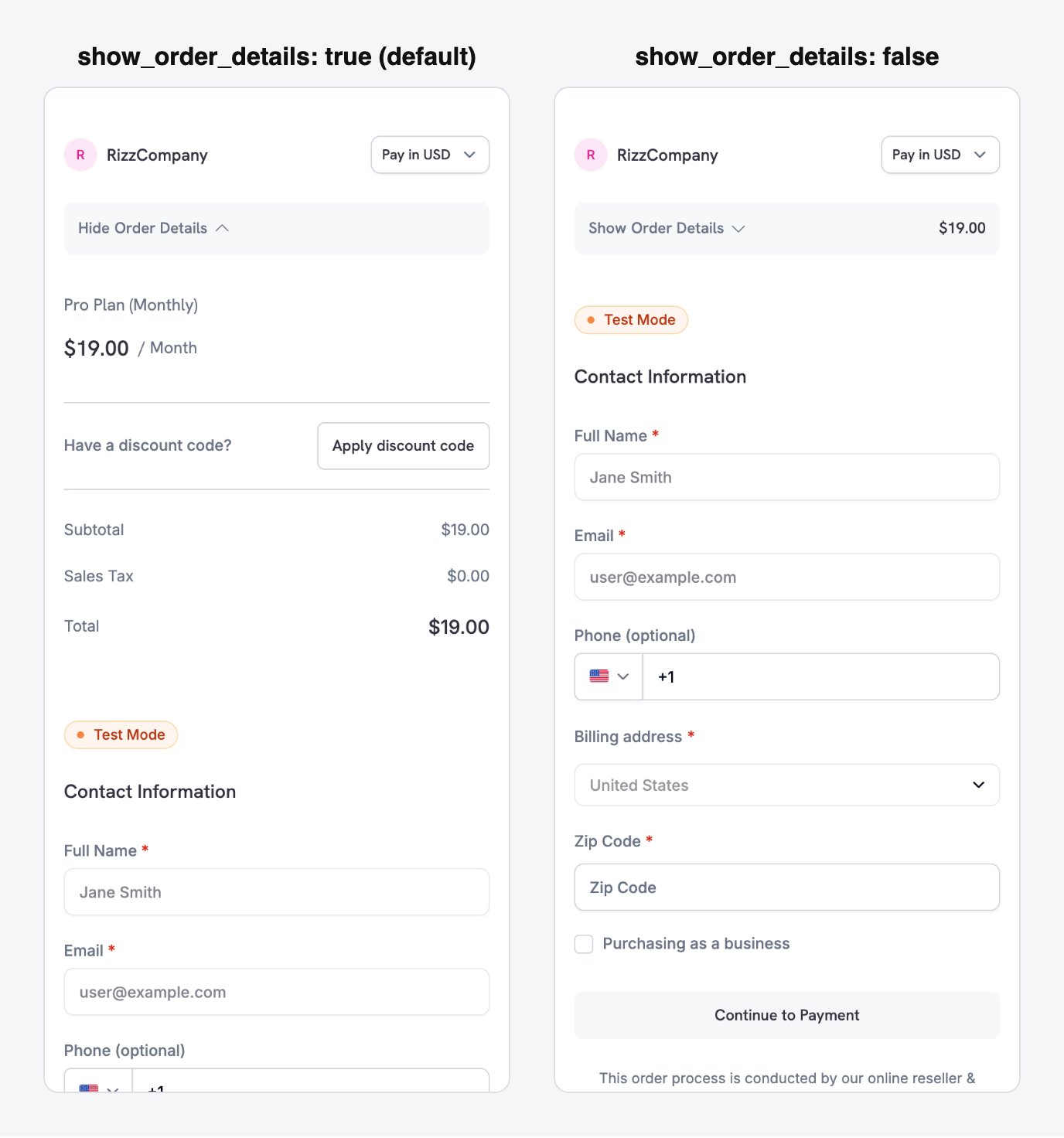
show_order_details: false moves the contact and payment fields above the fold, instead of behind the order summary.
minimal_address: true för att endast samla in ett postnummer i stället för fullständiga gatu-, stads- och delstatsfält:
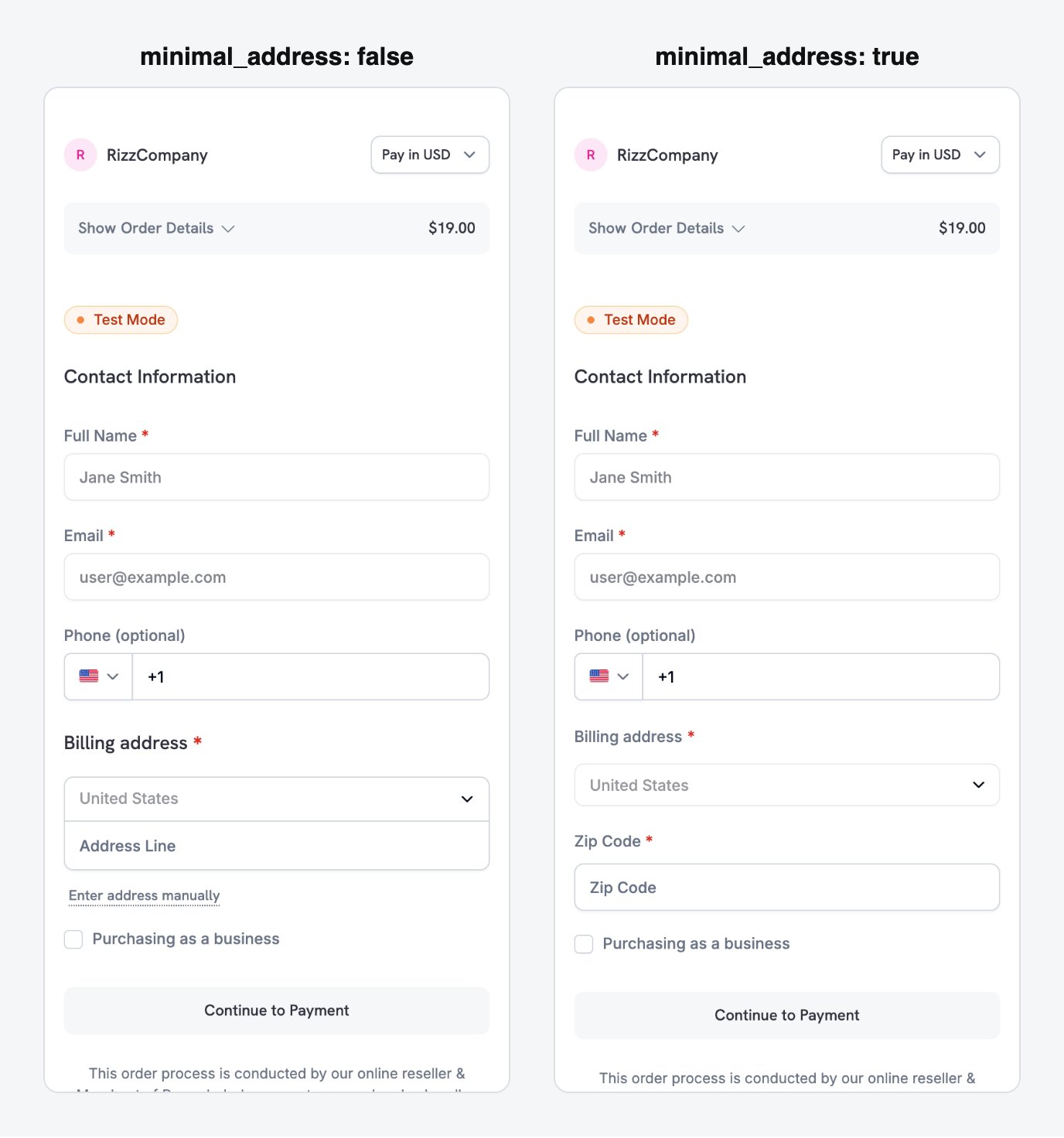
minimal_address: true reduces the billing address to a single postcode field.
theme: "system" så att checkouten följer enhetens inställning för ljust eller mörkt läge:
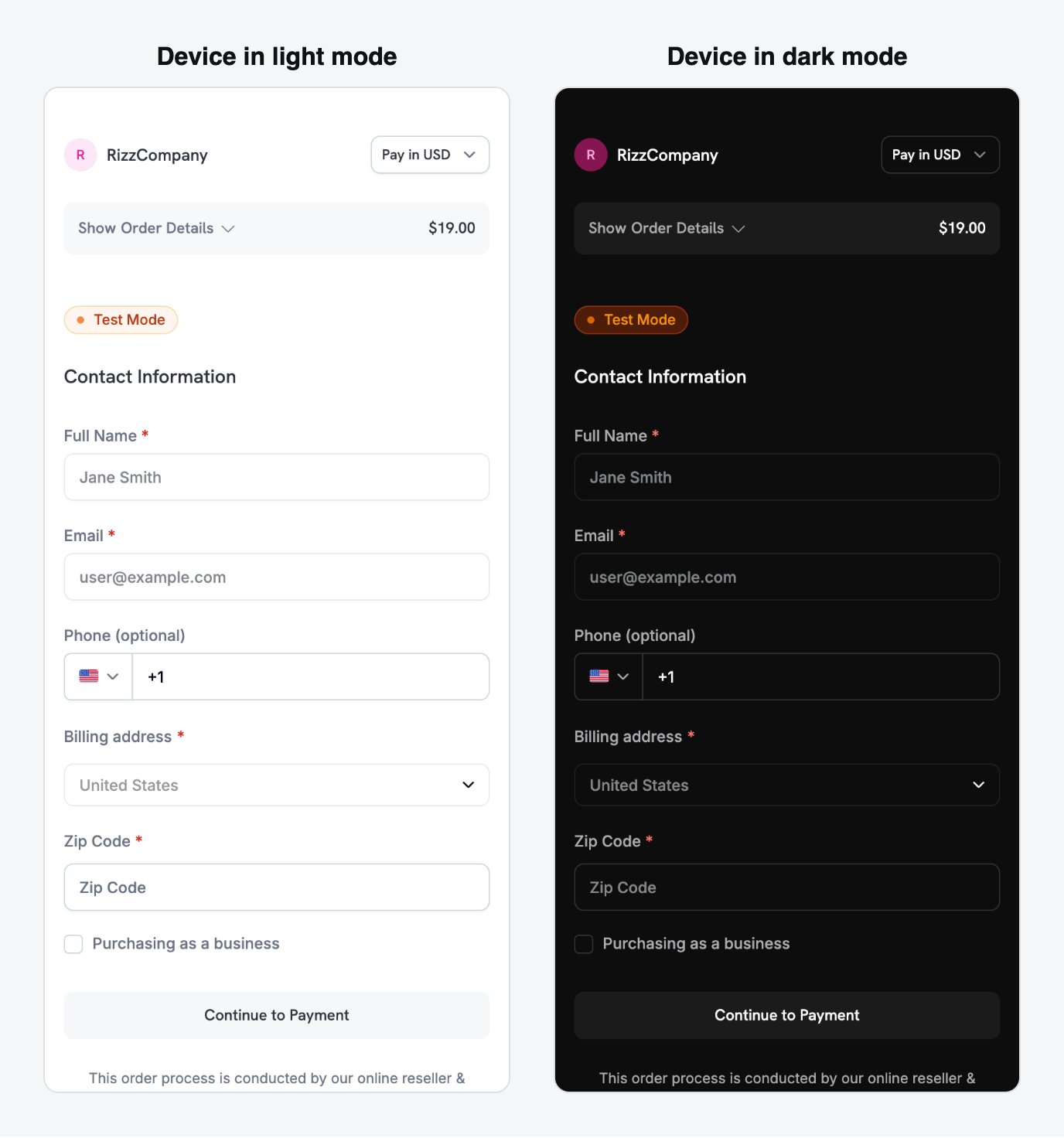
With theme: system, the checkout follows the device's light or dark appearance automatically.
Betalningsmetoderna beror på produkttypen. Apple Pay och Cash App Pay stöder återkommande prenumerationer med ett belopp som inte är noll. Engångsbetalningar kan använda alla betalningsmetoder som är aktiverade för ditt företag. Se Payment Methods.
Full checkout session parameter reference
Mobiloptimerade recept
Varje recept är en komplett begäran om en checkout-session som din backend skickar. Välj det som motsvarar din situation och ersätt produkt-ID:t med ditt eget. Node.js- och Python-klienterna konfigureras i det första receptet, och de övriga återanvänder dem.Minimal Mobile Checkout - fastest path to payment
Minimal Mobile Checkout - fastest path to payment
Använd detta recept för det kortaste formuläret: betalningsmetoder högst upp, endast postnummer för adressen, inget rabattkodsfält och ett tema som följer enheten.
- Node.js SDK
- Python SDK
Se Checkout Sessions för alla tillgängliga parametrar och deras standardvärden.
Använd detta recept när checkout-sidan måste se ut som en del av appen. Det anger dina varumärkesfärger, en hörnradie och en anpassad etikett på betalningsknappen.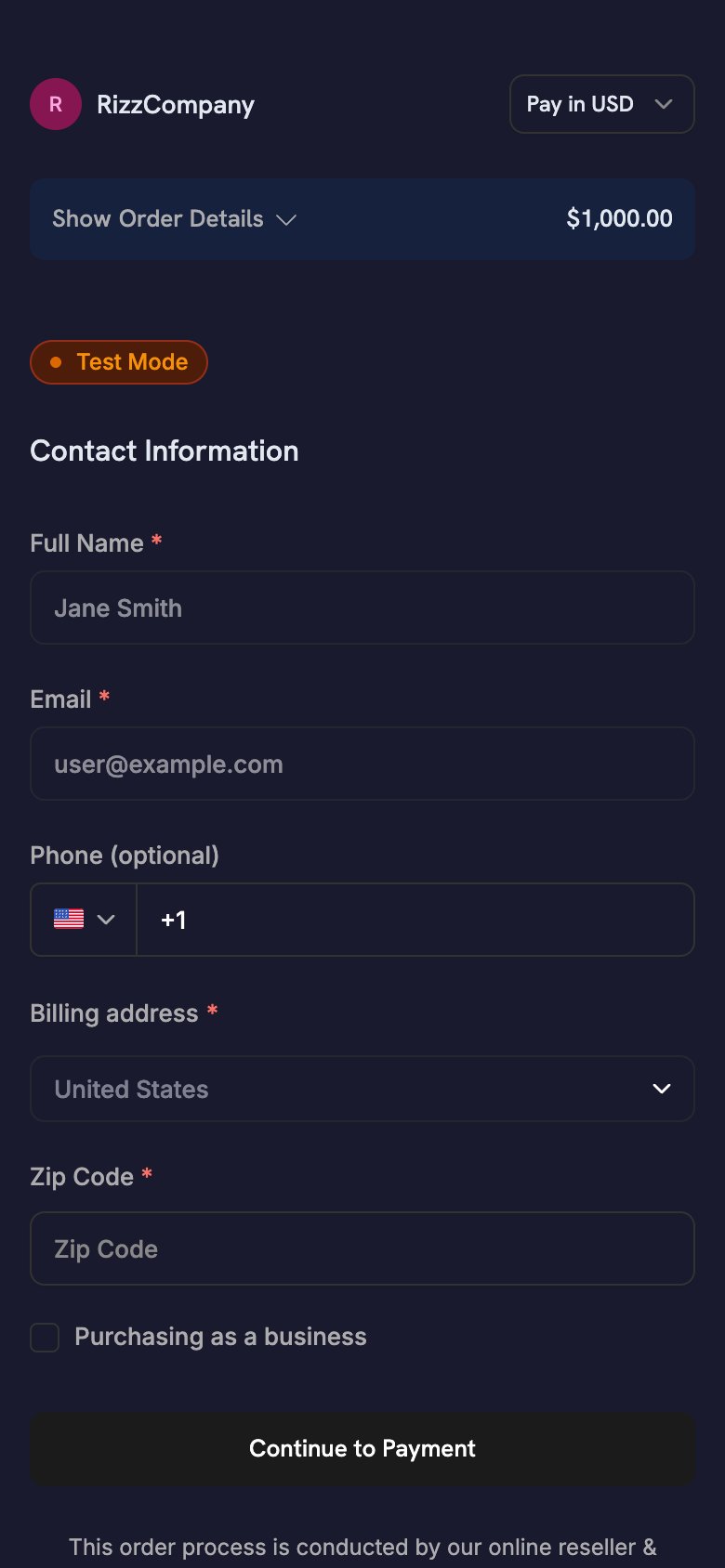
- Node.js SDK
- Python SDK
theme_config accepterar separata objekt för dark och light, så att färgpaletten följer enhetens utseende. Information om varje färgnyckel och typsnittsalternativet finns i Checkout Sessions.One-Click Returning Customer - saved card, instant confirmation
One-Click Returning Customer - saved card, instant confirmation
Använd detta recept för inloggade kunder som har betalat tidigare. Skicka kundens
customer_id, deras sparade payment_method_id och confirm: true för att hoppa över checkout-formuläret. Med en payment_method_id debiterar sessionen den sparade metoden direkt och returnerar ingen checkout_url, så appen har inget att öppna. Ta reda på resultatet via webhooks.- Node.js SDK
- Python SDK
Bevilja åtkomst när din backend tar emot
payment.succeeded-webhooken. Alla status som appen visar är endast UI-indikeringar.Subscription with Free Trial - trial before first charge
Subscription with Free Trial - trial before first charge
Använd detta recept för en prenumerationsprodukt med en kostnadsfri provperiod före den första debiteringen.
trial_period_days anger provperiodens längd för denna session.- Node.js SDK
- Python SDK
Bevilja åtkomst när din backend tar emot
subscription.active-webhooken, inte när det mobila SDK:t returnerar. Se Subscription Integration Guide för hela webhook-flödet.On-Demand Mandate - save a card for future variable charges
On-Demand Mandate - save a card for future variable charges
Använd detta recept för att spara en kunds betalningsmetod för senare debiteringar, till exempel påfyllning av plånbok, pay-as-you-go eller BNPL, utan att visa en prenumerationsetikett. Kunden godkänner betalningsmetoden en gång och du debiterar varierande belopp senare.
Appar som debiterar efter användning följer detta mönster. En astrologiapp kan till exempel debitera ett förgodkänt kort för varje session i stället för enligt ett fast schema.
- Node.js SDK
- Python SDK
Se On-Demand Subscriptions för hela debiteringsflödet, webhook-händelser och policyer för nya försök.
Prenumerationsflöden från mobilen
En mobilapp startar en prenumeration med samma flöde för checkout-sessionen som en engångsbetalning. SDK:t öppnar den hostade checkouten, kunden prenumererar och appen hanterar returen via deep link. Din backend hanterar resten av prenumerationens livscykel.Vanliga återkommande prenumerationer
För fakturering med ett fast intervall, till exempel månadsvis eller årsvis, skapar du en checkout-session med en prenumerationsprodukt och en deep link ireturn_url. Din backend tar emot subscription.active när prenumerationen startar.
Apple Pay och Cash App Pay stöder återkommande prenumerationer med ett belopp som inte är noll.
Prenumerationer på begäran
En prenumeration på begäran godkänner kundens betalningsmetod en gång, så att du kan debitera varierande belopp senare. Använd den för påfyllning av plånbok, pay-as-you-go och debiteringar vars belopp du inte känner till i förväg. Se receptet On-Demand Mandate för hela request body. På mobil bör du tänka på följande:- Ange
show_on_demand_tag: falseså att checkout-sidan inte visar formuleringar om prenumeration eller betalning på begäran. Kunder som sparar ett kort för påfyllningar förväntar sig inte prenumerationsvillkor. - När kunden har godkänt medgivandet tar din backend emot
subscription.active. Sparasubscription_id, eftersom alla senare debiteringar använder det.
Prenumeration med kostnadsfri provperiod
Om du vill erbjuda en provperiod före den första debiteringen skickar dusubscription_data.trial_period_days i checkout-sessionen. Kunden godkänner en betalningsmetod vid registreringen och Dodo Payments debiterar den när provperioden slutar. Se receptet Subscription with Free Trial för hela request body.
Uppgraderingar och nedgraderingar
Din backend ändrar planer via API:t, inte via en ny checkout-session. Dodo Payments beräknar proportioneringen med det proration-läge du väljer. Om du vill låta kunderna ändra planer själva länkar du till Customer Portal.Subscription Integration Guide
On-Demand Subscriptions
Upgrade / Downgrade
Customer Portal
Minska avhopp från checkout
På en liten skärm kräver varje formulärfält mer arbete att fylla i. Inställningarna för checkout-sessionen nedan förkortar formuläret och minskar avhoppen.Optimera formuläret
Dessa inställningar förkortar checkout-formuläret på mobil:Förifyll kunddata
Varje fält du förifyller är ett fält som kunden slipper skriva in:- Nya kunder: ange
customer.emailochcustomer.namefrån din auth-session. - Återkommande kunder: ange
customer.customer_idför att använda kundens lagrade uppgifter. - Valuta: skicka
billing_currencyochbilling_address.countrytillsammans.
Återställningsverktyg
Återställningsverktyg tar tillbaka kunder vars checkout eller förnyelse inte slutfördes:Abandoned Cart Recovery
Payment Retries
Subscription Dunning
Recovery Overview
Bästa praxis
- Säkerhet: Skicka aldrig med en API-nyckel i appen. Skapa checkout-sessioner på din backend och skicka endast
checkout_urltill appen. - Behörighet: Behandla
CheckoutResult.statussom en UI-ledtråd. Bevilja åtkomst först efter att din backend har bekräftat betalningen. - Användarupplevelse: Visa ett laddningstillstånd medan din backend skapar sessionen. Behandla inte
cancelledsom ett fel, eftersom betalningen fortfarande kan ha genomförts. - Testning: Använd testläge och testkort, och kontrollera retur-URL:ens rundresa på en riktig enhet såväl som i en simulator.
- Konvertering: Ange
show_order_details: falseochminimal_address: true. Tillsammans flyttar de betalningsmetoderna ovanför vecket och tar bort de flesta adressfälten. - Valuta: Skicka både
billing_currencyochbilling_address.country. Om du utelämnar någon av dem kan Adaptive Currency välja faktureringsvalutan från kundens IP-adress. - On-demand-betalning: Ange
show_on_demand_tag: falsenär du använder on-demand-prenumerationer enbart för att spara ett kort. Kunder som fyller på en plånbok förväntar sig inte formuleringar om prenumerationer. - Återställning: Aktivera Abandoned Cart Recovery i instrumentpanelen för att skicka e-post till kunder som inte slutför checkout.
Felsökning
Vanliga problem
- Callback anländer aldrig: Schemat i
returnUrlmåste matcha schemat du registrerade. På Android är det manifestetsdodoCallbackScheme-placeholder. På iOS är det URL-typenInfo.plist. React Native- och Flutter-appar behöver båda, och i Expo ställer config-pluginen in båda. - Checkout återgår till webbläsaren i stället för till din app (iOS): Din app vidarebefordrar inte den inkommande URL:en. Anropa
DodoCheckout.handleOpenURL(url)från.onOpenURL,scene(_:openURLContexts:)eller en React NativeLinking-lyssnare. PLATFORM_ERRORpå Android: Den vanligaste orsaken är att schemana inte matchar. Det inträffar också när dinMainActivityangerandroid:taskAffinity=""(standardvärdetflutter create), vilket kan göra att vissa Android OEM-versioner tappar den pågående checkouten.ALREADY_IN_PROGRESS: En checkout är fortfarande öppen. Vänta tills den föregående har slutförts eller stäng den innan du startar en ny.- Bygget misslyckas med en olöst placeholder: Du lade till Android SDK men angav inte
manifestPlaceholders["dodoCallbackScheme"]. - Betalningen lyckades men åtkomst beviljades inte: Din app beviljar åtkomst baserat på mobilresultatet. Bevilja i stället åtkomst från
payment.succeeded- ellersubscription.active-webhooken. - Apple Pay eller Google Pay visas inte på mobilen: Kontrollera om checkout laddas i en inbäddad WebView (
WKWebVieweller AndroidWebView). Öppna den med SDK:t eller i systemets webbläsaryta: en Custom Tab på Android ellerSFSafariViewControllerellerASWebAuthenticationSessionpå iOS.
Ytterligare resurser
- Guide för betalningsintegrering
- Webhook-dokumentation
- Testprocess
- Tekniska vanliga frågor
- Anpassning av checkout-sessioner
- On-Demand-prenumerationer
- Uppgradering/nedgradering av prenumerationer
- Abandoned Cart Recovery
- Customer Portal