

Pending đang chờ bạn cung cấp giá trị key, thay vì Dodo Payments tạo key khi thanh toán. Key có thể đến từ hệ thống riêng của bạn, nhà cung cấp bên thứ ba hoặc một pool mã có số lượng hữu hạn.
Khi hoàn tất hướng dẫn này, bạn sẽ có:
- A product with a License Key entitlement set to
manualfulfillment. - A webhook listener that detects when a customer is waiting for a key.
- A fulfillment call that delivers the key and notifies the customer automatically.
License Keys Overview
Toàn bộ vòng đời của license key và thiết lập
fulfillment_mode.Fulfill License Key Grant API
Tài liệu tham khảo API cho endpoint bạn gọi để cung cấp key.
How It Works
Trình tự dưới đây minh họa một giao dịch mua, từ checkout đến khi cung cấp key: Fulfillment thủ công chỉ thay đổi bước issuance. Sau khi được cung cấp, key hoạt động giống key được tạo tự động trong các thao tác kích hoạt, xác thực, vô hiệu hóa, hết hạn và thu hồi. Một giao dịch mua nhiều đơn vị tạo một grantPending cho mỗi đơn vị, và mỗi grant cần một key riêng.
Điều kiện tiên quyết
Để làm theo hướng dẫn này, bạn cần:- Tài khoản merchant Dodo Payments.
- API key được tạo trong Developer → API Keys và lưu trong
DODO_PAYMENTS_API_KEY, cùng webhook signing secret từ Developer → Webhooks, được lưu trongDODO_PAYMENTS_WEBHOOK_KEY. Xem hướng dẫn tạo API key. - Một backend endpoint có thể nhận webhook.
Sử dụng
https://test.dodopayments.com và thông tin xác thực test mode trong quá trình xây dựng. Khi chuyển sang production, hãy chuyển sang https://live.dodopayments.com và các live mode key.Bước 1 — Tạo entitlement License Key ở chế độ thủ công
Entitlement là định nghĩa có thể tái sử dụng về nội dung bạn cung cấp. Tạo một entitlement License Key và đặtfulfillment_mode thành manual.
- Dashboard
- API
1
Open Entitlements
Đi đến Entitlements trong dashboard và nhấp + để tạo entitlement.
2
Choose License Key
Chọn License Keys và nhập Name. Biểu mẫu có các trường sau: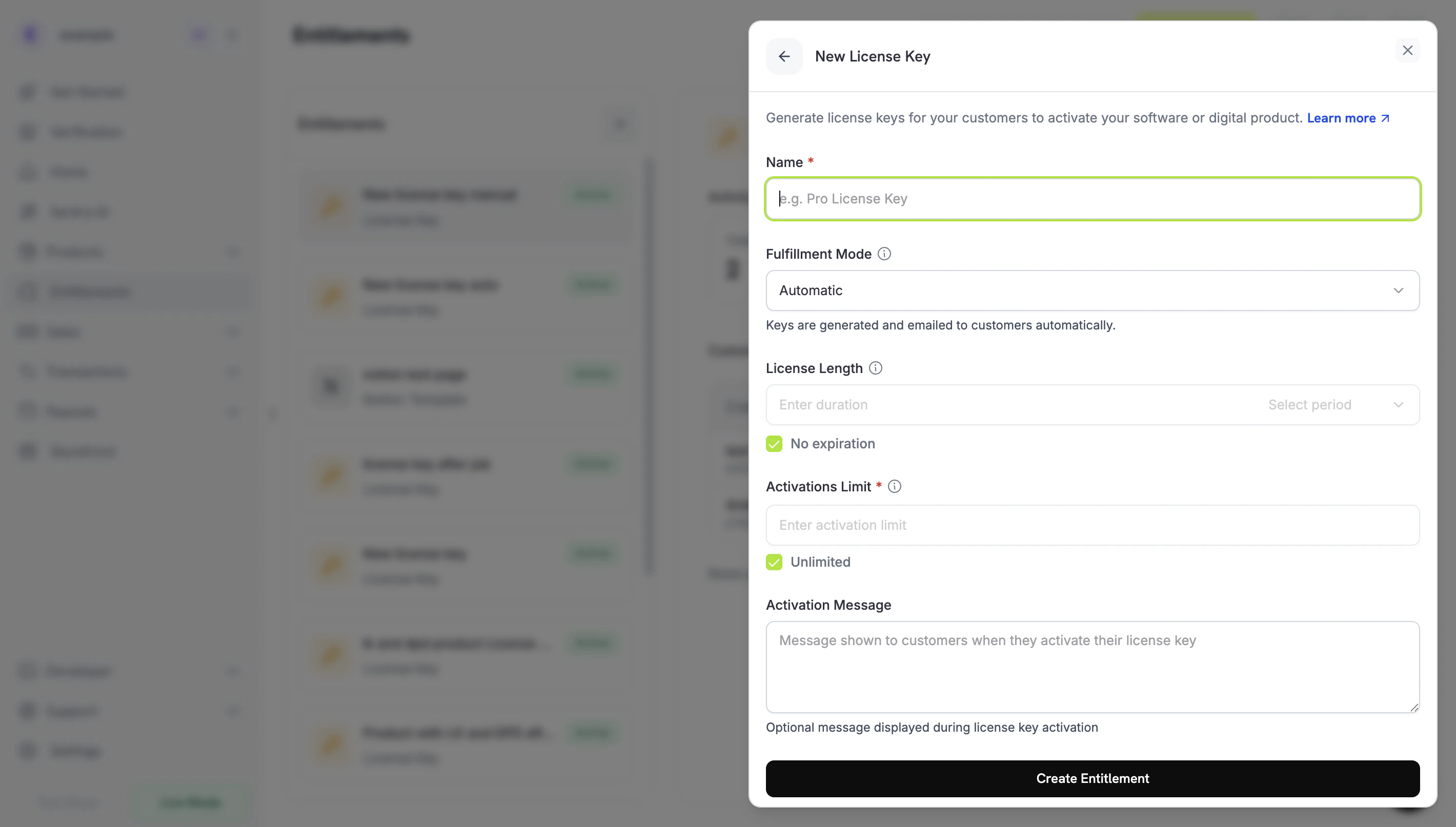
- Fulfillment Mode: mặc định là Automatic. Đây là thiết lập bật fulfillment thủ công và bạn sẽ thay đổi thiết lập này ở bước tiếp theo.
- License Length: thời gian mỗi key được cấp còn hiệu lực, hoặc No expiration.
- Activations Limit: số lần kích hoạt tối đa cho mỗi key, hoặc Unlimited.
- Activation Message: thông báo tùy chọn hiển thị cho khách hàng khi họ kích hoạt key và được đưa vào email license key.
3
Set Fulfillment Mode to Manual
Mở menu thả xuống Fulfillment Mode và chuyển từ Automatic sang Manual. Phần còn lại của hướng dẫn này phụ thuộc vào thiết lập này: nếu không có thiết lập này, Dodo Payments sẽ tự động tạo và gửi key qua email, đồng thời không tạo grant đang chờ xử lý. Khi chọn Manual, mỗi giao dịch mua sẽ tạo một grant
Pending để bạn xử lý. Nhấp Create Entitlement để lưu.fulfillment_mode mặc định là auto. Nếu bạn bỏ qua hoặc giữ nguyên một entitlement hiện có, entitlement đó vẫn sử dụng fulfillment tự động. Chỉ các entitlement được đặt rõ ràng thành manual mới tạo grant đang chờ xử lý.Bước 2 — Gắn entitlement vào sản phẩm
Mở sản phẩm bạn muốn bán, đi đến phần Entitlements và chọn License Key entitlement bạn đã đặt thành Manual ở Bước 1. Một sản phẩm có thể cung cấp license key này cùng với các entitlement khác trong cùng một giao dịch mua. Nếu bạn chưa có sản phẩm, trước tiên hãy tạo sản phẩm mua một lần hoặc sản phẩm subscription. Để bán sản phẩm qua checkout, xem Integration Guide.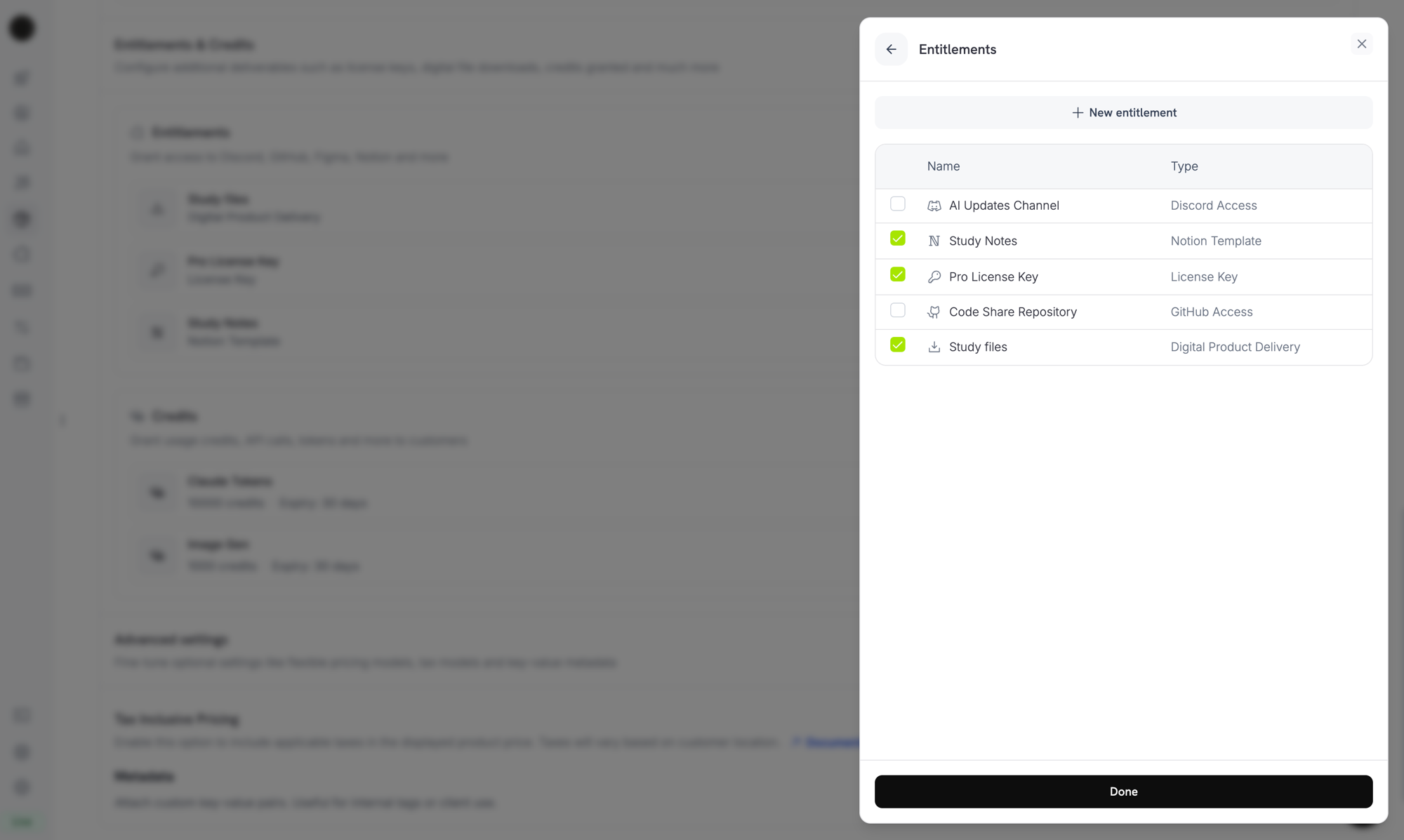
Selecting the License Key entitlement in the product entitlements panel.
Chế độ fulfillment là thuộc tính của entitlement, không phải sản phẩm. Vì bạn đã đặt chế độ này thành Manual ở Bước 1, mọi sản phẩm được gắn entitlement này sẽ tạo grant license key
Pending khi mua. Bạn không cần cấu hình thêm gì trên sản phẩm.Bước 3 — Phát hiện grant đang chờ xử lý
Khi khách hàng mua sản phẩm, Dodo Payments tạo một grant ở trạng tháiPending với không có key được gắn vào và gửi webhook entitlement_grant.created. Sự kiện này báo hiệu rằng khách hàng đang chờ key.
Lắng nghe webhook
Thêm webhook endpoint trong Developer → Webhooks trên dashboard, sau đó xử lý các grant license key đang chờ. Webhook tuân theo đặc tả Standard Webhooks, vì vậy bạn có thể xác minh chúng bằng thư việnstandardwebhooks:
integration_type: "license_key", vì vậy bạn có thể nhận diện grant license key mà không cần tra cứu thêm. Việc gửi webhook có thể lặp lại, vì vậy hãy bỏ qua các sự kiện có header webhook-id mà bạn đã xử lý. Xem tài liệu tham khảo webhook Entitlement Grant để biết payload đầy đủ.
Hoặc Poll API List Grants
Nếu không muốn phụ thuộc vào webhook, hãy liệt kê các grant cho entitlement License Key và lọc theostatus. Mọi grant trên entitlement License Key đều là grant license key, nên bạn không cần bộ lọc integration_type:
Bước 4 — Cung cấp key
Lấy giá trị key từ hệ thống riêng của bạn, sau đó gửi key đến endpoint Fulfill License Key Grant. Lệnh gọi này yêu cầu secret API key của bạn với quyền Editor. Đây không phải là một trong các public license endpoint. SDK cũng cung cấp endpoint này, ví dụ nhưclient.entitlements.grants.fulfillLicenseKey() trong TypeScript và client.entitlements.grants.fulfill_license_key() trong Python.
Các trường request
string
bắt buộc
Chuỗi license key cung cấp cho khách hàng, tối đa 255 ký tự. Khoảng trắng ở hai đầu sẽ được loại bỏ và giá trị trống hoặc chỉ gồm khoảng trắng sẽ bị từ chối.
integer
Giới hạn kích hoạt cho từng key, tối thiểu là 1. Khi không được cung cấp, thiết lập Activations Limit của entitlement sẽ được áp dụng.
string
Thời điểm hết hạn của từng key (ISO 8601). Khi không được cung cấp, key của grant one-time sẽ hết hạn theo License Length của entitlement, còn key của grant subscription không có thời hạn, nên hiệu lực của key tuân theo subscription.
Delivered, Dodo Payments gửi key qua email cho khách hàng (giống email họ nhận được khi fulfillment tự động), đồng thời các sự kiện webhook license_key.created và entitlement_grant.delivered được phát ra.
Email bao gồm license key, sản phẩm, giới hạn kích hoạt, thời hạn và hướng dẫn kích hoạt của bạn:
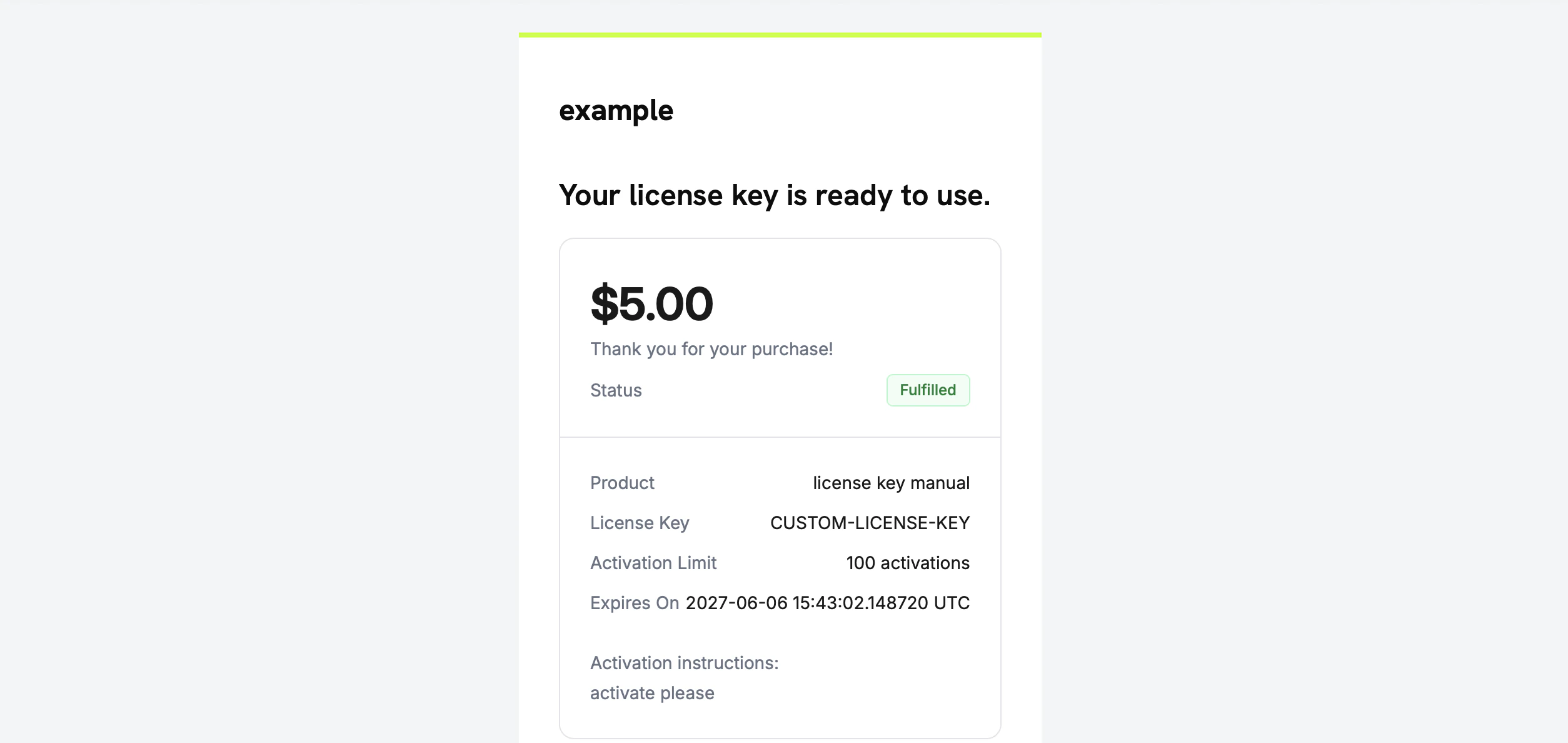
The license key email the customer receives once you fulfill the grant.
Bạn không cần tự gửi key qua email. Việc cung cấp diễn ra tự động khi grant được xử lý.
Bước 5 — Xử lý lỗi và retry
Endpoint sẽ xác thực grant trước khi cung cấp bất kỳ nội dung nào. Hãy xử lý các response sau:Xác minh quy trình
Để kiểm thử toàn bộ quy trình từ đầu đến cuối:- Mua sản phẩm trong test mode. Xem các hướng dẫn checkout.
- Xác nhận webhook của bạn đã nhận
entitlement_grant.createdcùng vớistatus: "Pending"vàintegration_type: "license_key", hoặc grant xuất hiện trong response List Grants được lọc theostatus=Pending. - Gọi fulfill endpoint với một test key.
- Xác nhận response hiển thị
status: "Delivered"cùnglicense_keyđã được điền, khách hàng nhận được email chứa key vàentitlement_grant.deliveredđược phát ra.
Sau khi key được cung cấp, khách hàng có thể kích hoạt và xác thực key đó thông qua các public license endpoint, giống như key được tạo tự động.
Tài liệu tham khảo API liên quan
Create Entitlement
Tạo entitlement License Key với
fulfillment_mode: manual.List Grants
Lọc theo
status và customer_id để tìm các grant đang chờ xử lý.Fulfill License Key Grant
Cung cấp giá trị key và chuyển grant sang
Delivered.Entitlement Grant Webhooks
Các sự kiện
entitlement_grant.* báo hiệu grant đang chờ xử lý và đã được cung cấp.