الانتقال إلى المحتوى الرئيسي

Documentation Index

Fetch the complete documentation index at: https://docs.dodopayments.com/llms.txt

Use this file to discover all available pages before exploring further.

دع Sentra تكتب لك رمز التكامل.
استخدم مساعدنا بالذكاء الاصطناعي في VS Code، Cursor، أو Windsurf لتوليد رمز SDK/API، معالجات webhook، والمزيد، بكتابة ما تريد.
جرّب Sentra: التكامل المدعوم بالذكاء الاصطناعي →
في هذا الدليل، ستقوم ببناء MailKit، منصة بريد إلكتروني تجارية حيث يدفع العملاء مقدمًا للحصول على مجموعة من أرصدة البريد الإلكتروني. تمنح الخطة بدلًا شهريًا للبريد الإلكتروني؛ وعندما ينخفض رصيد العملاء، يمكنهم شراء حزمة تعبئة بدلاً من الانتظار للدورة التالية. يتم خصم رصيد واحد تلقائيًا مع كل إرسال.
هذا الدليل يستخدم Resend كمزود بريد إلكتروني. تكفي خطته المجانية (3000 بريد إلكتروني/شهر) لبناء واختبار العملية بالكامل دون حساب مدفوع. النمط يعمل مع أي مزود؛ قم بتبديل resend.emails.send لخدمات مثل SendGrid أو Postmark أو SES أو جهاز إرسال SMTP الخاص بك.
بنهاية هذا الدليل، ستتعلم كيفية:
  • إنشاء حق ائتمان مخصص (البريد الإلكتروني) في لوحة التحكم الخاصة بك
  • إرفاق الأرصدة بخطة اشتراك ومنتج تعبئة لمرة واحدة
  • إرسال رسائل بريد إلكتروني حقيقية عبر Resend واقتطاع رصيد واحد لكل إرسال عبر إدخال دفتر الأستاذ
  • استعلام عن رصيد ائتمان مباشر من واجهتك الأمامية
  • التحقق من صحة webhooks الخاصة بـ Dodo والتعامل credit.balance_low لتنبيه العملاء قبل الوصول إلى الصفر

ما سنقوم ببنائه

إليك نموذج التسعير لMailKit:
المنتجالسعرالرسائل
خطة MailKit$19/شهر5000 رسالة/دورة
حزمة تعبئة$9 لمرة واحدة+5000 رسالة
الوحدة هي رسالة واحدة = رصيد واحد. لا يحتاج العملاء للتفكير في الرموز أو الحزم أو الوحدات الموزونة. يرون فقط “لديك 4231 رسالة متبقية هذا الشهر.”
قبل أن تبدأ، تأكد من أن لديك:
  • حساب Dodo Payments (وضع الاختبار كاف)
  • حساب Resend مجاني ومفتاح API
  • Node.js 18+ ومعرفة أساسية بـ TypeScript

الخطوة 1: إنشاء واجب ائتمان البريد الإلكتروني الخاص بك

يحدد واجب الائتمان الوحدة التي تبيعها منصتك: في هذه الحالة، إرسال بريد إلكتروني واحد.
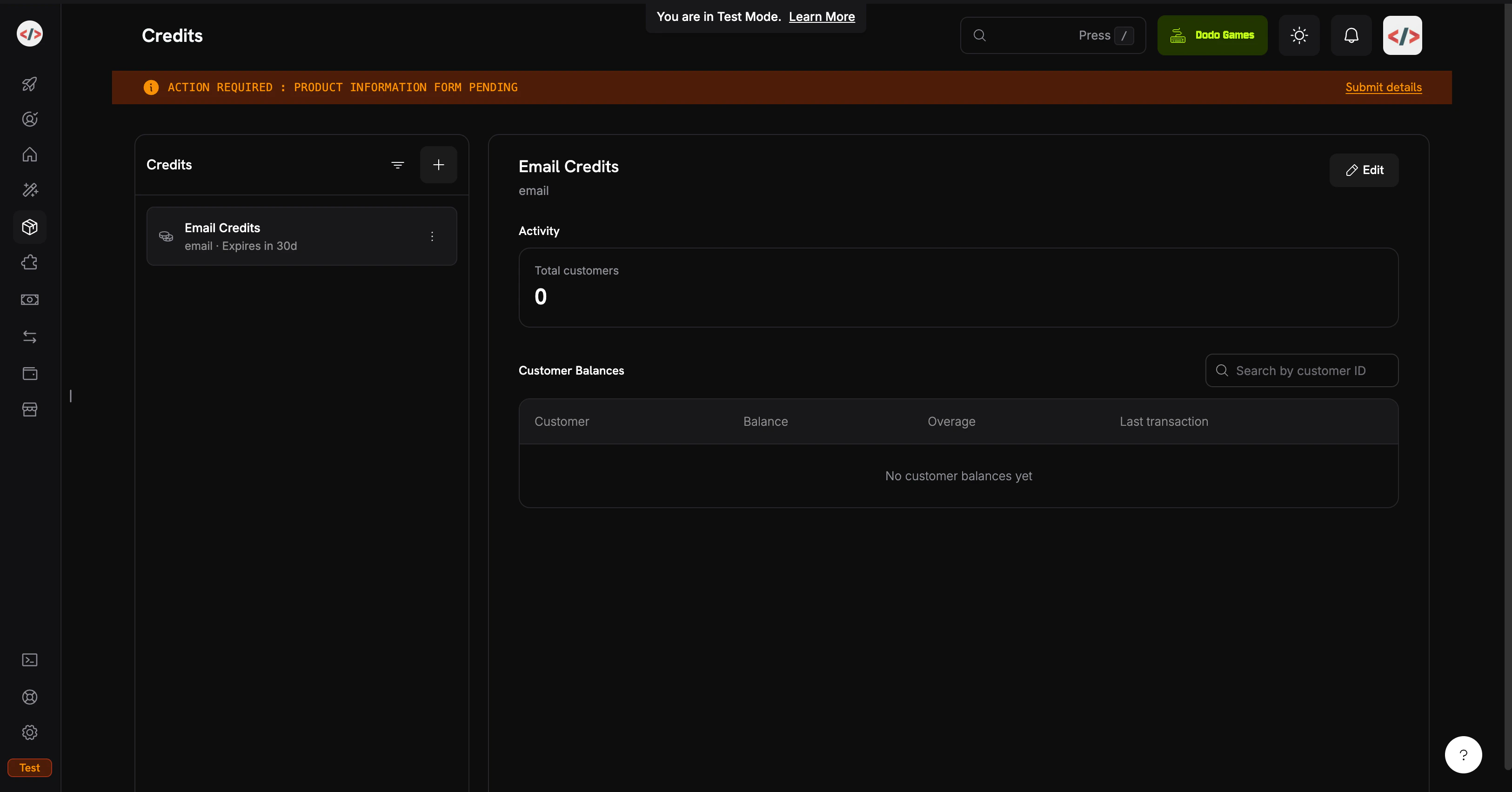
صفحة قائمة الأرصدة
  1. قم بتسجيل الدخول إلى لوحة التحكم في Dodo Payments الخاصة بك
  2. انقر على المنتجات في الشريط الجانبي الأيسر
  3. اختر علامة التبويب الأرصدة
  4. انقر على إنشاء ائتمان
املأ تفاصيل الائتمان: اسم الائتمان: Email Credits نوع الائتمان: اختر وحدة مخصصة اسم الوحدة: email الدقة: 0 (رسالة البريد الإلكتروني هي وحدة كاملة دائمًا؛ لا يمكنك إرسال نصف رسالة) انتهاء الصلاحية: 30 days (يتم إعادة ضبط بدل كل دورة) الدقة لا يمكن تغييرها بعد الإنشاء. للوحدات المتقطعة مثل رسائل البريد الإلكتروني أو الجلسات، 0 هو الصحيح. لن نقوم بتمكين التمديد أو الغرامات الزائدة في هذا الدليل؛ الهدف هو أبسط تدفق CBB ممكن. يمكنك مراجعتها في وقت لاحق على مرفق الائتمان. انقر على إنشاء الائتمان. افتح الائتمان ونسخ هويته. ستحتاجها لاستفسارات الرصيد الخلفية. يبدو مثل cent_xxxxxxxxxxxx. جاهز Email Credits تملكك. التالي: المنتجات التي تمنح الأرصدة للعملاء.

الخطوة 2: إنشاء الخطة وحزمة التعبئة

ستقوم بإنشاء منتجين: خطة اشتراك متجددة و حزمة تعبئة دفع واحد. تمنح الخطة 5000 رسالة لكل دورة؛ تضيف التعبئة 5000 رسالة أخرى عند الطلب. كلاهما يرفق نفس Email Credits الواجب. هذا الدليل يخصم الأرصدة من خلال إدخالات دفتر الأستاذ المباشرة بدلاً من العدادات المعتمدة على الاستخدام. إدخالات دفتر الأستاذ فورية (يحدث تحديث الرصيد في ميلي ثانية)، لا تحتاج إلى إعداد إضافي، وتناسب بشكل جيد عندما تساوي حركة المستخدم في الرصيد. إذا كنت تفضل التخصيم التلقائي من أحداث الاستخدام التي تم ابتلاعها (مفيد للوحدات الموزونة مثل “الرموز” أو ” MB المصنعة”)، راجع الفوترة المعتمدة على الرصيد → الفوترة المعتمدة على الاستخدام في الرصيد للنمط المعتمد على العدادات.

خطة MailKit ($19/شهر، 5000 بريد إلكتروني)

  1. انتقل إلى المنتجات → إنشاء منتج
  2. املأ تفاصيل المنتج:
اسم المنتج: MailKit Plan الوصف: 5,000 transactional emails per month.
  1. حدد الاشتراك كنوع للمنتج
  2. حدد السعر المتكرر:
سعر متكرر: 19.00 دورة الفوترة: Monthly العملة: USD انتقل إلى حقوق → أرصدة → إرفاق وقم بالتكوين: حق الائتمان: Email Credits الأرصدة الصادرة لكل دورة فوترة: 5000 عتبة الرصيد المنخفض: 20 (النسبة المئوية؛ يتم تشغيل credit.balance_low عند انخفاض الرصيد إلى أقل من 20٪ من بدل الدورة، أي 1000 رسالة) استيراد إعدادات الائتمان الافتراضية: تمكين (يستخدم صلاحية 30 يومًا من الخطوة 1) اضغط على إضافة إلى المنتج، ثم حفظ المنتج. انسخ معرف المنتج (pdt_xxxxxxxxxxxx). الخطة: $19/شهر → 5000 رسالة يتم تحديثها في كل دورة.

حزمة التعبئة ($9 لمرة واحدة، 5000 رسالة)

  1. اذهب إلى المنتجات → إنشاء منتج
  2. املأ تفاصيل المنتج:
اسم المنتج: Email Top-Up Pack الوصف: Add 5,000 emails to your MailKit balance instantly.
  1. حدد دفعة فردية كنوع للمنتج
  2. حدد التسعير:
السعر: 9.00 العملة: USD في الحقوق → الأرصدة → إرفاق:
  • واجب الائتمان: Email Credits
  • الأرصدة الصادرة: 5000
تمنح المنتجات لمرة واحدة أرصدة بصلاحية خاصة بها (30 يومًا من الشراء، حسب الخطوة 1). تتكدس التعبئة فوق أرصدة الاشتراك؛ لا تحل محلها. احفظ ونسخ معرف المنتج. حزمة التعبئة: $9 → +5000 رسالة، متاحة فورًا.

الخطوة 3: إعداد الخلفية

الآن قم ببناء خادم Express الذي يتعامل مع الدفع، الإرسال، استعلامات الرصيد، و webhooks.
mkdir mailkit && cd mailkit
npm init -y
npm install dodopayments resend express dotenv
npm install -D tsx @types/node @types/express
أضف نصًا للتطوير إلى package.json:
{
  "scripts": {
    "dev": "tsx watch server.ts"
  }
}
tsx يشغل TypeScript مباشرة بدون خطوة بناء أو tsconfig.json، وهو مثالي لدليل. للإنتاج، أضف tsconfig.json ونص build. قم بإنشاء .env:
.env
# Dodo Payments
DODO_PAYMENTS_API_KEY=your_dodo_test_api_key
DODO_WEBHOOK_KEY=your_dodo_webhook_signing_key
CREDIT_ENTITLEMENT_ID=cent_xxxxxxxxxxxx
PLAN_PRODUCT_ID=pdt_xxxxxxxxxxxx
TOPUP_PRODUCT_ID=pdt_xxxxxxxxxxxx

# Resend
RESEND_API_KEY=re_xxxxxxxxxxxx

# App
BASE_URL=http://localhost:3000
PORT=3000
ستملأ DODO_WEBHOOK_KEY في الخطوة 4 بعد إنشاء النقطة النهاية. مفتاح API لل Resend يأتي من resend.com/api-keys. أضف .env إلى .gitignore مباشرة. لا تقم بارتكاب مفاتيح API. قم بإنشاء server.ts في جذر المشروع:
server.ts
import 'dotenv/config';
import express, { Request, Response } from 'express';
import DodoPayments from 'dodopayments';
import { Resend } from 'resend';

const app = express();

const dodo = new DodoPayments({
  bearerToken: process.env.DODO_PAYMENTS_API_KEY!,
  webhookKey: process.env.DODO_WEBHOOK_KEY!,
  environment: 'test_mode',
});

const resend = new Resend(process.env.RESEND_API_KEY!);

const CREDIT_ENTITLEMENT_ID = process.env.CREDIT_ENTITLEMENT_ID!;
const BASE_URL = process.env.BASE_URL!;

// ---------------------------------------------------------------
// Webhook endpoint MUST receive the raw body for signature
// verification. Register it BEFORE express.json().
// ---------------------------------------------------------------
app.post(
  '/webhooks/dodo',
  express.raw({ type: 'application/json' }),
  async (req: Request, res: Response) => {
    const headers = {
      'webhook-id': req.headers['webhook-id'] as string,
      'webhook-signature': req.headers['webhook-signature'] as string,
      'webhook-timestamp': req.headers['webhook-timestamp'] as string,
    };

    let event: any;
    try {
      event = await dodo.webhooks.unwrap(req.body.toString('utf8'), { headers });
    } catch (err) {
      console.error('Webhook signature verification failed:', err);
      return res.status(401).json({ error: 'invalid signature' });
    }

    switch (event.type) {
      case 'credit.balance_low': {
        const { customer_id, credit_entitlement_name, available_balance, threshold_percent } =
          event.data;
        console.log(
          `[low-balance] ${customer_id} has ${available_balance} ${credit_entitlement_name} ` +
            `left (under ${threshold_percent}%)`
        );
        await notifyCustomerLowBalance(customer_id, Number(available_balance));
        break;
      }
      case 'credit.added':
        console.log('[credit.added]', event.data);
        break;
      case 'credit.rolled_over':
        console.log('[rolled_over]', event.data);
        break;
    }

    res.json({ received: true });
  }
);

// JSON parsing for everything else.
app.use(express.json());

// ---------------------------------------------------------------
// POST /checkout/subscribe → start the MailKit subscription.
// ---------------------------------------------------------------
app.post('/checkout/subscribe', async (req, res) => {
  const { email, name } = req.body as { email: string; name: string };

  const session = await dodo.checkoutSessions.create({
    product_cart: [{ product_id: process.env.PLAN_PRODUCT_ID!, quantity: 1 }],
    customer: { email, name },
    return_url: `${BASE_URL}/?subscribed=1`,
  });

  res.json({ checkout_url: session.checkout_url });
});

// ---------------------------------------------------------------
// POST /checkout/topup → buy a 5,000-email top-up for an existing
// customer. In a real app, customer_id is resolved from the
// authenticated session, never trusted from request input.
// ---------------------------------------------------------------
app.post('/checkout/topup', async (req, res) => {
  const { customer_id } = req.body as { customer_id: string };

  const session = await dodo.checkoutSessions.create({
    product_cart: [{ product_id: process.env.TOPUP_PRODUCT_ID!, quantity: 1 }],
    customer: { customer_id },
    return_url: `${BASE_URL}/?topped_up=1`,
  });

  res.json({ checkout_url: session.checkout_url });
});

// ---------------------------------------------------------------
// GET /credits/:customerId → live balance for the dashboard widget.
// ---------------------------------------------------------------
app.get('/credits/:customerId', async (req, res) => {
  const balance = await dodo.creditEntitlements.balances.retrieve(req.params.customerId, {
    credit_entitlement_id: CREDIT_ENTITLEMENT_ID,
  });

  res.json({ balance: balance.balance });
});

// ---------------------------------------------------------------
// POST /send → send an email via Resend, then write a ledger entry
// to debit 1 credit from the customer's balance. The deduction is
// instant; the next /credits call reflects it.
// ---------------------------------------------------------------
app.post('/send', async (req, res) => {
  const { customer_id, to, subject, html } = req.body as {
    customer_id: string;
    to: string;
    subject: string;
    html: string;
  };

  // 1. Pre-flight balance check: refuse to send if the balance is at zero.
  const balance = await dodo.creditEntitlements.balances.retrieve(customer_id, {
    credit_entitlement_id: CREDIT_ENTITLEMENT_ID,
  });

  if (Number(balance.balance) <= 0) {
    return res.status(402).json({
      error: 'No email credits remaining. Buy a top-up pack or upgrade your plan.',
    });
  }

  // 2. Send via Resend.
  const { data, error } = await resend.emails.send({
    from: 'MailKit <onboarding@resend.dev>', // swap for your verified domain
    to: [to],
    subject,
    html,
  });

  if (error) {
    return res.status(500).json({ error: error.message });
  }

  // 3. Debit 1 credit. Resend's message id is the idempotency key, so if
  //    the client retries this request, Dodo deduplicates and the
  //    customer is only debited once for that send.
  await dodo.creditEntitlements.balances.createLedgerEntry(customer_id, {
    credit_entitlement_id: CREDIT_ENTITLEMENT_ID,
    amount: '1',
    entry_type: 'debit',
    reason: `email send ${data!.id}`,
    idempotency_key: data!.id,
  });

  res.json({ id: data!.id });
});

async function notifyCustomerLowBalance(customerId: string, available: number) {
  // In production: send an email to the account owner, push a banner,
  // open an in-app modal, etc. For the demo we just log.
  console.log(`[NOTIFY] ${customerId}: ${available} emails left. Consider topping up.`);
}

app.use(express.static('public'));

const port = Number(process.env.PORT) || 3000;
app.listen(port, () => {
  console.log(`MailKit running on http://localhost:${port}`);
});
يجب أن يكون جسم Webhook خامًا. express.json() يقوم بتحليل وإعادة تسلسل الجسم، مما يكسر التحقق من التوقيع. قم بتعريف /webhooks/dodo باستخدام express.raw() قبل سطر app.use(express.json()). جهز الخلفية: الاشتراك، التعبئة، الرصيد، الإرسال، ومعالج الويب مرتبطة جميعًا. قم بإنشاء public/index.html:
public/index.html
<!doctype html>
<html>
  <head>
    <title>MailKit Demo</title>
    <style>
      body {
        font-family: system-ui, -apple-system, sans-serif;
        max-width: 720px;
        margin: 40px auto;
        padding: 0 20px;
        color: #1a1a2e;
      }
      h1 { font-size: 28px; margin-bottom: 4px; }
      h2 { font-size: 16px; margin-top: 32px; padding-bottom: 6px; border-bottom: 1px solid #eee; }
      label { display: block; font-size: 13px; font-weight: 600; margin: 12px 0 4px; }
      input, select, textarea {
        width: 100%;
        padding: 10px;
        border: 1px solid #ddd;
        border-radius: 6px;
        font-family: inherit;
        font-size: 14px;
        box-sizing: border-box;
      }
      button {
        background: #1a1a2e;
        color: white;
        padding: 10px 18px;
        border: none;
        border-radius: 6px;
        cursor: pointer;
        font-size: 14px;
        margin-top: 12px;
      }
      button:hover { background: #2d2d4a; }
      .out {
        background: #f6f6fa;
        padding: 12px;
        border-radius: 6px;
        margin-top: 12px;
        font-size: 13px;
        font-family: ui-monospace, monospace;
        white-space: pre-wrap;
        word-break: break-all;
      }
      .balance { font-size: 36px; font-weight: 700; color: #4f46e5; }
      .balance-sub { color: #888; font-size: 13px; margin-top: 4px; }
    </style>
  </head>
  <body>
    <h1>MailKit</h1>
    <p>Prepaid transactional email, billed per send.</p>

    <h2>1. Subscribe to MailKit ($19/mo, 5,000 emails)</h2>
    <label>Email</label>
    <input id="subEmail" type="email" placeholder="you@example.com" />
    <label>Name</label>
    <input id="subName" type="text" placeholder="Your name" />
    <button onclick="subscribe()">Get checkout link</button>
    <div id="subOut" class="out" hidden></div>

    <h2>2. Check your balance</h2>
    <label>Customer ID</label>
    <input id="balCust" type="text" placeholder="cus_xxxxxxxxxxxx" />
    <button onclick="checkBalance()">Refresh</button>
    <div id="balOut" class="out" hidden></div>

    <h2>3. Send a transactional email</h2>
    <label>Customer ID</label>
    <input id="sendCust" type="text" placeholder="cus_xxxxxxxxxxxx" />
    <label>To (Resend's sandbox accepts delivered@resend.dev)</label>
    <input id="sendTo" type="email" value="delivered@resend.dev" />
    <label>Subject</label>
    <input id="sendSubj" type="text" value="Hello from MailKit" />
    <label>HTML body</label>
    <textarea id="sendBody" rows="3">&lt;strong&gt;It works!&lt;/strong&gt;</textarea>
    <button onclick="sendEmail()">Send</button>
    <div id="sendOut" class="out" hidden></div>

    <h2>4. Run low? Buy a top-up pack</h2>
    <label>Customer ID</label>
    <input id="topCust" type="text" placeholder="cus_xxxxxxxxxxxx" />
    <button onclick="topup()">Buy 5,000 emails ($9)</button>
    <div id="topOut" class="out" hidden></div>

    <script>
      const show = (id, content) => {
        const el = document.getElementById(id);
        el.hidden = false;
        el.innerHTML = content;
      };

      async function subscribe() {
        const r = await fetch('/checkout/subscribe', {
          method: 'POST',
          headers: { 'Content-Type': 'application/json' },
          body: JSON.stringify({
            email: document.getElementById('subEmail').value,
            name: document.getElementById('subName').value,
          }),
        });
        const data = await r.json();
        show('subOut', r.ok
          ? `<a href="${data.checkout_url}" target="_blank">Open checkout →</a>`
          : `Error: ${data.error}`);
      }

      async function checkBalance() {
        const id = document.getElementById('balCust').value;
        const r = await fetch(`/credits/${id}`);
        const data = await r.json();
        show('balOut', r.ok
          ? `<div class="balance">${Number(data.balance).toLocaleString()}</div>
             <div class="balance-sub">emails available</div>`
          : `Error: ${data.error}`);
      }

      async function sendEmail() {
        const r = await fetch('/send', {
          method: 'POST',
          headers: { 'Content-Type': 'application/json' },
          body: JSON.stringify({
            customer_id: document.getElementById('sendCust').value,
            to: document.getElementById('sendTo').value,
            subject: document.getElementById('sendSubj').value,
            html: document.getElementById('sendBody').value,
          }),
        });
        const data = await r.json();
        show('sendOut', r.ok ? `Sent. Message id: ${data.id}` : `Error: ${data.error}`);
      }

      async function topup() {
        const r = await fetch('/checkout/topup', {
          method: 'POST',
          headers: { 'Content-Type': 'application/json' },
          body: JSON.stringify({ customer_id: document.getElementById('topCust').value }),
        });
        const data = await r.json();
        show('topOut', r.ok
          ? `<a href="${data.checkout_url}" target="_blank">Open top-up checkout →</a>`
          : `Error: ${data.error}`);
      }
    </script>
  </body>
</html>

الخطوة 4: ربط نقطة نهاية Webhook

حدث credit.balance_low هو ما يسمح لك بتنبيه العملاء قبل نفادهم. بدونه، أول مرة يلاحظون فيها المشكلة هي عندما يفشل إرسال البريد الإلكتروني. تحتاج Webhooks إلى URL عام. استخدم ngrok (أو أي نفق) أثناء التطوير:
ngrok http 3000
انسخ URL التحويل HTTPS (مثل https://1234abcd.ngrok-free.app).
  1. انتقل إلى المطورون → Webhooks → إضافة نقطة نهاية
  2. URL: https://1234abcd.ngrok-free.app/webhooks/dodo
  3. الأحداث: اشترك في credit.added، credit.balance_low، وcredit.rolled_over
  4. احفظ، ثم انسخ المفتاح إلى .env كـ DODO_WEBHOOK_KEY
  5. أعد تشغيل الخادم الخاص بك

الخطوة 5: اختبار التدفق الكامل

npm run dev
يجب أن ترى MailKit running on http://localhost:3000. افتحه في متصفحك.
  1. في القسم 1، أدخل بريد إلكتروني واختبار الاسم، انقر على الحصول على رابط الدفع
  2. افتح الرابط، واستكمل دفع باستخدام بطاقة اختبار
  3. بعد الدفع، اعثر على customer_id في لوحة القيادة الخاصة بك تحت العملاء
يجب أن يكون لدى العميل الآن 5000 رسالة في رصيده. تحقق من العملاء → [العميل] → الأرصدة.
  1. استبدل customer_id في القسم 3
  2. اترك to مضبوطًا إلى delivered@resend.dev (صندوق إعادة الارتداد لResend الذي يقبل كل شيء)
  3. انقر فوق إرسال
ستحصل على معرف رسالة Resend. قم بتحديث الرصيد في القسم 2 وينخفض العدد فورًا إلى 4999. يتم عكس كل خصم للدفتر في الرصيد المباشر في اللحظة التي يتم فيها كتابته. العتبة هي 20٪ (1000 من 5000 رسالة مسموح بها). لتشغيلها دون إرسال 4000 رسالة حقيقية، قم بخصم الرصيد يدويًا من لوحة التحكم:
  1. انتقل إلى العملاء → [العميل] → الأرصدة → أرصدة البريد الإلكتروني
  2. انقر على تعديل الرصيد وخصم 4000
  3. أرسل بريدًا إلكترونيًا آخر عبر العرض التجريبي
يجب أن يسجل الخادم الخاص بك في غضون ثوانٍ:
[low-balance] cus_xxx has 999 Email Credits left (under 20%)
[NOTIFY] cus_xxx: 999 emails left. Consider topping up.
تلقى خادمك وتحقق من صحة webhook. في بيئة الإنتاج، هنا سترسل بريدًا إلكترونيًا للعميل أو تعرض شريطًا في التطبيق.
  1. أدخل customer_id في القسم 4
  2. انقر على شراء 5000 رسالة، وأكمل الدفع التجريبي
  3. قم بتحديث الرصيد، وسيرتفع بمقدار 5000
يتم تشغيل حدث credit.added مع grant_source: one_time. تتكدس التعبئة فوق أرصدة الاشتراك؛ يتم استهلاك كلا المجموعتين بطريقة FIFO (القدمى أولاً). قم بخصم الرصيد يدويًا حتى يصل إلى الصفر، ثم حاول إرسال رسالة أخرى. ستحصل على:
{ "error": "No email credits remaining. Buy a top-up pack or upgrade your plan." }
يعتبر خطأ 402 هو فرض على مستوى التطبيق. تُعد API رصيد Dodo مصدر الحقيقة؛ لا تقم بتخزينه مؤقتًا على العميل.

استكشاف الأخطاء وإصلاحها

يتم حساب التوقيع على الجسد الرئيسي لHTTP الخام. express.json() يقوم بتحليل وتكرار الحمولة، مما يكسر HMAC. تأكد من أن /webhooks/dodo قد تم تسجيله مع express.raw({ type: 'application/json' }) فوق سطر app.use(express.json())، وأن DODO_WEBHOOK_KEY يتطابق مع مفتاح التوقيع المعروض على صفحة تفاصيل النقطة النهاية. ثلاثة أشياء لتأكيدها، بهذا الترتيب:
  1. أكمل العميل عملية الدفع (يتم إصدار الأرصدة عند الدفع الناجح، وليس عند إنشاء الجلسة)
  2. CREDIT_ENTITLEMENT_ID في .env مطابق للائتمان الذي تم إرفاقه بالمنتج (الرموز الغير متطابقة تكتب بصمت إلى الائتمان الخطأ)
  3. أن customer_id الذي تمرره جاء من Dodo (جدول customers في لوحة القيادة)، وليس من قاعدتك الخاصة
مرسل الصندوق رمل onboarding@resend.dev يسلم فقط إلى البريد الإلكتروني على حساب Resend الخاص بك أو إلى delivered@resend.dev. لإرسال إلى أي شخص آخر، تحقق من نطاق واستخدم عنوان from عليه.

ما قمت ببنائه

Email Credits، معرف مرة واحدة وملحق بكل من خطة الاشتراك وحزمة التعبئة. $19/شهر يمنح 5000 رسالة لكل دورة. يعرف العملاء ما الذي يدفعون مقابله، وتعرف أنت تكلفتك القصوى. منتج لمرة واحدة يمنح 5000 رسالة. يتكدس على أرصدة الاشتراك بدون تغيير في الخطة المطلوبة. استدعاء createLedgerEntry واحد بعد كل إرسال. لا مقياس، لا تأخر التجميع، غير معدل عند إعادة المحاولة عبر رقم الرسالة للResend. اقرأ كامل وثائق CBB للحصول على أوضاع التمديد، الإدارة المحاسبية، والسطح الكامل للAPI. تحتاج إلى مساعدة؟
Last modified on May 14, 2026