> ## Documentation Index
> Fetch the complete documentation index at: https://docs.dodopayments.com/llms.txt
> Use this file to discover all available pages before exploring further.
# One‑Time Payments
> Sell fixed‑price digital goods or services with a single upfront charge, no renewals.
One‑time payments let you sell lifetime access, downloads, or single‑use services with a single charge. There are no renewals, proration rules, or billing cycles. Just a clean, instant purchase experience.
Issue unique license keys after purchase.
Automatically deliver files and content after payment.
React to payment succeeded/failed and receipt events.
Create full or partial refunds programmatically.
## What Are One‑Time Payments?
One‑time payments are fixed, up‑front purchases - ideal for:
* **Software licenses**: Lifetime or major‑version unlocks
* **Digital downloads**: E‑books, templates, graphics, or plugins
* **Services**: Audits, onboarding packages, or one‑off consulting
* **Courses and tickets**: Courses, workshops, or live sessions
## Key Benefits
* **Simple checkout**: No renewals or proration logic
* **Instant fulfillment**: Deliver licenses or files right away
* **Flexible pricing**: Discounts and taxes supported
* **Developer‑first**: Clear APIs for creation, refunds, and webhooks
## Creating One‑Time Products
Create products in your Dodo Payments dashboard, then sell them via hosted checkout, payment links, or your API.
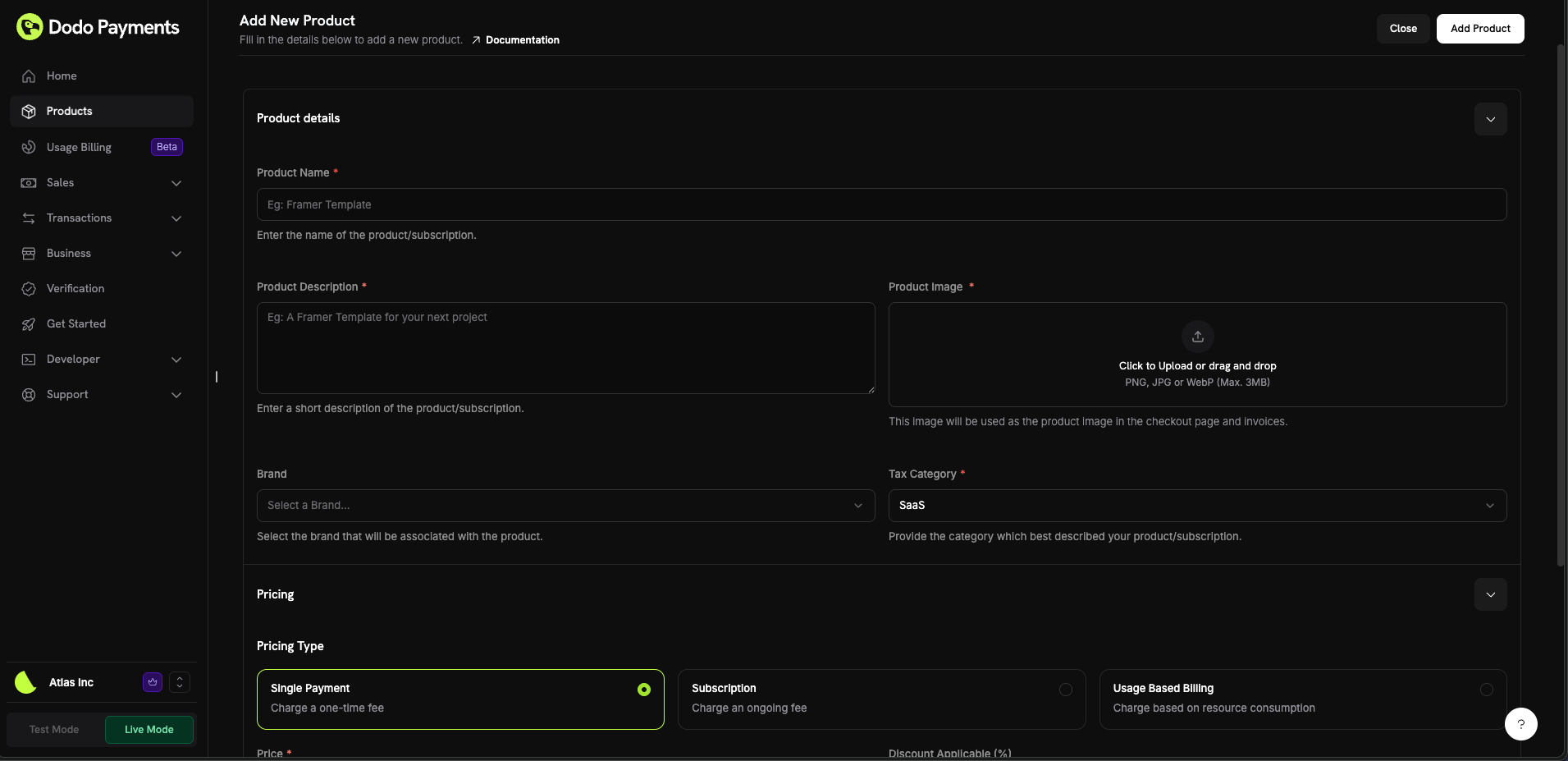 ### Product configuration
Configure the fields in the dashboard to define how your product appears and sells.
#### Product details
* **Product Name** (required): Display name shown in checkout and invoices
* **Product Description** (required): Clear value statement customers see before paying
* **Product Image** (required): PNG/JPG/WebP up to 3 MB
* **Brand**: Associate the product with a specific brand for theming and emails
* **Tax Category** (required): Choose the correct category to determine tax rules
Pick the most accurate tax category to ensure correct tax collection per region.
#### Pricing
* **Pricing Type**: Choose Single Payment
* **Price** (required): Fixed charge with currency
* **Discount Applicable (%)**: Optional percentage discount displayed in checkout and invoices
Changing product pricing affects only new purchases. Existing customers aren’t impacted.
#### Advanced settings
* **Tax Inclusive Pricing**: Display prices inclusive of applicable taxes
* **Generate license keys**: Issue a unique key after purchase. See License Keys
* **Digital Product Delivery**: Deliver files or content automatically. See Digital Product Delivery
* **Metadata**: Attach custom key–value pairs for internal tagging or integrations. See Metadata
Use metadata to store identifiers from your system (e.g., orderId) to reconcile events and receipts later.
## API Management
Use `POST /checkouts` to create one‑time charges from products.
View the create payment API.
Use `POST /refunds` to create full or partial refunds.
Learn how to refund a payment.
Use `GET /payments` to list payments and `GET /payments/{payment_id}` to retrieve one. Retrieve line items with `GET /payments/{payment_id}/line-items`.
Browse the listing API.
See the retrieval API.
Inspect purchased items for a payment.
React to events like payment.succeeded or payment.failed in your backend.
Handle payment lifecycle events.
## Common Use Cases
* **License‑based tools**: Unlock features with a one‑time key
* **Digital assets**: Themes, templates, icon sets, or media
* **Professional services**: Fixed‑fee implementation or setup
* **Education**: Course tickets and one‑off workshops
## Integration Examples
### Checkout Sessions (single payment)
Create a checkout session with a one‑time product in the cart:
```typescript theme={null}
const session = await client.checkoutSessions.create({
product_cart: [
{ product_id: 'prod_one_time', quantity: 1 }
]
});
```
## Best Practices
* **Clarify deliverables**: Tell buyers exactly what they get and how it’s delivered
* **Deliver instantly**: Use license keys or digital delivery for immediate access
* **Track with metadata**: Store your IDs for easy reconciliation
One‑time payments are the fastest path to selling fixed‑price products. Start simple, verify delivery, and iterate your offer based on conversion and feedback.
### Product configuration
Configure the fields in the dashboard to define how your product appears and sells.
#### Product details
* **Product Name** (required): Display name shown in checkout and invoices
* **Product Description** (required): Clear value statement customers see before paying
* **Product Image** (required): PNG/JPG/WebP up to 3 MB
* **Brand**: Associate the product with a specific brand for theming and emails
* **Tax Category** (required): Choose the correct category to determine tax rules
Pick the most accurate tax category to ensure correct tax collection per region.
#### Pricing
* **Pricing Type**: Choose Single Payment
* **Price** (required): Fixed charge with currency
* **Discount Applicable (%)**: Optional percentage discount displayed in checkout and invoices
Changing product pricing affects only new purchases. Existing customers aren’t impacted.
#### Advanced settings
* **Tax Inclusive Pricing**: Display prices inclusive of applicable taxes
* **Generate license keys**: Issue a unique key after purchase. See License Keys
* **Digital Product Delivery**: Deliver files or content automatically. See Digital Product Delivery
* **Metadata**: Attach custom key–value pairs for internal tagging or integrations. See Metadata
Use metadata to store identifiers from your system (e.g., orderId) to reconcile events and receipts later.
## API Management
Use `POST /checkouts` to create one‑time charges from products.
View the create payment API.
Use `POST /refunds` to create full or partial refunds.
Learn how to refund a payment.
Use `GET /payments` to list payments and `GET /payments/{payment_id}` to retrieve one. Retrieve line items with `GET /payments/{payment_id}/line-items`.
Browse the listing API.
See the retrieval API.
Inspect purchased items for a payment.
React to events like payment.succeeded or payment.failed in your backend.
Handle payment lifecycle events.
## Common Use Cases
* **License‑based tools**: Unlock features with a one‑time key
* **Digital assets**: Themes, templates, icon sets, or media
* **Professional services**: Fixed‑fee implementation or setup
* **Education**: Course tickets and one‑off workshops
## Integration Examples
### Checkout Sessions (single payment)
Create a checkout session with a one‑time product in the cart:
```typescript theme={null}
const session = await client.checkoutSessions.create({
product_cart: [
{ product_id: 'prod_one_time', quantity: 1 }
]
});
```
## Best Practices
* **Clarify deliverables**: Tell buyers exactly what they get and how it’s delivered
* **Deliver instantly**: Use license keys or digital delivery for immediate access
* **Track with metadata**: Store your IDs for easy reconciliation
One‑time payments are the fastest path to selling fixed‑price products. Start simple, verify delivery, and iterate your offer based on conversion and feedback.