);
}
```
1. 개발 서버를 시작하세요:
```bash theme={null}
npm run dev
```
2. 체크아웃 흐름을 테스트하세요:
* 체크아웃 버튼 클릭
* 오버레이가 나타나는지 확인
* 테스트 자격 증명을 사용하여 결제 흐름 테스트
* 리디렉션이 올바르게 작동하는지 확인
브라우저 콘솔에서 체크아웃 이벤트 로그를 확인할 수 있어야 합니다.
프로덕션 준비가 되었을 때:
1. 모드를 `'live'`로 변경합니다:
```typescript theme={null}
DodoPayments.Initialize({
mode: "live",
displayType: "overlay",
onEvent: (event) => {
console.log("Checkout event:", event);
}
});
```
2. 백엔드에서 라이브 체크아웃 세션을 사용하도록 체크아웃 URL을 업데이트하세요.
3. 프로덕션에서 전체 흐름을 테스트하세요.
4. 이벤트 및 오류를 모니터링하세요.
## API 참조
### 구성
#### 초기화 옵션
```typescript theme={null}
interface InitializeOptions {
mode: "test" | "live";
displayType?: "overlay" | "inline";
onEvent: (event: CheckoutEvent) => void;
}
```
| 옵션 | 타입 | 필수 | 설명 |
| ------------- | ----------------------- | --- | ------------------------------------------------------- |
| `mode` | `"test" \| "live"` | 예 | 환경 모드: 개발 시 `'test'`, 프로덕션 시 `'live'` |
| `displayType` | `"overlay" \| "inline"` | 아니요 | 표시 유형: 기본값인 모달 체크아웃은 `'overlay'`, 임베디드 체크아웃은 `'inline'` |
| `onEvent` | `function` | 예 | 체크아웃 이벤트 처리를 위한 콜백 함수 |
#### 체크아웃 옵션
```typescript theme={null}
interface CheckoutOptions {
checkoutUrl: string;
options?: {
showTimer?: boolean;
showSecurityBadge?: boolean;
manualRedirect?: boolean;
};
}
```
| 옵션 | 타입 | 필수 | 설명 |
| --------------------------- | --------- | --- | ----------------------------------------------------------------------------------------------------------------------- |
| `checkoutUrl` | `string` | 예 | [create checkout session API](/api-reference/checkout-sessions/create)에서 가져온 체크아웃 세션 URL |
| `options.showTimer` | `boolean` | 아니요 | 체크아웃 타이머 표시 여부. 기본값은 `true`입니다. 비활성화 시 세션 만료 시 `checkout.link_expired` 이벤트를 수신합니다. |
| `options.showSecurityBadge` | `boolean` | 아니요 | 보안 배지 표시 여부. 기본값은 `true`입니다. |
| `options.manualRedirect` | `boolean` | 아니요 | 활성화하면 체크아웃 완료 후 자동 리디렉션이 수행되지 않습니다. 대신 리디렉션을 직접 처리할 수 있도록 `checkout.status` 및 `checkout.redirect_requested` 이벤트가 발생합니다. |
### 메서드
#### 체크아웃 열기
지정된 체크아웃 세션 URL로 체크아웃 오버레이를 엽니다.
```typescript theme={null}
DodoPayments.Checkout.open({
checkoutUrl: "https://checkout.dodopayments.com/session/cks_123"
});
```
체크아웃 동작을 사용자 정의하기 위해 추가 옵션을 전달할 수도 있습니다:
```typescript theme={null}
DodoPayments.Checkout.open({
checkoutUrl: "https://checkout.dodopayments.com/session/cks_123",
options: {
showTimer: false,
showSecurityBadge: false,
manualRedirect: true,
},
});
```
`manualRedirect`를 사용하는 경우 `onEvent` 콜백에서 체크아웃 완료를 처리하세요:
```typescript theme={null}
DodoPayments.Initialize({
mode: "test",
displayType: "overlay",
onEvent: (event) => {
if (event.event_type === "checkout.status") {
const status = event.data?.message?.status;
// Handle status: "succeeded", "failed", or "processing"
}
if (event.event_type === "checkout.redirect_requested") {
const redirectUrl = event.data?.message?.redirect_to;
// Redirect the customer manually
window.location.href = redirectUrl;
}
if (event.event_type === "checkout.link_expired") {
// Handle expired checkout session
}
},
});
```
#### 체크아웃 닫기
프로그램적으로 체크아웃 오버레이를 닫습니다.
```typescript theme={null}
DodoPayments.Checkout.close();
```
#### 상태 확인
현재 체크아웃 오버레이가 열려 있는지 여부를 반환합니다.
```typescript theme={null}
const isOpen = DodoPayments.Checkout.isOpen();
// Returns: boolean
```
### 이벤트
SDK는 `onEvent` 콜백을 통해 수신할 수 있는 실시간 이벤트를 제공합니다:
#### 체크아웃 상태 이벤트 데이터
`manualRedirect`가 활성화되면 다음 데이터를 포함한 `checkout.status` 이벤트를 수신합니다:
```typescript theme={null}
interface CheckoutStatusEventData {
message: {
status?: "succeeded" | "failed" | "processing";
};
}
```
#### 체크아웃 리디렉션 요청 이벤트 데이터
`manualRedirect`가 활성화되면 다음 데이터를 포함한 `checkout.redirect_requested` 이벤트를 수신합니다:
```typescript theme={null}
interface CheckoutRedirectRequestedEventData {
message: {
redirect_to?: string;
};
}
```
```typescript theme={null}
DodoPayments.Initialize({
onEvent: (event: CheckoutEvent) => {
switch (event.event_type) {
case "checkout.opened":
// Checkout overlay has been opened
break;
case "checkout.form_ready":
// Checkout form is ready for user input
break;
case "checkout.payment_page_opened":
// Payment page has been displayed
break;
case "checkout.customer_details_submitted":
// Customer and billing details submitted
break;
case "checkout.closed":
// Checkout has been closed
break;
case "checkout.redirect":
// Checkout will perform a redirect
break;
case "checkout.error":
// An error occurred
console.error("Error:", event.data?.message);
break;
case "checkout.link_expired":
// Checkout session has expired (only when showTimer is false)
break;
case "checkout.status":
// Checkout status update (only when manualRedirect is enabled)
const status = event.data?.message?.status;
break;
case "checkout.redirect_requested":
// Redirect requested (only when manualRedirect is enabled)
const redirectUrl = event.data?.message?.redirect_to;
break;
}
}
});
```
| 이벤트 유형 | 설명 |
| ------------------------------------- | ------------------------------------------------------------------------------------- |
| `checkout.opened` | 체크아웃 오버레이가 열렸습니다 |
| `checkout.form_ready` | 체크아웃 양식이 사용자 입력을 받을 준비가 되었습니다. 로딩 상태를 숨길 때 유용합니다. |
| `checkout.payment_page_opened` | 결제 페이지가 표시되었습니다 |
| `checkout.customer_details_submitted` | 고객 및 청구 정보가 제출되었습니다 |
| `checkout.closed` | 체크아웃 오버레이가 닫혔습니다 |
| `checkout.redirect` | 체크아웃이 리디렉션을 수행할 예정입니다 |
| `checkout.error` | 체크아웃 중 오류가 발생했습니다 |
| `checkout.link_expired` | 체크아웃 세션이 만료될 때 발생합니다. `showTimer`가 `false`로 설정된 경우에만 수신됩니다. |
| `checkout.status` | `manualRedirect`이 활성화되면 발생합니다. 체크아웃 상태(`succeeded`, `failed` 또는 `processing`)를 포함합니다. |
| `checkout.redirect_requested` | `manualRedirect`이 활성화되면 발생합니다. 고객을 리디렉션할 URL을 포함합니다. |
## 구현 옵션
### 패키지 관리자 설치
npm, yarn 또는 pnpm을 통해 [단계별 통합 가이드](#step-by-step-integration-guide)와 같이 설치합니다.
### CDN 구현
빌드 단계 없이 빠른 통합을 위해 CDN을 사용할 수 있습니다:
```html theme={null}
Dodo Payments Checkout
```
### 테마 사용자 정의
체크아웃을 열 때 `options` 매개변수에 `themeConfig` 객체를 전달하여 외관을 사용자 정의할 수 있습니다. 테마 구성은 밝은 모드와 어두운 모드를 모두 지원하며 색상, 테두리, 텍스트, 버튼 및 테두리 반경을 사용자 정의할 수 있습니다.
이 섹션에서는 Checkout SDK를 사용한 **클라이언트 측** 테마 구성을 설명합니다. API를 통해 체크아웃 세션을 생성할 때 `theme_config` 매개변수를 사용하여 **서버 측**에서 테마를 구성할 수도 있습니다. API 수준 구성에 대해서는 [Checkout Theme Customization](/features/checkout#checkout-theme-customization)를 참조하거나, 대시보드의 [Design 페이지](/features/design)를 사용하여 실시간 미리보기와 함께 테마를 시각적으로 구성하십시오.
#### 기본 테마 구성
```typescript theme={null}
DodoPayments.Checkout.open({
checkoutUrl: "https://checkout.dodopayments.com/session/cks_123",
options: {
themeConfig: {
light: {
bgPrimary: "#FFFFFF",
textPrimary: "#344054",
buttonPrimary: "#A6E500",
},
dark: {
bgPrimary: "#0D0D0D",
textPrimary: "#FFFFFF",
buttonPrimary: "#A6E500",
},
radius: "8px",
},
},
});
```
#### 전체 테마 구성
사용 가능한 모든 테마 속성:
```typescript theme={null}
DodoPayments.Checkout.open({
checkoutUrl: "https://checkout.dodopayments.com/session/cks_123",
options: {
themeConfig: {
light: {
// Background colors
bgPrimary: "#FFFFFF", // Primary background color
bgSecondary: "#F9FAFB", // Secondary background color (e.g., tabs)
// Border colors
borderPrimary: "#D0D5DD", // Primary border color
borderSecondary: "#6B7280", // Secondary border color
// Text colors
textPrimary: "#344054", // Primary text color
textSecondary: "#6B7280", // Secondary text color
textPlaceholder: "#667085", // Placeholder text color
textError: "#D92D20", // Error text color
textSuccess: "#10B981", // Success text color
// Button colors
buttonPrimary: "#A6E500", // Primary button background
buttonPrimaryHover: "#8CC500", // Primary button hover state
buttonTextPrimary: "#0D0D0D", // Primary button text color
buttonSecondary: "#F3F4F6", // Secondary button background
buttonSecondaryHover: "#E5E7EB", // Secondary button hover state
buttonTextSecondary: "#344054", // Secondary button text color
},
dark: {
// Background colors
bgPrimary: "#0D0D0D",
bgSecondary: "#1A1A1A",
// Border colors
borderPrimary: "#323232",
borderSecondary: "#D1D5DB",
// Text colors
textPrimary: "#FFFFFF",
textSecondary: "#909090",
textPlaceholder: "#9CA3AF",
textError: "#F97066",
textSuccess: "#34D399",
// Button colors
buttonPrimary: "#A6E500",
buttonPrimaryHover: "#8CC500",
buttonTextPrimary: "#0D0D0D",
buttonSecondary: "#2A2A2A",
buttonSecondaryHover: "#3A3A3A",
buttonTextSecondary: "#FFFFFF",
},
radius: "8px", // Border radius for inputs, buttons, and tabs
},
},
});
```
#### 밝은 모드만
밝은 테마만 커스터마이징하려는 경우:
```typescript theme={null}
DodoPayments.Checkout.open({
checkoutUrl: "https://checkout.dodopayments.com/session/cks_123",
options: {
themeConfig: {
light: {
bgPrimary: "#FFFFFF",
textPrimary: "#000000",
buttonPrimary: "#0070F3",
},
radius: "12px",
},
},
});
```
#### 어두운 모드만
어두운 테마만 커스터마이징하려는 경우:
```typescript theme={null}
DodoPayments.Checkout.open({
checkoutUrl: "https://checkout.dodopayments.com/session/cks_123",
options: {
themeConfig: {
dark: {
bgPrimary: "#000000",
textPrimary: "#FFFFFF",
buttonPrimary: "#0070F3",
},
radius: "12px",
},
},
});
```
#### 부분 테마 재정의
특정 속성만 재정의할 수 있습니다. 지정하지 않은 속성은 기본값을 사용합니다:
```typescript theme={null}
DodoPayments.Checkout.open({
checkoutUrl: "https://checkout.dodopayments.com/session/cks_123",
options: {
themeConfig: {
light: {
buttonPrimary: "#FF6B6B", // Only override primary button color
},
radius: "16px", // Override border radius
},
},
});
```
#### 다른 옵션과 함께하는 테마 구성
테마 구성을 다른 체크아웃 옵션과 결합할 수 있습니다:
```typescript theme={null}
DodoPayments.Checkout.open({
checkoutUrl: "https://checkout.dodopayments.com/session/cks_123",
options: {
showTimer: true,
showSecurityBadge: true,
manualRedirect: false,
themeConfig: {
light: {
bgPrimary: "#FFFFFF",
buttonPrimary: "#A6E500",
},
dark: {
bgPrimary: "#0D0D0D",
buttonPrimary: "#A6E500",
},
radius: "8px",
},
},
});
```
#### TypeScript 타입
TypeScript 사용자의 경우 모든 테마 구성 타입이 내보내집니다:
```typescript theme={null}
import { ThemeConfig, ThemeModeConfig } from "dodopayments-checkout";
const themeConfig: ThemeConfig = {
light: {
bgPrimary: "#FFFFFF",
// ... other properties
},
dark: {
bgPrimary: "#0D0D0D",
// ... other properties
},
radius: "8px",
};
```
## 오류 처리
SDK는 이벤트 시스템을 통해 자세한 오류 정보를 제공합니다. `onEvent` 콜백에서 항상 적절한 오류 처리를 구현하세요:
```typescript theme={null}
DodoPayments.Initialize({
mode: "test",
displayType: "overlay",
onEvent: (event: CheckoutEvent) => {
if (event.event_type === "checkout.error") {
console.error("Checkout error:", event.data?.message);
// Handle error appropriately
// You may want to show a user-friendly error message
// or retry the checkout process
}
if (event.event_type === "checkout.link_expired") {
// Handle expired checkout session
console.warn("Checkout session has expired");
}
}
});
```
오류가 발생할 경우 좋은 사용자 경험을 제공하기 위해 `checkout.error` 이벤트를 항상 처리하세요.
## 모범 사례
1. **한 번만 초기화**: 애플리케이션이 로드될 때 SDK를 한 번만 초기화하고 모든 체크아웃 시도마다 반복하지 마세요
2. **오류 처리**: 이벤트 콜백에서 항상 적절한 오류 처리를 구현하세요
3. **테스트 모드**: 개발 중에는 `test` 모드를 사용하고 프로덕션 준비가 되었을 때만 `live`로 전환하세요
4. **이벤트 처리**: 완벽한 사용자 경험을 위해 관련된 모든 이벤트를 처리하세요
5. **유효한 URL**: create checkout session API에서 가져온 유효한 체크아웃 URL만 사용하세요
6. **TypeScript**: 더 나은 타입 안정성과 개발자 경험을 위해 TypeScript를 사용하세요
7. **로딩 상태**: 체크아웃이 열릴 때 로딩 상태를 표시하여 UX를 개선하세요
8. **수동 리디렉션**: 체크아웃 후 이동을 직접 제어해야 할 때 `manualRedirect`를 사용하세요
9. **타이머 관리**: 세션 만료를 수동으로 처리하려면 타이머(`showTimer: false`)를 비활성화하세요
## 문제 해결
**가능한 원인:**
* `open()`을 호출하기 전에 SDK가 초기화되지 않음
* 잘못된 체크아웃 URL
* 콘솔의 JavaScript 오류
* 네트워크 연결 문제
**해결 방법:**
* 체크아웃을 열기 전에 SDK 초기화가 수행되는지 확인하세요
* 콘솔 오류를 확인하세요
* 체크아웃 URL이 유효하며 create checkout session API에서 가져온 것인지 확인하세요
* 네트워크 연결을 확인하세요
**가능한 원인:**
* 이벤트 핸들러가 제대로 설정되지 않음
* JavaScript 오류로 인해 이벤트 전파가 차단됨
* SDK가 올바르게 초기화되지 않음
**해결 방법:**
* `Initialize()`에서 이벤트 핸들러가 올바르게 구성되었는지 확인하세요
* 브라우저 콘솔에서 JavaScript 오류를 확인하세요
* SDK 초기화가 성공적으로 완료되었는지 확인하세요
* 먼저 간단한 이벤트 핸들러로 테스트하세요
**가능한 원인:**
* 애플리케이션 스타일과 CSS 충돌
* 테마 설정이 제대로 적용되지 않음
* 반응형 디자인 문제
**해결 방법:**
* 브라우저 개발자 도구에서 CSS 충돌을 확인하세요
* 테마 설정이 올바른지 확인하세요
* 다양한 화면 크기에서 테스트하세요
* 오버레이와 z-index 충돌이 없는지 확인하세요
## 디지털 지갑 사용 설정
Google Pay 및 기타 디지털 지갑 설정에 대한 자세한 정보는 Digital Wallets 페이지를 참조하세요.
Apple Pay는 아직 오버레이 체크아웃에서 지원되지 않습니다. 곧 Apple Pay 지원을 제공할 예정입니다.
## 브라우저 지원
Dodo Payments Checkout SDK는 다음 브라우저를 지원합니다:
* Chrome (최신)
* Firefox (최신)
* Safari (최신)
* Edge (최신)
* IE11+
## 오버레이 vs 인라인 체크아웃
사용 사례에 적합한 체크아웃 유형을 선택하세요:
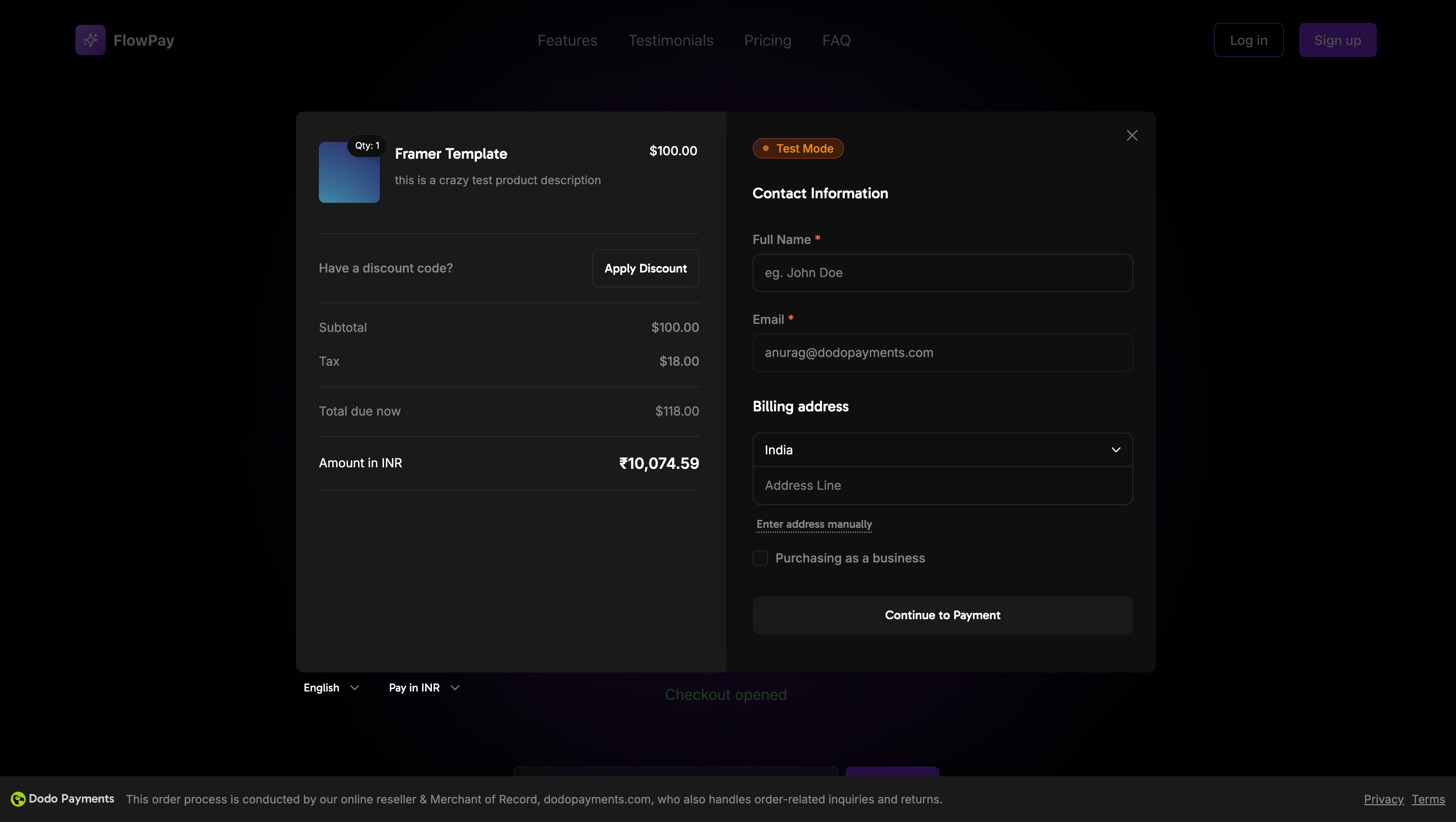 ## 데모
## 데모