> ## Documentation Index
> Fetch the complete documentation index at: https://docs.dodopayments.com/llms.txt
> Use this file to discover all available pages before exploring further.
# Cối xay gió
> Kích hoạt các quy trình và kịch bản Cối xay gió dựa trên các sự kiện Dodo Payments để tự động hóa tùy chỉnh.
## Giới thiệu
Thực hiện các quy trình và kịch bản tùy chỉnh trong Cối xay gió khi các sự kiện thanh toán xảy ra. Thực hiện các thao tác cơ sở dữ liệu, gửi thông báo, xử lý dữ liệu và tự động hóa logic kinh doanh phức tạp với động cơ quy trình mạnh mẽ của Cối xay gió.
Tích hợp này yêu cầu URL webhook Windmill từ cấu hình workflow của bạn.
## Bắt đầu
Trong bảng điều khiển Dodo Payments của bạn, điều hướng đến Webhooks → + Thêm Endpoint và mở rộng danh sách thả xuống tích hợp.
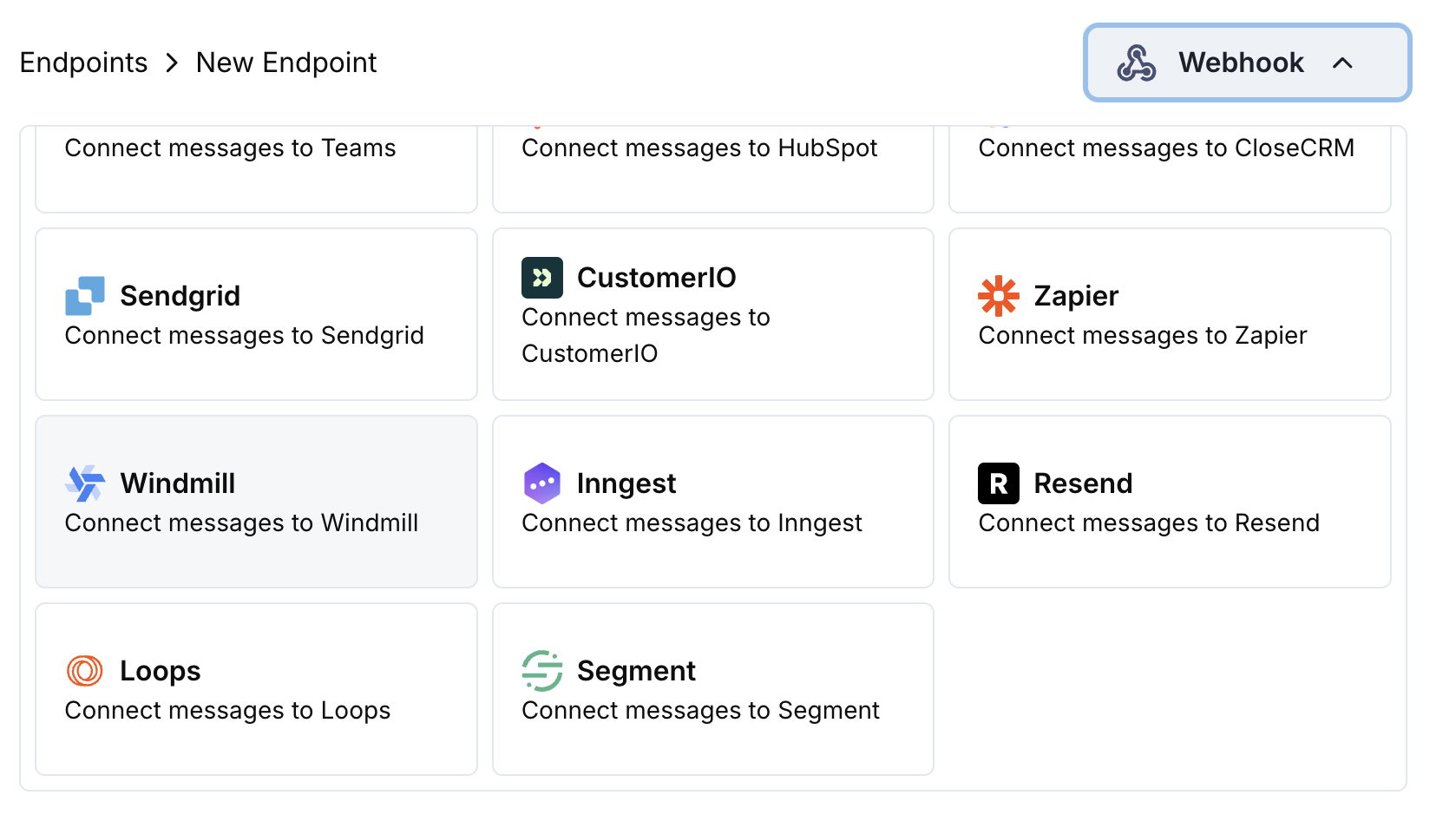 Chọn thẻ tích hợp Windmill.
Trong Windmill, tạo một workflow mới và sao chép URL webhook từ cấu hình trigger.
Dán URL webhook Windmill vào cấu hình endpoint.
Chỉnh sửa mã chuyển đổi để định dạng sự kiện cho workflow Windmill của bạn.
Kiểm tra với payload mẫu và nhấn Create để kích hoạt tích hợp.
🎉 Các sự kiện thanh toán sẽ ngay lập tức kích hoạt các workflow Windmill của bạn một cách tự động.
## Ví dụ Mã Chuyển đổi
### Payload Quy trình Cơ bản
```javascript basic_workflow.js icon="js" expandable theme={null}
function handler(webhook) {
if (webhook.eventType === "payment.succeeded") {
const p = webhook.payload.data;
webhook.payload = {
event_type: webhook.eventType,
payment_id: p.payment_id,
amount: (p.total_amount / 100).toFixed(2),
currency: p.currency || "USD",
customer_email: p.customer.email,
customer_name: p.customer.name,
payment_method: p.payment_method || "unknown",
timestamp: webhook.payload.timestamp,
metadata: {
business_id: p.business_id,
product_id: p.product_id
}
};
}
return webhook;
}
```
### Bộ xử lý Quy trình Đăng ký
```javascript subscription_workflow.js icon="js" expandable theme={null}
function handler(webhook) {
const s = webhook.payload.data;
switch (webhook.eventType) {
case "subscription.active":
webhook.payload = {
event_type: "subscription_started",
subscription_id: s.subscription_id,
customer_email: s.customer.email,
customer_name: s.customer.name,
product_id: s.product_id,
amount: (s.recurring_pre_tax_amount / 100).toFixed(2),
frequency: s.payment_frequency_interval,
next_billing: s.next_billing_date,
customer_id: s.customer.customer_id,
timestamp: webhook.payload.timestamp
};
break;
case "subscription.cancelled":
webhook.payload = {
event_type: "subscription_cancelled",
subscription_id: s.subscription_id,
customer_email: s.customer.email,
cancelled_at: s.cancelled_at,
cancel_at_next_billing: s.cancel_at_next_billing_date,
customer_id: s.customer.customer_id,
timestamp: webhook.payload.timestamp
};
break;
}
return webhook;
}
```
### Bộ xử lý Quy trình Tranh chấp
```javascript dispute_workflow.js icon="js" expandable theme={null}
function handler(webhook) {
if (webhook.eventType.startsWith("dispute.")) {
const d = webhook.payload.data;
webhook.payload = {
event_type: webhook.eventType,
dispute_id: d.dispute_id,
payment_id: d.payment_id,
amount: (d.amount / 100).toFixed(2),
status: d.dispute_status,
stage: d.dispute_stage,
remarks: d.remarks || "",
urgent: webhook.eventType === "dispute.opened",
business_id: d.business_id,
timestamp: webhook.payload.timestamp
};
}
return webhook;
}
```
## Các Trường hợp Sử dụng Cối xay gió Thông thường
* Cập nhật hồ sơ khách hàng trong PostgreSQL/MySQL
* Ghi lại sự kiện thanh toán vào kho dữ liệu
* Đồng bộ dữ liệu đến hệ thống bên ngoài
* Cập nhật mức tồn kho
* Theo dõi các chỉ số phân tích
* Tính toán các chỉ số doanh thu
* Xử lý hoàn tiền và điều chỉnh
* Quản lý vòng đời đăng ký
* Tạo báo cáo và xuất dữ liệu
* Xác thực dữ liệu thanh toán
* Gửi dữ liệu đến nền tảng phân tích
* Cập nhật hệ thống CRM
* Kích hoạt chiến dịch email
* Tạo sự kiện lịch
* Gửi thông báo SMS
## Mẹo
* Cấu trúc dữ liệu payload để dễ dàng xử lý quy trình
* Bao gồm tất cả các siêu dữ liệu liên quan cho logic kinh doanh
* Sử dụng tên trường nhất quán giữa các sự kiện
* Bao gồm dấu thời gian cho thời gian quy trình
* Tận dụng khả năng xử lý lỗi tích hợp sẵn của Cối xay gió
## Khắc phục sự cố
* Xác minh URL webhook chính xác và đang hoạt động
* Kiểm tra workflow Windmill đã được xuất bản và đang hoạt động
* Đảm bảo cấu trúc payload phù hợp với mong đợi của workflow
* Xem lại nhật ký thực thi Windmill để tìm lỗi
* Kiểm tra ánh xạ tham số đầu vào của workflow
* Xác minh kiểu dữ liệu phù hợp với định dạng mong đợi
* Thử nghiệm workflow với dữ liệu mẫu
* Xem lại nhật ký thực thi script Windmill
Chọn thẻ tích hợp Windmill.
Trong Windmill, tạo một workflow mới và sao chép URL webhook từ cấu hình trigger.
Dán URL webhook Windmill vào cấu hình endpoint.
Chỉnh sửa mã chuyển đổi để định dạng sự kiện cho workflow Windmill của bạn.
Kiểm tra với payload mẫu và nhấn Create để kích hoạt tích hợp.
🎉 Các sự kiện thanh toán sẽ ngay lập tức kích hoạt các workflow Windmill của bạn một cách tự động.
## Ví dụ Mã Chuyển đổi
### Payload Quy trình Cơ bản
```javascript basic_workflow.js icon="js" expandable theme={null}
function handler(webhook) {
if (webhook.eventType === "payment.succeeded") {
const p = webhook.payload.data;
webhook.payload = {
event_type: webhook.eventType,
payment_id: p.payment_id,
amount: (p.total_amount / 100).toFixed(2),
currency: p.currency || "USD",
customer_email: p.customer.email,
customer_name: p.customer.name,
payment_method: p.payment_method || "unknown",
timestamp: webhook.payload.timestamp,
metadata: {
business_id: p.business_id,
product_id: p.product_id
}
};
}
return webhook;
}
```
### Bộ xử lý Quy trình Đăng ký
```javascript subscription_workflow.js icon="js" expandable theme={null}
function handler(webhook) {
const s = webhook.payload.data;
switch (webhook.eventType) {
case "subscription.active":
webhook.payload = {
event_type: "subscription_started",
subscription_id: s.subscription_id,
customer_email: s.customer.email,
customer_name: s.customer.name,
product_id: s.product_id,
amount: (s.recurring_pre_tax_amount / 100).toFixed(2),
frequency: s.payment_frequency_interval,
next_billing: s.next_billing_date,
customer_id: s.customer.customer_id,
timestamp: webhook.payload.timestamp
};
break;
case "subscription.cancelled":
webhook.payload = {
event_type: "subscription_cancelled",
subscription_id: s.subscription_id,
customer_email: s.customer.email,
cancelled_at: s.cancelled_at,
cancel_at_next_billing: s.cancel_at_next_billing_date,
customer_id: s.customer.customer_id,
timestamp: webhook.payload.timestamp
};
break;
}
return webhook;
}
```
### Bộ xử lý Quy trình Tranh chấp
```javascript dispute_workflow.js icon="js" expandable theme={null}
function handler(webhook) {
if (webhook.eventType.startsWith("dispute.")) {
const d = webhook.payload.data;
webhook.payload = {
event_type: webhook.eventType,
dispute_id: d.dispute_id,
payment_id: d.payment_id,
amount: (d.amount / 100).toFixed(2),
status: d.dispute_status,
stage: d.dispute_stage,
remarks: d.remarks || "",
urgent: webhook.eventType === "dispute.opened",
business_id: d.business_id,
timestamp: webhook.payload.timestamp
};
}
return webhook;
}
```
## Các Trường hợp Sử dụng Cối xay gió Thông thường
* Cập nhật hồ sơ khách hàng trong PostgreSQL/MySQL
* Ghi lại sự kiện thanh toán vào kho dữ liệu
* Đồng bộ dữ liệu đến hệ thống bên ngoài
* Cập nhật mức tồn kho
* Theo dõi các chỉ số phân tích
* Tính toán các chỉ số doanh thu
* Xử lý hoàn tiền và điều chỉnh
* Quản lý vòng đời đăng ký
* Tạo báo cáo và xuất dữ liệu
* Xác thực dữ liệu thanh toán
* Gửi dữ liệu đến nền tảng phân tích
* Cập nhật hệ thống CRM
* Kích hoạt chiến dịch email
* Tạo sự kiện lịch
* Gửi thông báo SMS
## Mẹo
* Cấu trúc dữ liệu payload để dễ dàng xử lý quy trình
* Bao gồm tất cả các siêu dữ liệu liên quan cho logic kinh doanh
* Sử dụng tên trường nhất quán giữa các sự kiện
* Bao gồm dấu thời gian cho thời gian quy trình
* Tận dụng khả năng xử lý lỗi tích hợp sẵn của Cối xay gió
## Khắc phục sự cố
* Xác minh URL webhook chính xác và đang hoạt động
* Kiểm tra workflow Windmill đã được xuất bản và đang hoạt động
* Đảm bảo cấu trúc payload phù hợp với mong đợi của workflow
* Xem lại nhật ký thực thi Windmill để tìm lỗi
* Kiểm tra ánh xạ tham số đầu vào của workflow
* Xác minh kiểu dữ liệu phù hợp với định dạng mong đợi
* Thử nghiệm workflow với dữ liệu mẫu
* Xem lại nhật ký thực thi script Windmill