> ## Documentation Index
> Fetch the complete documentation index at: https://docs.dodopayments.com/llms.txt
> Use this file to discover all available pages before exploring further.
# Discord
> Gửi thông báo Dodo Payments theo thời gian thực đến các kênh Discord của bạn.
## Giới thiệu
Giữ cho đội ngũ của bạn được thông báo nơi họ đã hợp tác. Tích hợp Discord cung cấp thông tin về thanh toán, đăng ký, tranh chấp và các sự kiện quan trọng khác trực tiếp đến bất kỳ kênh nào bạn chọn—không cần polling hay bảng điều khiển.
Hướng dẫn này giả định bạn có quyền truy cập phần Tích hợp trong bảng điều khiển Dodo Payments.
## Bắt đầu
Trong bảng điều khiển Dodo Payments của bạn, mở Webhooks → + Thêm Endpoint và mở rộng menu thả xuống để hiển thị các tích hợp.
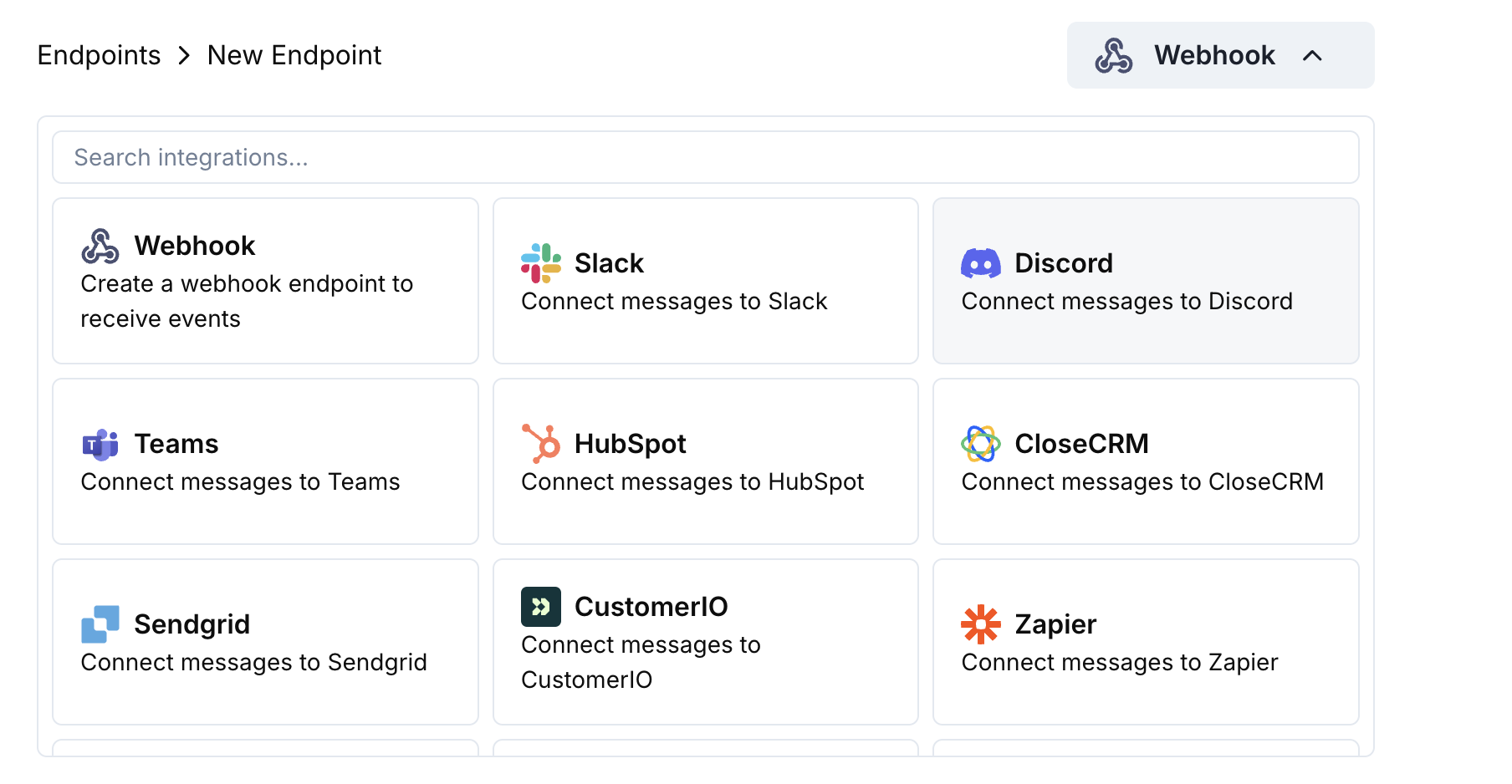 Chọn thẻ Discord rồi nhấp Connect your Discord workspace.
Cấp quyền yêu cầu để bot có thể đăng tin nhắn lên kênh bạn chọn.
Tùy chỉnh ánh xạ payload → embed theo nhu cầu của bạn — hoặc bắt đầu với các mẫu bên dưới.
Sử dụng payload mẫu để xem trước embed, rồi nhấn Create.
🎉 Kênh Discord của bạn sẽ bắt đầu nhận các cập nhật Dodo Payments theo thời gian thực.
## Ví dụ về Mã Biến đổi
### Nhúng Thanh toán Tối thiểu
```javascript payment_embed.js icon="js" expandable theme={null}
function handler(webhook) {
if (webhook.eventType === "payment.succeeded") {
const p = webhook.payload.data;
webhook.payload = {
embeds: [{
title: "✅ Payment Successful",
description: `**Amount:** $${(p.total_amount / 100).toFixed(2)}\n**Customer:** ${p.customer.email}`,
color: 0x2ecc71 // green
}]
};
}
return webhook;
}
```
### Sự kiện Đăng ký
```javascript subscription_embed.js icon="js" expandable theme={null}
function handler(webhook) {
const s = webhook.payload.data;
switch (webhook.eventType) {
case "subscription.active":
webhook.payload = {
embeds: [{
title: "📄 Subscription Activated",
fields: [
{ name: "Customer", value: s.customer.email, inline: true },
{ name: "Product", value: s.product_id, inline: true },
{ name: "Next Billing", value: new Date(s.next_billing_date).toLocaleDateString(), inline: true }
],
color: 0x2ecc71
}]
};
break;
case "subscription.cancelled":
webhook.payload = {
embeds: [{
title: "⚠️ Subscription Cancelled",
fields: [
{ name: "Customer", value: s.customer.email, inline: true },
{ name: "Product", value: s.product_id, inline: true }
],
color: 0xf1c40f
}]
};
break;
}
return webhook;
}
```
### Cảnh báo Tranh chấp
```javascript dispute_embed.js icon="js" expandable theme={null}
function handler(webhook) {
if (webhook.eventType.startsWith("dispute.")) {
const d = webhook.payload.data;
webhook.payload = {
embeds: [{
title: d.dispute_status === "won" ? "🏆 Dispute Won" : d.dispute_status === "lost" ? "❌ Dispute Lost" : "🚨 Dispute Update",
fields: [
{ name: "Payment ID", value: d.payment_id, inline: true },
{ name: "Amount", value: `$${(d.amount / 100).toFixed(2)}`, inline: true },
{ name: "Status", value: d.dispute_status, inline: true }
],
color: d.dispute_status === "won" ? 0x2ecc71 : d.dispute_status === "lost" ? 0xe74c3c : 0xe67e22
}]
};
}
return webhook;
}
```
## Mẹo
* Ưu tiên nhúng cho định dạng phong phú và màu sắc.
* Giữ tiêu đề ngắn gọn; đưa chi tiết vào các trường.
* Sử dụng màu sắc trực quan: xanh (thành công), đỏ (thất bại), cam (cảnh báo).
## Khắc phục sự cố
* Xác nhận bot đã có quyền truy cập vào kênh.
* Kiểm tra xem phép biến đổi có trả về đối tượng JSON với `embeds`.
* Xác thực mã của bạn trong trình chỉnh sửa – lỗi cú pháp sẽ chặn việc gửi.
* Đảm bảo tên trường khớp với cấu trúc payload của webhook.
Chọn thẻ Discord rồi nhấp Connect your Discord workspace.
Cấp quyền yêu cầu để bot có thể đăng tin nhắn lên kênh bạn chọn.
Tùy chỉnh ánh xạ payload → embed theo nhu cầu của bạn — hoặc bắt đầu với các mẫu bên dưới.
Sử dụng payload mẫu để xem trước embed, rồi nhấn Create.
🎉 Kênh Discord của bạn sẽ bắt đầu nhận các cập nhật Dodo Payments theo thời gian thực.
## Ví dụ về Mã Biến đổi
### Nhúng Thanh toán Tối thiểu
```javascript payment_embed.js icon="js" expandable theme={null}
function handler(webhook) {
if (webhook.eventType === "payment.succeeded") {
const p = webhook.payload.data;
webhook.payload = {
embeds: [{
title: "✅ Payment Successful",
description: `**Amount:** $${(p.total_amount / 100).toFixed(2)}\n**Customer:** ${p.customer.email}`,
color: 0x2ecc71 // green
}]
};
}
return webhook;
}
```
### Sự kiện Đăng ký
```javascript subscription_embed.js icon="js" expandable theme={null}
function handler(webhook) {
const s = webhook.payload.data;
switch (webhook.eventType) {
case "subscription.active":
webhook.payload = {
embeds: [{
title: "📄 Subscription Activated",
fields: [
{ name: "Customer", value: s.customer.email, inline: true },
{ name: "Product", value: s.product_id, inline: true },
{ name: "Next Billing", value: new Date(s.next_billing_date).toLocaleDateString(), inline: true }
],
color: 0x2ecc71
}]
};
break;
case "subscription.cancelled":
webhook.payload = {
embeds: [{
title: "⚠️ Subscription Cancelled",
fields: [
{ name: "Customer", value: s.customer.email, inline: true },
{ name: "Product", value: s.product_id, inline: true }
],
color: 0xf1c40f
}]
};
break;
}
return webhook;
}
```
### Cảnh báo Tranh chấp
```javascript dispute_embed.js icon="js" expandable theme={null}
function handler(webhook) {
if (webhook.eventType.startsWith("dispute.")) {
const d = webhook.payload.data;
webhook.payload = {
embeds: [{
title: d.dispute_status === "won" ? "🏆 Dispute Won" : d.dispute_status === "lost" ? "❌ Dispute Lost" : "🚨 Dispute Update",
fields: [
{ name: "Payment ID", value: d.payment_id, inline: true },
{ name: "Amount", value: `$${(d.amount / 100).toFixed(2)}`, inline: true },
{ name: "Status", value: d.dispute_status, inline: true }
],
color: d.dispute_status === "won" ? 0x2ecc71 : d.dispute_status === "lost" ? 0xe74c3c : 0xe67e22
}]
};
}
return webhook;
}
```
## Mẹo
* Ưu tiên nhúng cho định dạng phong phú và màu sắc.
* Giữ tiêu đề ngắn gọn; đưa chi tiết vào các trường.
* Sử dụng màu sắc trực quan: xanh (thành công), đỏ (thất bại), cam (cảnh báo).
## Khắc phục sự cố
* Xác nhận bot đã có quyền truy cập vào kênh.
* Kiểm tra xem phép biến đổi có trả về đối tượng JSON với `embeds`.
* Xác thực mã của bạn trong trình chỉnh sửa – lỗi cú pháp sẽ chặn việc gửi.
* Đảm bảo tên trường khớp với cấu trúc payload của webhook.