> ## Documentation Index
> Fetch the complete documentation index at: https://docs.dodopayments.com/llms.txt
> Use this file to discover all available pages before exploring further.
# Customer Management
> Manage customer relationships, track purchase history, and provide self-service options through the Dodo Payments dashboard and API.
## Overview
Tính năng Khách hàng trong Dodo Payments cung cấp một trung tâm tập trung để quản lý tất cả mối quan hệ với khách hàng của bạn. Theo dõi mọi tương tác với khách hàng, xem lịch sử mua hàng, quản lý đăng ký, truy cập sổ cái giao dịch ví và kích hoạt các tùy chọn tự phục vụ — tất cả từ một bảng điều khiển duy nhất.
View and manage all customers in one place with search and filtering capabilities.
Quản lý số dư tiền trả trước, nạp tiền vào ví và theo dõi lịch sử giao dịch.
Empower customers to self-manage subscriptions, invoices, and license keys.
Programmatically create, update, and retrieve customer data via API.
## Accessing the Customers Page
From the dashboard, click on **Sales > Customers** in the navigation menu.
The Customers Page will display a list of all current and past customers who have interacted with your business.
 ## Customer Information
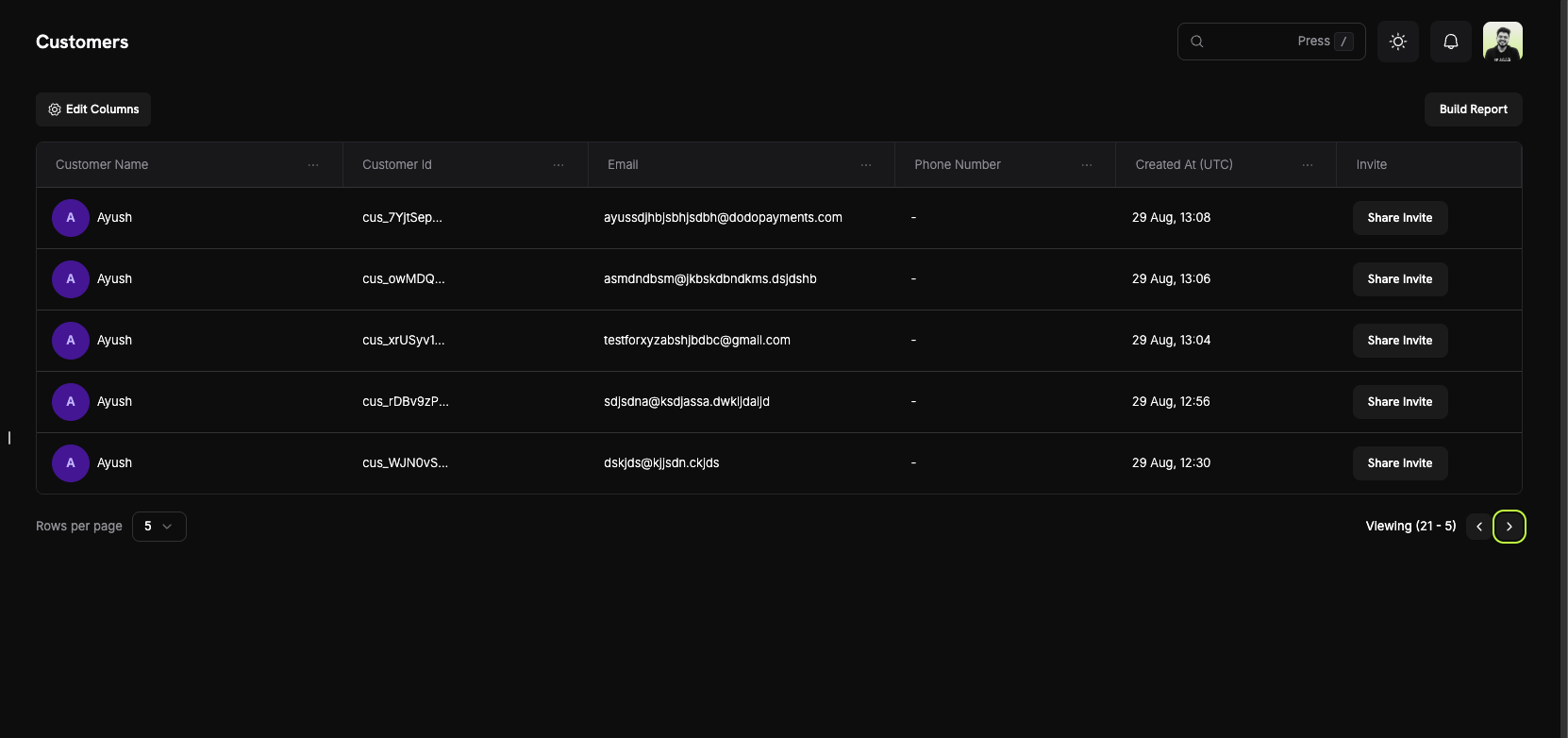
On the **Customers Page**, you can see a comprehensive overview of your entire customer base. The table displays all customers with the following information:
### Customer List Columns
* **Customer Name**: The full name of the customer with an avatar indicator.
* **Customer Id**: A unique identifier (e.g., `cus_5fpsWAa...`) for each customer.
* **Email**: The customer's email address for communication and portal access.
* **Phone Number**: The customer's phone number (if provided).
* **Created At (UTC)**: The date and time when the customer account was created.
* **Invite**: Quick action button to share Customer Portal invites.
### Page Features
* **Edit Columns**: Customize which columns are displayed in the customer table.
* **Build Report**: Generate custom reports based on your customer data.
* **Search**: Quickly find specific customers by name, email, or customer ID.
* **Pagination**: Navigate through your customer list with adjustable rows per page.
Use the "Edit Columns" feature to customize your view and show only the information most relevant to your workflow.
## Customer Details Page
Click on any customer to view their detailed information page, which includes:
## Customer Information
On the **Customers Page**, you can see a comprehensive overview of your entire customer base. The table displays all customers with the following information:
### Customer List Columns
* **Customer Name**: The full name of the customer with an avatar indicator.
* **Customer Id**: A unique identifier (e.g., `cus_5fpsWAa...`) for each customer.
* **Email**: The customer's email address for communication and portal access.
* **Phone Number**: The customer's phone number (if provided).
* **Created At (UTC)**: The date and time when the customer account was created.
* **Invite**: Quick action button to share Customer Portal invites.
### Page Features
* **Edit Columns**: Customize which columns are displayed in the customer table.
* **Build Report**: Generate custom reports based on your customer data.
* **Search**: Quickly find specific customers by name, email, or customer ID.
* **Pagination**: Navigate through your customer list with adjustable rows per page.
Use the "Edit Columns" feature to customize your view and show only the information most relevant to your workflow.
## Customer Details Page
Click on any customer to view their detailed information page, which includes:
 ### About Section
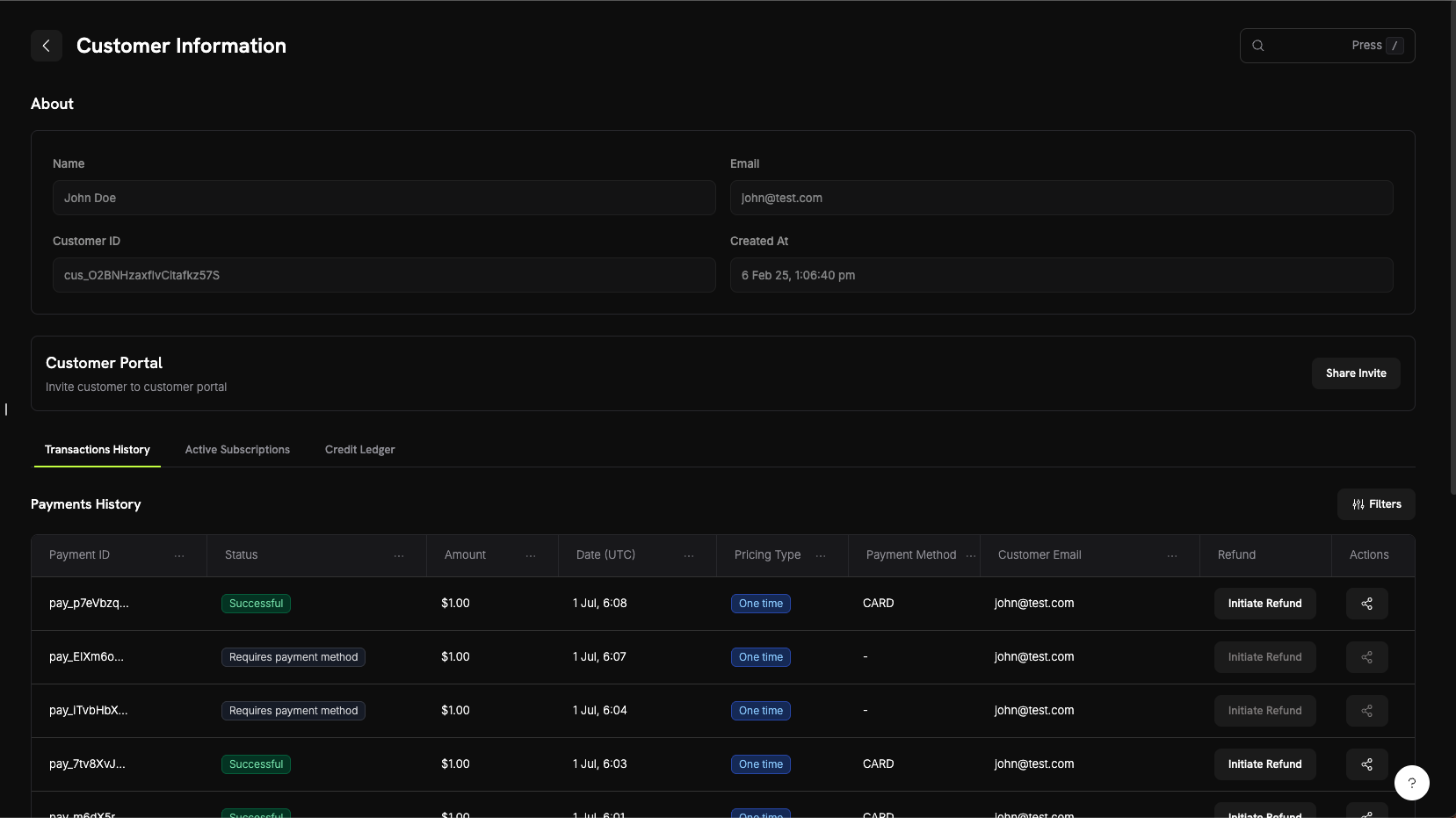
The About section displays core customer information:
* **Name**: Customer's full name
* **Email**: Customer's email address
* **Customer ID**: Unique identifier for API and tracking purposes
* **Created At**: Timestamp of when the customer account was created
### Customer Activity Tabs
The customer details page includes three tabs for viewing different aspects of customer activity:
View all payment transactions for this customer including:
* **Payment ID**: Unique transaction identifier
* **Status**: Payment status (Successful, Failed, Pending, Refunded)
* **Amount**: Transaction amount
* **Date (UTC)**: When the transaction occurred
* **Pricing Type**: Whether it's a one-time purchase or subscription
* **Payment Method**: Payment method used (Card, UPI, etc.)
* **Customer Email**: Email associated with the transaction
* **Refund**: Quick action to initiate refunds
* **Actions**: Additional options for managing the transaction
View all active subscriptions for this customer:
* Subscription plan details
* Billing cycle and next renewal date
* Subscription status
* Options to manage or cancel subscriptions
Xem sổ cái giao dịch ví của khách hàng hiển thị:
* Tất cả các lần bổ sung và khấu trừ quỹ
* Số dư ví hiện tại theo từng loại tiền (USD, INR)
* Lý do giao dịch và dấu thời gian
* Lịch sử giao dịch chi tiết để đối chiếu
Xem sổ cái tín dụng ví của khách hàng hiển thị:
* Tất cả các giao dịch tín dụng và ghi nợ
* Số dư ví hiện tại theo từng loại tiền
* Lý do giao dịch và dấu thời gian
* Lịch sử giao dịch chi tiết để đối chiếu
Tab Sổ cái Ví cung cấp độ minh bạch đầy đủ về các giao dịch ví của khách hàng, giúp dễ dàng theo dõi việc bổ sung quỹ, khấu trừ và số dư tiền hiện tại.
## Cổng Khách hàng
Cổng Khách hàng là một khu vực tự phục vụ được lưu trữ an toàn, nơi khách hàng của bạn có thể quản lý đăng ký, xem lịch sử thanh toán, truy cập khóa giấy phép và cập nhật hồ sơ — mà không cần liên hệ bộ phận hỗ trợ.
### Khả năng của Cổng
Khách hàng có thể truy cập cổng để:
* **Xem Lịch sử Thanh toán**: Xem tất cả giao dịch trước đây và tải xuống hóa đơn.
* **Quản lý Đăng ký**: Hủy hoặc xem chi tiết đăng ký.
* **Lấy Khóa Giấy phép**: Truy cập tất cả khóa giấy phép liên quan đến giao dịch mua của họ.
* **Cập nhật Hồ sơ**: Thay đổi tên, email hoặc số điện thoại.
Khám phá tài liệu chi tiết về các tính năng cổng, phương thức truy cập và ví dụ tích hợp.
## Ví của Khách hàng
Ví của Khách hàng là các tài khoản số dư tiền trả trước dành cho khách hàng của bạn. Mỗi khách hàng tự động nhận được một ví có thể chứa tiền thật bằng nhiều loại tiền (USD và INR), có thể áp dụng cho hóa đơn đăng ký, dùng để hoàn tiền hoặc nạp tiền bằng tiền thưởng khuyến mãi.
### Tính năng chính
* **Hỗ trợ Đa tiền tệ**: Theo dõi số dư tiền riêng biệt theo USD và INR.
* **Số dư Trả trước**: Khách hàng có thể giữ quỹ để áp dụng cho các hóa đơn và thanh toán đăng ký trong tương lai.
* **Lịch sử Giao dịch**: Xem sổ cái đầy đủ của tất cả các lần bổ sung và khấu trừ quỹ.
* **Thiết kế API-First**: Thêm, khấu trừ và kiểm tra số dư ví theo chương trình.
* **Thanh toán Dựa trên Tín dụng**: Cho phép khách hàng mua tín dụng trước và sử dụng chúng cho dịch vụ của bạn.
* **Lịch sử Giao dịch**: Xem sổ cái đầy đủ của tất cả tín dụng và ghi nợ.
* **Thiết kế API-First**: Thêm, xóa và kiểm tra số dư ví theo chương trình.
Khám phá tài liệu chi tiết, ví dụ mã và các phương pháp hay nhất để quản lý số dư ví khách hàng.
## Quản lý API
Dodo Payments cung cấp một REST API toàn diện để quản lý khách hàng theo chương trình. Bạn có thể tạo, truy xuất, cập nhật và quản lý khách hàng hoàn toàn thông qua API.
### Các điểm cuối API có sẵn
Tạo một khách hàng mới trong tài khoản Dodo Payments của bạn với thông tin của họ.
Truy xuất danh sách phân trang tất cả khách hàng liên kết với tài khoản của bạn.
Nhận thông tin chi tiết về một khách hàng cụ thể theo ID của họ.
Cập nhật thông tin khách hàng như tên, email hoặc metadata.
Xóa phương thức thanh toán đã lưu khỏi tài khoản khách hàng.
Tạo liên kết phiên Cổng thông tin khách hàng an toàn cho một khách hàng cụ thể.
Tất cả các điểm cuối API đều yêu cầu xác thực bằng khóa API của bạn. Luôn sử dụng khóa bí mật của bạn ở phía máy chủ và không bao giờ tiết lộ nó trong mã phía máy khách.
### About Section
The About section displays core customer information:
* **Name**: Customer's full name
* **Email**: Customer's email address
* **Customer ID**: Unique identifier for API and tracking purposes
* **Created At**: Timestamp of when the customer account was created
### Customer Activity Tabs
The customer details page includes three tabs for viewing different aspects of customer activity:
View all payment transactions for this customer including:
* **Payment ID**: Unique transaction identifier
* **Status**: Payment status (Successful, Failed, Pending, Refunded)
* **Amount**: Transaction amount
* **Date (UTC)**: When the transaction occurred
* **Pricing Type**: Whether it's a one-time purchase or subscription
* **Payment Method**: Payment method used (Card, UPI, etc.)
* **Customer Email**: Email associated with the transaction
* **Refund**: Quick action to initiate refunds
* **Actions**: Additional options for managing the transaction
View all active subscriptions for this customer:
* Subscription plan details
* Billing cycle and next renewal date
* Subscription status
* Options to manage or cancel subscriptions
Xem sổ cái giao dịch ví của khách hàng hiển thị:
* Tất cả các lần bổ sung và khấu trừ quỹ
* Số dư ví hiện tại theo từng loại tiền (USD, INR)
* Lý do giao dịch và dấu thời gian
* Lịch sử giao dịch chi tiết để đối chiếu
Xem sổ cái tín dụng ví của khách hàng hiển thị:
* Tất cả các giao dịch tín dụng và ghi nợ
* Số dư ví hiện tại theo từng loại tiền
* Lý do giao dịch và dấu thời gian
* Lịch sử giao dịch chi tiết để đối chiếu
Tab Sổ cái Ví cung cấp độ minh bạch đầy đủ về các giao dịch ví của khách hàng, giúp dễ dàng theo dõi việc bổ sung quỹ, khấu trừ và số dư tiền hiện tại.
## Cổng Khách hàng
Cổng Khách hàng là một khu vực tự phục vụ được lưu trữ an toàn, nơi khách hàng của bạn có thể quản lý đăng ký, xem lịch sử thanh toán, truy cập khóa giấy phép và cập nhật hồ sơ — mà không cần liên hệ bộ phận hỗ trợ.
### Khả năng của Cổng
Khách hàng có thể truy cập cổng để:
* **Xem Lịch sử Thanh toán**: Xem tất cả giao dịch trước đây và tải xuống hóa đơn.
* **Quản lý Đăng ký**: Hủy hoặc xem chi tiết đăng ký.
* **Lấy Khóa Giấy phép**: Truy cập tất cả khóa giấy phép liên quan đến giao dịch mua của họ.
* **Cập nhật Hồ sơ**: Thay đổi tên, email hoặc số điện thoại.
Khám phá tài liệu chi tiết về các tính năng cổng, phương thức truy cập và ví dụ tích hợp.
## Ví của Khách hàng
Ví của Khách hàng là các tài khoản số dư tiền trả trước dành cho khách hàng của bạn. Mỗi khách hàng tự động nhận được một ví có thể chứa tiền thật bằng nhiều loại tiền (USD và INR), có thể áp dụng cho hóa đơn đăng ký, dùng để hoàn tiền hoặc nạp tiền bằng tiền thưởng khuyến mãi.
### Tính năng chính
* **Hỗ trợ Đa tiền tệ**: Theo dõi số dư tiền riêng biệt theo USD và INR.
* **Số dư Trả trước**: Khách hàng có thể giữ quỹ để áp dụng cho các hóa đơn và thanh toán đăng ký trong tương lai.
* **Lịch sử Giao dịch**: Xem sổ cái đầy đủ của tất cả các lần bổ sung và khấu trừ quỹ.
* **Thiết kế API-First**: Thêm, khấu trừ và kiểm tra số dư ví theo chương trình.
* **Thanh toán Dựa trên Tín dụng**: Cho phép khách hàng mua tín dụng trước và sử dụng chúng cho dịch vụ của bạn.
* **Lịch sử Giao dịch**: Xem sổ cái đầy đủ của tất cả tín dụng và ghi nợ.
* **Thiết kế API-First**: Thêm, xóa và kiểm tra số dư ví theo chương trình.
Khám phá tài liệu chi tiết, ví dụ mã và các phương pháp hay nhất để quản lý số dư ví khách hàng.
## Quản lý API
Dodo Payments cung cấp một REST API toàn diện để quản lý khách hàng theo chương trình. Bạn có thể tạo, truy xuất, cập nhật và quản lý khách hàng hoàn toàn thông qua API.
### Các điểm cuối API có sẵn
Tạo một khách hàng mới trong tài khoản Dodo Payments của bạn với thông tin của họ.
Truy xuất danh sách phân trang tất cả khách hàng liên kết với tài khoản của bạn.
Nhận thông tin chi tiết về một khách hàng cụ thể theo ID của họ.
Cập nhật thông tin khách hàng như tên, email hoặc metadata.
Xóa phương thức thanh toán đã lưu khỏi tài khoản khách hàng.
Tạo liên kết phiên Cổng thông tin khách hàng an toàn cho một khách hàng cụ thể.
Tất cả các điểm cuối API đều yêu cầu xác thực bằng khóa API của bạn. Luôn sử dụng khóa bí mật của bạn ở phía máy chủ và không bao giờ tiết lộ nó trong mã phía máy khách.