> ## Documentation Index
> Fetch the complete documentation index at: https://docs.dodopayments.com/llms.txt
> Use this file to discover all available pages before exploring further.
# Customer Wallets
> Build credit-based billing systems like OpenAI or Claude with customer wallets. Track balances, manage credits, and create sophisticated financial workflows.
Check customer wallet balances across currencies.
Add or remove credits from customer wallets.
View complete transaction history with pagination.
## What are Customer Wallets?
Think of customer wallets as digital piggy banks for your users. Every customer gets one automatically when you create their account. You can use these wallets to:
* **Track credit balances** in USD and INR
* **Build API credit systems** like OpenAI or Claude
* **Create prepaid billing** where customers buy credits upfront
* **Handle refunds** as wallet credits instead of cash
* **Manage complex billing** with detailed transaction history
Every customer automatically gets a wallet when you create their account. Wallets support USD and INR currencies with separate balances for each.
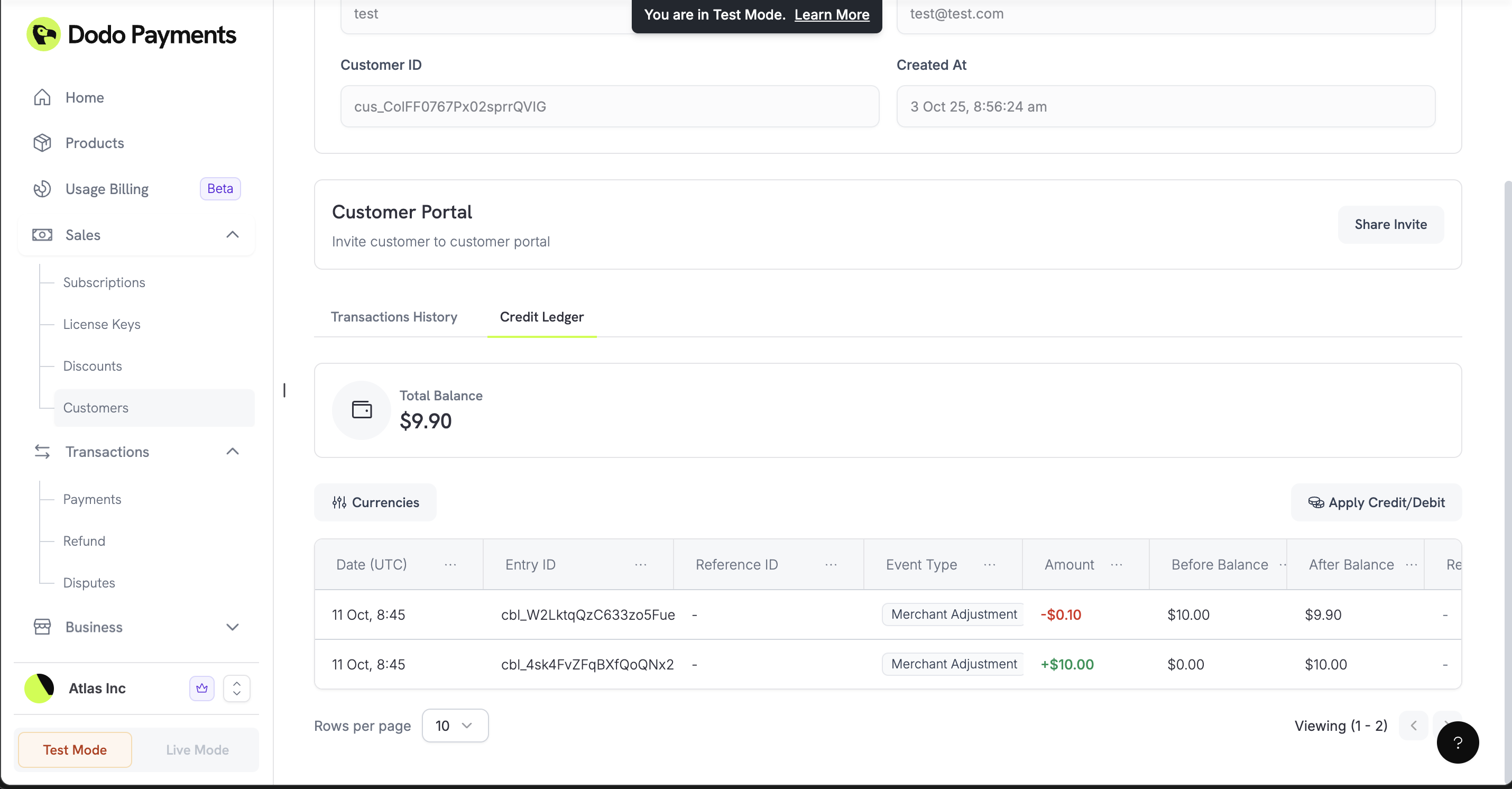 ## How It Works
Customer wallets are simple: they hold money (credits) that customers can spend on your services. When a customer makes a purchase, their wallet balance is checked first, and any available credits are used before charging their payment method.
When you create a new customer, Dodo Payments automatically creates a wallet with zero balance. It's ready to use immediately through our API.
### Multi-Currency Support
Each wallet can hold balances in different currencies:
Balance in US Dollars (stored in cents)
Balance in Indian Rupees (stored in paise)
Currently, only USD and INR balances are available. More currencies coming soon.
## Working with Wallets
### Check Customer Balances
See how much credit a customer has across all currencies. Perfect for checking if they have enough funds before processing a purchase.
Check a customer’s wallet credit balances in all supported currencies.
### Add or Remove Credits
Give customers credits (like welcome bonuses) or deduct credits (like usage charges). You can add reasons for each transaction to keep track of what happened.
Add or remove credits from a customer’s wallet.
### View Transaction History
See every credit and debit transaction for a customer. Great for debugging billing issues or showing customers their spending history.
View every credit and debit transaction for a customer.
## Real-World Examples
### API Credit System (Like OpenAI)
Build a system where customers buy credits and spend them on API calls:
```javascript theme={null}
// Give new customers welcome credits
async function giveWelcomeCredits(customerId) {
await client.customers.wallets.ledgerEntries.create(customerId, {
amount: 10000, // $100 in cents
currency: 'USD',
entry_type: 'credit',
reason: 'Welcome bonus - 100 API credits',
idempotency_key: `welcome_${customerId}_${Date.now()}`
});
}
// Charge customers for API usage
async function chargeForApiUsage(customerId, usageCost) {
try {
await client.customers.wallets.ledgerEntries.create(customerId, {
amount: usageCost, // Cost in cents
currency: 'USD',
entry_type: 'debit',
reason: `API usage - ${usageCost} credits consumed`,
idempotency_key: `usage_${customerId}_${Date.now()}`
});
} catch (error) {
if (error.status === 400) {
console.log('Customer needs to buy more credits');
}
}
}
```
### Prepaid Billing System
Let customers buy credits upfront and spend them over time:
Give new customers some free credits to get started.
```javascript theme={null}
await client.customers.wallets.ledgerEntries.create(customerId, {
amount: 5000, // $50 welcome bonus
currency: 'USD',
entry_type: 'credit',
reason: 'Welcome bonus for new customer',
idempotency_key: `welcome_${customerId}`
});
```
When customers buy credits, add them to their wallet.
```javascript theme={null}
await client.customers.wallets.ledgerEntries.create(customerId, {
amount: purchaseAmount, // Amount paid in cents
currency: 'USD',
entry_type: 'credit',
reason: `Credit purchase - ${purchaseAmount} credits`,
idempotency_key: `purchase_${paymentId}`
});
```
Deduct credits when customers use your service.
```javascript theme={null}
await client.customers.wallets.ledgerEntries.create(customerId, {
amount: usageCost,
currency: 'USD',
entry_type: 'debit',
reason: `Service usage - ${usageCost} credits`,
idempotency_key: `usage_${usageId}`
});
```
Check if customers are running low on credits.
```javascript theme={null}
const wallets = await client.customers.wallets.list(customerId);
const usdWallet = wallets.items.find(w => w.currency === 'USD');
const balance = usdWallet.balance;
if (balance < 1000) { // Less than $10
// Send low balance notification
await sendLowBalanceNotification(customerId, balance);
}
```
### Multi-Currency Support
Handle customers in different countries:
Give USD credits to US-based customers.
```javascript theme={null}
await client.customers.wallets.ledgerEntries.create(customerId, {
amount: 20000, // $200 in cents
currency: 'USD',
entry_type: 'credit',
reason: 'USD credit purchase',
idempotency_key: `usd_purchase_${paymentId}`
});
```
Give INR credits to Indian customers.
```javascript theme={null}
await client.customers.wallets.ledgerEntries.create(customerId, {
amount: 1500000, // Rs 15,000 in paise
currency: 'INR',
entry_type: 'credit',
reason: 'INR credit purchase',
idempotency_key: `inr_purchase_${paymentId}`
});
```
## Best Practices
### Prevent Duplicate Transactions
Use idempotency keys to make sure you don't accidentally charge customers twice for the same thing:
```javascript theme={null}
async function addCreditsSafely(customerId, amount, reason) {
const idempotencyKey = `${reason}_${customerId}_${Date.now()}`;
try {
const result = await client.customers.wallets.ledgerEntries.create(customerId, {
amount: amount,
currency: 'USD',
entry_type: 'credit',
reason: reason,
idempotency_key: idempotencyKey
});
return { success: true, wallet: result };
} catch (error) {
if (error.status === 400 && error.message.includes('Insufficient balance')) {
return { success: false, error: 'INSUFFICIENT_BALANCE' };
}
if (error.status === 409) {
// Transaction already processed
return { success: true, wallet: null, duplicate: true };
}
throw error;
}
}
```
### Check Balances Before Charging
Always verify customers have enough credits before processing expensive operations:
```javascript theme={null}
async function checkBalanceBeforeOperation(customerId, requiredAmount) {
const wallets = await client.customers.wallets.list(customerId);
const usdWallet = wallets.items.find(w => w.currency === 'USD');
if (!usdWallet || usdWallet.balance < requiredAmount) {
throw new Error('Not enough credits for this operation');
}
return usdWallet.balance;
}
```
## What's Coming Next
These features are planned for future releases:
* **Credit Expiration**: Set credits to expire after a certain time
* **Better Analytics**: Detailed spending reports and usage insights
* **More Webhooks**: Real-time notifications for balance changes and low credits
Start simple with basic credit/debit operations, then add more complex features as your business grows.
### Kiểm tra số dư trước khi tính phí
Xác minh khách hàng có đủ tiền trước khi cố gắng xử lý các giao dịch lớn từ ví.
```javascript theme={null}
async function checkBalanceBeforeOperation(customerId, requiredAmount) {
const wallets = await client.customers.wallets.list(customerId);
const usdWallet = wallets.items.find(w => w.currency === 'USD');
if (!usdWallet || usdWallet.balance < requiredAmount) {
throw new Error('Insufficient funds for this operation');
}
return usdWallet.balance;
}
```
## Những điều sắp tới
Những tính năng này được lên kế hoạch cho các bản phát hành tương lai:
* **Balance Expiration**: Đặt tiền hết hạn sau một khoảng thời gian
* **Better Analytics**: Báo cáo chi tiêu chi tiết và xu hướng số dư
* **More Webhooks**: Thông báo thời gian thực cho các thay đổi số dư và cảnh báo số dư thấp
Bắt đầu với các thao tác nạp và trừ cơ bản, sau đó tích hợp các quy trình thanh toán tự động phức tạp hơn khi doanh nghiệp của bạn phát triển.
## How It Works
Customer wallets are simple: they hold money (credits) that customers can spend on your services. When a customer makes a purchase, their wallet balance is checked first, and any available credits are used before charging their payment method.
When you create a new customer, Dodo Payments automatically creates a wallet with zero balance. It's ready to use immediately through our API.
### Multi-Currency Support
Each wallet can hold balances in different currencies:
Balance in US Dollars (stored in cents)
Balance in Indian Rupees (stored in paise)
Currently, only USD and INR balances are available. More currencies coming soon.
## Working with Wallets
### Check Customer Balances
See how much credit a customer has across all currencies. Perfect for checking if they have enough funds before processing a purchase.
Check a customer’s wallet credit balances in all supported currencies.
### Add or Remove Credits
Give customers credits (like welcome bonuses) or deduct credits (like usage charges). You can add reasons for each transaction to keep track of what happened.
Add or remove credits from a customer’s wallet.
### View Transaction History
See every credit and debit transaction for a customer. Great for debugging billing issues or showing customers their spending history.
View every credit and debit transaction for a customer.
## Real-World Examples
### API Credit System (Like OpenAI)
Build a system where customers buy credits and spend them on API calls:
```javascript theme={null}
// Give new customers welcome credits
async function giveWelcomeCredits(customerId) {
await client.customers.wallets.ledgerEntries.create(customerId, {
amount: 10000, // $100 in cents
currency: 'USD',
entry_type: 'credit',
reason: 'Welcome bonus - 100 API credits',
idempotency_key: `welcome_${customerId}_${Date.now()}`
});
}
// Charge customers for API usage
async function chargeForApiUsage(customerId, usageCost) {
try {
await client.customers.wallets.ledgerEntries.create(customerId, {
amount: usageCost, // Cost in cents
currency: 'USD',
entry_type: 'debit',
reason: `API usage - ${usageCost} credits consumed`,
idempotency_key: `usage_${customerId}_${Date.now()}`
});
} catch (error) {
if (error.status === 400) {
console.log('Customer needs to buy more credits');
}
}
}
```
### Prepaid Billing System
Let customers buy credits upfront and spend them over time:
Give new customers some free credits to get started.
```javascript theme={null}
await client.customers.wallets.ledgerEntries.create(customerId, {
amount: 5000, // $50 welcome bonus
currency: 'USD',
entry_type: 'credit',
reason: 'Welcome bonus for new customer',
idempotency_key: `welcome_${customerId}`
});
```
When customers buy credits, add them to their wallet.
```javascript theme={null}
await client.customers.wallets.ledgerEntries.create(customerId, {
amount: purchaseAmount, // Amount paid in cents
currency: 'USD',
entry_type: 'credit',
reason: `Credit purchase - ${purchaseAmount} credits`,
idempotency_key: `purchase_${paymentId}`
});
```
Deduct credits when customers use your service.
```javascript theme={null}
await client.customers.wallets.ledgerEntries.create(customerId, {
amount: usageCost,
currency: 'USD',
entry_type: 'debit',
reason: `Service usage - ${usageCost} credits`,
idempotency_key: `usage_${usageId}`
});
```
Check if customers are running low on credits.
```javascript theme={null}
const wallets = await client.customers.wallets.list(customerId);
const usdWallet = wallets.items.find(w => w.currency === 'USD');
const balance = usdWallet.balance;
if (balance < 1000) { // Less than $10
// Send low balance notification
await sendLowBalanceNotification(customerId, balance);
}
```
### Multi-Currency Support
Handle customers in different countries:
Give USD credits to US-based customers.
```javascript theme={null}
await client.customers.wallets.ledgerEntries.create(customerId, {
amount: 20000, // $200 in cents
currency: 'USD',
entry_type: 'credit',
reason: 'USD credit purchase',
idempotency_key: `usd_purchase_${paymentId}`
});
```
Give INR credits to Indian customers.
```javascript theme={null}
await client.customers.wallets.ledgerEntries.create(customerId, {
amount: 1500000, // Rs 15,000 in paise
currency: 'INR',
entry_type: 'credit',
reason: 'INR credit purchase',
idempotency_key: `inr_purchase_${paymentId}`
});
```
## Best Practices
### Prevent Duplicate Transactions
Use idempotency keys to make sure you don't accidentally charge customers twice for the same thing:
```javascript theme={null}
async function addCreditsSafely(customerId, amount, reason) {
const idempotencyKey = `${reason}_${customerId}_${Date.now()}`;
try {
const result = await client.customers.wallets.ledgerEntries.create(customerId, {
amount: amount,
currency: 'USD',
entry_type: 'credit',
reason: reason,
idempotency_key: idempotencyKey
});
return { success: true, wallet: result };
} catch (error) {
if (error.status === 400 && error.message.includes('Insufficient balance')) {
return { success: false, error: 'INSUFFICIENT_BALANCE' };
}
if (error.status === 409) {
// Transaction already processed
return { success: true, wallet: null, duplicate: true };
}
throw error;
}
}
```
### Check Balances Before Charging
Always verify customers have enough credits before processing expensive operations:
```javascript theme={null}
async function checkBalanceBeforeOperation(customerId, requiredAmount) {
const wallets = await client.customers.wallets.list(customerId);
const usdWallet = wallets.items.find(w => w.currency === 'USD');
if (!usdWallet || usdWallet.balance < requiredAmount) {
throw new Error('Not enough credits for this operation');
}
return usdWallet.balance;
}
```
## What's Coming Next
These features are planned for future releases:
* **Credit Expiration**: Set credits to expire after a certain time
* **Better Analytics**: Detailed spending reports and usage insights
* **More Webhooks**: Real-time notifications for balance changes and low credits
Start simple with basic credit/debit operations, then add more complex features as your business grows.
### Kiểm tra số dư trước khi tính phí
Xác minh khách hàng có đủ tiền trước khi cố gắng xử lý các giao dịch lớn từ ví.
```javascript theme={null}
async function checkBalanceBeforeOperation(customerId, requiredAmount) {
const wallets = await client.customers.wallets.list(customerId);
const usdWallet = wallets.items.find(w => w.currency === 'USD');
if (!usdWallet || usdWallet.balance < requiredAmount) {
throw new Error('Insufficient funds for this operation');
}
return usdWallet.balance;
}
```
## Những điều sắp tới
Những tính năng này được lên kế hoạch cho các bản phát hành tương lai:
* **Balance Expiration**: Đặt tiền hết hạn sau một khoảng thời gian
* **Better Analytics**: Báo cáo chi tiêu chi tiết và xu hướng số dư
* **More Webhooks**: Thông báo thời gian thực cho các thay đổi số dư và cảnh báo số dư thấp
Bắt đầu với các thao tác nạp và trừ cơ bản, sau đó tích hợp các quy trình thanh toán tự động phức tạp hơn khi doanh nghiệp của bạn phát triển.