> ## Documentation Index
> Fetch the complete documentation index at: https://docs.dodopayments.com/llms.txt
> Use this file to discover all available pages before exploring further.
# Microsoft Teams
> Skicka Dodo Payments-notifikationer till Microsoft Teams-kanaler med rika Adaptive Cards.
## Introduktion
Håll ditt företagsteam informerat med realtidsbetalningsnotifikationer i Microsoft Teams. Integrationen levererar betalningsevenemang som rika Adaptive Cards—perfekt för företagsmiljöer där Teams är det primära samarbetsverktyget.
Denna guide förutsätter att du har administratörsbehörighet för att skapa webhooks i din Microsoft Teams-arbetsyta.
## Komma igång
I din Dodo Payments-instrumentpanel, navigera till Webhooks → + Lägg till slutpunkt och expandera integrationsrullgardinen.
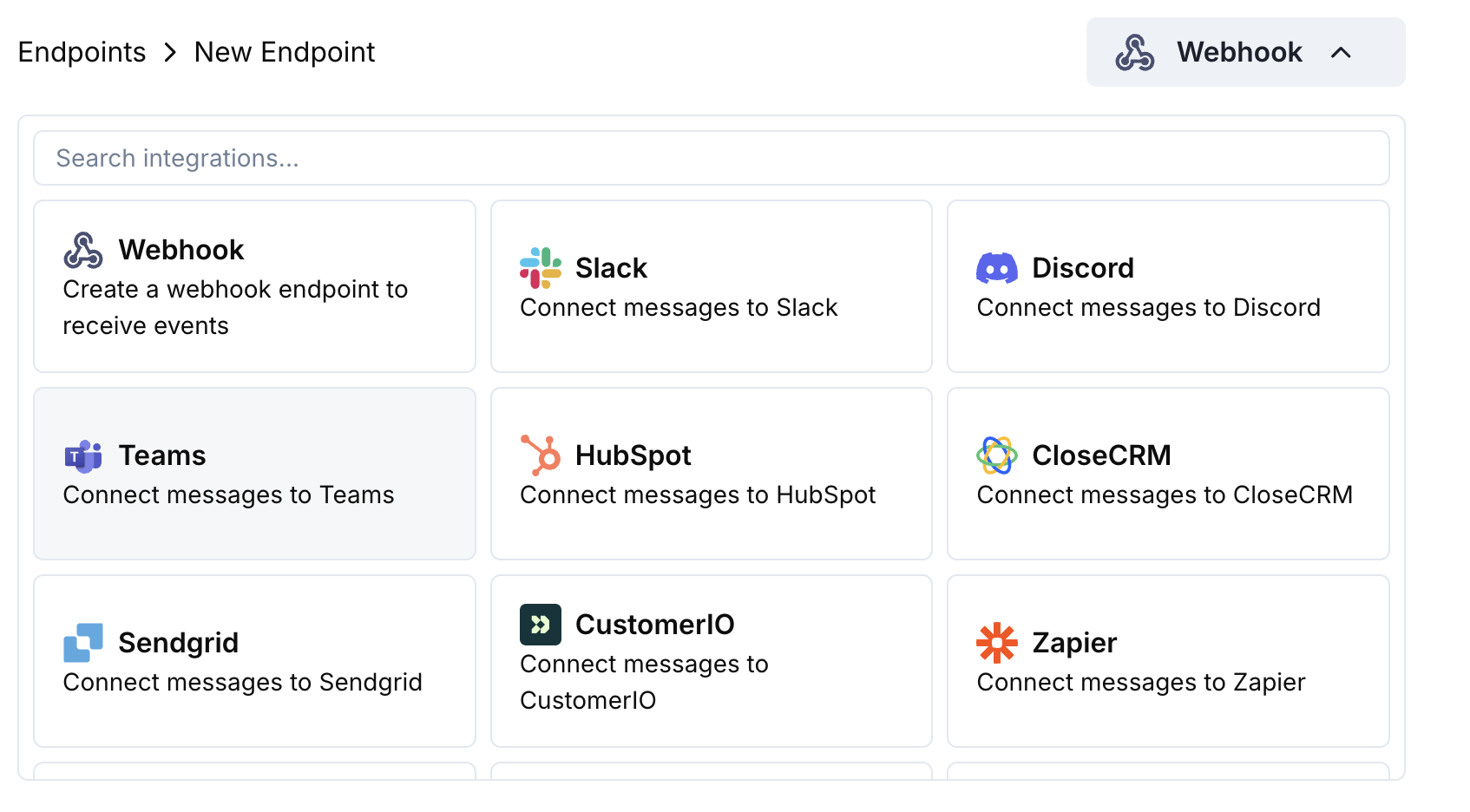 Välj kortet Microsoft Teams för integrationen.
I Teams går du till din kanal → ⋯ → Anslutningar → Ingående webhook → Konfigurera. Kopiera webhook-URL:en.
Klistra in Teams webhook-URL:en i slutpunktens konfiguration.
Redigera transformationskoden för att formatera meddelanden som Adaptive Cards för Teams.
Testa med exempelbelastningar och klicka på Create för att aktivera.
🎉 Din Teams-kanal kommer nu att ta emot Dodo Payments-uppdateringar som Adaptive Cards.
## Exempel på transformationskod
### Grundläggande betalningskort
```javascript payment_card.js icon="js" expandable theme={null}
function handler(webhook) {
if (webhook.eventType === "payment.succeeded") {
const p = webhook.payload.data;
webhook.payload = {
type: "message",
attachments: [{
contentType: "application/vnd.microsoft.card.adaptive",
content: {
type: "AdaptiveCard",
body: [
{
type: "TextBlock",
text: "✅ Payment Successful",
weight: "Bolder",
size: "Medium"
},
{
type: "FactSet",
facts: [
{ title: "Amount", value: `$${(p.total_amount / 100).toFixed(2)}` },
{ title: "Customer", value: p.customer.email },
{ title: "Payment ID", value: p.payment_id }
]
}
]
}
}]
};
}
return webhook;
}
```
### Hantering av prenumerationer
```javascript subscription_card.js icon="js" expandable theme={null}
function handler(webhook) {
const s = webhook.payload.data;
switch (webhook.eventType) {
case "subscription.active":
webhook.payload = {
type: "message",
attachments: [{
contentType: "application/vnd.microsoft.card.adaptive",
content: {
type: "AdaptiveCard",
body: [
{
type: "TextBlock",
text: "📄 Subscription Activated",
weight: "Bolder",
color: "Good"
},
{
type: "FactSet",
facts: [
{ title: "Customer", value: s.customer.email },
{ title: "Product", value: s.product_id },
{ title: "Amount", value: `$${(s.recurring_pre_tax_amount / 100).toFixed(2)}/${s.payment_frequency_interval}` },
{ title: "Next Billing", value: new Date(s.next_billing_date).toLocaleDateString() }
]
}
]
}
}]
};
break;
case "subscription.cancelled":
webhook.payload = {
type: "message",
attachments: [{
contentType: "application/vnd.microsoft.card.adaptive",
content: {
type: "AdaptiveCard",
body: [
{
type: "TextBlock",
text: "⚠️ Subscription Cancelled",
weight: "Bolder",
color: "Warning"
},
{
type: "FactSet",
facts: [
{ title: "Customer", value: s.customer.email },
{ title: "Product", value: s.product_id },
{ title: "Cancelled At", value: new Date(s.cancelled_at).toLocaleDateString() }
]
}
]
}
}]
};
break;
}
return webhook;
}
```
### Tvistvarningar
```javascript dispute_card.js icon="js" expandable theme={null}
function handler(webhook) {
if (webhook.eventType.startsWith("dispute.")) {
const d = webhook.payload.data;
const color = d.dispute_status === "won" ? "Good" : d.dispute_status === "lost" ? "Attention" : "Warning";
const title = d.dispute_status === "won" ? "🏆 Dispute Won" : d.dispute_status === "lost" ? "❌ Dispute Lost" : "🚨 Dispute Update";
webhook.payload = {
type: "message",
attachments: [{
contentType: "application/vnd.microsoft.card.adaptive",
content: {
type: "AdaptiveCard",
body: [
{
type: "TextBlock",
text: title,
weight: "Bolder",
color: color
},
{
type: "FactSet",
facts: [
{ title: "Payment ID", value: d.payment_id },
{ title: "Amount", value: `$${(d.amount / 100).toFixed(2)}` },
{ title: "Status", value: d.dispute_status },
{ title: "Stage", value: d.dispute_stage }
]
}
]
}
}]
};
}
return webhook;
}
```
## Tips
* Använd Adaptive Cards för rik, interaktiv formatering
* Välj lämpliga färger: Bra (grön), Varning (gul), Uppmärksamhet (röd)
* Håll faktaset kortfattat och läsbart
* Testa med Teams webhook-testare innan du distribuerar
## Felsökning
* Kontrollera att webhook-URL:en är korrekt och aktiv
* Kontrollera att transformeringen returnerar giltig Adaptive Card JSON
* Säkerställ att webhooken har behörighet att posta i kanalen
* Validera Adaptive Card-schema i Teams webhook-testaren
* Kontrollera att alla obligatoriska fält finns
* Säkerställ att färgvärdena är giltiga (Good, Warning, Attention, Default)
Välj kortet Microsoft Teams för integrationen.
I Teams går du till din kanal → ⋯ → Anslutningar → Ingående webhook → Konfigurera. Kopiera webhook-URL:en.
Klistra in Teams webhook-URL:en i slutpunktens konfiguration.
Redigera transformationskoden för att formatera meddelanden som Adaptive Cards för Teams.
Testa med exempelbelastningar och klicka på Create för att aktivera.
🎉 Din Teams-kanal kommer nu att ta emot Dodo Payments-uppdateringar som Adaptive Cards.
## Exempel på transformationskod
### Grundläggande betalningskort
```javascript payment_card.js icon="js" expandable theme={null}
function handler(webhook) {
if (webhook.eventType === "payment.succeeded") {
const p = webhook.payload.data;
webhook.payload = {
type: "message",
attachments: [{
contentType: "application/vnd.microsoft.card.adaptive",
content: {
type: "AdaptiveCard",
body: [
{
type: "TextBlock",
text: "✅ Payment Successful",
weight: "Bolder",
size: "Medium"
},
{
type: "FactSet",
facts: [
{ title: "Amount", value: `$${(p.total_amount / 100).toFixed(2)}` },
{ title: "Customer", value: p.customer.email },
{ title: "Payment ID", value: p.payment_id }
]
}
]
}
}]
};
}
return webhook;
}
```
### Hantering av prenumerationer
```javascript subscription_card.js icon="js" expandable theme={null}
function handler(webhook) {
const s = webhook.payload.data;
switch (webhook.eventType) {
case "subscription.active":
webhook.payload = {
type: "message",
attachments: [{
contentType: "application/vnd.microsoft.card.adaptive",
content: {
type: "AdaptiveCard",
body: [
{
type: "TextBlock",
text: "📄 Subscription Activated",
weight: "Bolder",
color: "Good"
},
{
type: "FactSet",
facts: [
{ title: "Customer", value: s.customer.email },
{ title: "Product", value: s.product_id },
{ title: "Amount", value: `$${(s.recurring_pre_tax_amount / 100).toFixed(2)}/${s.payment_frequency_interval}` },
{ title: "Next Billing", value: new Date(s.next_billing_date).toLocaleDateString() }
]
}
]
}
}]
};
break;
case "subscription.cancelled":
webhook.payload = {
type: "message",
attachments: [{
contentType: "application/vnd.microsoft.card.adaptive",
content: {
type: "AdaptiveCard",
body: [
{
type: "TextBlock",
text: "⚠️ Subscription Cancelled",
weight: "Bolder",
color: "Warning"
},
{
type: "FactSet",
facts: [
{ title: "Customer", value: s.customer.email },
{ title: "Product", value: s.product_id },
{ title: "Cancelled At", value: new Date(s.cancelled_at).toLocaleDateString() }
]
}
]
}
}]
};
break;
}
return webhook;
}
```
### Tvistvarningar
```javascript dispute_card.js icon="js" expandable theme={null}
function handler(webhook) {
if (webhook.eventType.startsWith("dispute.")) {
const d = webhook.payload.data;
const color = d.dispute_status === "won" ? "Good" : d.dispute_status === "lost" ? "Attention" : "Warning";
const title = d.dispute_status === "won" ? "🏆 Dispute Won" : d.dispute_status === "lost" ? "❌ Dispute Lost" : "🚨 Dispute Update";
webhook.payload = {
type: "message",
attachments: [{
contentType: "application/vnd.microsoft.card.adaptive",
content: {
type: "AdaptiveCard",
body: [
{
type: "TextBlock",
text: title,
weight: "Bolder",
color: color
},
{
type: "FactSet",
facts: [
{ title: "Payment ID", value: d.payment_id },
{ title: "Amount", value: `$${(d.amount / 100).toFixed(2)}` },
{ title: "Status", value: d.dispute_status },
{ title: "Stage", value: d.dispute_stage }
]
}
]
}
}]
};
}
return webhook;
}
```
## Tips
* Använd Adaptive Cards för rik, interaktiv formatering
* Välj lämpliga färger: Bra (grön), Varning (gul), Uppmärksamhet (röd)
* Håll faktaset kortfattat och läsbart
* Testa med Teams webhook-testare innan du distribuerar
## Felsökning
* Kontrollera att webhook-URL:en är korrekt och aktiv
* Kontrollera att transformeringen returnerar giltig Adaptive Card JSON
* Säkerställ att webhooken har behörighet att posta i kanalen
* Validera Adaptive Card-schema i Teams webhook-testaren
* Kontrollera att alla obligatoriska fält finns
* Säkerställ att färgvärdena är giltiga (Good, Warning, Attention, Default)