> ## Documentation Index
> Fetch the complete documentation index at: https://docs.dodopayments.com/llms.txt
> Use this file to discover all available pages before exploring further.
# Zapier
> Dodo Payments를 Zapier 웹후크를 통해 5000개 이상의 앱에 연결하여 무한한 자동화 가능성을 제공합니다.
## 소개
Dodo Payments를 수천 개의 앱 및 서비스에 Zapier를 통해 연결하세요. 결제 이벤트가 발생할 때 Zaps를 트리거하여 이메일 전송, 스프레드시트 업데이트, 작업 생성 등 다양한 워크플로를 자동화할 수 있습니다.
이 통합을 사용하려면 Zap 설정에서 Zapier 웹훅 URL이 필요합니다.
## 시작하기
Dodo Payments 대시보드에서 Webhooks → + Add Endpoint로 이동하여 통합 드롭다운을 펼칩니다.
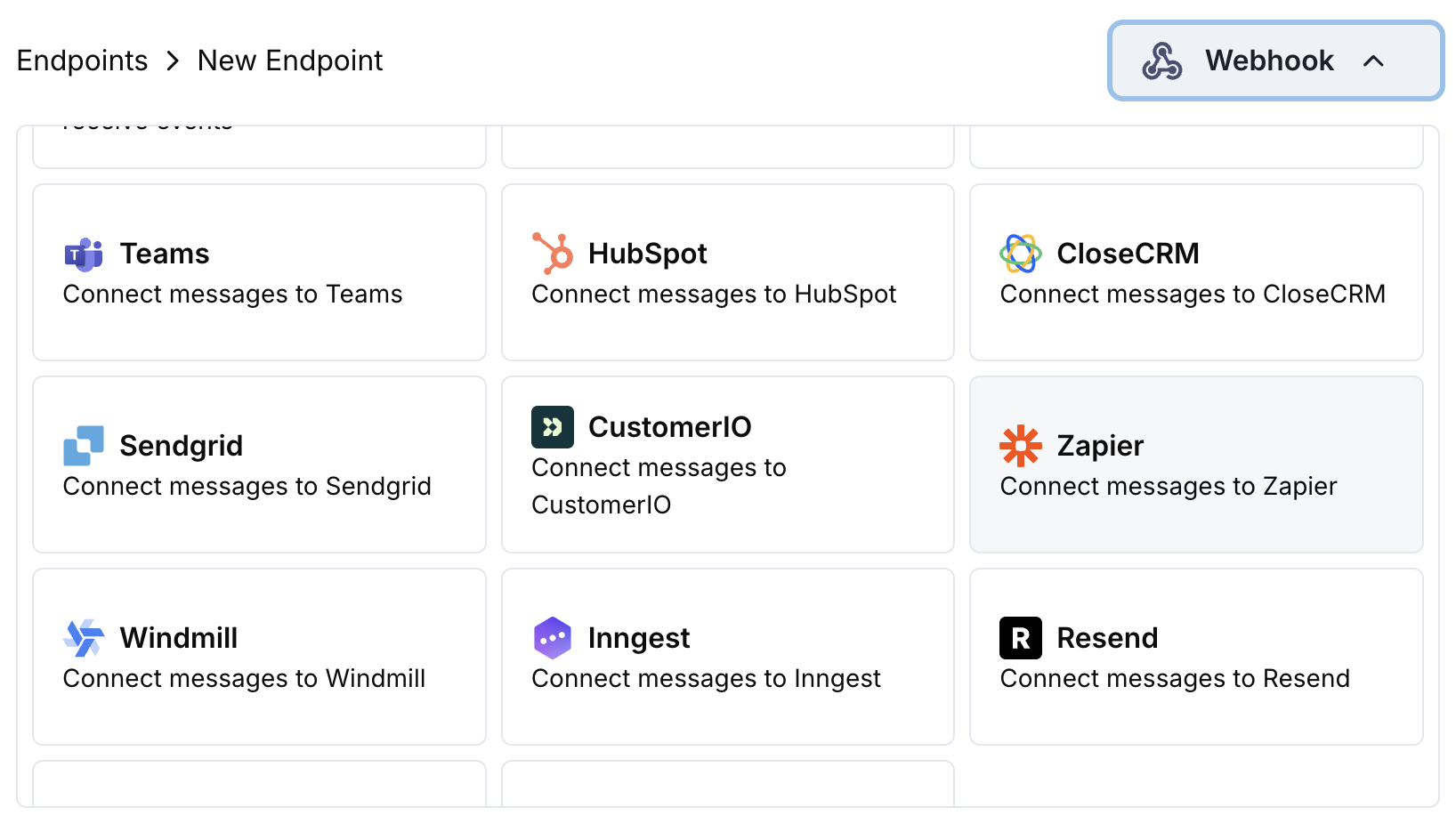 Zapier 통합 카드를 선택합니다.
Zapier에서 트리거로 "Webhooks by Zapier"를 사용하여 새 Zap을 생성합니다. 웹훅 URL을 복사합니다.
Zapier 웹훅 URL을 엔드포인트 구성에 붙여넣습니다.
Zapier 워크플로용 데이터를 서식화하도록 변환 코드를 편집합니다.
샘플 페이로드로 테스트한 다음 Create을 클릭하여 통합을 활성화합니다.
🎉 이제 결제 이벤트가 자동으로 Zapier 워크플로를 트리거합니다.
## 변환 코드 예제
### 기본 웹후크 페이로드
```javascript basic_webhook.js icon="js" expandable theme={null}
function handler(webhook) {
if (webhook.eventType === "payment.succeeded") {
const p = webhook.payload.data;
webhook.payload = {
event_type: webhook.eventType,
payment_id: p.payment_id,
amount: (p.total_amount / 100).toFixed(2),
currency: p.currency || "USD",
customer_email: p.customer.email,
customer_name: p.customer.name,
payment_method: p.payment_method || "unknown",
timestamp: webhook.payload.timestamp
};
}
return webhook;
}
```
### 구독 이벤트 핸들러
```javascript subscription_webhook.js icon="js" expandable theme={null}
function handler(webhook) {
const s = webhook.payload.data;
switch (webhook.eventType) {
case "subscription.active":
webhook.payload = {
event_type: "subscription_started",
subscription_id: s.subscription_id,
customer_email: s.customer.email,
customer_name: s.customer.name,
product_id: s.product_id,
amount: (s.recurring_pre_tax_amount / 100).toFixed(2),
frequency: s.payment_frequency_interval,
next_billing: s.next_billing_date,
timestamp: webhook.payload.timestamp
};
break;
case "subscription.cancelled":
webhook.payload = {
event_type: "subscription_cancelled",
subscription_id: s.subscription_id,
customer_email: s.customer.email,
cancelled_at: s.cancelled_at,
cancel_at_next_billing: s.cancel_at_next_billing_date,
timestamp: webhook.payload.timestamp
};
break;
}
return webhook;
}
```
### 분쟁 알림 핸들러
```javascript dispute_webhook.js icon="js" expandable theme={null}
function handler(webhook) {
if (webhook.eventType.startsWith("dispute.")) {
const d = webhook.payload.data;
webhook.payload = {
event_type: webhook.eventType,
dispute_id: d.dispute_id,
payment_id: d.payment_id,
amount: (d.amount / 100).toFixed(2),
status: d.dispute_status,
stage: d.dispute_stage,
remarks: d.remarks || "",
urgent: webhook.eventType === "dispute.opened",
timestamp: webhook.payload.timestamp
};
}
return webhook;
}
```
## 인기 있는 Zapier 사용 사례
* 결제 확인용으로 Gmail/Outlook 이메일을 보냅니다.
* Mailchimp/ConvertKit에서 이메일 시퀀스를 생성합니다.
* Slack/Discord 알림을 보냅니다.
* Google Sheets 레코드를 생성합니다.
* HubSpot/Salesforce에 연락처를 추가합니다.
* Pipedrive/Close에서 거래를 생성합니다.
* Airtable에서 고객 기록을 업데이트합니다.
* Monday.com에서 활동을 기록합니다.
* Asana/Trello에서 작업을 생성합니다.
* Notion에 할 일 항목을 추가합니다.
* 캘린더 이벤트를 생성합니다.
* Twilio를 통해 SMS 알림을 보냅니다.
## 팁
* Zapier 파싱을 쉽게 하기 위해 페이로드 구조를 간단하게 유지하세요.
* 모든 이벤트에서 일관된 필드 이름을 사용하세요.
* 워크플로 타이밍을 위해 타임스탬프를 포함하세요.
* 라이브로 전환하기 전에 샘플 데이터로 Zap을 테스트하세요.
* 조건 논리를 위해 Zapier의 내장 필터를 사용하세요.
## 문제 해결
* 웹훅 URL이 올바르고 활성 상태인지 확인합니다.
* Zapier에서 Zap이 켜져 있는지 확인합니다.
* 페이로드 구조가 Zapier의 기대치와 일치하는지 확인합니다.
* Zapier 대시보드에서 웹훅 전달을 테스트합니다.
* Zapier 작업 단계에서 필드 이름을 확인합니다.
* 데이터 형식이 예상 형식과 일치하는지 확인합니다.
* Zapier의 테스트 기능을 사용하여 매핑을 디버그합니다.
* 변환 코드가 유효한 JSON을 반환하는지 확인합니다.
Zapier 통합 카드를 선택합니다.
Zapier에서 트리거로 "Webhooks by Zapier"를 사용하여 새 Zap을 생성합니다. 웹훅 URL을 복사합니다.
Zapier 웹훅 URL을 엔드포인트 구성에 붙여넣습니다.
Zapier 워크플로용 데이터를 서식화하도록 변환 코드를 편집합니다.
샘플 페이로드로 테스트한 다음 Create을 클릭하여 통합을 활성화합니다.
🎉 이제 결제 이벤트가 자동으로 Zapier 워크플로를 트리거합니다.
## 변환 코드 예제
### 기본 웹후크 페이로드
```javascript basic_webhook.js icon="js" expandable theme={null}
function handler(webhook) {
if (webhook.eventType === "payment.succeeded") {
const p = webhook.payload.data;
webhook.payload = {
event_type: webhook.eventType,
payment_id: p.payment_id,
amount: (p.total_amount / 100).toFixed(2),
currency: p.currency || "USD",
customer_email: p.customer.email,
customer_name: p.customer.name,
payment_method: p.payment_method || "unknown",
timestamp: webhook.payload.timestamp
};
}
return webhook;
}
```
### 구독 이벤트 핸들러
```javascript subscription_webhook.js icon="js" expandable theme={null}
function handler(webhook) {
const s = webhook.payload.data;
switch (webhook.eventType) {
case "subscription.active":
webhook.payload = {
event_type: "subscription_started",
subscription_id: s.subscription_id,
customer_email: s.customer.email,
customer_name: s.customer.name,
product_id: s.product_id,
amount: (s.recurring_pre_tax_amount / 100).toFixed(2),
frequency: s.payment_frequency_interval,
next_billing: s.next_billing_date,
timestamp: webhook.payload.timestamp
};
break;
case "subscription.cancelled":
webhook.payload = {
event_type: "subscription_cancelled",
subscription_id: s.subscription_id,
customer_email: s.customer.email,
cancelled_at: s.cancelled_at,
cancel_at_next_billing: s.cancel_at_next_billing_date,
timestamp: webhook.payload.timestamp
};
break;
}
return webhook;
}
```
### 분쟁 알림 핸들러
```javascript dispute_webhook.js icon="js" expandable theme={null}
function handler(webhook) {
if (webhook.eventType.startsWith("dispute.")) {
const d = webhook.payload.data;
webhook.payload = {
event_type: webhook.eventType,
dispute_id: d.dispute_id,
payment_id: d.payment_id,
amount: (d.amount / 100).toFixed(2),
status: d.dispute_status,
stage: d.dispute_stage,
remarks: d.remarks || "",
urgent: webhook.eventType === "dispute.opened",
timestamp: webhook.payload.timestamp
};
}
return webhook;
}
```
## 인기 있는 Zapier 사용 사례
* 결제 확인용으로 Gmail/Outlook 이메일을 보냅니다.
* Mailchimp/ConvertKit에서 이메일 시퀀스를 생성합니다.
* Slack/Discord 알림을 보냅니다.
* Google Sheets 레코드를 생성합니다.
* HubSpot/Salesforce에 연락처를 추가합니다.
* Pipedrive/Close에서 거래를 생성합니다.
* Airtable에서 고객 기록을 업데이트합니다.
* Monday.com에서 활동을 기록합니다.
* Asana/Trello에서 작업을 생성합니다.
* Notion에 할 일 항목을 추가합니다.
* 캘린더 이벤트를 생성합니다.
* Twilio를 통해 SMS 알림을 보냅니다.
## 팁
* Zapier 파싱을 쉽게 하기 위해 페이로드 구조를 간단하게 유지하세요.
* 모든 이벤트에서 일관된 필드 이름을 사용하세요.
* 워크플로 타이밍을 위해 타임스탬프를 포함하세요.
* 라이브로 전환하기 전에 샘플 데이터로 Zap을 테스트하세요.
* 조건 논리를 위해 Zapier의 내장 필터를 사용하세요.
## 문제 해결
* 웹훅 URL이 올바르고 활성 상태인지 확인합니다.
* Zapier에서 Zap이 켜져 있는지 확인합니다.
* 페이로드 구조가 Zapier의 기대치와 일치하는지 확인합니다.
* Zapier 대시보드에서 웹훅 전달을 테스트합니다.
* Zapier 작업 단계에서 필드 이름을 확인합니다.
* 데이터 형식이 예상 형식과 일치하는지 확인합니다.
* Zapier의 테스트 기능을 사용하여 매핑을 디버그합니다.
* 변환 코드가 유효한 JSON을 반환하는지 확인합니다.