> ## Documentation Index
> Fetch the complete documentation index at: https://docs.dodopayments.com/llms.txt
> Use this file to discover all available pages before exploring further.
# Microsoft Teams
> Microsoft Teams 채널에 풍부한 Adaptive Cards로 Dodo Payments 알림을 전송합니다.
## 소개
실시간 결제 알림으로 비즈니스 팀을 Microsoft Teams와 연결하세요. 이 통합은 결제 이벤트를 풍부한 Adaptive Cards로 전달합니다. 이는 Teams가 주요 협업 도구인 기업 환경에 적합합니다.
이 가이드는 Microsoft Teams 작업 공간에서 웹후크를 생성할 수 있는 관리자 액세스 권한이 있다고 가정합니다.
## 시작하기
Dodo Payments 대시보드에서 Webhooks → + Add Endpoint로 이동하여 통합 드롭다운을 확장합니다.
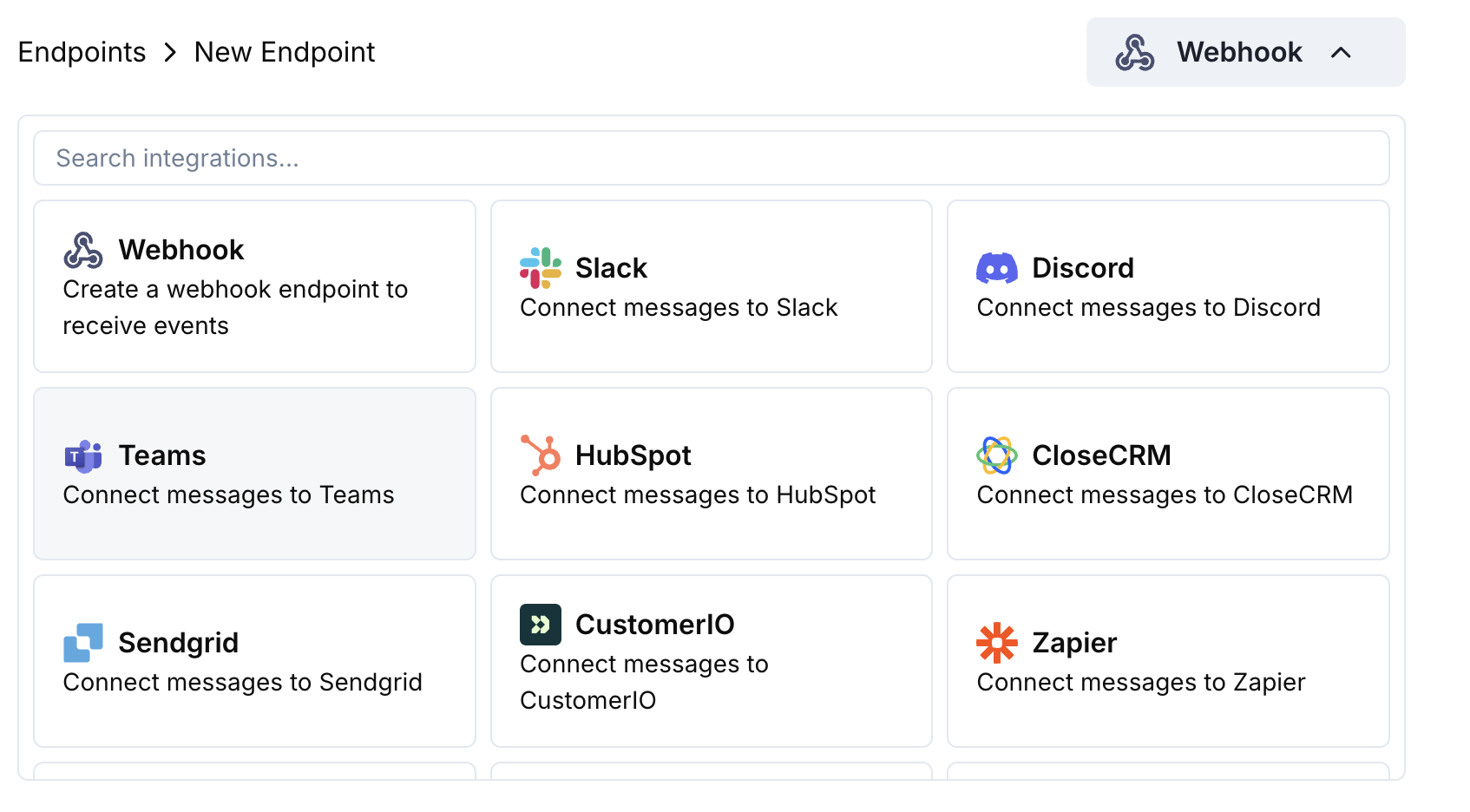 Microsoft Teams 통합 카드를 선택합니다.
Teams에서 채널 → ⋯ → Connectors → Incoming Webhook → Configure로 이동합니다. 웹후크 URL을 복사합니다.
Teams 웹후크 URL을 엔드포인트 구성에 붙여넣습니다.
메시지를 Teams용 Adaptive Card로 포맷하려면 변환 코드를 편집합니다.
샘플 페이로드로 테스트한 다음 Create를 클릭하여 활성화합니다.
🎉 이제 Teams 채널에서 Adaptive Card 형식으로 Dodo Payments 업데이트를 수신합니다.
## 변환 코드 예제
### 기본 결제 카드
```javascript payment_card.js icon="js" expandable theme={null}
function handler(webhook) {
if (webhook.eventType === "payment.succeeded") {
const p = webhook.payload.data;
webhook.payload = {
type: "message",
attachments: [{
contentType: "application/vnd.microsoft.card.adaptive",
content: {
type: "AdaptiveCard",
body: [
{
type: "TextBlock",
text: "✅ Payment Successful",
weight: "Bolder",
size: "Medium"
},
{
type: "FactSet",
facts: [
{ title: "Amount", value: `$${(p.total_amount / 100).toFixed(2)}` },
{ title: "Customer", value: p.customer.email },
{ title: "Payment ID", value: p.payment_id }
]
}
]
}
}]
};
}
return webhook;
}
```
### 구독 관리
```javascript subscription_card.js icon="js" expandable theme={null}
function handler(webhook) {
const s = webhook.payload.data;
switch (webhook.eventType) {
case "subscription.active":
webhook.payload = {
type: "message",
attachments: [{
contentType: "application/vnd.microsoft.card.adaptive",
content: {
type: "AdaptiveCard",
body: [
{
type: "TextBlock",
text: "📄 Subscription Activated",
weight: "Bolder",
color: "Good"
},
{
type: "FactSet",
facts: [
{ title: "Customer", value: s.customer.email },
{ title: "Product", value: s.product_id },
{ title: "Amount", value: `$${(s.recurring_pre_tax_amount / 100).toFixed(2)}/${s.payment_frequency_interval}` },
{ title: "Next Billing", value: new Date(s.next_billing_date).toLocaleDateString() }
]
}
]
}
}]
};
break;
case "subscription.cancelled":
webhook.payload = {
type: "message",
attachments: [{
contentType: "application/vnd.microsoft.card.adaptive",
content: {
type: "AdaptiveCard",
body: [
{
type: "TextBlock",
text: "⚠️ Subscription Cancelled",
weight: "Bolder",
color: "Warning"
},
{
type: "FactSet",
facts: [
{ title: "Customer", value: s.customer.email },
{ title: "Product", value: s.product_id },
{ title: "Cancelled At", value: new Date(s.cancelled_at).toLocaleDateString() }
]
}
]
}
}]
};
break;
}
return webhook;
}
```
### 분쟁 알림
```javascript dispute_card.js icon="js" expandable theme={null}
function handler(webhook) {
if (webhook.eventType.startsWith("dispute.")) {
const d = webhook.payload.data;
const color = d.dispute_status === "won" ? "Good" : d.dispute_status === "lost" ? "Attention" : "Warning";
const title = d.dispute_status === "won" ? "🏆 Dispute Won" : d.dispute_status === "lost" ? "❌ Dispute Lost" : "🚨 Dispute Update";
webhook.payload = {
type: "message",
attachments: [{
contentType: "application/vnd.microsoft.card.adaptive",
content: {
type: "AdaptiveCard",
body: [
{
type: "TextBlock",
text: title,
weight: "Bolder",
color: color
},
{
type: "FactSet",
facts: [
{ title: "Payment ID", value: d.payment_id },
{ title: "Amount", value: `$${(d.amount / 100).toFixed(2)}` },
{ title: "Status", value: d.dispute_status },
{ title: "Stage", value: d.dispute_stage }
]
}
]
}
}]
};
}
return webhook;
}
```
## 팁
* 풍부하고 상호작용적인 포맷을 위해 Adaptive Cards 사용
* 적절한 색상 선택: 좋음 (초록), 경고 (노랑), 주의 (빨강)
* 사실 세트를 간결하고 읽기 쉽게 유지
* 배포 전에 Teams 웹후크 테스터로 테스트
## 문제 해결
* 웹후크 URL이 정확하고 활성 상태인지 확인합니다
* 변환이 유효한 Adaptive Card JSON을 반환하는지 확인합니다
* 웹후크가 채널에 게시할 권한이 있는지 확인합니다
* Teams 웹후크 테스터에서 Adaptive Card 스키마를 검증합니다
* 모든 필수 필드가 존재하는지 확인합니다
* 색상 값이 유효한지 확인합니다(Good, Warning, Attention, Default)
Microsoft Teams 통합 카드를 선택합니다.
Teams에서 채널 → ⋯ → Connectors → Incoming Webhook → Configure로 이동합니다. 웹후크 URL을 복사합니다.
Teams 웹후크 URL을 엔드포인트 구성에 붙여넣습니다.
메시지를 Teams용 Adaptive Card로 포맷하려면 변환 코드를 편집합니다.
샘플 페이로드로 테스트한 다음 Create를 클릭하여 활성화합니다.
🎉 이제 Teams 채널에서 Adaptive Card 형식으로 Dodo Payments 업데이트를 수신합니다.
## 변환 코드 예제
### 기본 결제 카드
```javascript payment_card.js icon="js" expandable theme={null}
function handler(webhook) {
if (webhook.eventType === "payment.succeeded") {
const p = webhook.payload.data;
webhook.payload = {
type: "message",
attachments: [{
contentType: "application/vnd.microsoft.card.adaptive",
content: {
type: "AdaptiveCard",
body: [
{
type: "TextBlock",
text: "✅ Payment Successful",
weight: "Bolder",
size: "Medium"
},
{
type: "FactSet",
facts: [
{ title: "Amount", value: `$${(p.total_amount / 100).toFixed(2)}` },
{ title: "Customer", value: p.customer.email },
{ title: "Payment ID", value: p.payment_id }
]
}
]
}
}]
};
}
return webhook;
}
```
### 구독 관리
```javascript subscription_card.js icon="js" expandable theme={null}
function handler(webhook) {
const s = webhook.payload.data;
switch (webhook.eventType) {
case "subscription.active":
webhook.payload = {
type: "message",
attachments: [{
contentType: "application/vnd.microsoft.card.adaptive",
content: {
type: "AdaptiveCard",
body: [
{
type: "TextBlock",
text: "📄 Subscription Activated",
weight: "Bolder",
color: "Good"
},
{
type: "FactSet",
facts: [
{ title: "Customer", value: s.customer.email },
{ title: "Product", value: s.product_id },
{ title: "Amount", value: `$${(s.recurring_pre_tax_amount / 100).toFixed(2)}/${s.payment_frequency_interval}` },
{ title: "Next Billing", value: new Date(s.next_billing_date).toLocaleDateString() }
]
}
]
}
}]
};
break;
case "subscription.cancelled":
webhook.payload = {
type: "message",
attachments: [{
contentType: "application/vnd.microsoft.card.adaptive",
content: {
type: "AdaptiveCard",
body: [
{
type: "TextBlock",
text: "⚠️ Subscription Cancelled",
weight: "Bolder",
color: "Warning"
},
{
type: "FactSet",
facts: [
{ title: "Customer", value: s.customer.email },
{ title: "Product", value: s.product_id },
{ title: "Cancelled At", value: new Date(s.cancelled_at).toLocaleDateString() }
]
}
]
}
}]
};
break;
}
return webhook;
}
```
### 분쟁 알림
```javascript dispute_card.js icon="js" expandable theme={null}
function handler(webhook) {
if (webhook.eventType.startsWith("dispute.")) {
const d = webhook.payload.data;
const color = d.dispute_status === "won" ? "Good" : d.dispute_status === "lost" ? "Attention" : "Warning";
const title = d.dispute_status === "won" ? "🏆 Dispute Won" : d.dispute_status === "lost" ? "❌ Dispute Lost" : "🚨 Dispute Update";
webhook.payload = {
type: "message",
attachments: [{
contentType: "application/vnd.microsoft.card.adaptive",
content: {
type: "AdaptiveCard",
body: [
{
type: "TextBlock",
text: title,
weight: "Bolder",
color: color
},
{
type: "FactSet",
facts: [
{ title: "Payment ID", value: d.payment_id },
{ title: "Amount", value: `$${(d.amount / 100).toFixed(2)}` },
{ title: "Status", value: d.dispute_status },
{ title: "Stage", value: d.dispute_stage }
]
}
]
}
}]
};
}
return webhook;
}
```
## 팁
* 풍부하고 상호작용적인 포맷을 위해 Adaptive Cards 사용
* 적절한 색상 선택: 좋음 (초록), 경고 (노랑), 주의 (빨강)
* 사실 세트를 간결하고 읽기 쉽게 유지
* 배포 전에 Teams 웹후크 테스터로 테스트
## 문제 해결
* 웹후크 URL이 정확하고 활성 상태인지 확인합니다
* 변환이 유효한 Adaptive Card JSON을 반환하는지 확인합니다
* 웹후크가 채널에 게시할 권한이 있는지 확인합니다
* Teams 웹후크 테스터에서 Adaptive Card 스키마를 검증합니다
* 모든 필수 필드가 존재하는지 확인합니다
* 색상 값이 유효한지 확인합니다(Good, Warning, Attention, Default)