> ## Documentation Index
> Fetch the complete documentation index at: https://docs.dodopayments.com/llms.txt
> Use this file to discover all available pages before exploring further.
# 현지화된 가격
> 환율에 의해 결정되는 대신 각 통화나 국가에 원하는 고정 가격을 설정하세요. 고객에게 동그라미 형태로 시장 맞춤형 가격을 부과하고 국가별 프로모션을 실행하세요.
## 현지화된 가격이란?
모든 제품은 기본 통화의 기본 가격을 가지고 있습니다. 현지화된 가격은 **통화별 또는 국가별로 설정한 고정 가격**으로 기본값을 무시할 수 있도록 합니다. 제품에 `pricing_mode`를 설정하여 활성화한 다음, 시장별로 하나의 규칙을 연결하세요.
이는 각각 다른 문제를 해결하는 세 가지 독립적인 국제 가격 조정 레버 중 하나입니다:
| 메커니즘 | 기능 | 고객에게 보이는 가격 |
| :---------------------------------------- | :------------------- | :--------------- |
| **로컬라이즈된 가격** | 통화 또는 국가별로 설정한 고정 가격 | 설정한 금액 그대로 |
| [**적응형 통화**](/features/adaptive-currency) | 실시간 환율로 기준 가격을 자동 변환 | 현재 환율로 변환된 기준 가격 |
| [**할인 코드**](/features/discount-codes) | 기준 가격에서의 비율 할인 | 기준 가격에서 할인된 금액 |
현지화된 가격과 적응형 통화는 함께 작동합니다. 현지화된 규칙이 없으면 제품은 기본 가격으로 돌아갑니다 — 고객이 이미 기본 통화에 있는 경우 직접 부과되며, 그렇지 않으면 적응형 통화를 통해 변환됩니다.
***
## 사용 사례
민감한 가격 시장에서 본국 시장의 할인을 하지 않고 적게 청구하세요. `by_country` 규칙은 \$20 기본 제품을 **인도의 ₹999**에 판매할 수 있게 하며, 이는 단순 환율 변환이 아니라 현지 구매력에 맞춘 것입니다. PPP를 실행하는 추천하는, 본격적인 방법입니다.
\$19.99의 실시간 환율 변환은 €18.43처럼 어색한 숫자에 도달합니다. `by_currency` 규칙은 소비자가 기대하는 깔끔하고 심리적으로 조율된 가격을 설정합니다 — **€9.99**, **¥1000**, **₹499** — 타이핑 그대로입니다.
새로운 국가에 출시하나요? `by_country` 규칙을 도입 가격과 함께 추가한 다음, 프로모션이 끝나면 **기록 보관**하여 기본/적응형 가격으로 돌아갑니다. 규칙은 삭제되지 않고 기록 보관되므로, 어떤 것이 언제 실시간으로 있었는지에 대한 깨끗한 기록을 유지합니다.
로컬 경쟁업체와 일치하도록 단일 시장을 고정하세요. **영국에서 £9.00**에 대한 `by_country` 규칙은 GBP/USD 환율이 어떻게 변하든 그 정확한 가격을 유지합니다.
***
## 핵심 개념
* **가격 모드** — 제품은 한 번에 정확히 하나의 모드에 있으며, `pricing_mode`에 의해 설정됩니다:
* `by_currency`: 모든 통화별로 한 가지 가격입니다. EUR로 지불하는 모든 사람에게는 €9.99가 보입니다.
* `by_country`: 여러 국가가 동일한 통화를 공유하더라도 특정 국가에 대한 가격(인도의 ₹999)입니다.
* **최소 단위로 고정된 금액** — 규칙의 `amount`는 API의 다른 모든 곳과 마찬가지로 통화의 최소 단위에서의 정수입니다: `99900`는 ₹999.00, `999`는 €9.99입니다. 이는 변환된 값이 아니라 설정한 가격입니다.
* **규칙이 일치하지 않을 때** — 제품은 기존 동작을 유지합니다: 기본 통화에 있는 고객은 기본 가격을 직접 지불하고, 다른 모든 사람은 [적응형 통화](/features/adaptive-currency)를 통해 변환됩니다.
* **규칙이 일치할 때 요금 포함** — 고객은 설정한 금액을 **정확하게** 지불합니다. [적응형 통화](/features/adaptive-currency#choose-who-bears-the-fee) FX 요금은 추가되는 것이 아니라 트랜잭션에 대해 요금을 포함하는 방식으로 처리되므로, 명시된 현지 가격이 항상 청구되는 가격이 됩니다.
***
## 대시보드에서 설정하기
Merchant Dashboard에서 **제품**으로 가서 제품을 생성하거나 (기존 제품을 열어 편집하세요). 기본 **가격**과 통화를 평소처럼 설정하세요.
**가격** 섹션에서 **현지화된 가격**을 선택하고, **국가별** 또는 **통화별**을 선택하세요.
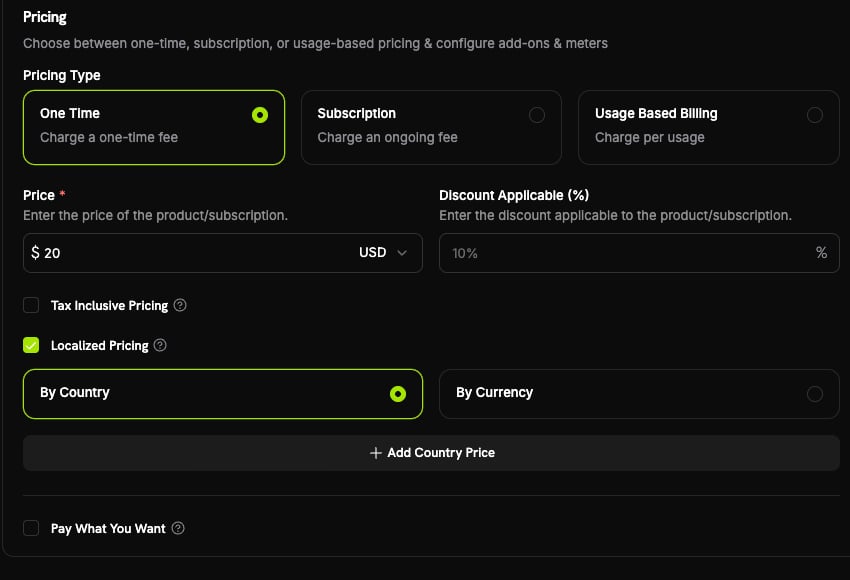 **국가 가격 추가** 또는 **통화 가격 추가**를 클릭하고, **현지화된 가격** 패널을 작성한 후 **추가**를 클릭하세요. 추가된 각 시장은 나중에 편집하거나 제거할 수 있는 변경 테이블에 나타납니다.
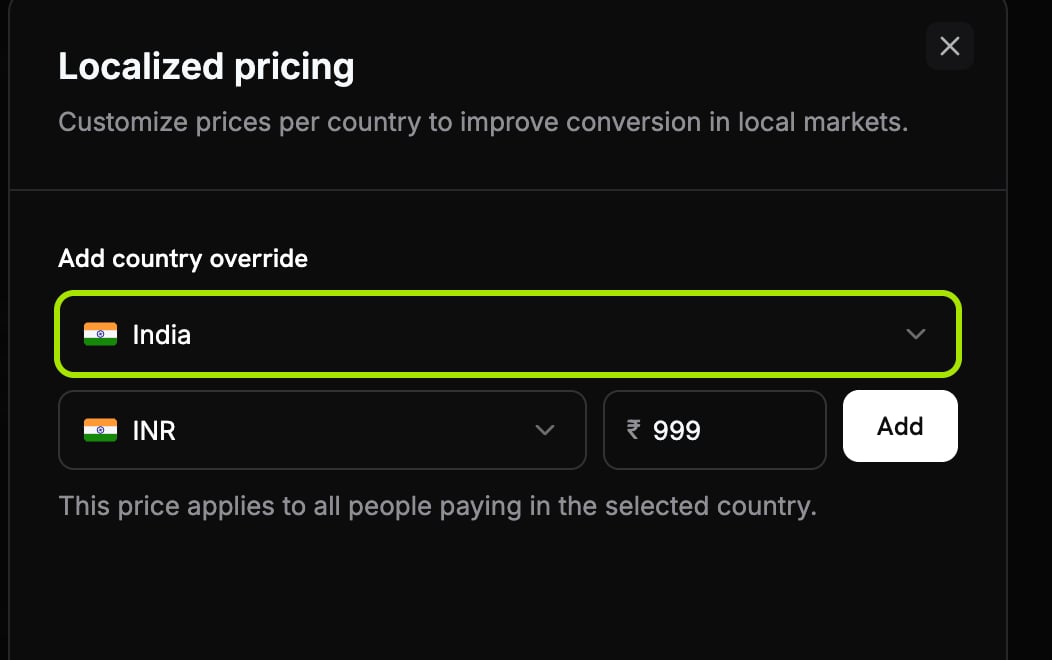
국가를 선택하고, 통화를 선택한 다음 금액을 입력하세요 (예를 들어 인도는 ₹999). 그런 다음 **추가**를 클릭하세요.
**국가 가격 추가** 또는 **통화 가격 추가**를 클릭하고, **현지화된 가격** 패널을 작성한 후 **추가**를 클릭하세요. 추가된 각 시장은 나중에 편집하거나 제거할 수 있는 변경 테이블에 나타납니다.
국가를 선택하고, 통화를 선택한 다음 금액을 입력하세요 (예를 들어 인도는 ₹999). 그런 다음 **추가**를 클릭하세요.
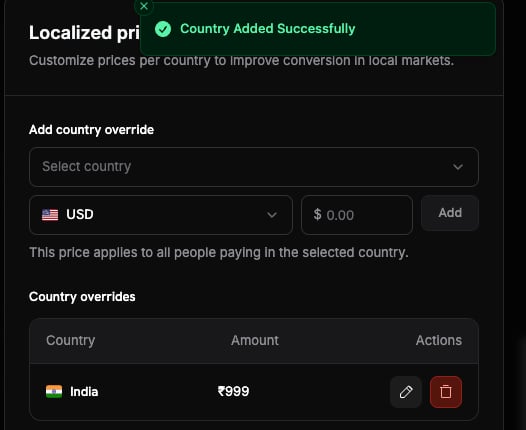
 국가가 이제 **국가 덮어쓰기** 테이블에 나타나며, 여기서 편집하거나 제거할 수 있습니다.
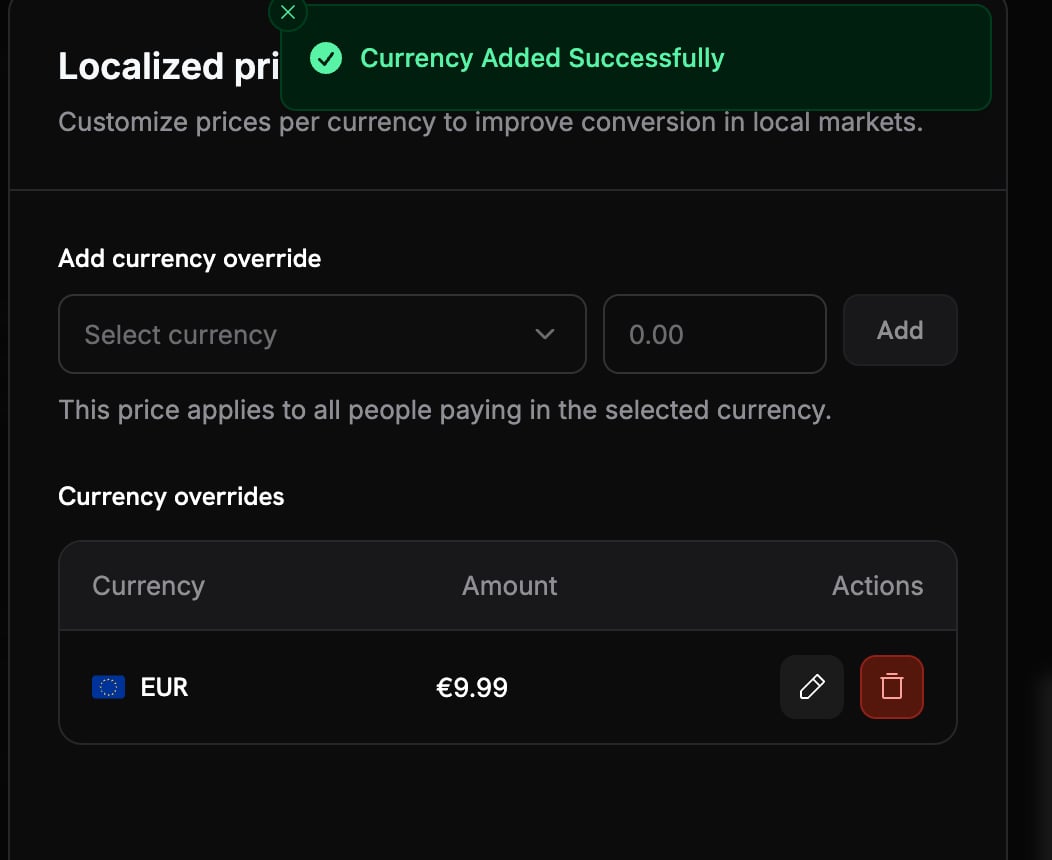
 통화를 선택하고 금액을 입력하세요 (예를 들어 EUR는 €9.99). 그런 다음 **추가**를 클릭하세요.
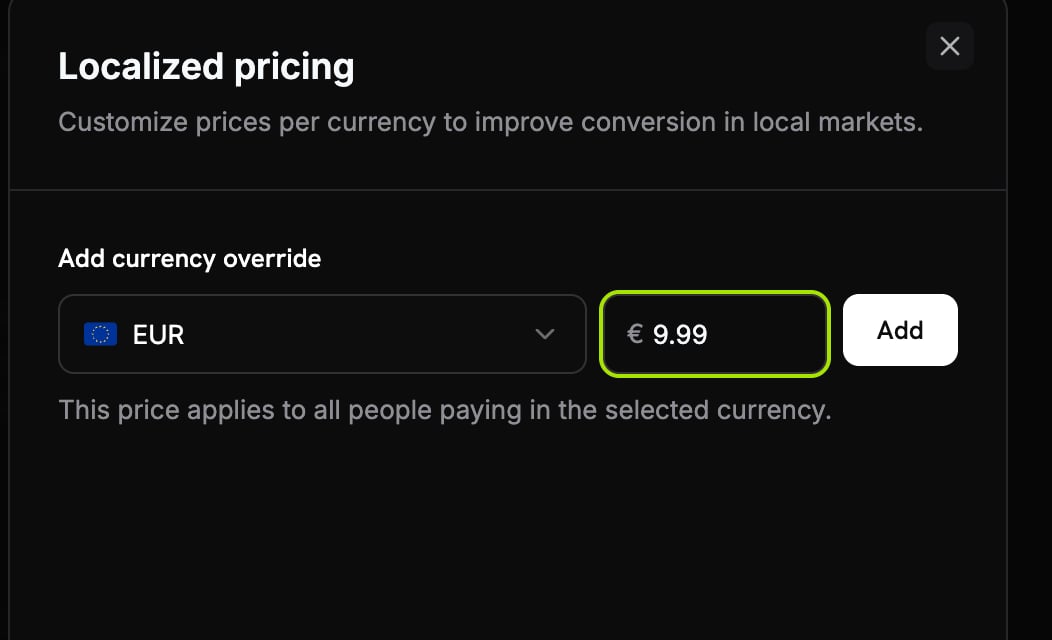 통화가 이제 **통화 덮어쓰기** 테이블에 표시되며, 여기서 편집하거나 제거할 수 있습니다.
 **제품 추가**로 저장하세요. 현지화된 가격은 이후 결제에 즉시 적용됩니다.
규칙이 있는 청구 국가로 테스트 결제를 실행하고, 현지화된 금액이 나타나는지 확인하세요.
***
## API를 통한 관리
현지화된 가격은 API를 통해 완전히 이용 가능합니다. 먼저 제품의 가격 모드를 설정한 다음 규칙을 연결합니다.
### 가격 모드 설정하기
제품을 생성할 때 (또는 기존 제품을 업데이트할 때) `pricing_mode`를 설정합니다. `null`는 기본 전용이며, 기존 동작을 의미합니다.
```typescript theme={null} theme={null}
import DodoPayments from 'dodopayments';
const client = new DodoPayments({
bearerToken: process.env.DODO_PAYMENTS_API_KEY,
environment: 'test_mode',
});
const product = await client.products.update('pdt_premium_plan', {
pricing_mode: 'by_country',
});
```
```python theme={null} theme={null}
import os
from dodopayments import DodoPayments
client = DodoPayments(
bearer_token=os.environ.get("DODO_PAYMENTS_API_KEY"),
environment="test_mode",
)
product = client.products.update(
"pdt_premium_plan",
pricing_mode="by_country",
)
```
```go theme={null} theme={null}
package main
import (
"context"
"os"
"github.com/dodopayments/dodopayments-go"
"github.com/dodopayments/dodopayments-go/option"
)
func main() {
client := dodopayments.NewClient(
option.WithBearerToken(os.Getenv("DODO_PAYMENTS_API_KEY")),
)
_, err := client.Products.Update(
context.TODO(),
"pdt_premium_plan",
dodopayments.ProductUpdateParams{
PricingMode: dodopayments.F(dodopayments.PricingModeByCountry),
},
)
if err != nil {
panic(err)
}
}
```
### 현지화된 가격 추가
제품에 규칙을 연결합니다. `by_country` 모드에서는 `country_code`가 필요하고, `by_currency` 모드에서는 생략해야 합니다.
```typescript theme={null} theme={null}
// ₹999.00 for customers in India
const localizedPrice = await client.products.localizedPrices.create('pdt_premium_plan', {
currency: 'INR',
country_code: 'IN',
amount: 99900,
});
```
```python theme={null} theme={null}
# ₹999.00 for customers in India
localized_price = client.products.localized_prices.create(
"pdt_premium_plan",
currency="INR",
country_code="IN",
amount=99900,
)
```
```go theme={null} theme={null}
// ₹999.00 for customers in India
localizedPrice, err := client.Products.LocalizedPrices.New(
context.TODO(),
"pdt_premium_plan",
dodopayments.ProductLocalizedPriceNewParams{
Currency: dodopayments.F(dodopayments.CurrencyInr),
CountryCode: dodopayments.F(dodopayments.CountryCodeIn),
Amount: dodopayments.F(int64(99900)),
},
)
```
`by_currency` 제품인 경우 `country_code`를 생략합니다. 예를 들어, EUR 지불에 대한 일률적인 `€9.99` (`currency: 'EUR'`, `amount: 999`)입니다.
### 나열, 업데이트 및 기록 보관
규칙의 `amount`만 업데이트할 수 있습니다; 통화와 국가는 생성 후 고정됩니다. 기록 보관은 멱등한 소프트 삭제이며, 규칙은 일치가 중지되지만 이력에 남습니다.
```typescript theme={null} theme={null}
// List all active rules on a product
const rules = await client.products.localizedPrices.list('pdt_premium_plan');
// Change the amount (e.g. end a promo)
await client.products.localizedPrices.update('lcp_india_price', {
product_id: 'pdt_premium_plan',
amount: 119900,
});
// Archive a rule
await client.products.localizedPrices.archive('lcp_india_price', {
product_id: 'pdt_premium_plan',
});
```
```python theme={null} theme={null}
# List all active rules on a product
rules = client.products.localized_prices.list("pdt_premium_plan")
# Change the amount (e.g. end a promo)
client.products.localized_prices.update(
"lcp_india_price",
product_id="pdt_premium_plan",
amount=119900,
)
# Archive a rule
client.products.localized_prices.archive(
"lcp_india_price",
product_id="pdt_premium_plan",
)
```
```go theme={null} theme={null}
// List all active rules on a product
rules, err := client.Products.LocalizedPrices.List(context.TODO(), "pdt_premium_plan")
// Change the amount (e.g. end a promo)
_, err = client.Products.LocalizedPrices.Update(
context.TODO(),
"pdt_premium_plan",
"lcp_india_price",
dodopayments.ProductLocalizedPriceUpdateParams{
Amount: dodopayments.F(int64(119900)),
},
)
// Archive a rule
err = client.Products.LocalizedPrices.Archive(
context.TODO(),
"pdt_premium_plan",
"lcp_india_price",
)
```
전체 제품 현지화된 가격 엔드포인트: 생성, 목록, 검색, 업데이트 및 기록 보관을 참조하세요.
***
## 결제 시 적용 방법
현지화된 가격은 각 장바구니 라인별로 해석되며, `pricing_mode`가 설정된 제품에만 적용됩니다. Dodo Payments는 요청에서 고객의 **청구 국가**와 선택적 **`billing_currency`**(생략 시, 국가에서 파생된 통화)를 읽습니다.
* **국가별**: 청구 국가와 일치하는 규칙을 찾습니다. 존재하면 고객에게 규칙의 통화로 규칙의 금액을 청구합니다.
* **통화별**: 고객의 통화(`billing_currency`, 또는 국가에서 파생된 통화)와 일치하는 규칙을 찾습니다. 존재하면 고객에게 해당 통화로 규칙의 금액을 청구합니다.
* **일치하지 않거나 `pricing_mode`가 없는 경우**: 기본 가격이 적용됩니다. 고객의 통화가 기본 통화와 같으면 직접 청구하고, 그렇지 않으면 [적응형 통화](/features/adaptive-currency)를 통해 변환됩니다.
각 장바구니 라인은 독립적으로 해결되므로, 하나의 제품을 현지화하고 다른 제품은 동일한 결제에서 기본 가격으로 남길 수 있습니다. 어떤 라인이든 현지화된 규칙에 일치하면 전체 거래는 강제로 요금 포함으로 처리됩니다 ([핵심 개념](#core-concepts)을 참조하세요).
***
## 주요 동작
| 동작 | 세부 사항 |
| :------------------ | :----------------------------------------------------------------------------------------------------------------------------- |
| **세전 금액** | 현지화된 금액은 세금 전 가격입니다. 세금이 제외되는 제품의 경우, 세금은 결제 시 추가되며, 현지화된 금액은 최종 합계가 아닙니다. [세금 포함 가격](/features/tax-inclusive-pricing)을 참조하세요. |
| **원하는 금액 지불이 아닙니다** | 현지화된 규칙은 고객이 금액을 선택하는 [원하는 금액 지불](/features/pay-what-you-want) 제품에 절대 적용되지 않습니다. |
| **기본과 다른 통화별** | `by_currency` 규칙은 제품의 기본 통화와 다른 통화를 사용해야 합니다. |
| **시장별 하나의 규칙** | 제품 하나당 통화당 최대 하나의 활성 규칙(통화별) 또는 국가당(국가별) 규칙을 가질 수 있습니다. |
| **모든 제품 유형** | 일회성, 구독 및 사용 기반 제품에 적용됩니다. |
현지화된 규칙 변경은 자체 웹훅을 발행하지 않습니다. 해결된 금액은 다른 가격과 마찬가지로 결과 결제 또는 구독에 나타납니다.
***
## 모범 사례
* **합리적인 기본 가격을 유지하십시오.** 규칙인 없는 모든 시장에 대한 대체 가격이며, 적응형 통화를 통해 변환됩니다.
* **현지 매력적인 가격에 맞추세요.** 고정 금액의 전체 목적은 ₹999, €9.99 또는 ¥1000과 같은 깔끔한 수치를 설정하는 것입니다, 환율 결과가 아닙니다.
* **작업에 맞는 모드를 선택하세요.** 구매력 가격 설정에는 `by_country`를 사용하세요. 통화 영역별로 하나의 가격만 필요한 경우 `by_currency`를 사용하세요.
* **프로모션은 기록 보관, 재생성하지 마세요.** 규칙 기록 보관은 기록을 유지하면서 시장을 기본/적응형으로 복원합니다; 나중에 필요할 경우 새로 만들거나 다시 가격을 조정하세요.
* **광고하기 전에 세금 라인을 유의하세요.** 세금이 제외된 제품인 경우 고객은 현지화된 금액에 *세금을 추가*로 지불하므로, 광고의 최종 가격으로 인용하지 마세요.
***
## 관련된 내용
PPP에 대한 본격적인 현지화된 가격과 위치 기반 할인 코드 비교.
자동 환율 변환 및 현지화된 가격이 구축된 수수료 처리.
가격에 세금 포함 여부를 제어하세요.
고객이 금액을 선택하도록 허용합니다. 그곳에서는 현지화된 규칙이 적용되지 않습니다.
**제품 추가**로 저장하세요. 현지화된 가격은 이후 결제에 즉시 적용됩니다.
규칙이 있는 청구 국가로 테스트 결제를 실행하고, 현지화된 금액이 나타나는지 확인하세요.
***
## API를 통한 관리
현지화된 가격은 API를 통해 완전히 이용 가능합니다. 먼저 제품의 가격 모드를 설정한 다음 규칙을 연결합니다.
### 가격 모드 설정하기
제품을 생성할 때 (또는 기존 제품을 업데이트할 때) `pricing_mode`를 설정합니다. `null`는 기본 전용이며, 기존 동작을 의미합니다.
```typescript theme={null} theme={null}
import DodoPayments from 'dodopayments';
const client = new DodoPayments({
bearerToken: process.env.DODO_PAYMENTS_API_KEY,
environment: 'test_mode',
});
const product = await client.products.update('pdt_premium_plan', {
pricing_mode: 'by_country',
});
```
```python theme={null} theme={null}
import os
from dodopayments import DodoPayments
client = DodoPayments(
bearer_token=os.environ.get("DODO_PAYMENTS_API_KEY"),
environment="test_mode",
)
product = client.products.update(
"pdt_premium_plan",
pricing_mode="by_country",
)
```
```go theme={null} theme={null}
package main
import (
"context"
"os"
"github.com/dodopayments/dodopayments-go"
"github.com/dodopayments/dodopayments-go/option"
)
func main() {
client := dodopayments.NewClient(
option.WithBearerToken(os.Getenv("DODO_PAYMENTS_API_KEY")),
)
_, err := client.Products.Update(
context.TODO(),
"pdt_premium_plan",
dodopayments.ProductUpdateParams{
PricingMode: dodopayments.F(dodopayments.PricingModeByCountry),
},
)
if err != nil {
panic(err)
}
}
```
### 현지화된 가격 추가
제품에 규칙을 연결합니다. `by_country` 모드에서는 `country_code`가 필요하고, `by_currency` 모드에서는 생략해야 합니다.
```typescript theme={null} theme={null}
// ₹999.00 for customers in India
const localizedPrice = await client.products.localizedPrices.create('pdt_premium_plan', {
currency: 'INR',
country_code: 'IN',
amount: 99900,
});
```
```python theme={null} theme={null}
# ₹999.00 for customers in India
localized_price = client.products.localized_prices.create(
"pdt_premium_plan",
currency="INR",
country_code="IN",
amount=99900,
)
```
```go theme={null} theme={null}
// ₹999.00 for customers in India
localizedPrice, err := client.Products.LocalizedPrices.New(
context.TODO(),
"pdt_premium_plan",
dodopayments.ProductLocalizedPriceNewParams{
Currency: dodopayments.F(dodopayments.CurrencyInr),
CountryCode: dodopayments.F(dodopayments.CountryCodeIn),
Amount: dodopayments.F(int64(99900)),
},
)
```
`by_currency` 제품인 경우 `country_code`를 생략합니다. 예를 들어, EUR 지불에 대한 일률적인 `€9.99` (`currency: 'EUR'`, `amount: 999`)입니다.
### 나열, 업데이트 및 기록 보관
규칙의 `amount`만 업데이트할 수 있습니다; 통화와 국가는 생성 후 고정됩니다. 기록 보관은 멱등한 소프트 삭제이며, 규칙은 일치가 중지되지만 이력에 남습니다.
```typescript theme={null} theme={null}
// List all active rules on a product
const rules = await client.products.localizedPrices.list('pdt_premium_plan');
// Change the amount (e.g. end a promo)
await client.products.localizedPrices.update('lcp_india_price', {
product_id: 'pdt_premium_plan',
amount: 119900,
});
// Archive a rule
await client.products.localizedPrices.archive('lcp_india_price', {
product_id: 'pdt_premium_plan',
});
```
```python theme={null} theme={null}
# List all active rules on a product
rules = client.products.localized_prices.list("pdt_premium_plan")
# Change the amount (e.g. end a promo)
client.products.localized_prices.update(
"lcp_india_price",
product_id="pdt_premium_plan",
amount=119900,
)
# Archive a rule
client.products.localized_prices.archive(
"lcp_india_price",
product_id="pdt_premium_plan",
)
```
```go theme={null} theme={null}
// List all active rules on a product
rules, err := client.Products.LocalizedPrices.List(context.TODO(), "pdt_premium_plan")
// Change the amount (e.g. end a promo)
_, err = client.Products.LocalizedPrices.Update(
context.TODO(),
"pdt_premium_plan",
"lcp_india_price",
dodopayments.ProductLocalizedPriceUpdateParams{
Amount: dodopayments.F(int64(119900)),
},
)
// Archive a rule
err = client.Products.LocalizedPrices.Archive(
context.TODO(),
"pdt_premium_plan",
"lcp_india_price",
)
```
전체 제품 현지화된 가격 엔드포인트: 생성, 목록, 검색, 업데이트 및 기록 보관을 참조하세요.
***
## 결제 시 적용 방법
현지화된 가격은 각 장바구니 라인별로 해석되며, `pricing_mode`가 설정된 제품에만 적용됩니다. Dodo Payments는 요청에서 고객의 **청구 국가**와 선택적 **`billing_currency`**(생략 시, 국가에서 파생된 통화)를 읽습니다.
* **국가별**: 청구 국가와 일치하는 규칙을 찾습니다. 존재하면 고객에게 규칙의 통화로 규칙의 금액을 청구합니다.
* **통화별**: 고객의 통화(`billing_currency`, 또는 국가에서 파생된 통화)와 일치하는 규칙을 찾습니다. 존재하면 고객에게 해당 통화로 규칙의 금액을 청구합니다.
* **일치하지 않거나 `pricing_mode`가 없는 경우**: 기본 가격이 적용됩니다. 고객의 통화가 기본 통화와 같으면 직접 청구하고, 그렇지 않으면 [적응형 통화](/features/adaptive-currency)를 통해 변환됩니다.
각 장바구니 라인은 독립적으로 해결되므로, 하나의 제품을 현지화하고 다른 제품은 동일한 결제에서 기본 가격으로 남길 수 있습니다. 어떤 라인이든 현지화된 규칙에 일치하면 전체 거래는 강제로 요금 포함으로 처리됩니다 ([핵심 개념](#core-concepts)을 참조하세요).
***
## 주요 동작
| 동작 | 세부 사항 |
| :------------------ | :----------------------------------------------------------------------------------------------------------------------------- |
| **세전 금액** | 현지화된 금액은 세금 전 가격입니다. 세금이 제외되는 제품의 경우, 세금은 결제 시 추가되며, 현지화된 금액은 최종 합계가 아닙니다. [세금 포함 가격](/features/tax-inclusive-pricing)을 참조하세요. |
| **원하는 금액 지불이 아닙니다** | 현지화된 규칙은 고객이 금액을 선택하는 [원하는 금액 지불](/features/pay-what-you-want) 제품에 절대 적용되지 않습니다. |
| **기본과 다른 통화별** | `by_currency` 규칙은 제품의 기본 통화와 다른 통화를 사용해야 합니다. |
| **시장별 하나의 규칙** | 제품 하나당 통화당 최대 하나의 활성 규칙(통화별) 또는 국가당(국가별) 규칙을 가질 수 있습니다. |
| **모든 제품 유형** | 일회성, 구독 및 사용 기반 제품에 적용됩니다. |
현지화된 규칙 변경은 자체 웹훅을 발행하지 않습니다. 해결된 금액은 다른 가격과 마찬가지로 결과 결제 또는 구독에 나타납니다.
***
## 모범 사례
* **합리적인 기본 가격을 유지하십시오.** 규칙인 없는 모든 시장에 대한 대체 가격이며, 적응형 통화를 통해 변환됩니다.
* **현지 매력적인 가격에 맞추세요.** 고정 금액의 전체 목적은 ₹999, €9.99 또는 ¥1000과 같은 깔끔한 수치를 설정하는 것입니다, 환율 결과가 아닙니다.
* **작업에 맞는 모드를 선택하세요.** 구매력 가격 설정에는 `by_country`를 사용하세요. 통화 영역별로 하나의 가격만 필요한 경우 `by_currency`를 사용하세요.
* **프로모션은 기록 보관, 재생성하지 마세요.** 규칙 기록 보관은 기록을 유지하면서 시장을 기본/적응형으로 복원합니다; 나중에 필요할 경우 새로 만들거나 다시 가격을 조정하세요.
* **광고하기 전에 세금 라인을 유의하세요.** 세금이 제외된 제품인 경우 고객은 현지화된 금액에 *세금을 추가*로 지불하므로, 광고의 최종 가격으로 인용하지 마세요.
***
## 관련된 내용
PPP에 대한 본격적인 현지화된 가격과 위치 기반 할인 코드 비교.
자동 환율 변환 및 현지화된 가격이 구축된 수수료 처리.
가격에 세금 포함 여부를 제어하세요.
고객이 금액을 선택하도록 허용합니다. 그곳에서는 현지화된 규칙이 적용되지 않습니다.