> ## Documentation Index
> Fetch the complete documentation index at: https://docs.dodopayments.com/llms.txt
> Use this file to discover all available pages before exploring further.
# Telegram 자격 부여
> 구독하거나 구매할 때 지불 고객을 자동으로 비공개 Telegram 채팅 또는 채널에 추가합니다.
Telegram 자격 부여는 비공개 채팅 또는 채널에 액세스할 수 있는 권한을 지불 고객에게 제공합니다. Dodo Payments Telegram 봇은 각 고객에게 일회용 초대 링크를 생성하고, 취소 시 그들을 제거합니다.
## 전달되는 항목
* 봇이 초대 준비를 하는 동안 INBLICODE\_PLACEHOLDER\_36268e8d276eafe3\_END에서 권한이 생성된 다음, 링크가 준비되면 `delivered`로 전환됩니다.
* 고객은 배달 이메일과 고객 포털에서 일회용 Telegram 초대 링크를 받습니다.
* 고객이 링크를 누르면 봇이 설정된 채팅에 추가합니다.
* 취소, 환불 또는 수동 취소 시, 봇이 채팅에서 고객을 제거합니다.
일반적인 용도로는 비공개 알파 채널, 유료 신호 그룹, 커뮤니티 등급 혜택 등이 있습니다.
## Telegram 연결
Dodo Payments 대시보드에서 **자격**으로 이동하여 \*\*+\*\*를 클릭하고 **Telegram 액세스**를 통합으로 선택합니다. 대시보드는 봇이 관리하는 채팅의 소유를 확인할 수 있도록 Telegram 사용자 ID를 요청합니다.
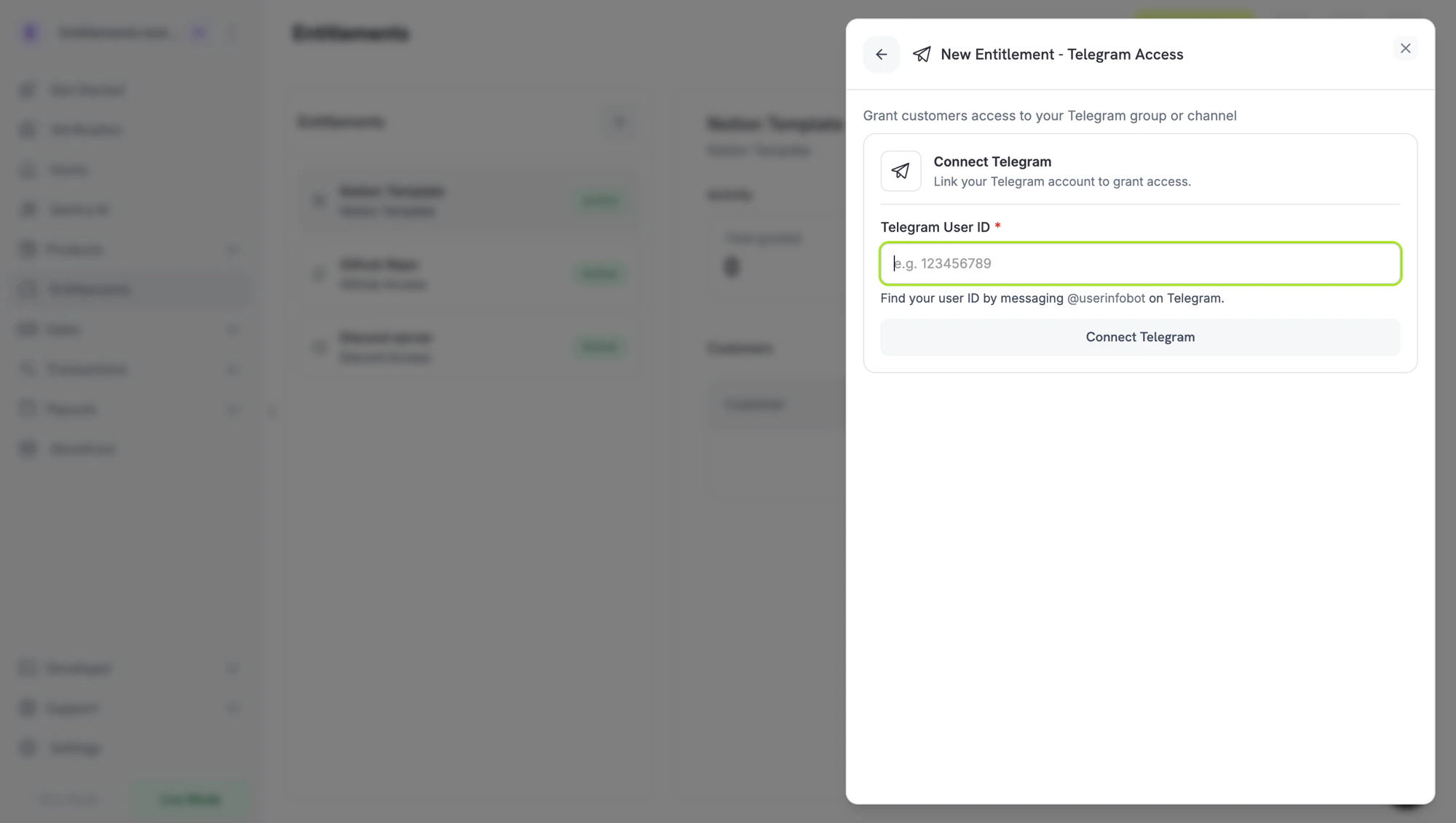 다음 두 단계는 Telegram에서의 설정 작업이며, 순서에 상관없이 완료할 수 있습니다 — 사용자 ID를 얻고 봇을 채팅에 관리자로 추가하세요. 둘 다 완료한 후, 최종 단계를 위해 대시보드로 돌아옵니다.
Telegram에서 \*\*`/start`\*\*에 메시지를 보내세요:
* **`@dodo_payments_bot`** - **라이브 모드**를 사용하는 경우
* **`@DodoPaymentsTestBot`** - **테스트 모드**를 사용하는 경우
봇이 숫자 Telegram 사용자 ID로 응답합니다. 복사하여 마지막 단계에서 대시보드에 붙여넣습니다.
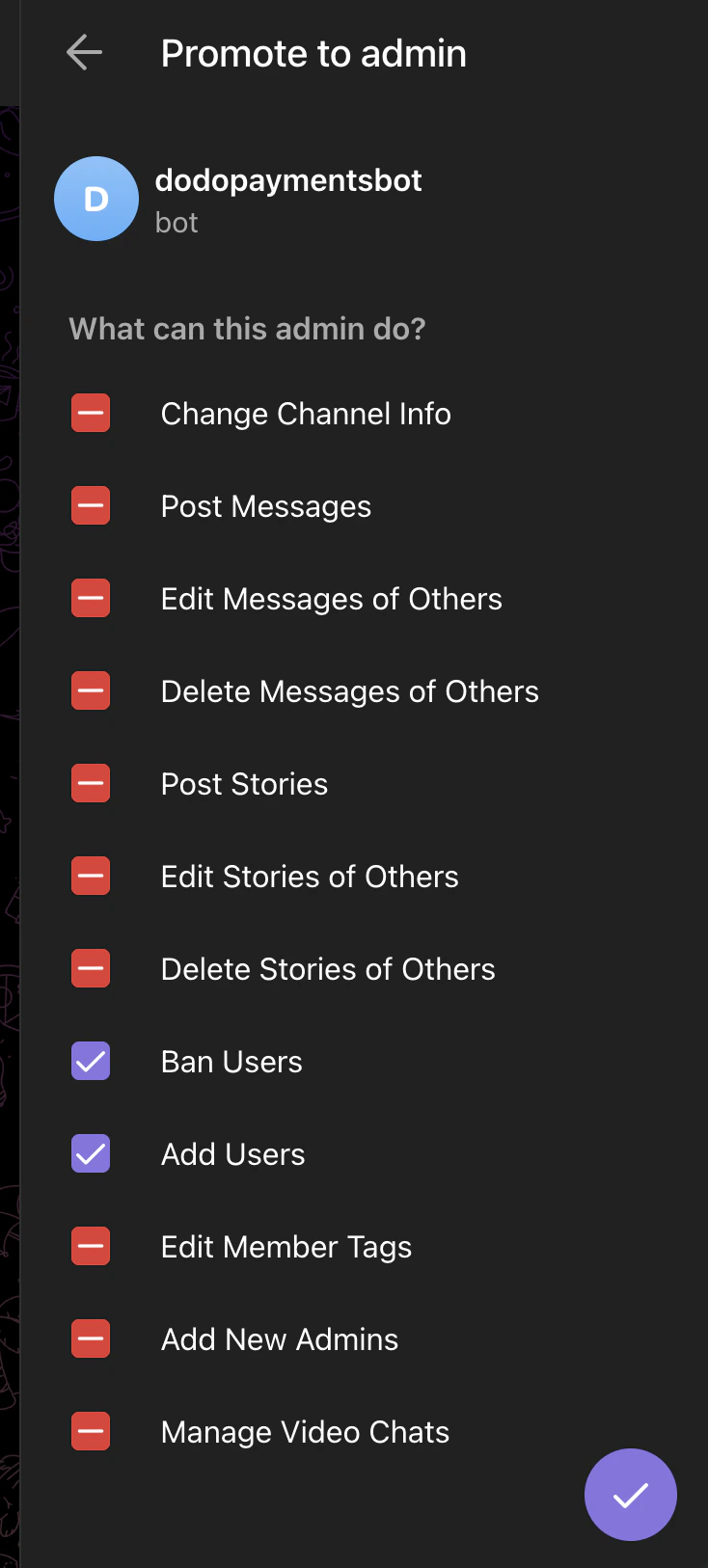
게이트하고 싶은 Telegram 그룹 또는 채널에서 회원 목록을 열고 **같은 봇을 관리자로 추가**합니다 (라이브는 INBLICODE\_PLACEHOLDER\_8c919161b29d3e3f\_END, 테스트는 `@DodoPaymentsTestBot`) 두 가지 권한이 활성화된 상태로:
* **사용자 차단** — 취소 시 회원 제거를 위해 필요함
* **사용자 추가** — 지불 고객 초대를 위해 필요함
다른 관리자 권한은 모두 해제하세요.
다음 두 단계는 Telegram에서의 설정 작업이며, 순서에 상관없이 완료할 수 있습니다 — 사용자 ID를 얻고 봇을 채팅에 관리자로 추가하세요. 둘 다 완료한 후, 최종 단계를 위해 대시보드로 돌아옵니다.
Telegram에서 \*\*`/start`\*\*에 메시지를 보내세요:
* **`@dodo_payments_bot`** - **라이브 모드**를 사용하는 경우
* **`@DodoPaymentsTestBot`** - **테스트 모드**를 사용하는 경우
봇이 숫자 Telegram 사용자 ID로 응답합니다. 복사하여 마지막 단계에서 대시보드에 붙여넣습니다.
게이트하고 싶은 Telegram 그룹 또는 채널에서 회원 목록을 열고 **같은 봇을 관리자로 추가**합니다 (라이브는 INBLICODE\_PLACEHOLDER\_8c919161b29d3e3f\_END, 테스트는 `@DodoPaymentsTestBot`) 두 가지 권한이 활성화된 상태로:
* **사용자 차단** — 취소 시 회원 제거를 위해 필요함
* **사용자 추가** — 지불 고객 초대를 위해 필요함
다른 관리자 권한은 모두 해제하세요.
 대시보드로 돌아가 2단계에서 얻은 사용자 ID를 **Telegram 사용자 ID**에 붙여넣고, **Telegram 연결**을 클릭하세요. 채팅 선택 도구는 봇이 관리자인 모든 그룹과 채널을 나열하므로, 게이트할 것을 선택하고 자격에 이름을 지정한 후 **자격 생성**을 클릭하세요.
## 고객 흐름
1. 고객이 결제를 완료합니다.
2. Dodo Payments는 INBLICODE\_PLACEHOLDER\_36268e8d276eafe3\_END 권한을 생성하고 설정된 채팅에 대한 일회용 초대 링크를 생성하도록 봇에 요청합니다.
3. 링크가 준비되면, 권한이 `delivered`로 전환되며, 해당 링크는 배달 이메일 및 고객 포털에 포함됩니다.
4. 고객이 링크를 누르면 채팅에 추가됩니다.
5. 취소 시, 봇이 고객을 채팅에서 제거합니다.
초대 링크는 일회용으로, 고객이 가입한 후 만료됩니다. 가입 전 링크를 잃어버리면, 배달 이메일을 다시 보내거나 대시보드에서 권한을 취소하고 다시 생성하여 재생성하십시오.
## 필요한 설정
| 필드 | 필수 | 설명 |
| --------------------------------------------- | -- | ----------------------------------------------------------------------------- |
| INBLICODE\_PLACEHOLDER\_7b19c0708b8a1a3e\_END | 예 | Telegram 채팅 ID (숫자, 그룹/채널의 경우 종종 음수)를 입력해야 합니다. 대시보드 선택 도구에서 이 항목을 자동으로 채웁니다. |
## API를 통한 생성
```typescript TypeScript theme={null} theme={null}
const entitlement = await client.entitlements.create({
name: 'Premium Signals Group',
integration_type: 'telegram',
integration_config: {
chat_id: '-1001234567890',
},
});
```
```python Python theme={null} theme={null}
client.entitlements.create(
name="Premium Signals Group",
integration_type="telegram",
integration_config={"chat_id": "-1001234567890"},
)
```
```go Go theme={null} theme={null}
client.Entitlements.New(ctx, dodopayments.EntitlementNewParams{
Name: dodopayments.F("Premium Signals Group"),
IntegrationType: dodopayments.F(dodopayments.EntitlementIntegrationTypeTelegram),
IntegrationConfig: dodopayments.F[dodopayments.IntegrationConfigUnionParam](
dodopayments.IntegrationConfigTelegramConfigParam{
ChatID: dodopayments.F("-1001234567890"),
},
),
})
```
## 웹훅
[`entitlement_grant.*` 웹훅 이벤트](/developer-resources/webhooks/intents/entitlement-grant)를 참조하세요. Telegram 권한은 INBLICODE\_PLACEHOLDER\_36268e8d276eafe3\_END로 도착하여 봇이 초대 링크를 발행하면 `delivered`로 전환됩니다.
## 문제 해결
Dodo Payments 봇은 **관리자**로 **사용자 추가**가 활성화된 상태로 채팅에 추가되어야 합니다. 선택 도구는 최신 상태를 읽으므로, 봇이 관리자일 때 채팅이 표시됩니다.
Telegram 일회용 링크는 첫 사용 후 만료됩니다. 고객이 로그아웃된 장치에서 눌렀거나 링크를 잃어버린 경우, 권한을 취소하고 다시 발급하세요.
봇은 멤버를 제거하기 위해 **사용자 차단** 관리 권한이 필요합니다. 채팅 설정을 열고 Dodo Payments 봇에 대해 **사용자 차단**과 **사용자 추가**가 모두 확인되어 있는지 확인하십시오.
대시보드로 돌아가 2단계에서 얻은 사용자 ID를 **Telegram 사용자 ID**에 붙여넣고, **Telegram 연결**을 클릭하세요. 채팅 선택 도구는 봇이 관리자인 모든 그룹과 채널을 나열하므로, 게이트할 것을 선택하고 자격에 이름을 지정한 후 **자격 생성**을 클릭하세요.
## 고객 흐름
1. 고객이 결제를 완료합니다.
2. Dodo Payments는 INBLICODE\_PLACEHOLDER\_36268e8d276eafe3\_END 권한을 생성하고 설정된 채팅에 대한 일회용 초대 링크를 생성하도록 봇에 요청합니다.
3. 링크가 준비되면, 권한이 `delivered`로 전환되며, 해당 링크는 배달 이메일 및 고객 포털에 포함됩니다.
4. 고객이 링크를 누르면 채팅에 추가됩니다.
5. 취소 시, 봇이 고객을 채팅에서 제거합니다.
초대 링크는 일회용으로, 고객이 가입한 후 만료됩니다. 가입 전 링크를 잃어버리면, 배달 이메일을 다시 보내거나 대시보드에서 권한을 취소하고 다시 생성하여 재생성하십시오.
## 필요한 설정
| 필드 | 필수 | 설명 |
| --------------------------------------------- | -- | ----------------------------------------------------------------------------- |
| INBLICODE\_PLACEHOLDER\_7b19c0708b8a1a3e\_END | 예 | Telegram 채팅 ID (숫자, 그룹/채널의 경우 종종 음수)를 입력해야 합니다. 대시보드 선택 도구에서 이 항목을 자동으로 채웁니다. |
## API를 통한 생성
```typescript TypeScript theme={null} theme={null}
const entitlement = await client.entitlements.create({
name: 'Premium Signals Group',
integration_type: 'telegram',
integration_config: {
chat_id: '-1001234567890',
},
});
```
```python Python theme={null} theme={null}
client.entitlements.create(
name="Premium Signals Group",
integration_type="telegram",
integration_config={"chat_id": "-1001234567890"},
)
```
```go Go theme={null} theme={null}
client.Entitlements.New(ctx, dodopayments.EntitlementNewParams{
Name: dodopayments.F("Premium Signals Group"),
IntegrationType: dodopayments.F(dodopayments.EntitlementIntegrationTypeTelegram),
IntegrationConfig: dodopayments.F[dodopayments.IntegrationConfigUnionParam](
dodopayments.IntegrationConfigTelegramConfigParam{
ChatID: dodopayments.F("-1001234567890"),
},
),
})
```
## 웹훅
[`entitlement_grant.*` 웹훅 이벤트](/developer-resources/webhooks/intents/entitlement-grant)를 참조하세요. Telegram 권한은 INBLICODE\_PLACEHOLDER\_36268e8d276eafe3\_END로 도착하여 봇이 초대 링크를 발행하면 `delivered`로 전환됩니다.
## 문제 해결
Dodo Payments 봇은 **관리자**로 **사용자 추가**가 활성화된 상태로 채팅에 추가되어야 합니다. 선택 도구는 최신 상태를 읽으므로, 봇이 관리자일 때 채팅이 표시됩니다.
Telegram 일회용 링크는 첫 사용 후 만료됩니다. 고객이 로그아웃된 장치에서 눌렀거나 링크를 잃어버린 경우, 권한을 취소하고 다시 발급하세요.
봇은 멤버를 제거하기 위해 **사용자 차단** 관리 권한이 필요합니다. 채팅 설정을 열고 Dodo Payments 봇에 대해 **사용자 차단**과 **사용자 추가**가 모두 확인되어 있는지 확인하십시오.