> ## Documentation Index
> Fetch the complete documentation index at: https://docs.dodopayments.com/llms.txt
> Use this file to discover all available pages before exploring further.
# Customer Management
> Manage customer relationships, track purchase history, and provide self-service options through the Dodo Payments dashboard and API.
## Overview
Dodo Payments의 Customers 기능은 모든 고객 관계를 관리할 수 있는 중앙 허브를 제공합니다. 모든 고객 상호작용을 추적하고, 구매 내역을 확인하며, 구독을 관리하고, 지갑 거래 원장을 조회하고, 셀프 서비스 옵션을 활성화하는 등 모든 기능을 하나의 대시보드에서 이용할 수 있습니다.
View and manage all customers in one place with search and filtering capabilities.
선불화된 금전 잔액을 관리하고 지갑에 자금을 충전하며 거래 내역을 추적합니다.
Empower customers to self-manage subscriptions, invoices, and license keys.
Programmatically create, update, and retrieve customer data via API.
## Accessing the Customers Page
From the dashboard, click on **Sales > Customers** in the navigation menu.
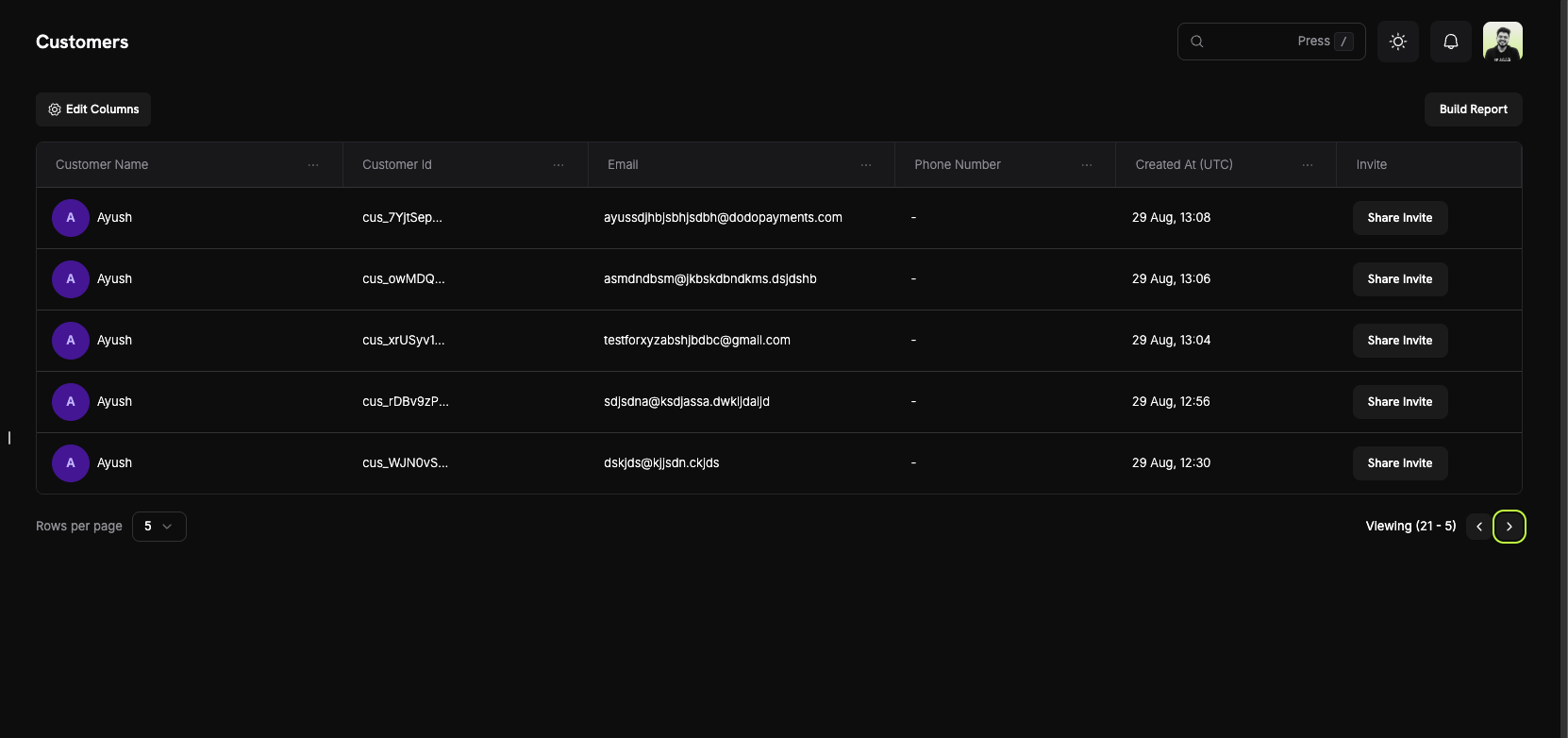
The Customers Page will display a list of all current and past customers who have interacted with your business.
 ## Customer Information
On the **Customers Page**, you can see a comprehensive overview of your entire customer base. The table displays all customers with the following information:
### Customer List Columns
* **Customer Name**: The full name of the customer with an avatar indicator.
* **Customer Id**: A unique identifier (e.g., `cus_5fpsWAa...`) for each customer.
* **Email**: The customer's email address for communication and portal access.
* **Phone Number**: The customer's phone number (if provided).
* **Created At (UTC)**: The date and time when the customer account was created.
* **Invite**: Quick action button to share Customer Portal invites.
### Page Features
* **Edit Columns**: Customize which columns are displayed in the customer table.
* **Build Report**: Generate custom reports based on your customer data.
* **Search**: Quickly find specific customers by name, email, or customer ID.
* **Pagination**: Navigate through your customer list with adjustable rows per page.
Use the "Edit Columns" feature to customize your view and show only the information most relevant to your workflow.
## Customer Details Page
Click on any customer to view their detailed information page, which includes:
## Customer Information
On the **Customers Page**, you can see a comprehensive overview of your entire customer base. The table displays all customers with the following information:
### Customer List Columns
* **Customer Name**: The full name of the customer with an avatar indicator.
* **Customer Id**: A unique identifier (e.g., `cus_5fpsWAa...`) for each customer.
* **Email**: The customer's email address for communication and portal access.
* **Phone Number**: The customer's phone number (if provided).
* **Created At (UTC)**: The date and time when the customer account was created.
* **Invite**: Quick action button to share Customer Portal invites.
### Page Features
* **Edit Columns**: Customize which columns are displayed in the customer table.
* **Build Report**: Generate custom reports based on your customer data.
* **Search**: Quickly find specific customers by name, email, or customer ID.
* **Pagination**: Navigate through your customer list with adjustable rows per page.
Use the "Edit Columns" feature to customize your view and show only the information most relevant to your workflow.
## Customer Details Page
Click on any customer to view their detailed information page, which includes:
 ### About Section
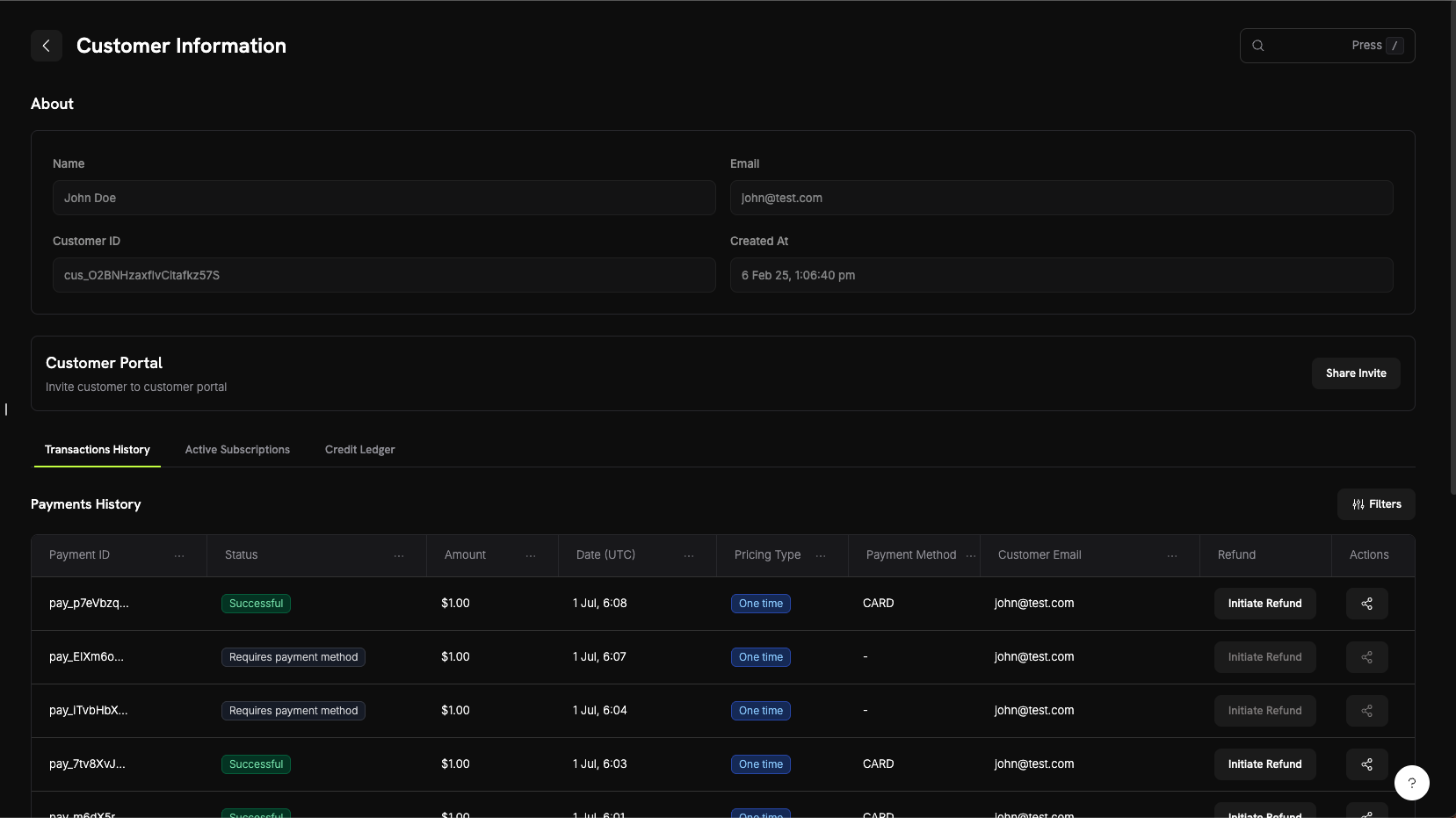
The About section displays core customer information:
* **Name**: Customer's full name
* **Email**: Customer's email address
* **Customer ID**: Unique identifier for API and tracking purposes
* **Created At**: Timestamp of when the customer account was created
### Customer Activity Tabs
The customer details page includes three tabs for viewing different aspects of customer activity:
View all payment transactions for this customer including:
* **Payment ID**: Unique transaction identifier
* **Status**: Payment status (Successful, Failed, Pending, Refunded)
* **Amount**: Transaction amount
* **Date (UTC)**: When the transaction occurred
* **Pricing Type**: Whether it's a one-time purchase or subscription
* **Payment Method**: Payment method used (Card, UPI, etc.)
* **Customer Email**: Email associated with the transaction
* **Refund**: Quick action to initiate refunds
* **Actions**: Additional options for managing the transaction
View all active subscriptions for this customer:
* Subscription plan details
* Billing cycle and next renewal date
* Subscription status
* Options to manage or cancel subscriptions
고객의 지갑 거래 원장을 확인하여 다음 내용을 볼 수 있습니다:
* 모든 자금 입금 및 출금 내역
* 각 통화(USD, INR)별 현재 지갑 잔액
* 거래 사유 및 타임스탬프
* 조정을 위한 세부 거래 내역
고객의 지갑 크레딧 원장을 확인하여:
* 모든 크레딧 및 차감 거래 내역
* 각 통화별 현재 지갑 잔액
* 거래 사유 및 타임스탬프
* 조정을 위한 세부 거래 내역
Wallet Ledger 탭은 고객 지갑 거래의 완전한 투명성을 제공하여 자금 입금, 출금 및 현재 금전 잔액을 쉽게 추적할 수 있도록 합니다.
## Customer Portal
Customer Portal은 고객이 지원팀에 연락하지 않고도 구독을 관리하고, 청구 내역을 확인하며, 라이선스 키에 접근하고, 프로필을 업데이트할 수 있는 보안 호스팅 셀프 서비스 공간입니다.
### Portal Capabilities
고객은 포털에 접속하여 다음을 수행할 수 있습니다:
* **청구 내역 보기**: 과거 거래를 모두 확인하고 송장을 다운로드합니다.
* **구독 관리**: 구독을 취소하거나 세부 정보를 확인합니다.
* **라이선스 키 검색**: 구매와 연결된 모든 라이선스 키에 접근합니다.
* **프로필 업데이트**: 이름, 이메일 또는 전화번호를 변경합니다.
포털 기능, 접근 방법 및 통합 예시에 대한 자세한 문서를 확인하세요.
## Customer Wallets
Customer Wallets는 고객을 위한 선불 금전 잔액 계정입니다. 각 고객은 USD 및 INR과 같은 여러 통화로 실제 자금을 보유할 수 있는 지갑을 자동으로 받으며, 이 자금은 구독 송장에 적용하거나 환불 잔액으로 사용하거나 프로모션 보너스로 충전할 수 있습니다.
### Key Features
* **다중 통화 지원**: USD와 INR의 금전 잔액을 별도로 추적합니다.
* **선불 잔액**: 고객이 미래 송장 및 구독 결제에 적용되는 자금을 보유할 수 있습니다.
* **거래 내역**: 모든 자금 입금 및 차감 내역에 대한 전체 원장을 확인합니다.
* **API 우선 설계**: 지갑 잔액을 프로그램 방식으로 추가, 차감 및 확인할 수 있습니다.
* **크레딧 기반 청구**: 고객이 서비스를 위해 미리 크레딧을 구매하고 사용할 수 있습니다.
* **거래 내역**: 모든 크레딧 및 차감 내역에 대한 전체 원장을 확인합니다.
* **API 우선 설계**: 지갑 잔액을 프로그램 방식으로 추가, 제거 및 확인할 수 있습니다.
고객 지갑 잔액을 관리하기 위한 자세한 문서, 코드 예제 및 모범 사례를 확인하세요.
## API Management
Dodo Payments는 프로그래밍 방식의 고객 관리를 위한 종합 REST API를 제공합니다. API를 통해 고객을 생성, 조회, 업데이트 및 완전히 관리할 수 있습니다.
### Available API Endpoints
고객의 세부 정보를 사용하여 Dodo Payments 계정에 새 고객을 생성합니다.
계정에 연결된 모든 고객 목록을 페이지 매김하여 조회합니다.
고객 ID로 특정 고객에 대한 자세한 정보를 가져옵니다.
이름, 이메일 또는 메타데이터와 같은 고객 정보를 업데이트합니다.
고객 계정의 저장된 결제 수단을 제거합니다.
특정 고객을 위한 안전한 고객 포털 세션 링크를 생성합니다.
모든 API 엔드포인트는 API 키를 사용하여 인증이 필요합니다. 항상 서버 측에서 비밀 키를 사용하고 클라이언트 측 코드에 노출하지 마십시오.
### About Section
The About section displays core customer information:
* **Name**: Customer's full name
* **Email**: Customer's email address
* **Customer ID**: Unique identifier for API and tracking purposes
* **Created At**: Timestamp of when the customer account was created
### Customer Activity Tabs
The customer details page includes three tabs for viewing different aspects of customer activity:
View all payment transactions for this customer including:
* **Payment ID**: Unique transaction identifier
* **Status**: Payment status (Successful, Failed, Pending, Refunded)
* **Amount**: Transaction amount
* **Date (UTC)**: When the transaction occurred
* **Pricing Type**: Whether it's a one-time purchase or subscription
* **Payment Method**: Payment method used (Card, UPI, etc.)
* **Customer Email**: Email associated with the transaction
* **Refund**: Quick action to initiate refunds
* **Actions**: Additional options for managing the transaction
View all active subscriptions for this customer:
* Subscription plan details
* Billing cycle and next renewal date
* Subscription status
* Options to manage or cancel subscriptions
고객의 지갑 거래 원장을 확인하여 다음 내용을 볼 수 있습니다:
* 모든 자금 입금 및 출금 내역
* 각 통화(USD, INR)별 현재 지갑 잔액
* 거래 사유 및 타임스탬프
* 조정을 위한 세부 거래 내역
고객의 지갑 크레딧 원장을 확인하여:
* 모든 크레딧 및 차감 거래 내역
* 각 통화별 현재 지갑 잔액
* 거래 사유 및 타임스탬프
* 조정을 위한 세부 거래 내역
Wallet Ledger 탭은 고객 지갑 거래의 완전한 투명성을 제공하여 자금 입금, 출금 및 현재 금전 잔액을 쉽게 추적할 수 있도록 합니다.
## Customer Portal
Customer Portal은 고객이 지원팀에 연락하지 않고도 구독을 관리하고, 청구 내역을 확인하며, 라이선스 키에 접근하고, 프로필을 업데이트할 수 있는 보안 호스팅 셀프 서비스 공간입니다.
### Portal Capabilities
고객은 포털에 접속하여 다음을 수행할 수 있습니다:
* **청구 내역 보기**: 과거 거래를 모두 확인하고 송장을 다운로드합니다.
* **구독 관리**: 구독을 취소하거나 세부 정보를 확인합니다.
* **라이선스 키 검색**: 구매와 연결된 모든 라이선스 키에 접근합니다.
* **프로필 업데이트**: 이름, 이메일 또는 전화번호를 변경합니다.
포털 기능, 접근 방법 및 통합 예시에 대한 자세한 문서를 확인하세요.
## Customer Wallets
Customer Wallets는 고객을 위한 선불 금전 잔액 계정입니다. 각 고객은 USD 및 INR과 같은 여러 통화로 실제 자금을 보유할 수 있는 지갑을 자동으로 받으며, 이 자금은 구독 송장에 적용하거나 환불 잔액으로 사용하거나 프로모션 보너스로 충전할 수 있습니다.
### Key Features
* **다중 통화 지원**: USD와 INR의 금전 잔액을 별도로 추적합니다.
* **선불 잔액**: 고객이 미래 송장 및 구독 결제에 적용되는 자금을 보유할 수 있습니다.
* **거래 내역**: 모든 자금 입금 및 차감 내역에 대한 전체 원장을 확인합니다.
* **API 우선 설계**: 지갑 잔액을 프로그램 방식으로 추가, 차감 및 확인할 수 있습니다.
* **크레딧 기반 청구**: 고객이 서비스를 위해 미리 크레딧을 구매하고 사용할 수 있습니다.
* **거래 내역**: 모든 크레딧 및 차감 내역에 대한 전체 원장을 확인합니다.
* **API 우선 설계**: 지갑 잔액을 프로그램 방식으로 추가, 제거 및 확인할 수 있습니다.
고객 지갑 잔액을 관리하기 위한 자세한 문서, 코드 예제 및 모범 사례를 확인하세요.
## API Management
Dodo Payments는 프로그래밍 방식의 고객 관리를 위한 종합 REST API를 제공합니다. API를 통해 고객을 생성, 조회, 업데이트 및 완전히 관리할 수 있습니다.
### Available API Endpoints
고객의 세부 정보를 사용하여 Dodo Payments 계정에 새 고객을 생성합니다.
계정에 연결된 모든 고객 목록을 페이지 매김하여 조회합니다.
고객 ID로 특정 고객에 대한 자세한 정보를 가져옵니다.
이름, 이메일 또는 메타데이터와 같은 고객 정보를 업데이트합니다.
고객 계정의 저장된 결제 수단을 제거합니다.
특정 고객을 위한 안전한 고객 포털 세션 링크를 생성합니다.
모든 API 엔드포인트는 API 키를 사용하여 인증이 필요합니다. 항상 서버 측에서 비밀 키를 사용하고 클라이언트 측 코드에 노출하지 마십시오.