> ## Documentation Index
> Fetch the complete documentation index at: https://docs.dodopayments.com/llms.txt
> Use this file to discover all available pages before exploring further.
# Customer Blocklist
> 고객을 차단하여 향후 결제를 중지하고, 진행 중인 구독을 취소하며, Customer Portal을 읽기 전용으로 설정할 수 있습니다. Settings 또는 API에서 차단 목록을 관리하세요.
Customer Blocklist는 이미 문제가 있는 것으로 알려진 사용자가 다시 구매하는 것을 막습니다. 차단된 고객은 결제할 수 없고, 진행 중인 구독이 사라지며, [Customer Portal](/features/customer-portal)에서 내용을 확인할 수는 있지만 변경할 수는 없습니다. **Settings → Blocklist** 또는 Blocklist API를 통해 관리하세요.
 ## 고객을 차단하면 발생하는 일
| 영역 | 영향 |
| ------------------------ | ---------------------------------------------------------------------------------------------------------------------------------------------------------------------------- |
| **Checkout** | 차단된 이메일에서 발생하는 모든 결제 시도가 거부됩니다. 여기에는 payment links, checkout sessions, API를 통해 생성된 payments 또는 subscriptions가 포함됩니다. |
| **Live subscriptions** | `pending`, `active`, `on_hold` 또는 `paused` 상태인 구독은 `cancelled_by_merchant` 사유로 취소됩니다. 각 구독에 대해 일반적인 `subscription.cancelled` webhook이 발생합니다. |
| **Renewals and retries** | 자동 갱신과 [payment retries](/features/recovery/payment-retries)는 차단된 고객을 건너뛰므로, 취소가 아직 보류 중이어도 추가 청구가 발생하지 않습니다. |
| **Manual retry** | 차단된 고객의 결제에 대한 [manual retry](/features/recovery/manual-retry)는 거부됩니다. |
| **Customer Portal** | 고객은 계속 로그인하여 invoices, subscriptions, license keys를 확인할 수 있지만, subscription을 취소·일시 중지·재개하거나, 요금제를 변경하거나, payment method를 업데이트할 수 없습니다. 저장된 payment method를 삭제하는 것은 계속 허용됩니다. |
차단은 과거 결제를 환불하지 않으며, 진행 중인 disputes에도 영향을 주지 않습니다. [Refunds](/features/transactions/refunds) 페이지에서 별도로 환불을 처리하세요.
## 고객 차단 매칭 방식
**customer ID** 또는 **email**로 차단할 수 있습니다. 어느 방법을 사용하든 차단은 customer record가 아니라 고객의 email을 기준으로 적용됩니다:
* **해당 이메일의 모든 record에 적용됩니다.** Checkout에서는 재방문 이메일에 대해 새로운 customer record를 생성할 수 있으므로, 단일 customer ID에 대한 차단은 우회될 수 있습니다. 이메일을 차단하면 우회할 수 없습니다.
* **별칭에도 적용됩니다.** 이메일은 소문자로 비교하며 `+alias`를 제거합니다. 따라서 `buyer+promo@example.com`와 `Buyer@example.com`는 동일한 고객으로 처리됩니다. 주소의 점은 그대로 유지됩니다.
* **비즈니스별로 적용됩니다.** 차단은 해당 비즈니스에만 적용됩니다. 동일한 이메일은 Dodo Payments의 다른 비즈니스에서 계속 구매할 수 있습니다.
* **이메일은 기존 고객에 속해야 합니다.** 귀하와 checkout을 진행한 적이 없는 이메일은 차단할 수 없으며, 이메일이 없는 customer record도 차단할 수 없습니다.
## 고객 차단
대시보드에서 **Settings → Blocklist**로 이동합니다.
**Add to Blocklist**를 클릭한 다음 고객의 이메일 또는 customer ID를 입력합니다. 팀에서 나중에 차단 사유를 확인할 수 있도록 이유를 추가하세요.
차단을 확인합니다. 고객의 진행 중인 구독은 즉시 취소되며, 항목이 **Blocked entries** 테이블에 표시됩니다.
**Sales → Customers**로 이동하여 차단하려는 고객을 엽니다.
**Block Customer**를 클릭합니다. 차단이 적용되면 고객 이름 옆에 **Blocked** 배지가 표시됩니다.
## 차단된 고객 관리
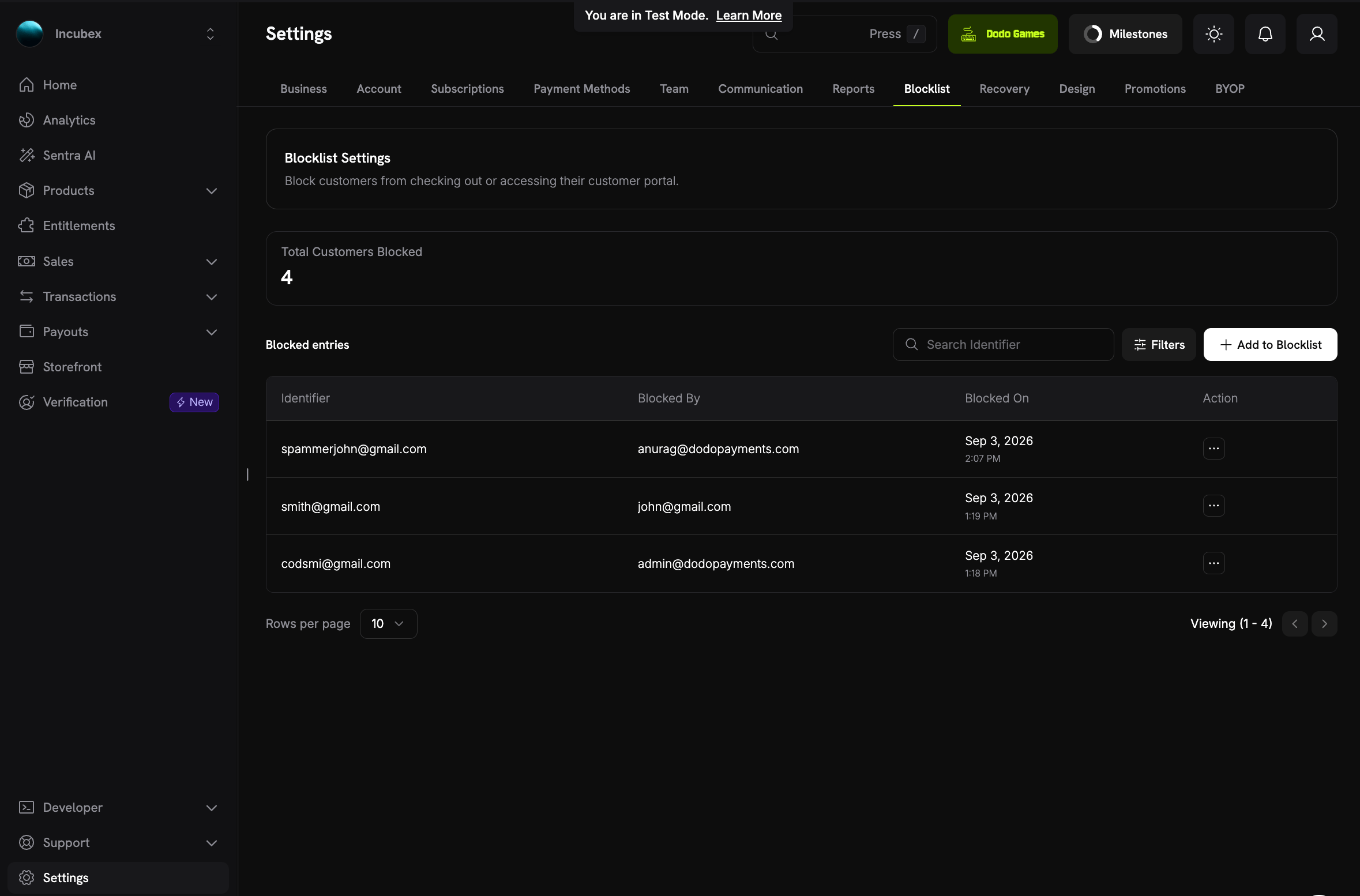
**Blocklist** 페이지에는 모든 활성 차단 항목이 표시됩니다:
* **Total Customers Blocked**: 현재 차단된 고객 수입니다.
* **Blocked entries**: 차단 항목당 한 행으로 표시되며, 입력한 **Identifier**(email 또는 customer ID), **Blocked By**(차단을 추가한 팀원), **Blocked On**이 포함됩니다.
* **Search Identifier** 및 **Filters**: 이메일 또는 customer ID로 항목을 찾거나, 차단한 사람과 시점으로 필터링할 수 있습니다.
* **Action**: 고객 차단 해제를 포함하여 항목을 관리합니다.
### 차단된 고객의 페이지
## 고객을 차단하면 발생하는 일
| 영역 | 영향 |
| ------------------------ | ---------------------------------------------------------------------------------------------------------------------------------------------------------------------------- |
| **Checkout** | 차단된 이메일에서 발생하는 모든 결제 시도가 거부됩니다. 여기에는 payment links, checkout sessions, API를 통해 생성된 payments 또는 subscriptions가 포함됩니다. |
| **Live subscriptions** | `pending`, `active`, `on_hold` 또는 `paused` 상태인 구독은 `cancelled_by_merchant` 사유로 취소됩니다. 각 구독에 대해 일반적인 `subscription.cancelled` webhook이 발생합니다. |
| **Renewals and retries** | 자동 갱신과 [payment retries](/features/recovery/payment-retries)는 차단된 고객을 건너뛰므로, 취소가 아직 보류 중이어도 추가 청구가 발생하지 않습니다. |
| **Manual retry** | 차단된 고객의 결제에 대한 [manual retry](/features/recovery/manual-retry)는 거부됩니다. |
| **Customer Portal** | 고객은 계속 로그인하여 invoices, subscriptions, license keys를 확인할 수 있지만, subscription을 취소·일시 중지·재개하거나, 요금제를 변경하거나, payment method를 업데이트할 수 없습니다. 저장된 payment method를 삭제하는 것은 계속 허용됩니다. |
차단은 과거 결제를 환불하지 않으며, 진행 중인 disputes에도 영향을 주지 않습니다. [Refunds](/features/transactions/refunds) 페이지에서 별도로 환불을 처리하세요.
## 고객 차단 매칭 방식
**customer ID** 또는 **email**로 차단할 수 있습니다. 어느 방법을 사용하든 차단은 customer record가 아니라 고객의 email을 기준으로 적용됩니다:
* **해당 이메일의 모든 record에 적용됩니다.** Checkout에서는 재방문 이메일에 대해 새로운 customer record를 생성할 수 있으므로, 단일 customer ID에 대한 차단은 우회될 수 있습니다. 이메일을 차단하면 우회할 수 없습니다.
* **별칭에도 적용됩니다.** 이메일은 소문자로 비교하며 `+alias`를 제거합니다. 따라서 `buyer+promo@example.com`와 `Buyer@example.com`는 동일한 고객으로 처리됩니다. 주소의 점은 그대로 유지됩니다.
* **비즈니스별로 적용됩니다.** 차단은 해당 비즈니스에만 적용됩니다. 동일한 이메일은 Dodo Payments의 다른 비즈니스에서 계속 구매할 수 있습니다.
* **이메일은 기존 고객에 속해야 합니다.** 귀하와 checkout을 진행한 적이 없는 이메일은 차단할 수 없으며, 이메일이 없는 customer record도 차단할 수 없습니다.
## 고객 차단
대시보드에서 **Settings → Blocklist**로 이동합니다.
**Add to Blocklist**를 클릭한 다음 고객의 이메일 또는 customer ID를 입력합니다. 팀에서 나중에 차단 사유를 확인할 수 있도록 이유를 추가하세요.
차단을 확인합니다. 고객의 진행 중인 구독은 즉시 취소되며, 항목이 **Blocked entries** 테이블에 표시됩니다.
**Sales → Customers**로 이동하여 차단하려는 고객을 엽니다.
**Block Customer**를 클릭합니다. 차단이 적용되면 고객 이름 옆에 **Blocked** 배지가 표시됩니다.
## 차단된 고객 관리
**Blocklist** 페이지에는 모든 활성 차단 항목이 표시됩니다:
* **Total Customers Blocked**: 현재 차단된 고객 수입니다.
* **Blocked entries**: 차단 항목당 한 행으로 표시되며, 입력한 **Identifier**(email 또는 customer ID), **Blocked By**(차단을 추가한 팀원), **Blocked On**이 포함됩니다.
* **Search Identifier** 및 **Filters**: 이메일 또는 customer ID로 항목을 찾거나, 차단한 사람과 시점으로 필터링할 수 있습니다.
* **Action**: 고객 차단 해제를 포함하여 항목을 관리합니다.
### 차단된 고객의 페이지
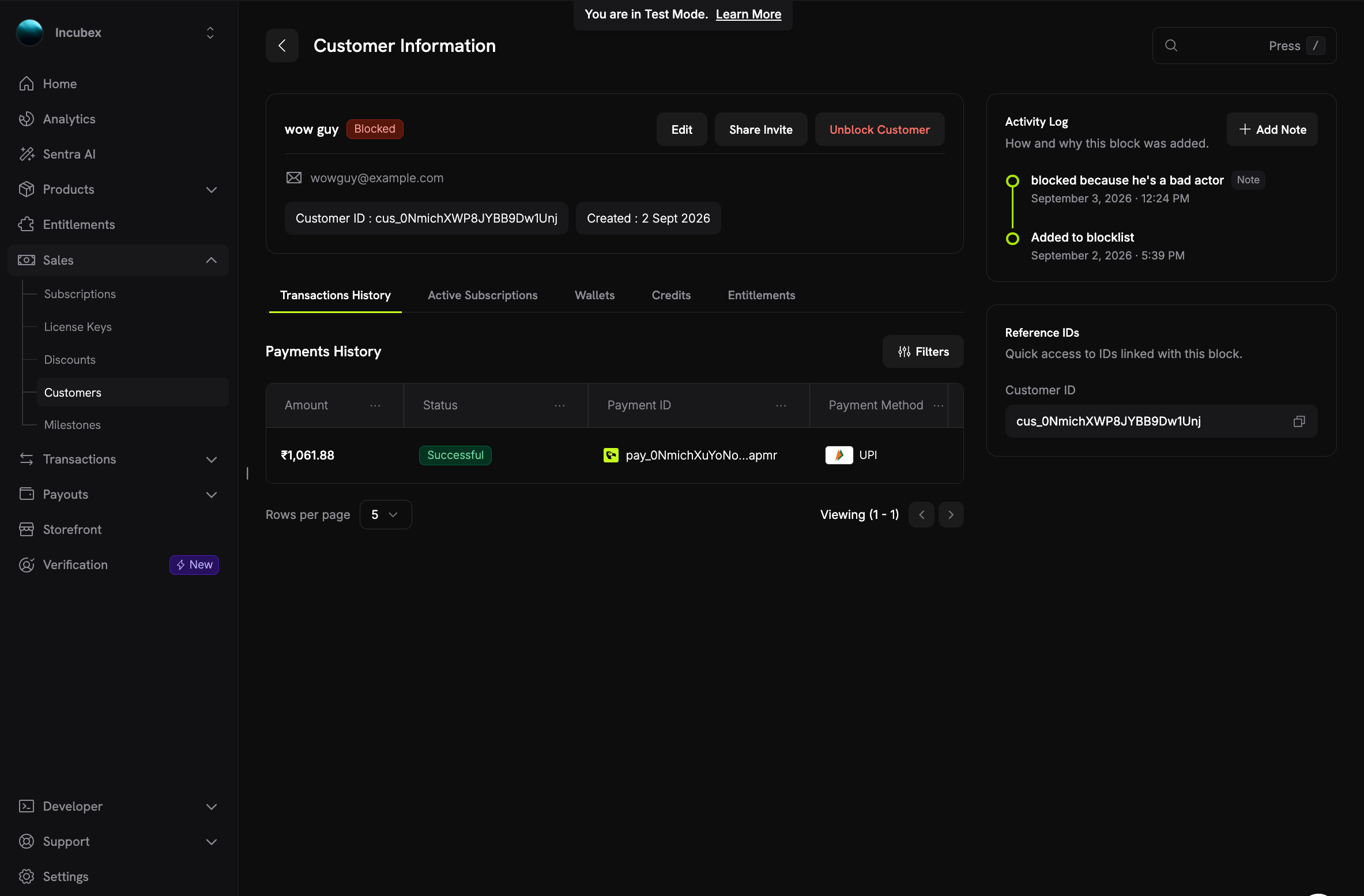 **Sales → Customers** 또는 Blocklist 페이지에서 차단된 고객을 열어 다음을 확인할 수 있습니다:
* 고객 이름 옆의 **Blocked** 배지와 **Unblock Customer** 버튼
* **Activity Log**: 고객이 차단 목록에 추가된 시점, 이유, 이후 팀에서 추가한 메모가 표시됩니다. **Add Note**를 클릭하여 chargeback 결과와 같은 새로운 내용을 기록하세요. 메모는 나중에 편집할 수 있습니다.
* **Reference IDs**: 이 차단에 연결된 customer ID를 바로 복사할 수 있습니다.
## 고객 차단 해제
고객 페이지에서 **Unblock Customer**를 클릭하거나 Blocklist 페이지의 작업 메뉴를 사용합니다.
* Checkout 및 Customer Portal 변경 사항이 즉시 복원됩니다.
* **취소된 subscriptions는 다시 활성화되지 않습니다.** 고객은 다시 구매해야 합니다.
* 항목은 메모와 함께 audit record로 유지되지만 더 이상 활성 목록에는 표시되지 않습니다.
* 나중에 동일한 고객을 다시 차단할 수 있습니다. 이 경우 새 항목이 생성됩니다.
## 고객에게 표시되는 내용
차단된 고객에게는 차단되었다는 사실이 절대 표시되지 않습니다.
* **Checkout에서** 결제가 일반적인 거절 메시지인 "This payment cannot be processed."와 함께 실패합니다. API는 원인을 밝히지 않는 오류 코드 `PAYMENT_NOT_PERMITTED`와 함께 HTTP `403`를 반환합니다. 실제 이유는 Dodo Payments의 로그에만 기록됩니다.
* **Customer Portal에서** 모든 항목을 볼 수 있지만 모든 작업이 비활성화됩니다. 차단된 write는 "This action is not available." 메시지와 함께 `PORTAL_ACTION_NOT_PERMITTED`를 반환합니다. portal profile에는 `read_only: true`가 포함되므로 custom portal integration에서 자체 컨트롤을 비활성화할 수 있습니다. 포털에는 차단 목록 항목이나 메모가 절대 표시되지 않습니다.
자체 제품에서 checkout 또는 portal 오류를 표시하는 경우에도 이 동작을 유지하세요. `PAYMENT_NOT_PERMITTED` 및 `PORTAL_ACTION_NOT_PERMITTED`에 대해 일반적인 메시지를 표시합니다. 차단 사실을 알려주면 문제가 있는 사용자가 다른 이메일을 시도하게 됩니다.
## API 사용
Blocklist API를 사용하면 chargeback이 접수되는 경우처럼 자체 도구에서 고객을 차단할 수 있습니다. 이를 위해 비밀 [API key](/api-reference/introduction)가 필요합니다. 모든 key는 항목을 나열하고 메모를 읽을 수 있습니다. **write access**가 활성화된 key는 차단, 차단 해제 및 메모 관리를 수행할 수 있습니다. 대시보드에서도 팀 역할에 동일한 구분이 적용됩니다. **Viewer** 역할은 목록을 읽고, **Editor** 역할은 변경할 수 있습니다.
| Method | Endpoint | Purpose |
| -------- | ------------------------------------------------- | ------------------------------------------ |
| `GET` | `/blocklist/customers` | 차단된 고객을 filters 및 `total` count와 함께 나열합니다. |
| `POST` | `/blocklist/customers` | customer ID 또는 email로 고객을 차단합니다. |
| `GET` | `/blocklist/customers/{entry_id}` | 메모와 함께 항목을 가져옵니다. |
| `DELETE` | `/blocklist/customers/{entry_id}` | 고객 차단을 해제합니다. |
| `POST` | `/blocklist/customers/{entry_id}/notes` | 메모를 추가합니다. |
| `PATCH` | `/blocklist/customers/{entry_id}/notes/{note_id}` | 메모를 업데이트합니다. |
### 고객 차단
본문 최상위에 `customer_id` 또는 `email` 중 하나를 전송합니다. `reason`는 선택 사항이며 항목 페이지에 표시됩니다.
```typescript Node.js theme={null}
import DodoPayments from 'dodopayments';
const client = new DodoPayments({
bearerToken: process.env.DODO_PAYMENTS_API_KEY,
});
// Block by customer ID
const entry = await client.blocklist.customers.create({
customer_id: 'cus_0NmichXWP8JYBB9Dw1Unj',
reason: 'Chargeback on pay_0NmichXuYoNoapmr',
});
// Or block by email
const byEmail = await client.blocklist.customers.create({
email: 'buyer@example.com',
reason: 'Repeated refund abuse',
});
console.log(entry.id, entry.cancelled_subscription_ids);
```
```python Python theme={null}
import os
from dodopayments import DodoPayments
client = DodoPayments(bearer_token=os.environ["DODO_PAYMENTS_API_KEY"])
# Block by customer ID
entry = client.blocklist.customers.create(
customer_id="cus_0NmichXWP8JYBB9Dw1Unj",
reason="Chargeback on pay_0NmichXuYoNoapmr",
)
# Or block by email
by_email = client.blocklist.customers.create(
email="buyer@example.com",
reason="Repeated refund abuse",
)
print(entry.id, entry.cancelled_subscription_ids)
```
```bash cURL theme={null}
curl -X POST https://live.dodopayments.com/blocklist/customers \
-H "Authorization: Bearer $DODO_PAYMENTS_API_KEY" \
-H "Content-Type: application/json" \
-d '{
"customer_id": "cus_0NmichXWP8JYBB9Dw1Unj",
"reason": "Chargeback on pay_0NmichXuYoNoapmr"
}'
```
```json Response theme={null}
{
"id": "bcu_7Hq2mV9kRt4LxYw3Pz",
"customer_id": "cus_0NmichXWP8JYBB9Dw1Unj",
"customer_name": "wow guy",
"customer_email": "wowguy@example.com",
"identifier": "cus_0NmichXWP8JYBB9Dw1Unj",
"reason": "Chargeback on pay_0NmichXuYoNoapmr",
"source": "api",
"blocked_by_email": null,
"created_at": "2026-09-02T12:09:41Z",
"unblocked_at": null,
"cancelled_subscription_ids": ["sub_3Fk8pW2nQs6MzXc1"],
"subscriptions_swept": true
}
```
| Field | Description |
| ---------------------------- | -------------------------------------------------------------------------------------------------------------------- |
| `identifier` | 전송한 customer ID 또는 email입니다. |
| `source` | 차단이 시작된 위치입니다: `blocklist_page`, `customer_page`, `payment_page`, `dispute_page` 또는 `api`. API key는 항상 `api`를 기록합니다. |
| `blocked_by_email` | 차단을 추가한 대시보드 사용자입니다. API key의 경우 `null`입니다. |
| `cancelled_subscription_ids` | 이 호출로 취소된 subscriptions입니다. |
| `remaining_subscription_ids` | 취소에 실패했거나 호출당 취소 한도인 25개에 도달하여 여전히 진행 중인 subscriptions입니다. |
| `subscriptions_swept` | 진행 중인 subscriptions가 남아 있을 때의 `false`입니다. `true`가 될 때까지 호출을 반복합니다. 차단 자체는 이미 적용된 상태입니다. |
이미 차단된 고객을 차단하면 `CUSTOMER_ALREADY_BLOCKED`와 함께 HTTP `409`가 반환됩니다. 단, 아직 취소를 기다리는 subscriptions가 있는 경우에는 예외이며, 호출이 대신 취소 절차를 계속 진행합니다.
### 고객이 차단되었는지 확인
[Get Customer Detail](/api-reference/customers/get-customers-1)는 두 개의 추가 field를 반환합니다. `blocked_at`는 활성 차단이 추가된 시간이며, 고객이 차단되지 않은 경우 `null`입니다. `blocklist_entry_id`는 해당 차단을 나타내는 항목입니다. [List Customers](/api-reference/customers/get-customers) endpoint에서는 두 field가 모두 비어 있습니다.
### 고객 차단 해제
```typescript Node.js theme={null}
await client.blocklist.customers.delete('bcu_7Hq2mV9kRt4LxYw3Pz');
```
```python Python theme={null}
client.blocklist.customers.delete("bcu_7Hq2mV9kRt4LxYw3Pz")
```
```bash cURL theme={null}
curl -X DELETE https://live.dodopayments.com/blocklist/customers/bcu_7Hq2mV9kRt4LxYw3Pz \
-H "Authorization: Bearer $DODO_PAYMENTS_API_KEY"
```
endpoint는 성공 시 HTTP `204`를 반환합니다. 차단 해제하면 checkout과 portal write가 복원되지만, 어떤 subscription도 다시 활성화되지 않습니다.
## 모범 사례
* **이유를 기록하세요.** 차단 시 짧은 이유를 남기고 이후 발생하는 일은 메모로 기록하면, 대시보드를 벗어나지 않고도 support team이 전체 상황을 파악할 수 있습니다.
* **chargeback 후 차단하세요.** dispute 또는 payment에서 고객을 열어 해당 위치에서 차단하거나, `dispute.opened` webhook과 `POST /blocklist/customers`를 사용하여 자동화하세요. [Disputes](/features/transactions/disputes)를 참조하세요.
* **`subscriptions_swept`를 확인하세요.** API를 통해 차단하는 경우 response에 `true`가 표시될 때까지 호출을 반복하여 진행 중인 subscription이 남지 않도록 합니다.
* **환불은 별도로 처리하세요.** 차단은 향후 구매만 중지합니다. 고객에게 지급해야 할 금액이 있다면 평소와 같이 payment를 환불하세요.
* **목록을 검토하세요.** 문제가 해결된 고객은 차단 해제합니다. 차단 해제는 즉시 적용되며 기록은 유지됩니다.
## 관련 항목
고객을 찾고, 세부 정보 페이지를 연 다음 subscriptions를 관리합니다.
차단된 고객이 포털에서 할 수 있는 작업과 할 수 없는 작업입니다.
chargeback에 대응하고 차단이 필요한 시점을 결정합니다.
`PAYMENT_NOT_PERMITTED` 및 `PORTAL_ACTION_NOT_PERMITTED`가 의미하는 내용입니다.
**Sales → Customers** 또는 Blocklist 페이지에서 차단된 고객을 열어 다음을 확인할 수 있습니다:
* 고객 이름 옆의 **Blocked** 배지와 **Unblock Customer** 버튼
* **Activity Log**: 고객이 차단 목록에 추가된 시점, 이유, 이후 팀에서 추가한 메모가 표시됩니다. **Add Note**를 클릭하여 chargeback 결과와 같은 새로운 내용을 기록하세요. 메모는 나중에 편집할 수 있습니다.
* **Reference IDs**: 이 차단에 연결된 customer ID를 바로 복사할 수 있습니다.
## 고객 차단 해제
고객 페이지에서 **Unblock Customer**를 클릭하거나 Blocklist 페이지의 작업 메뉴를 사용합니다.
* Checkout 및 Customer Portal 변경 사항이 즉시 복원됩니다.
* **취소된 subscriptions는 다시 활성화되지 않습니다.** 고객은 다시 구매해야 합니다.
* 항목은 메모와 함께 audit record로 유지되지만 더 이상 활성 목록에는 표시되지 않습니다.
* 나중에 동일한 고객을 다시 차단할 수 있습니다. 이 경우 새 항목이 생성됩니다.
## 고객에게 표시되는 내용
차단된 고객에게는 차단되었다는 사실이 절대 표시되지 않습니다.
* **Checkout에서** 결제가 일반적인 거절 메시지인 "This payment cannot be processed."와 함께 실패합니다. API는 원인을 밝히지 않는 오류 코드 `PAYMENT_NOT_PERMITTED`와 함께 HTTP `403`를 반환합니다. 실제 이유는 Dodo Payments의 로그에만 기록됩니다.
* **Customer Portal에서** 모든 항목을 볼 수 있지만 모든 작업이 비활성화됩니다. 차단된 write는 "This action is not available." 메시지와 함께 `PORTAL_ACTION_NOT_PERMITTED`를 반환합니다. portal profile에는 `read_only: true`가 포함되므로 custom portal integration에서 자체 컨트롤을 비활성화할 수 있습니다. 포털에는 차단 목록 항목이나 메모가 절대 표시되지 않습니다.
자체 제품에서 checkout 또는 portal 오류를 표시하는 경우에도 이 동작을 유지하세요. `PAYMENT_NOT_PERMITTED` 및 `PORTAL_ACTION_NOT_PERMITTED`에 대해 일반적인 메시지를 표시합니다. 차단 사실을 알려주면 문제가 있는 사용자가 다른 이메일을 시도하게 됩니다.
## API 사용
Blocklist API를 사용하면 chargeback이 접수되는 경우처럼 자체 도구에서 고객을 차단할 수 있습니다. 이를 위해 비밀 [API key](/api-reference/introduction)가 필요합니다. 모든 key는 항목을 나열하고 메모를 읽을 수 있습니다. **write access**가 활성화된 key는 차단, 차단 해제 및 메모 관리를 수행할 수 있습니다. 대시보드에서도 팀 역할에 동일한 구분이 적용됩니다. **Viewer** 역할은 목록을 읽고, **Editor** 역할은 변경할 수 있습니다.
| Method | Endpoint | Purpose |
| -------- | ------------------------------------------------- | ------------------------------------------ |
| `GET` | `/blocklist/customers` | 차단된 고객을 filters 및 `total` count와 함께 나열합니다. |
| `POST` | `/blocklist/customers` | customer ID 또는 email로 고객을 차단합니다. |
| `GET` | `/blocklist/customers/{entry_id}` | 메모와 함께 항목을 가져옵니다. |
| `DELETE` | `/blocklist/customers/{entry_id}` | 고객 차단을 해제합니다. |
| `POST` | `/blocklist/customers/{entry_id}/notes` | 메모를 추가합니다. |
| `PATCH` | `/blocklist/customers/{entry_id}/notes/{note_id}` | 메모를 업데이트합니다. |
### 고객 차단
본문 최상위에 `customer_id` 또는 `email` 중 하나를 전송합니다. `reason`는 선택 사항이며 항목 페이지에 표시됩니다.
```typescript Node.js theme={null}
import DodoPayments from 'dodopayments';
const client = new DodoPayments({
bearerToken: process.env.DODO_PAYMENTS_API_KEY,
});
// Block by customer ID
const entry = await client.blocklist.customers.create({
customer_id: 'cus_0NmichXWP8JYBB9Dw1Unj',
reason: 'Chargeback on pay_0NmichXuYoNoapmr',
});
// Or block by email
const byEmail = await client.blocklist.customers.create({
email: 'buyer@example.com',
reason: 'Repeated refund abuse',
});
console.log(entry.id, entry.cancelled_subscription_ids);
```
```python Python theme={null}
import os
from dodopayments import DodoPayments
client = DodoPayments(bearer_token=os.environ["DODO_PAYMENTS_API_KEY"])
# Block by customer ID
entry = client.blocklist.customers.create(
customer_id="cus_0NmichXWP8JYBB9Dw1Unj",
reason="Chargeback on pay_0NmichXuYoNoapmr",
)
# Or block by email
by_email = client.blocklist.customers.create(
email="buyer@example.com",
reason="Repeated refund abuse",
)
print(entry.id, entry.cancelled_subscription_ids)
```
```bash cURL theme={null}
curl -X POST https://live.dodopayments.com/blocklist/customers \
-H "Authorization: Bearer $DODO_PAYMENTS_API_KEY" \
-H "Content-Type: application/json" \
-d '{
"customer_id": "cus_0NmichXWP8JYBB9Dw1Unj",
"reason": "Chargeback on pay_0NmichXuYoNoapmr"
}'
```
```json Response theme={null}
{
"id": "bcu_7Hq2mV9kRt4LxYw3Pz",
"customer_id": "cus_0NmichXWP8JYBB9Dw1Unj",
"customer_name": "wow guy",
"customer_email": "wowguy@example.com",
"identifier": "cus_0NmichXWP8JYBB9Dw1Unj",
"reason": "Chargeback on pay_0NmichXuYoNoapmr",
"source": "api",
"blocked_by_email": null,
"created_at": "2026-09-02T12:09:41Z",
"unblocked_at": null,
"cancelled_subscription_ids": ["sub_3Fk8pW2nQs6MzXc1"],
"subscriptions_swept": true
}
```
| Field | Description |
| ---------------------------- | -------------------------------------------------------------------------------------------------------------------- |
| `identifier` | 전송한 customer ID 또는 email입니다. |
| `source` | 차단이 시작된 위치입니다: `blocklist_page`, `customer_page`, `payment_page`, `dispute_page` 또는 `api`. API key는 항상 `api`를 기록합니다. |
| `blocked_by_email` | 차단을 추가한 대시보드 사용자입니다. API key의 경우 `null`입니다. |
| `cancelled_subscription_ids` | 이 호출로 취소된 subscriptions입니다. |
| `remaining_subscription_ids` | 취소에 실패했거나 호출당 취소 한도인 25개에 도달하여 여전히 진행 중인 subscriptions입니다. |
| `subscriptions_swept` | 진행 중인 subscriptions가 남아 있을 때의 `false`입니다. `true`가 될 때까지 호출을 반복합니다. 차단 자체는 이미 적용된 상태입니다. |
이미 차단된 고객을 차단하면 `CUSTOMER_ALREADY_BLOCKED`와 함께 HTTP `409`가 반환됩니다. 단, 아직 취소를 기다리는 subscriptions가 있는 경우에는 예외이며, 호출이 대신 취소 절차를 계속 진행합니다.
### 고객이 차단되었는지 확인
[Get Customer Detail](/api-reference/customers/get-customers-1)는 두 개의 추가 field를 반환합니다. `blocked_at`는 활성 차단이 추가된 시간이며, 고객이 차단되지 않은 경우 `null`입니다. `blocklist_entry_id`는 해당 차단을 나타내는 항목입니다. [List Customers](/api-reference/customers/get-customers) endpoint에서는 두 field가 모두 비어 있습니다.
### 고객 차단 해제
```typescript Node.js theme={null}
await client.blocklist.customers.delete('bcu_7Hq2mV9kRt4LxYw3Pz');
```
```python Python theme={null}
client.blocklist.customers.delete("bcu_7Hq2mV9kRt4LxYw3Pz")
```
```bash cURL theme={null}
curl -X DELETE https://live.dodopayments.com/blocklist/customers/bcu_7Hq2mV9kRt4LxYw3Pz \
-H "Authorization: Bearer $DODO_PAYMENTS_API_KEY"
```
endpoint는 성공 시 HTTP `204`를 반환합니다. 차단 해제하면 checkout과 portal write가 복원되지만, 어떤 subscription도 다시 활성화되지 않습니다.
## 모범 사례
* **이유를 기록하세요.** 차단 시 짧은 이유를 남기고 이후 발생하는 일은 메모로 기록하면, 대시보드를 벗어나지 않고도 support team이 전체 상황을 파악할 수 있습니다.
* **chargeback 후 차단하세요.** dispute 또는 payment에서 고객을 열어 해당 위치에서 차단하거나, `dispute.opened` webhook과 `POST /blocklist/customers`를 사용하여 자동화하세요. [Disputes](/features/transactions/disputes)를 참조하세요.
* **`subscriptions_swept`를 확인하세요.** API를 통해 차단하는 경우 response에 `true`가 표시될 때까지 호출을 반복하여 진행 중인 subscription이 남지 않도록 합니다.
* **환불은 별도로 처리하세요.** 차단은 향후 구매만 중지합니다. 고객에게 지급해야 할 금액이 있다면 평소와 같이 payment를 환불하세요.
* **목록을 검토하세요.** 문제가 해결된 고객은 차단 해제합니다. 차단 해제는 즉시 적용되며 기록은 유지됩니다.
## 관련 항목
고객을 찾고, 세부 정보 페이지를 연 다음 subscriptions를 관리합니다.
차단된 고객이 포털에서 할 수 있는 작업과 할 수 없는 작업입니다.
chargeback에 대응하고 차단이 필요한 시점을 결정합니다.
`PAYMENT_NOT_PERMITTED` 및 `PORTAL_ACTION_NOT_PERMITTED`가 의미하는 내용입니다.