> ## Documentation Index
> Fetch the complete documentation index at: https://docs.dodopayments.com/llms.txt
> Use this file to discover all available pages before exploring further.
# v1.113.6 (2026년 8월 22일)
> status 필드를 통한 Subscription 일시 중지 및 재개가 지원되며, 제거된 pause 필드를 대체합니다. 또한 국가별 비율을 적용한 네이티브 Purchasing Power Parity, Charm Pricing, business 및 brand 보관, Milestones 페이지, 안내형 설정 환경이 추가되었습니다.
## 주요 변경 사항
**`PATCH /subscriptions/{subscription_id}`의 boolean `pause` 필드가 제거되었습니다.** 이제 아무 작업도 수행하지 않고 조용히 넘어가는 대신 항상 `422` 오류가 발생합니다. 따라서 이 필드를 계속 전송하는 integration은 영원히 일시 중지되지 않는 Subscription을 만드는 대신 명확한 오류를 받게 됩니다.
일시 중지 및 재개 기능이 `status` 필드로 이동되었습니다. 일시 중지하려면 `{"status": "paused"}`를, 재개하려면 `{"status": "active"}`를 전송하세요. 별도의 일시 중지 endpoint는 없습니다. 두 값 중 하나는 단독으로 전송해야 하며, 다른 필드와 함께 전송하면 역시 `422` 오류가 발생합니다.
이전에 문서화된 일시 중지 API를 기준으로 integration을 구축했다면 업그레이드하기 전에 해당 호출을 업데이트하세요.
자세히 알아보기: [Subscription 일시 중지 및 재개](/features/subscription#pausing-and-resuming-subscriptions)
## 새로운 기능
### 1. **Subscription 일시 중지 및 재개**
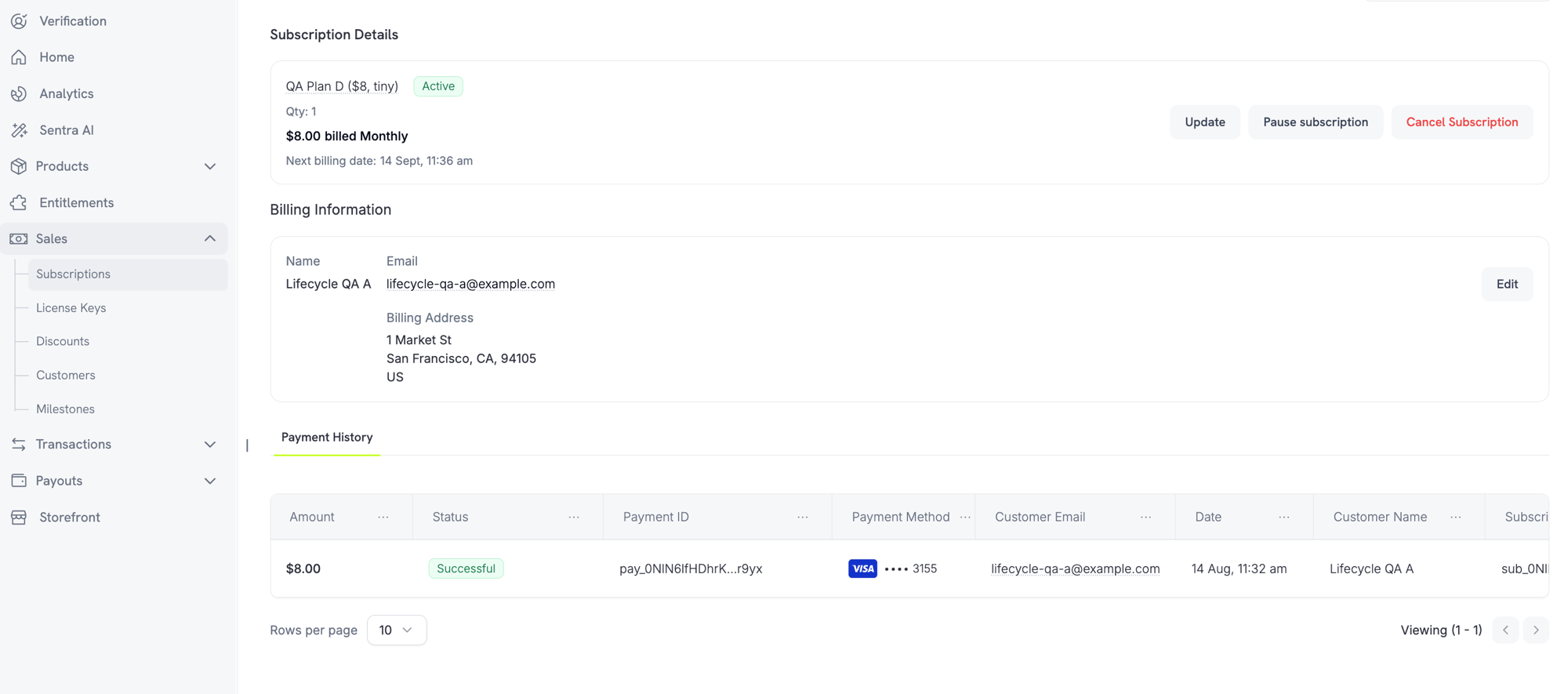
이제 Merchant는 dashboard의 Subscription 세부 정보 페이지에서 직접 Subscription을 일시 중지하고 재개할 수 있습니다. business 설정에서 허용한 경우 Customer Portal에서도 고객이 Subscription을 일시 중지할 수 있습니다.
**Merchant 제어**
Subscription 세부 정보 페이지에서 **Subscription 일시 중지** 또는 **Subscription 재개** 버튼을 사용하여 Subscription을 일시 중지하거나 재개할 수 있습니다.
 **Business 설정**
**Settings → Subscriptions** 아래에 새로운 설정 2개가 표시됩니다:
* **Allow Subscription Pause** — "고객이 언제든지 customer portal에서 Subscription을 일시 중지하고 재개하도록 허용"
* **Bill Usage at Pause** — "사용량 기반 Subscription을 일시 중지하는 즉시 미납 사용량을 청구"
**고객 경험**
고객이 Customer Portal에서 일시 중지를 선택하면 일시 중지 즉시 access가 취소된다는 경고가 표시됩니다. Subscription을 재개할 때까지 기능, 다운로드 및 license key가 작동하지 않습니다.
자세히 알아보기: [Subscriptions](/features/subscription) | [Customer Portal](/features/customer-portal)
### 2. **Purchasing Power Parity**
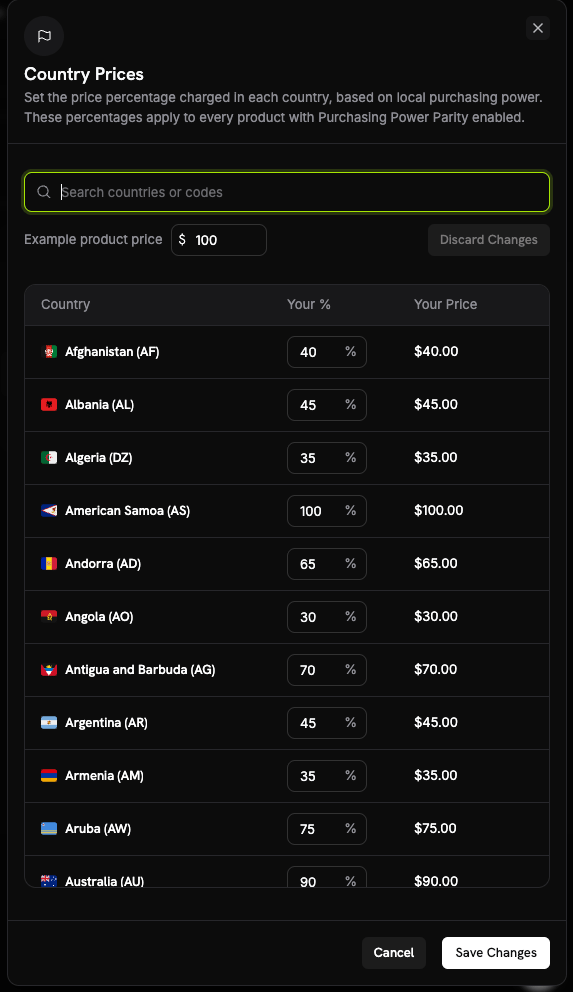
네이티브 PPP가 이제 third-party 도구에 의존하는 방식을 대체합니다. **Business Settings**의 **Country Prices** 시트에서 business 전체에 적용할 국가별 비율을 설정하세요. 이 비율은 PPP가 활성화된 모든 product에 적용됩니다.
**작동 방식**
* 각 product의 가격 설정 섹션에 있는 **Purchasing Power Parity** checkbox를 통해 개별적으로 opt-in합니다.
* PPP를 사용하려면 Adaptive Currency가 활성화되어 있어야 합니다. business에서 Adaptive Currency가 꺼져 있으면 product opt-in이 거부됩니다.
**Business 설정**
**Settings → Subscriptions** 아래에 새로운 설정 2개가 표시됩니다:
* **Allow Subscription Pause** — "고객이 언제든지 customer portal에서 Subscription을 일시 중지하고 재개하도록 허용"
* **Bill Usage at Pause** — "사용량 기반 Subscription을 일시 중지하는 즉시 미납 사용량을 청구"
**고객 경험**
고객이 Customer Portal에서 일시 중지를 선택하면 일시 중지 즉시 access가 취소된다는 경고가 표시됩니다. Subscription을 재개할 때까지 기능, 다운로드 및 license key가 작동하지 않습니다.
자세히 알아보기: [Subscriptions](/features/subscription) | [Customer Portal](/features/customer-portal)
### 2. **Purchasing Power Parity**
네이티브 PPP가 이제 third-party 도구에 의존하는 방식을 대체합니다. **Business Settings**의 **Country Prices** 시트에서 business 전체에 적용할 국가별 비율을 설정하세요. 이 비율은 PPP가 활성화된 모든 product에 적용됩니다.
**작동 방식**
* 각 product의 가격 설정 섹션에 있는 **Purchasing Power Parity** checkbox를 통해 개별적으로 opt-in합니다.
* PPP를 사용하려면 Adaptive Currency가 활성화되어 있어야 합니다. business에서 Adaptive Currency가 꺼져 있으면 product opt-in이 거부됩니다.
 자세히 알아보기: [Purchasing Power Parity](/features/purchasing-power-parity)
### 3. **Charm Pricing**
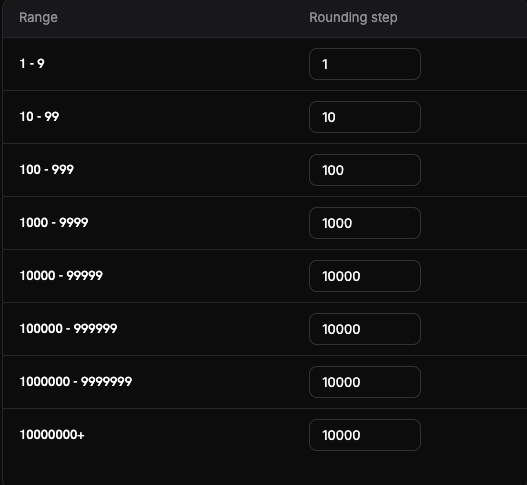
**Business Settings**의 **Set up Charm Pricing** 시트에서 설정하여 변환된 가격을 심리적으로 매력적인 값으로 반올림합니다. 각 가격 범위(구간)마다 반올림 단계를 설정하므로 작은 가격과 큰 가격이 서로 다르게 반올림됩니다.
**반올림 유형**
네 가지 반올림 유형 중에서 선택하세요(권장 시작점은 Nearest입니다):
* **Nearest** — 가장 가까운 단계로 반올림
* **Floor** — 내림
* **Ceiling** — 올림
* **Whole** — 정수로 반올림
저장하기 전에 **Try it** 미리보기에서 특정 금액이 어떻게 반올림되는지 확인할 수 있습니다.
자세히 알아보기: [Purchasing Power Parity](/features/purchasing-power-parity)
### 3. **Charm Pricing**
**Business Settings**의 **Set up Charm Pricing** 시트에서 설정하여 변환된 가격을 심리적으로 매력적인 값으로 반올림합니다. 각 가격 범위(구간)마다 반올림 단계를 설정하므로 작은 가격과 큰 가격이 서로 다르게 반올림됩니다.
**반올림 유형**
네 가지 반올림 유형 중에서 선택하세요(권장 시작점은 Nearest입니다):
* **Nearest** — 가장 가까운 단계로 반올림
* **Floor** — 내림
* **Ceiling** — 올림
* **Whole** — 정수로 반올림
저장하기 전에 **Try it** 미리보기에서 특정 금액이 어떻게 반올림되는지 확인할 수 있습니다.
 자세히 알아보기: [Charm Pricing](/features/charm-pricing)
### 4. **Business 및 Brand 보관**
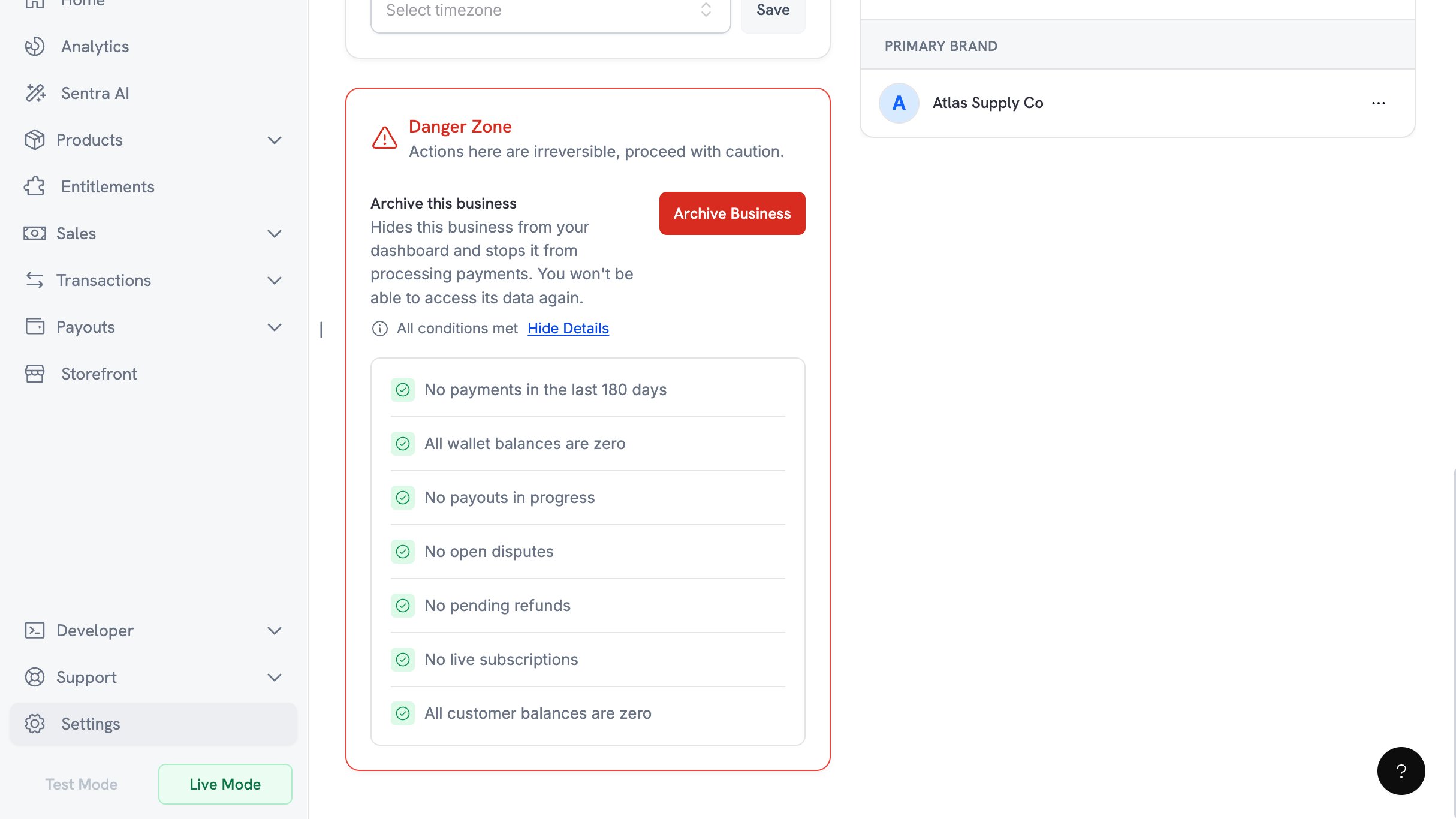
더 이상 거래하지 않는 business를 **Business Settings → Danger Zone → Archive Business**에서 보관할 수 있습니다. 이 작업은 owner만 수행할 수 있으며 취소할 수 없습니다.
**자격 요건 checklist**
보관을 허용하려면 다음 7가지 조건을 모두 충족해야 합니다:
* 최근 180일 동안 payment 없음
* 모든 wallet 잔액이 0
* 진행 중인 payout 없음
* 열린 dispute 없음
* pending refund 없음
* 활성 Subscription 없음
* 모든 customer 잔액이 0
자세히 알아보기: [Charm Pricing](/features/charm-pricing)
### 4. **Business 및 Brand 보관**
더 이상 거래하지 않는 business를 **Business Settings → Danger Zone → Archive Business**에서 보관할 수 있습니다. 이 작업은 owner만 수행할 수 있으며 취소할 수 없습니다.
**자격 요건 checklist**
보관을 허용하려면 다음 7가지 조건을 모두 충족해야 합니다:
* 최근 180일 동안 payment 없음
* 모든 wallet 잔액이 0
* 진행 중인 payout 없음
* 열린 dispute 없음
* pending refund 없음
* 활성 Subscription 없음
* 모든 customer 잔액이 0
 **확인 절차**
확인하려면 owner에게 이메일로 전송된 6자리 code가 필요합니다. 시도 횟수는 3회이며 code는 10분 후 만료됩니다.
Brand는 business와 별도로 보관할 수 있습니다.
자세히 알아보기: [Business 보관](/features/archive-business)
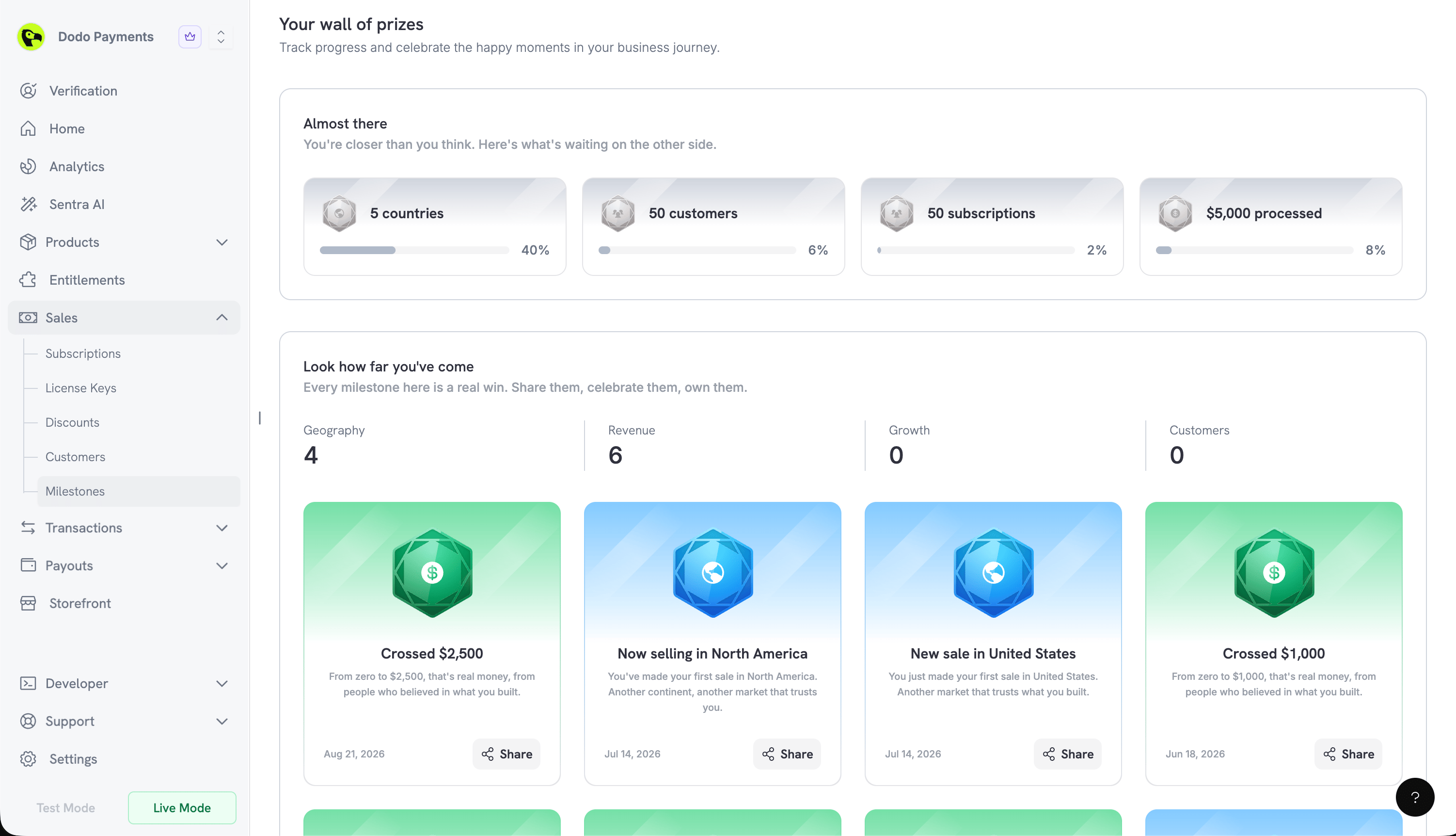
### 5. **Milestones**
새로운 **Milestones** 페이지에서 business의 성장을 확인할 수 있으며, dashboard의 **Sales → Milestones**에서 이용할 수 있습니다. **Geography**, **Revenue**, **Growth**, **Customers**의 네 가지 category로 진행 상황을 추적합니다.
**진행 상황 및 달성 카드**
* **거의 달성**에는 달성 가능한 Milestones가 완료율과 함께 표시됩니다.
* **얼마나 멀리 왔는지 확인하세요**에서는 이미 달성한 Milestones를 기념합니다.
달성한 Milestones는 공유 가능한 카드를 생성합니다. **Share**를 클릭하면 **Include business & logo** toggle과 카드를 image로 저장할 수 있는 **Download** button이 포함된 미리보기가 열립니다.
**확인 절차**
확인하려면 owner에게 이메일로 전송된 6자리 code가 필요합니다. 시도 횟수는 3회이며 code는 10분 후 만료됩니다.
Brand는 business와 별도로 보관할 수 있습니다.
자세히 알아보기: [Business 보관](/features/archive-business)
### 5. **Milestones**
새로운 **Milestones** 페이지에서 business의 성장을 확인할 수 있으며, dashboard의 **Sales → Milestones**에서 이용할 수 있습니다. **Geography**, **Revenue**, **Growth**, **Customers**의 네 가지 category로 진행 상황을 추적합니다.
**진행 상황 및 달성 카드**
* **거의 달성**에는 달성 가능한 Milestones가 완료율과 함께 표시됩니다.
* **얼마나 멀리 왔는지 확인하세요**에서는 이미 달성한 Milestones를 기념합니다.
달성한 Milestones는 공유 가능한 카드를 생성합니다. **Share**를 클릭하면 **Include business & logo** toggle과 카드를 image로 저장할 수 있는 **Download** button이 포함된 미리보기가 열립니다.
 ### 6. **안내형 설정 환경**
이제 모든 가입 경로가 하나의 onboarding dialog로 연결되며, 나중에는 dashboard header의 **Setup guide** button에서 다시 열 수 있습니다. 진행 상황이 저장되므로 guide는 중단한 지점부터 재개됩니다. 라이브 전환 시 축하 화면이 표시됩니다.
test mode에서 생성한 product는 Products 페이지의 **Import from Test**를 사용하여 live로 복사할 수 있습니다.
### 6. **안내형 설정 환경**
이제 모든 가입 경로가 하나의 onboarding dialog로 연결되며, 나중에는 dashboard header의 **Setup guide** button에서 다시 열 수 있습니다. 진행 상황이 저장되므로 guide는 중단한 지점부터 재개됩니다. 라이브 전환 시 축하 화면이 표시됩니다.
test mode에서 생성한 product는 Products 페이지의 **Import from Test**를 사용하여 live로 복사할 수 있습니다.