> ## Documentation Index
> Fetch the complete documentation index at: https://docs.dodopayments.com/llms.txt
> Use this file to discover all available pages before exploring further.
# MailerLite
> Dodo Paymentsのイベントに基づいて、顧客をMailerLiteの購読者リストに自動的に追加し、メールの自動化をトリガーします。
## はじめに
支払いイベントが発生したときに、支払い顧客をMailerLiteの購読者リストに自動的に同期します。顧客を特定のグループに追加し、自動化ワークフローをトリガーし、実際の支払いデータでメールマーケティングリストを最新の状態に保ちます。
MailerLiteは、ニュースレター、キャンペーン、および自動化のための強力なメールマーケティングプラットフォームです。この統合により、支払い活動に基づいて購読者を自動的に管理できます。これは、オンボーディングシーケンス、顧客セグメンテーション、およびターゲットマーケティングキャンペーンに最適です。
この統合では認証のためにMailerLite APIキーが必要です。[MailerLiteのIntegrationsページ](https://dashboard.mailerlite.com/integrations/api) から生成できます。
## 始め方
Dodo Paymentsダッシュボードで、Webhooks + Add Endpointに移動し、統合ドロップダウンを展開します。
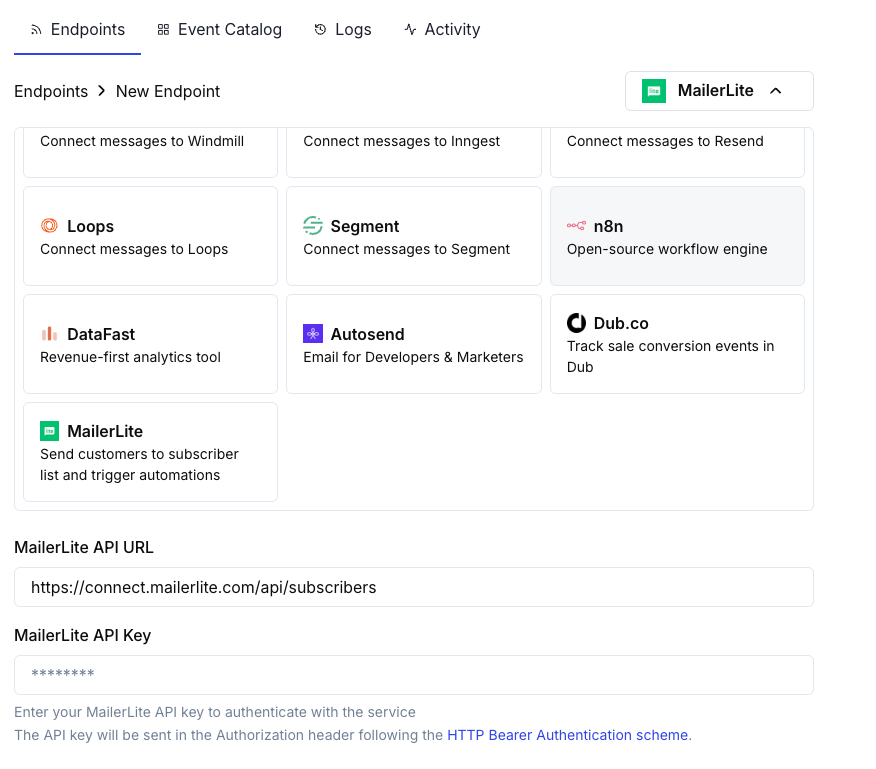 MailerLite インテグレーションカードを選択します。
設定でMailerLite APIキーを入力します。
変換コードを編集して、MailerLiteのAPI用に購読者データを整形します。
サンプルペイロードでテストし、Create をクリックして購読者同期を有効化します。
支払いイベントが自動的に顧客をMailerLiteリストに同期します。
## 変換コードの例
### 成功した支払い時に顧客を追加
```javascript add_customer.js icon="js" expandable theme={null}
function handler(webhook) {
if (webhook.eventType === "payment.succeeded") {
const p = webhook.payload.data;
webhook.url = "https://connect.mailerlite.com/api/subscribers";
webhook.payload = {
email: p.customer.email,
fields: {
name: p.customer.name,
company: p.customer.business_name || "",
last_name: ""
},
groups: ["your-group-id-here"],
status: "active"
};
}
return webhook;
}
```
### 製品に基づいて複数のグループに購読者を追加
```javascript product_segmentation.js icon="js" expandable theme={null}
function handler(webhook) {
if (webhook.eventType === "payment.succeeded") {
const p = webhook.payload.data;
// Determine groups based on product or amount
const groups = ["customers-group-id"];
// Add to premium group if high-value purchase
if (p.total_amount >= 10000) { // $100+
groups.push("premium-customers-group-id");
}
webhook.url = "https://connect.mailerlite.com/api/subscribers";
webhook.payload = {
email: p.customer.email,
fields: {
name: p.customer.name,
last_purchase_amount: (p.total_amount / 100).toFixed(2),
last_purchase_date: new Date(webhook.payload.timestamp).toISOString().split('T')[0],
payment_id: p.payment_id
},
groups: groups,
status: "active"
};
}
return webhook;
}
```
### サブスクリプションのアクティベーション時に新しい購読者を追加
```javascript subscription_subscriber.js icon="js" expandable theme={null}
function handler(webhook) {
if (webhook.eventType === "subscription.active") {
const s = webhook.payload.data;
webhook.url = "https://connect.mailerlite.com/api/subscribers";
webhook.payload = {
email: s.customer.email,
fields: {
name: s.customer.name,
subscription_plan: s.product_id,
subscription_amount: (s.recurring_pre_tax_amount / 100).toFixed(2),
billing_frequency: s.payment_frequency_interval,
subscription_start: new Date().toISOString().split('T')[0]
},
groups: ["subscribers-group-id", "active-subscriptions-group-id"],
status: "active"
};
}
return webhook;
}
```
### サブスクリプションのキャンセル時に購読者を更新
```javascript subscription_cancelled.js icon="js" expandable theme={null}
function handler(webhook) {
if (webhook.eventType === "subscription.cancelled") {
const s = webhook.payload.data;
// Use PUT to update existing subscriber
webhook.url = "https://connect.mailerlite.com/api/subscribers/" + encodeURIComponent(s.customer.email);
webhook.method = "PUT";
webhook.payload = {
fields: {
subscription_status: "cancelled",
cancellation_date: new Date().toISOString().split('T')[0]
},
groups: ["churned-customers-group-id"]
};
}
return webhook;
}
```
### カスタムフィールドを持つ顧客を追加
```javascript custom_fields.js icon="js" expandable theme={null}
function handler(webhook) {
if (webhook.eventType === "payment.succeeded") {
const p = webhook.payload.data;
webhook.url = "https://connect.mailerlite.com/api/subscribers";
webhook.payload = {
email: p.customer.email,
fields: {
name: p.customer.name,
company: p.customer.business_name || "",
country: p.customer.country || "",
city: p.customer.city || "",
phone: p.customer.phone || "",
// Custom fields (must be created in MailerLite first)
total_spent: (p.total_amount / 100).toFixed(2),
customer_since: new Date().toISOString().split('T')[0],
payment_method: p.payment_method || "unknown",
currency: p.currency || "USD"
},
groups: ["paying-customers-group-id"],
status: "active",
subscribed_at: new Date().toISOString().replace('T', ' ').split('.')[0]
};
}
return webhook;
}
```
### イベントを介して自動化をトリガー
```javascript trigger_automation.js icon="js" expandable theme={null}
function handler(webhook) {
if (webhook.eventType === "payment.succeeded") {
const p = webhook.payload.data;
// First, ensure subscriber exists
webhook.url = "https://connect.mailerlite.com/api/subscribers";
webhook.payload = {
email: p.customer.email,
fields: {
name: p.customer.name,
// Add a trigger field that your automation watches
last_payment_trigger: new Date().toISOString(),
last_payment_amount: (p.total_amount / 100).toFixed(2)
},
status: "active"
};
// Tip: Create an automation in MailerLite that triggers
// when 'last_payment_trigger' field is updated
}
return webhook;
}
```
## ヒント
* 変換で使用する前にMailerLiteでカスタムフィールドを作成してください
* グループを使用して、製品、プランのティア、または購入行動によって顧客をセグメント化します
* フィールドの更新時にトリガーされるMailerLiteの自動化ワークフローを設定します
* 重複する購読者エラーを避けるために、upsert動作(/subscribersにPOST)を使用します
* より良い顧客インサイトのために、カスタムフィールドに支払いメタデータを保存します
* すべての支払いを有効にする前に、小さなグループでテストします
## カスタムフィールドの設定
カスタムフィールドを使用する前に、MailerLiteで作成する必要があります:
1. MailerLiteダッシュボードにアクセスします。
2. **Subscribers Fields** に移動します。
3. **Create field** をクリックし、次のようなフィールドを追加します:
* `total_spent` (Number)
* `customer_since` (Date)
* `subscription_plan` (Text)
* `payment_method` (Text)
* `last_payment_amount` (Number)
## トラブルシューティング
* APIキーが正しく有効であることを確認します。
* メールアドレスが有効であること(RFC 2821準拠)を確認します。
* グループIDが正しいこと、かつアカウントに存在することを確認します。
* 注意: 退会済み、バウンス、またはジャンクに分類された購読者はAPI経由で再アクティベートできません。
* カスタムフィールドを使用する前にMailerLiteに存在することを確認します。
* フィールド名が完全に一致していること(大文字小文字を区別)を確認します。
* フィールド値が期待される型(テキスト、数値、日付)に一致していることを確認します。
* MailerLite APIには1分あたり120件のレートリミットがあります。
* 多数の購読者を処理する場合はバッチエンドポイントを使用します。
* 高負荷シナリオではバックオフ戦略を実装します。
* グループIDが数値文字列であることを確認します。
* グループがMailerLiteアカウントに存在することを確認します。
* 注意: グループを指定してPUTを使用すると、リストにないグループから購読者が削除されます。
## APIリファレンス
MailerLite購読者APIは、次の主要なパラメータを受け入れます:
| パラメーター | タイプ | 必須 | 説明 |
| ------------------ | ------ | --- | -------------------------------------------------------- |
| `email` | string | Yes | 有効なメールアドレス(RFC 2821) |
| `fields` | object | No | フィールド名/値のペアを持つオブジェクト |
| `fields.name` | string | No | 購読者の名 |
| `fields.last_name` | string | No | 購読者の姓 |
| `fields.company` | string | No | 会社名 |
| `fields.country` | string | No | 国 |
| `fields.city` | string | No | 市区町村 |
| `fields.phone` | string | No | 電話番号 |
| `groups` | array | No | 購読者を追加するグループIDの配列 |
| `status` | string | No | 次のいずれか: active, unsubscribed, unconfirmed, bounced, junk |
| `subscribed_at` | string | No | 形式 `yyyy-MM-dd HH:mm:ss` の日付 |
| `ip_address` | string | No | 購読者のIPアドレス |
完全なAPIドキュメントについては、[MailerLite Developers](https://developers.mailerlite.com/docs/subscribers.html)を訪問してください。
MailerLite インテグレーションカードを選択します。
設定でMailerLite APIキーを入力します。
変換コードを編集して、MailerLiteのAPI用に購読者データを整形します。
サンプルペイロードでテストし、Create をクリックして購読者同期を有効化します。
支払いイベントが自動的に顧客をMailerLiteリストに同期します。
## 変換コードの例
### 成功した支払い時に顧客を追加
```javascript add_customer.js icon="js" expandable theme={null}
function handler(webhook) {
if (webhook.eventType === "payment.succeeded") {
const p = webhook.payload.data;
webhook.url = "https://connect.mailerlite.com/api/subscribers";
webhook.payload = {
email: p.customer.email,
fields: {
name: p.customer.name,
company: p.customer.business_name || "",
last_name: ""
},
groups: ["your-group-id-here"],
status: "active"
};
}
return webhook;
}
```
### 製品に基づいて複数のグループに購読者を追加
```javascript product_segmentation.js icon="js" expandable theme={null}
function handler(webhook) {
if (webhook.eventType === "payment.succeeded") {
const p = webhook.payload.data;
// Determine groups based on product or amount
const groups = ["customers-group-id"];
// Add to premium group if high-value purchase
if (p.total_amount >= 10000) { // $100+
groups.push("premium-customers-group-id");
}
webhook.url = "https://connect.mailerlite.com/api/subscribers";
webhook.payload = {
email: p.customer.email,
fields: {
name: p.customer.name,
last_purchase_amount: (p.total_amount / 100).toFixed(2),
last_purchase_date: new Date(webhook.payload.timestamp).toISOString().split('T')[0],
payment_id: p.payment_id
},
groups: groups,
status: "active"
};
}
return webhook;
}
```
### サブスクリプションのアクティベーション時に新しい購読者を追加
```javascript subscription_subscriber.js icon="js" expandable theme={null}
function handler(webhook) {
if (webhook.eventType === "subscription.active") {
const s = webhook.payload.data;
webhook.url = "https://connect.mailerlite.com/api/subscribers";
webhook.payload = {
email: s.customer.email,
fields: {
name: s.customer.name,
subscription_plan: s.product_id,
subscription_amount: (s.recurring_pre_tax_amount / 100).toFixed(2),
billing_frequency: s.payment_frequency_interval,
subscription_start: new Date().toISOString().split('T')[0]
},
groups: ["subscribers-group-id", "active-subscriptions-group-id"],
status: "active"
};
}
return webhook;
}
```
### サブスクリプションのキャンセル時に購読者を更新
```javascript subscription_cancelled.js icon="js" expandable theme={null}
function handler(webhook) {
if (webhook.eventType === "subscription.cancelled") {
const s = webhook.payload.data;
// Use PUT to update existing subscriber
webhook.url = "https://connect.mailerlite.com/api/subscribers/" + encodeURIComponent(s.customer.email);
webhook.method = "PUT";
webhook.payload = {
fields: {
subscription_status: "cancelled",
cancellation_date: new Date().toISOString().split('T')[0]
},
groups: ["churned-customers-group-id"]
};
}
return webhook;
}
```
### カスタムフィールドを持つ顧客を追加
```javascript custom_fields.js icon="js" expandable theme={null}
function handler(webhook) {
if (webhook.eventType === "payment.succeeded") {
const p = webhook.payload.data;
webhook.url = "https://connect.mailerlite.com/api/subscribers";
webhook.payload = {
email: p.customer.email,
fields: {
name: p.customer.name,
company: p.customer.business_name || "",
country: p.customer.country || "",
city: p.customer.city || "",
phone: p.customer.phone || "",
// Custom fields (must be created in MailerLite first)
total_spent: (p.total_amount / 100).toFixed(2),
customer_since: new Date().toISOString().split('T')[0],
payment_method: p.payment_method || "unknown",
currency: p.currency || "USD"
},
groups: ["paying-customers-group-id"],
status: "active",
subscribed_at: new Date().toISOString().replace('T', ' ').split('.')[0]
};
}
return webhook;
}
```
### イベントを介して自動化をトリガー
```javascript trigger_automation.js icon="js" expandable theme={null}
function handler(webhook) {
if (webhook.eventType === "payment.succeeded") {
const p = webhook.payload.data;
// First, ensure subscriber exists
webhook.url = "https://connect.mailerlite.com/api/subscribers";
webhook.payload = {
email: p.customer.email,
fields: {
name: p.customer.name,
// Add a trigger field that your automation watches
last_payment_trigger: new Date().toISOString(),
last_payment_amount: (p.total_amount / 100).toFixed(2)
},
status: "active"
};
// Tip: Create an automation in MailerLite that triggers
// when 'last_payment_trigger' field is updated
}
return webhook;
}
```
## ヒント
* 変換で使用する前にMailerLiteでカスタムフィールドを作成してください
* グループを使用して、製品、プランのティア、または購入行動によって顧客をセグメント化します
* フィールドの更新時にトリガーされるMailerLiteの自動化ワークフローを設定します
* 重複する購読者エラーを避けるために、upsert動作(/subscribersにPOST)を使用します
* より良い顧客インサイトのために、カスタムフィールドに支払いメタデータを保存します
* すべての支払いを有効にする前に、小さなグループでテストします
## カスタムフィールドの設定
カスタムフィールドを使用する前に、MailerLiteで作成する必要があります:
1. MailerLiteダッシュボードにアクセスします。
2. **Subscribers Fields** に移動します。
3. **Create field** をクリックし、次のようなフィールドを追加します:
* `total_spent` (Number)
* `customer_since` (Date)
* `subscription_plan` (Text)
* `payment_method` (Text)
* `last_payment_amount` (Number)
## トラブルシューティング
* APIキーが正しく有効であることを確認します。
* メールアドレスが有効であること(RFC 2821準拠)を確認します。
* グループIDが正しいこと、かつアカウントに存在することを確認します。
* 注意: 退会済み、バウンス、またはジャンクに分類された購読者はAPI経由で再アクティベートできません。
* カスタムフィールドを使用する前にMailerLiteに存在することを確認します。
* フィールド名が完全に一致していること(大文字小文字を区別)を確認します。
* フィールド値が期待される型(テキスト、数値、日付)に一致していることを確認します。
* MailerLite APIには1分あたり120件のレートリミットがあります。
* 多数の購読者を処理する場合はバッチエンドポイントを使用します。
* 高負荷シナリオではバックオフ戦略を実装します。
* グループIDが数値文字列であることを確認します。
* グループがMailerLiteアカウントに存在することを確認します。
* 注意: グループを指定してPUTを使用すると、リストにないグループから購読者が削除されます。
## APIリファレンス
MailerLite購読者APIは、次の主要なパラメータを受け入れます:
| パラメーター | タイプ | 必須 | 説明 |
| ------------------ | ------ | --- | -------------------------------------------------------- |
| `email` | string | Yes | 有効なメールアドレス(RFC 2821) |
| `fields` | object | No | フィールド名/値のペアを持つオブジェクト |
| `fields.name` | string | No | 購読者の名 |
| `fields.last_name` | string | No | 購読者の姓 |
| `fields.company` | string | No | 会社名 |
| `fields.country` | string | No | 国 |
| `fields.city` | string | No | 市区町村 |
| `fields.phone` | string | No | 電話番号 |
| `groups` | array | No | 購読者を追加するグループIDの配列 |
| `status` | string | No | 次のいずれか: active, unsubscribed, unconfirmed, bounced, junk |
| `subscribed_at` | string | No | 形式 `yyyy-MM-dd HH:mm:ss` の日付 |
| `ip_address` | string | No | 購読者のIPアドレス |
完全なAPIドキュメントについては、[MailerLite Developers](https://developers.mailerlite.com/docs/subscribers.html)を訪問してください。