> ## Documentation Index
> Fetch the complete documentation index at: https://docs.dodopayments.com/llms.txt
> Use this file to discover all available pages before exploring further.
# Inngest
> Dodo Paymentsのイベントに基づいて、Inngestでサーバーレス関数とバックグラウンドジョブをトリガーします。
## はじめに
支払いイベントが発生したときに、サーバーレス関数とバックグラウンドジョブを自動的に実行します。支払いを処理し、通知を送信し、データベースを更新し、Inngestの信頼性の高い関数実行プラットフォームを使用して複雑なワークフローを実行します。
この統合には、関数構成から取得する Inngest の webhook URL が必要です。
## 始め方
In your Dodo Payments dashboard, navigate to Webhooks → + Add Endpoint and expand the integrations dropdown.
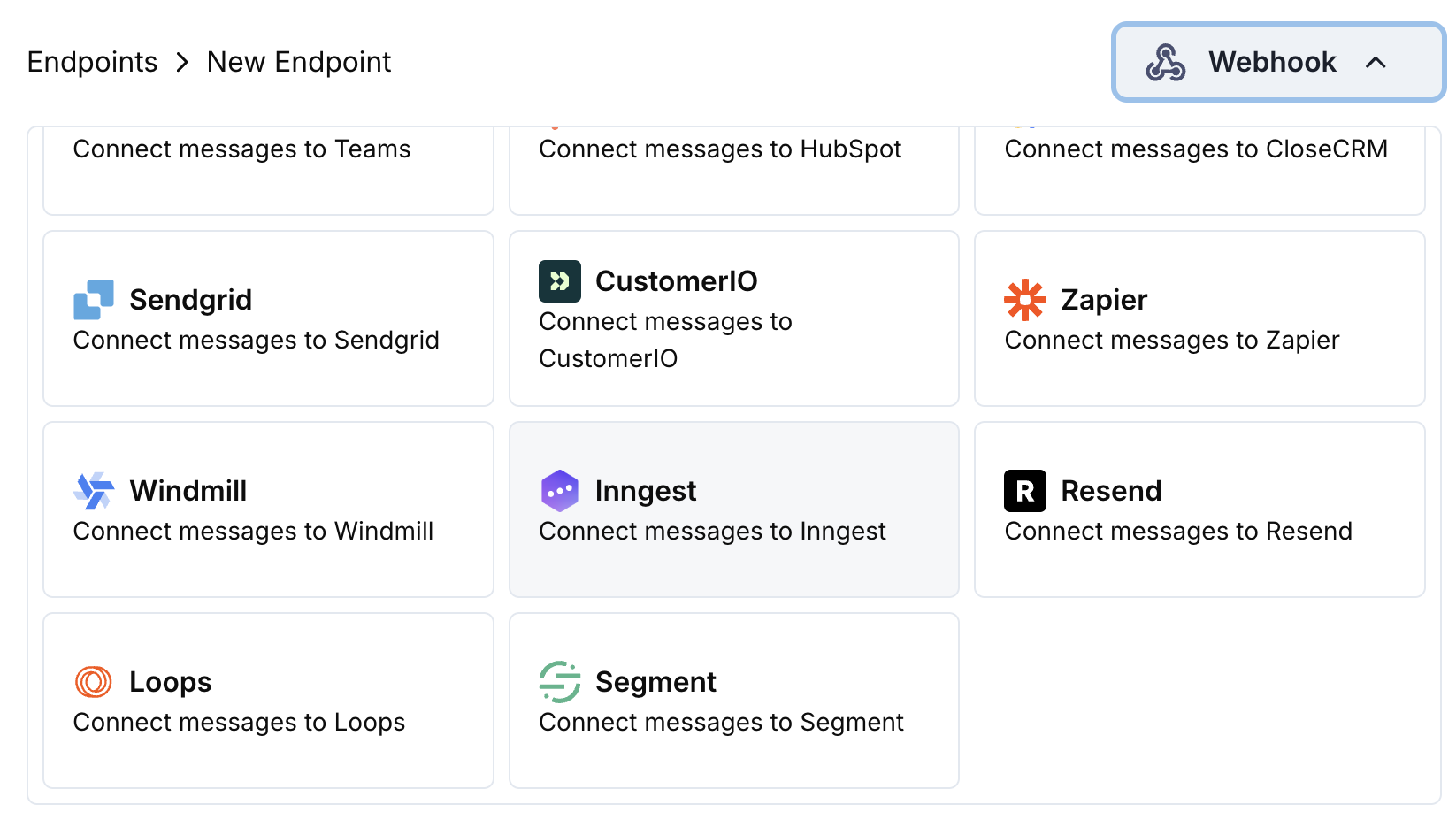 Inngest の統合カードを選択します。
Inngest で新しい関数を作成し、関数構成から webhook URL をコピーします。
Inngest の webhook URL をエンドポイント構成に貼り付けます。
変換コードを編集して、イベントを Inngest 関数用にフォーマットします。
サンプルペイロードでテストし、Create をクリックして統合を有効にします。
🎉 支払いイベントが Inngest 関数を自動的にトリガーするようになります。
## 変換コードの例
### 基本的なイベントペイロード
```javascript basic_event.js icon="js" expandable theme={null}
function handler(webhook) {
if (webhook.eventType === "payment.succeeded") {
const p = webhook.payload.data;
webhook.payload = {
name: "payment.succeeded",
data: {
payment_id: p.payment_id,
amount: (p.total_amount / 100).toFixed(2),
currency: p.currency || "USD",
customer_email: p.customer.email,
customer_name: p.customer.name,
payment_method: p.payment_method || "unknown"
},
user: {
email: p.customer.email
},
ts: Math.floor(new Date(webhook.payload.timestamp).getTime() / 1000)
};
}
return webhook;
}
```
### サブスクリプションイベントハンドラー
```javascript subscription_event.js icon="js" expandable theme={null}
function handler(webhook) {
const s = webhook.payload.data;
switch (webhook.eventType) {
case "subscription.active":
webhook.payload = {
name: "subscription.started",
data: {
subscription_id: s.subscription_id,
customer_email: s.customer.email,
customer_name: s.customer.name,
product_id: s.product_id,
amount: (s.recurring_pre_tax_amount / 100).toFixed(2),
frequency: s.payment_frequency_interval,
next_billing: s.next_billing_date
},
user: {
email: s.customer.email
},
ts: Math.floor(new Date(webhook.payload.timestamp).getTime() / 1000)
};
break;
case "subscription.cancelled":
webhook.payload = {
name: "subscription.cancelled",
data: {
subscription_id: s.subscription_id,
customer_email: s.customer.email,
cancelled_at: s.cancelled_at,
cancel_at_next_billing: s.cancel_at_next_billing_date
},
user: {
email: s.customer.email
},
ts: Math.floor(new Date(webhook.payload.timestamp).getTime() / 1000)
};
break;
}
return webhook;
}
```
### 争議イベントハンドラー
```javascript dispute_event.js icon="js" expandable theme={null}
function handler(webhook) {
if (webhook.eventType.startsWith("dispute.")) {
const d = webhook.payload.data;
webhook.payload = {
name: webhook.eventType,
data: {
dispute_id: d.dispute_id,
payment_id: d.payment_id,
amount: (d.amount / 100).toFixed(2),
status: d.dispute_status,
stage: d.dispute_stage,
remarks: d.remarks || "",
urgent: webhook.eventType === "dispute.opened"
},
user: {
email: d.customer?.email || "unknown"
},
ts: Math.floor(new Date(webhook.payload.timestamp).getTime() / 1000)
};
}
return webhook;
}
```
## 一般的なInngestの使用例
* 確認メールを送信
* 顧客記録を更新
* 返金処理を行う
* 請求書を作成
* 在庫を更新
* 新しい購読者を歓迎
* 解約を処理
* 更新リマインダーを送信
* 請求サイクルを更新
* 支払い失敗を処理
* 収益指標を更新
* 顧客行動を追跡
* レポートを作成
* データを分析プラットフォームへ同期
* 解約率を計算
## ヒント
* より良い関数の整理のために説明的なイベント名を使用する
* 関数実行のためにユーザーコンテキストを含める
* イベントの順序付けのために適切なタイムスタンプを設定する
* イベント間でデータを一貫して構造化する
* Inngestの再試行とエラーハンドリング機能を使用する
## トラブルシューティング
* webhook URL が正しく有効か確認
* Inngest 関数がデプロイされ有効か確認
* イベント名が関数トリガーと一致しているか確認
* Inngest 関数のログでエラーを確認
* ペイロード構造が Inngest の期待値と一致しているか確認
* イベント名が適切にフォーマットされているか確認
* 必須フィールドがすべて含まれているか確認
* Inngest の webhook テストツールでテスト
Inngest の統合カードを選択します。
Inngest で新しい関数を作成し、関数構成から webhook URL をコピーします。
Inngest の webhook URL をエンドポイント構成に貼り付けます。
変換コードを編集して、イベントを Inngest 関数用にフォーマットします。
サンプルペイロードでテストし、Create をクリックして統合を有効にします。
🎉 支払いイベントが Inngest 関数を自動的にトリガーするようになります。
## 変換コードの例
### 基本的なイベントペイロード
```javascript basic_event.js icon="js" expandable theme={null}
function handler(webhook) {
if (webhook.eventType === "payment.succeeded") {
const p = webhook.payload.data;
webhook.payload = {
name: "payment.succeeded",
data: {
payment_id: p.payment_id,
amount: (p.total_amount / 100).toFixed(2),
currency: p.currency || "USD",
customer_email: p.customer.email,
customer_name: p.customer.name,
payment_method: p.payment_method || "unknown"
},
user: {
email: p.customer.email
},
ts: Math.floor(new Date(webhook.payload.timestamp).getTime() / 1000)
};
}
return webhook;
}
```
### サブスクリプションイベントハンドラー
```javascript subscription_event.js icon="js" expandable theme={null}
function handler(webhook) {
const s = webhook.payload.data;
switch (webhook.eventType) {
case "subscription.active":
webhook.payload = {
name: "subscription.started",
data: {
subscription_id: s.subscription_id,
customer_email: s.customer.email,
customer_name: s.customer.name,
product_id: s.product_id,
amount: (s.recurring_pre_tax_amount / 100).toFixed(2),
frequency: s.payment_frequency_interval,
next_billing: s.next_billing_date
},
user: {
email: s.customer.email
},
ts: Math.floor(new Date(webhook.payload.timestamp).getTime() / 1000)
};
break;
case "subscription.cancelled":
webhook.payload = {
name: "subscription.cancelled",
data: {
subscription_id: s.subscription_id,
customer_email: s.customer.email,
cancelled_at: s.cancelled_at,
cancel_at_next_billing: s.cancel_at_next_billing_date
},
user: {
email: s.customer.email
},
ts: Math.floor(new Date(webhook.payload.timestamp).getTime() / 1000)
};
break;
}
return webhook;
}
```
### 争議イベントハンドラー
```javascript dispute_event.js icon="js" expandable theme={null}
function handler(webhook) {
if (webhook.eventType.startsWith("dispute.")) {
const d = webhook.payload.data;
webhook.payload = {
name: webhook.eventType,
data: {
dispute_id: d.dispute_id,
payment_id: d.payment_id,
amount: (d.amount / 100).toFixed(2),
status: d.dispute_status,
stage: d.dispute_stage,
remarks: d.remarks || "",
urgent: webhook.eventType === "dispute.opened"
},
user: {
email: d.customer?.email || "unknown"
},
ts: Math.floor(new Date(webhook.payload.timestamp).getTime() / 1000)
};
}
return webhook;
}
```
## 一般的なInngestの使用例
* 確認メールを送信
* 顧客記録を更新
* 返金処理を行う
* 請求書を作成
* 在庫を更新
* 新しい購読者を歓迎
* 解約を処理
* 更新リマインダーを送信
* 請求サイクルを更新
* 支払い失敗を処理
* 収益指標を更新
* 顧客行動を追跡
* レポートを作成
* データを分析プラットフォームへ同期
* 解約率を計算
## ヒント
* より良い関数の整理のために説明的なイベント名を使用する
* 関数実行のためにユーザーコンテキストを含める
* イベントの順序付けのために適切なタイムスタンプを設定する
* イベント間でデータを一貫して構造化する
* Inngestの再試行とエラーハンドリング機能を使用する
## トラブルシューティング
* webhook URL が正しく有効か確認
* Inngest 関数がデプロイされ有効か確認
* イベント名が関数トリガーと一致しているか確認
* Inngest 関数のログでエラーを確認
* ペイロード構造が Inngest の期待値と一致しているか確認
* イベント名が適切にフォーマットされているか確認
* 必須フィールドがすべて含まれているか確認
* Inngest の webhook テストツールでテスト