> ## Documentation Index
> Fetch the complete documentation index at: https://docs.dodopayments.com/llms.txt
> Use this file to discover all available pages before exploring further.
# レポート
> 残高を照合し、すべての手数料を確認し、任意の日付範囲のpayments、adjustments、payouts、balance ledgerをCSVまたはXLSXとしてエクスポートします。
## はじめに
**レポート**では、資金移動を追跡し、エクスポートを作成できます。
**Settings → Reports**に移動します。
このページは3つのパートで構成されています。
画面上で残高と手数料を説明する2つのライブビュー。
日付範囲を指定し、CSVまたはXLSXとして作成する4種類のエクスポート。
以前に作成したすべてのレポートを、再度ダウンロードできます。
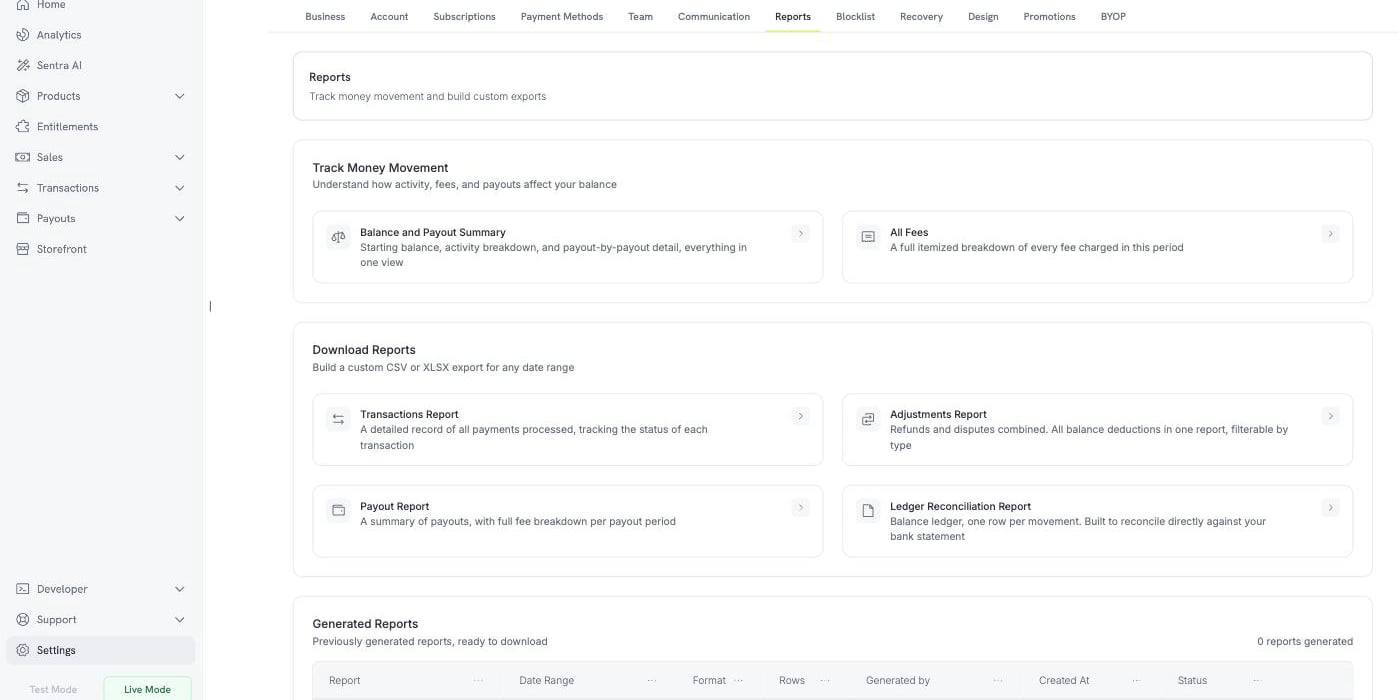 レポートは**Test Mode**と**Live Mode**の両方で利用でき、それぞれ該当するモードのデータのみを読み取ります。レポートを作成する前に、サイドバーでモードを切り替えてください。
***
## 資金移動の追跡
画面上で確認でき、ダウンロードが不要な2つのビューがあります。どちらも日付範囲を指定でき、同じビューをファイルとして保存する**Export**ボタンがあります。
### Balance and Payout Summary
このビューでは、期間中の残高を照合します。3つのブロックがあります。
レポートは**Test Mode**と**Live Mode**の両方で利用でき、それぞれ該当するモードのデータのみを読み取ります。レポートを作成する前に、サイドバーでモードを切り替えてください。
***
## 資金移動の追跡
画面上で確認でき、ダウンロードが不要な2つのビューがあります。どちらも日付範囲を指定でき、同じビューをファイルとして保存する**Export**ボタンがあります。
### Balance and Payout Summary
このビューでは、期間中の残高を照合します。3つのブロックがあります。
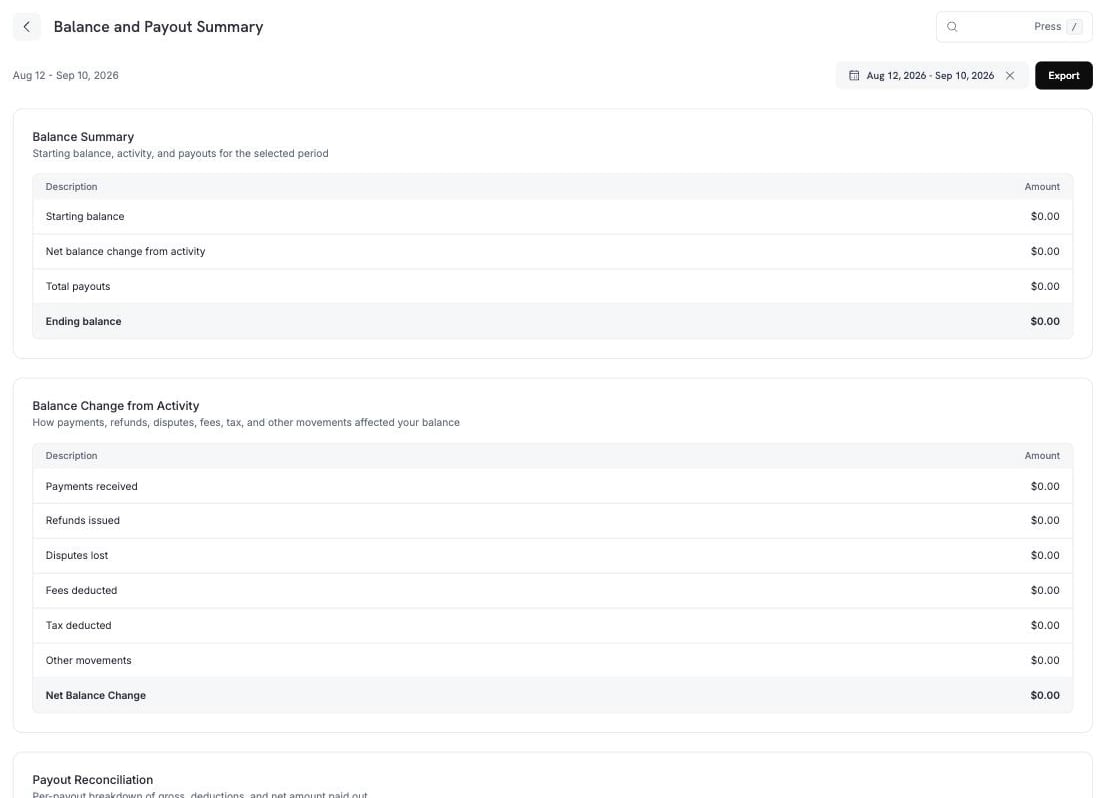 **Balance Summary**には、期間の開始から終了までが表示されます。
| 行 | 意味 |
| --------------- | ------------------------- |
| 開始残高 | 期間開始時点の残高。 |
| アクティビティによる純残高変動 | payoutを除く、期間中に発生したすべての変動。 |
| 合計payout | payoutとして出金された金額。 |
| 終了残高 | 開始残高 + アクティビティ − payout。 |
**Balance Change from Activity**では、中央の行を構成要素に分けて表示します。
| 行 | 含まれるもの |
| ------------- | ------------------------------------------------------------------------------------------------------------------------------- |
| 受け取ったpayments | 成功したpayments。 |
| 発行したrefunds | refundsとrefund feesから、それぞれのreversalを差し引いたもの。 |
| 失ったdisputes | disputesとdispute feesから、dispute reversalを差し引いたもの。 |
| 控除されたfees | payment fees、payout fees、dunning fees、payment retry fees、BYOP fees、abandoned cart recovery fees、Ethoca feesから、reversalを差し引いたもの。 |
| 控除されたtax | taxからtax reversalを差し引いたもの。 |
| その他の移動 | Dodo Credits、手動調整、通貨換算。 |
| 純残高変動 | 上記の行の合計。 |
**Other movements**には、上記の名前付きの行に該当しない項目が含まれます。**Dodo Credits**(Dodo Paymentsが残高に適用するcredits)、**manual adjustments**(チームが登録した修正)、**currency conversion**(残高を通貨間で換算した際に記録される差額)です。
**Payout Reconciliation**には、期間中の各payoutが1行ずつ表示され、総額、各控除額、支払われた純額を確認できます。
**Balance Summary**には、期間の開始から終了までが表示されます。
| 行 | 意味 |
| --------------- | ------------------------- |
| 開始残高 | 期間開始時点の残高。 |
| アクティビティによる純残高変動 | payoutを除く、期間中に発生したすべての変動。 |
| 合計payout | payoutとして出金された金額。 |
| 終了残高 | 開始残高 + アクティビティ − payout。 |
**Balance Change from Activity**では、中央の行を構成要素に分けて表示します。
| 行 | 含まれるもの |
| ------------- | ------------------------------------------------------------------------------------------------------------------------------- |
| 受け取ったpayments | 成功したpayments。 |
| 発行したrefunds | refundsとrefund feesから、それぞれのreversalを差し引いたもの。 |
| 失ったdisputes | disputesとdispute feesから、dispute reversalを差し引いたもの。 |
| 控除されたfees | payment fees、payout fees、dunning fees、payment retry fees、BYOP fees、abandoned cart recovery fees、Ethoca feesから、reversalを差し引いたもの。 |
| 控除されたtax | taxからtax reversalを差し引いたもの。 |
| その他の移動 | Dodo Credits、手動調整、通貨換算。 |
| 純残高変動 | 上記の行の合計。 |
**Other movements**には、上記の名前付きの行に該当しない項目が含まれます。**Dodo Credits**(Dodo Paymentsが残高に適用するcredits)、**manual adjustments**(チームが登録した修正)、**currency conversion**(残高を通貨間で換算した際に記録される差額)です。
**Payout Reconciliation**には、期間中の各payoutが1行ずつ表示され、総額、各控除額、支払われた純額を確認できます。
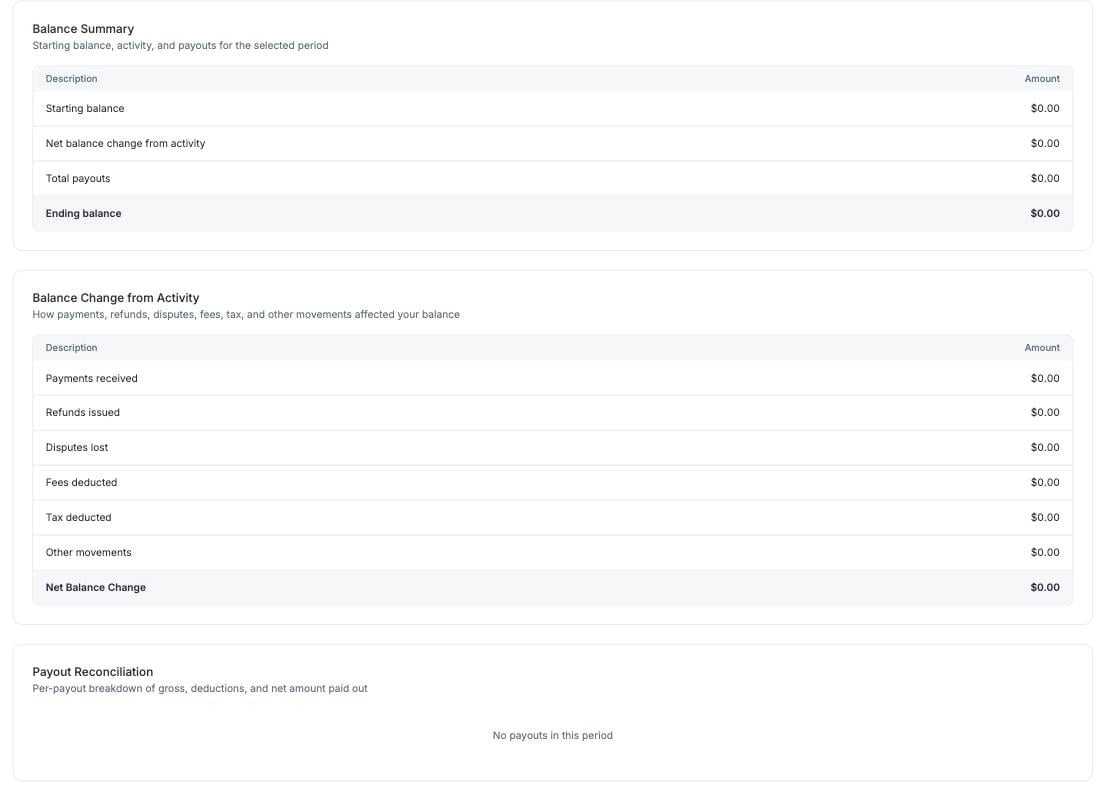 payoutは、その締め日までに未請求のすべてのledger entryを対象とします。期間中のpaymentsだけが対象になるわけではありません。そのため、Dodo Creditsとadjustmentsがpayoutの一部に充当される場合があり、それらは**Other**に表示されます。
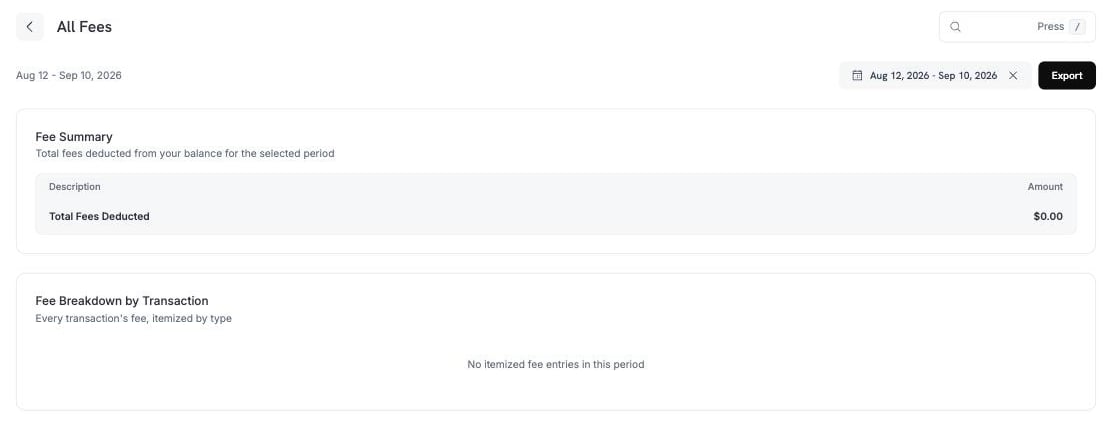
### すべてのFees
期間中に残高から徴収されたすべてのfeeを、合計とtransactionごとの内訳で表示します。
payoutは、その締め日までに未請求のすべてのledger entryを対象とします。期間中のpaymentsだけが対象になるわけではありません。そのため、Dodo Creditsとadjustmentsがpayoutの一部に充当される場合があり、それらは**Other**に表示されます。
### すべてのFees
期間中に残高から徴収されたすべてのfeeを、合計とtransactionごとの内訳で表示します。
 ***
## レポートのダウンロード
4種類のレポートで、任意の日付範囲のファイルを作成できます。各レポートを開くとパネルが表示され、期間、形式、レポートのfiltersを選択できます。
すべてのレポートは**CSV**または**XLSX**としてエクスポートできます。
| レポート | 含まれる内容 |
| -------------------------------- | -------------------------------------------- |
| **Transactions Report** | 処理されたすべてのpaymentと、各transactionのstatus。 |
| **Adjustments Report** | refundsとdisputesをまとめたもの。すべての残高控除を1つのファイルに収録。 |
| **Payout Report** | payoutの概要と、payout期間ごとの完全なfee内訳。 |
| **Ledger Reconciliation Report** | 残高ledgerを移動ごとに1行で表示し、bank statementと照合できます。 |
### Transactions Report
***
## レポートのダウンロード
4種類のレポートで、任意の日付範囲のファイルを作成できます。各レポートを開くとパネルが表示され、期間、形式、レポートのfiltersを選択できます。
すべてのレポートは**CSV**または**XLSX**としてエクスポートできます。
| レポート | 含まれる内容 |
| -------------------------------- | -------------------------------------------- |
| **Transactions Report** | 処理されたすべてのpaymentと、各transactionのstatus。 |
| **Adjustments Report** | refundsとdisputesをまとめたもの。すべての残高控除を1つのファイルに収録。 |
| **Payout Report** | payoutの概要と、payout期間ごとの完全なfee内訳。 |
| **Ledger Reconciliation Report** | 残高ledgerを移動ごとに1行で表示し、bank statementと照合できます。 |
### Transactions Report
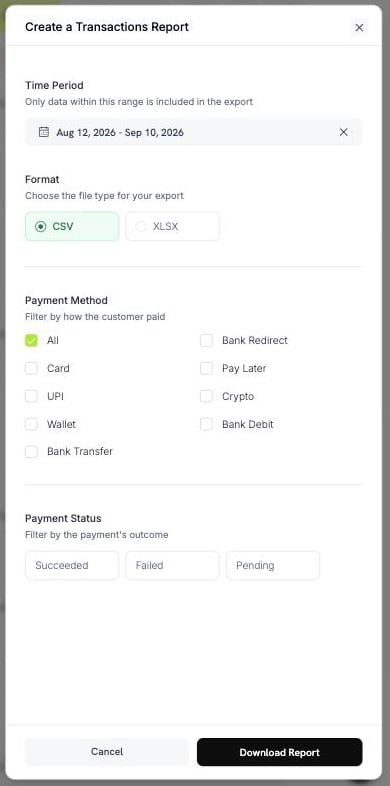 * **Payment Method** — Card、UPI、Wallet、Bank Transfer、Bank Redirect、Pay Later、Crypto、Bank Debit。すべてのmethodを対象にするには**All**を選択します。
* **Payment Status** — Succeeded、Failed、Pending。
### Adjustments Report
* **Payment Method** — Card、UPI、Wallet、Bank Transfer、Bank Redirect、Pay Later、Crypto、Bank Debit。すべてのmethodを対象にするには**All**を選択します。
* **Payment Status** — Succeeded、Failed、Pending。
### Adjustments Report
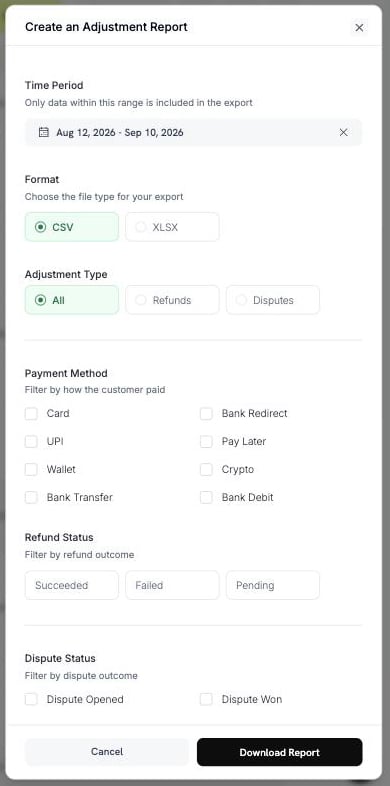 * **Adjustment Type** — All、Refunds、Disputes。
* **Payment Method** — 上記と同じ8種類のmethod。
* **Refund Status** — Succeeded、Failed、Pending。
* **Dispute Status** — Opened、Challenged、Accepted、Lost、Won、Cancelled、Expired。
### Payout Report
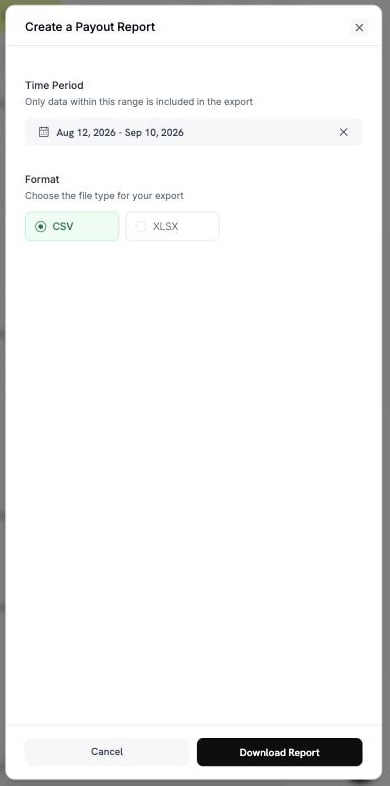
期間と形式を選択します。このレポートに他のfilterは必要ありません。
* **Adjustment Type** — All、Refunds、Disputes。
* **Payment Method** — 上記と同じ8種類のmethod。
* **Refund Status** — Succeeded、Failed、Pending。
* **Dispute Status** — Opened、Challenged、Accepted、Lost、Won、Cancelled、Expired。
### Payout Report
期間と形式を選択します。このレポートに他のfilterは必要ありません。
 ### Ledger Reconciliation Report
このレポートには2つのモードがあります。**Reconciliation by**でどちらかを選択します。
### Ledger Reconciliation Report
このレポートには2つのモードがあります。**Reconciliation by**でどちらかを選択します。
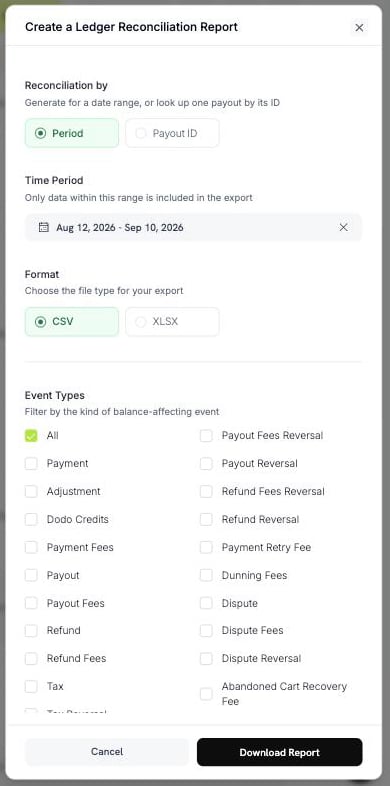 **Period**では、日付範囲内のすべてのledger movementをエクスポートします。
**Payout ID**では、1つのpayoutのmovementをエクスポートします。payout reference(例: `pyt_kxncrebha`)を入力すると、そのpayoutでsettleされた正確な行を取得できます。
**Period**では、日付範囲内のすべてのledger movementをエクスポートします。
**Payout ID**では、1つのpayoutのmovementをエクスポートします。payout reference(例: `pyt_kxncrebha`)を入力すると、そのpayoutでsettleされた正確な行を取得できます。
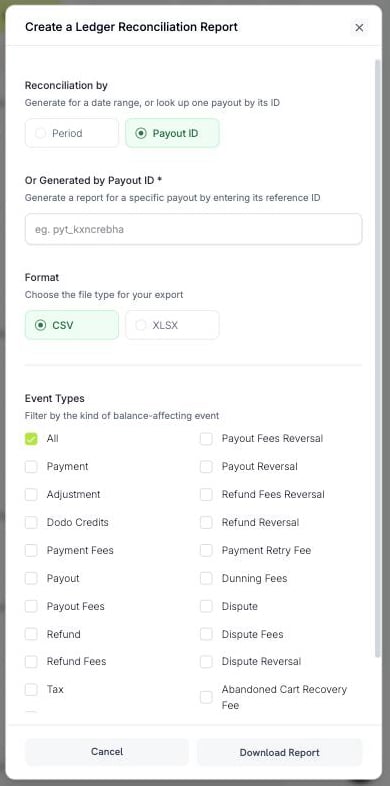 存在しないpayout IDを指定するとエラーが返されます。空のファイルは返されません。
**Event Types**では、balance movementの種類で行をfilterします。すべてのtypeを残すには**All**を選択するか、次から選択します。
| グループ | Options |
| -------- | -------------------------------------------------------------------------------- |
| 入金 | Payment、Dodo Credits、Adjustment、Currency Conversion |
| Payouts | Payout、Payout Reversal、Payout Fees、Payout Fees Reversal |
| Refunds | Refund、Refund Reversal、Refund Fees、Refund Fees Reversal |
| Disputes | Dispute、Dispute Fees、Dispute Reversal |
| Fees | Payment Fees、Payment Retry Fee、Dunning Fees、Abandoned Cart Recovery Fee、BYOP Fee |
| Tax | Tax、Tax Reversal |
すべてのtypeにreversalがあるわけではありません。reversalがあるのはPayout、Payout Fees、Refund、Refund Fees、Dispute、Taxのみです。
「このpayoutには何が含まれていたか」を確認するには**Payout ID**モードを使用します。bank statementを1行ずつ照合するには、**All** event typesを指定した**Period**を使用します。
***
## レポートの作成とダウンロード
**Settings → Reports**に移動し、必要なレポートを選択します。
日付範囲を選択します。この範囲内のデータのみがファイルに含まれます。
**CSV**または**XLSX**を選択し、そのレポートのfiltersを設定します。
**Download Report**を選択します。ファイルがダウンロードされ、レポートが**Generated Reports**に追加されます。
ファイル名にはレポートと日付範囲が含まれるため、開かなくてもダウンロードを識別できます。例: `dodo_ledger_2026-06-01_to_2026-06-30.csv`。
CSVエクスポートはUTF-8 byte order markから始まるため、Excelでアクセント付き文字や非ラテン文字のscriptが正しく開かれます。
### 行数制限
1回のエクスポートには上限があるため、長い期間を分割する必要が生じる場合があります。
| レポート | CSV | XLSX |
| --------------------- | -------- | -------- |
| Ledger Reconciliation | 500,000行 | 100,000行 |
| その他のすべてのレポート | 100,000行 | 50,000行 |
日付範囲が上限を超えると、メッセージとともにエクスポートが拒否されます。範囲を狭めるかfilterを追加して、もう一度作成してください。
長い期間にはCSVを選択してください。CSVの行数制限のほうが高く設定されています。
***
## Generated Reports
作成したすべてのレポートが記録されるため、再作成せずに再度ダウンロードできます。
| 列 | 意味 |
| ------------ | --------------------------- |
| Report | レポートのtype。 |
| Date Range | レポートが対象とする期間。 |
| Format | CSVまたはXLSX。 |
| Rows | ファイルに含まれる行数。 |
| Generated by | 作成したteam member。 |
| Created At | 作成日時。 |
| Status | **Completed**または**Failed**。 |
ダウンロードlinkは短時間のみ有効です。保存されたファイルの有効期限が切れている場合、Dodo Paymentsは同じparametersから再作成し、その行をregeneratedとして記録します。
再作成されたレポートは、元のレポートと異なる場合があります。日付範囲の基礎となるデータは変化し続けるため、最初の作成後に記録されたrefundやdisputeが再作成時には含まれます。数値を作成時点のまま保持する必要がある場合は、ダウンロードしたファイルを保存してください。
***
## 必要なレポートの選び方
| 質問 | レポート |
| --------------------------- | ------------------------------------- |
| 残高がこの金額になる理由は? | Balance and Payout Summary |
| このpayoutには何が含まれていたか? | **Payout ID**によるLedger Reconciliation |
| 支払ったfeeは? | All Fees |
| accountant向けにすべてのpaymentが必要 | Transactions Report |
| refundsとdisputesにかかった金額は? | Adjustments Report |
| bank statementと照合したい | **Period**によるLedger Reconciliation |
***
## ベストプラクティス
* まず**Balance and Payout Summary**で照合します。数値の説明が必要な場合のみ、詳細なレポートをダウンロードします。
* 長い期間には**CSV**をエクスポートし、ファイルを手作業で扱う場合のみ**XLSX**を使用します。
* ダウンロードしたファイルを保存します。再作成したファイルが一致するとは限りません。
* 日付範囲を広げる前にfilterを設定します。filterを使うと、エクスポートを行数制限以内に収めやすくなります。
数値に誤りがあるように見える場合は、まず日付範囲とfiltersを確認してください。それでも解決しない場合は、レポートのtypeと期間を添えて[support@dodopayments.com](mailto:support@dodopayments.com)までお問い合わせください。
## 次のステップ
revenue、customers、retention、transaction healthを追跡します。
earnings、deductions、payout cyclesを確認します。
payoutがいつ、どのようにbank accountへ到着するかを確認します。
refundを開始し、監視します。
存在しないpayout IDを指定するとエラーが返されます。空のファイルは返されません。
**Event Types**では、balance movementの種類で行をfilterします。すべてのtypeを残すには**All**を選択するか、次から選択します。
| グループ | Options |
| -------- | -------------------------------------------------------------------------------- |
| 入金 | Payment、Dodo Credits、Adjustment、Currency Conversion |
| Payouts | Payout、Payout Reversal、Payout Fees、Payout Fees Reversal |
| Refunds | Refund、Refund Reversal、Refund Fees、Refund Fees Reversal |
| Disputes | Dispute、Dispute Fees、Dispute Reversal |
| Fees | Payment Fees、Payment Retry Fee、Dunning Fees、Abandoned Cart Recovery Fee、BYOP Fee |
| Tax | Tax、Tax Reversal |
すべてのtypeにreversalがあるわけではありません。reversalがあるのはPayout、Payout Fees、Refund、Refund Fees、Dispute、Taxのみです。
「このpayoutには何が含まれていたか」を確認するには**Payout ID**モードを使用します。bank statementを1行ずつ照合するには、**All** event typesを指定した**Period**を使用します。
***
## レポートの作成とダウンロード
**Settings → Reports**に移動し、必要なレポートを選択します。
日付範囲を選択します。この範囲内のデータのみがファイルに含まれます。
**CSV**または**XLSX**を選択し、そのレポートのfiltersを設定します。
**Download Report**を選択します。ファイルがダウンロードされ、レポートが**Generated Reports**に追加されます。
ファイル名にはレポートと日付範囲が含まれるため、開かなくてもダウンロードを識別できます。例: `dodo_ledger_2026-06-01_to_2026-06-30.csv`。
CSVエクスポートはUTF-8 byte order markから始まるため、Excelでアクセント付き文字や非ラテン文字のscriptが正しく開かれます。
### 行数制限
1回のエクスポートには上限があるため、長い期間を分割する必要が生じる場合があります。
| レポート | CSV | XLSX |
| --------------------- | -------- | -------- |
| Ledger Reconciliation | 500,000行 | 100,000行 |
| その他のすべてのレポート | 100,000行 | 50,000行 |
日付範囲が上限を超えると、メッセージとともにエクスポートが拒否されます。範囲を狭めるかfilterを追加して、もう一度作成してください。
長い期間にはCSVを選択してください。CSVの行数制限のほうが高く設定されています。
***
## Generated Reports
作成したすべてのレポートが記録されるため、再作成せずに再度ダウンロードできます。
| 列 | 意味 |
| ------------ | --------------------------- |
| Report | レポートのtype。 |
| Date Range | レポートが対象とする期間。 |
| Format | CSVまたはXLSX。 |
| Rows | ファイルに含まれる行数。 |
| Generated by | 作成したteam member。 |
| Created At | 作成日時。 |
| Status | **Completed**または**Failed**。 |
ダウンロードlinkは短時間のみ有効です。保存されたファイルの有効期限が切れている場合、Dodo Paymentsは同じparametersから再作成し、その行をregeneratedとして記録します。
再作成されたレポートは、元のレポートと異なる場合があります。日付範囲の基礎となるデータは変化し続けるため、最初の作成後に記録されたrefundやdisputeが再作成時には含まれます。数値を作成時点のまま保持する必要がある場合は、ダウンロードしたファイルを保存してください。
***
## 必要なレポートの選び方
| 質問 | レポート |
| --------------------------- | ------------------------------------- |
| 残高がこの金額になる理由は? | Balance and Payout Summary |
| このpayoutには何が含まれていたか? | **Payout ID**によるLedger Reconciliation |
| 支払ったfeeは? | All Fees |
| accountant向けにすべてのpaymentが必要 | Transactions Report |
| refundsとdisputesにかかった金額は? | Adjustments Report |
| bank statementと照合したい | **Period**によるLedger Reconciliation |
***
## ベストプラクティス
* まず**Balance and Payout Summary**で照合します。数値の説明が必要な場合のみ、詳細なレポートをダウンロードします。
* 長い期間には**CSV**をエクスポートし、ファイルを手作業で扱う場合のみ**XLSX**を使用します。
* ダウンロードしたファイルを保存します。再作成したファイルが一致するとは限りません。
* 日付範囲を広げる前にfilterを設定します。filterを使うと、エクスポートを行数制限以内に収めやすくなります。
数値に誤りがあるように見える場合は、まず日付範囲とfiltersを確認してください。それでも解決しない場合は、レポートのtypeと期間を添えて[support@dodopayments.com](mailto:support@dodopayments.com)までお問い合わせください。
## 次のステップ
revenue、customers、retention、transaction healthを追跡します。
earnings、deductions、payout cyclesを確認します。
payoutがいつ、どのようにbank accountへ到着するかを確認します。
refundを開始し、監視します。