> ## Documentation Index
> Fetch the complete documentation index at: https://docs.dodopayments.com/llms.txt
> Use this file to discover all available pages before exploring further.
# Payouts Process
> Consolidate your eligible earnings and manage your payout threshold directly from the dashboard.
## Introduction
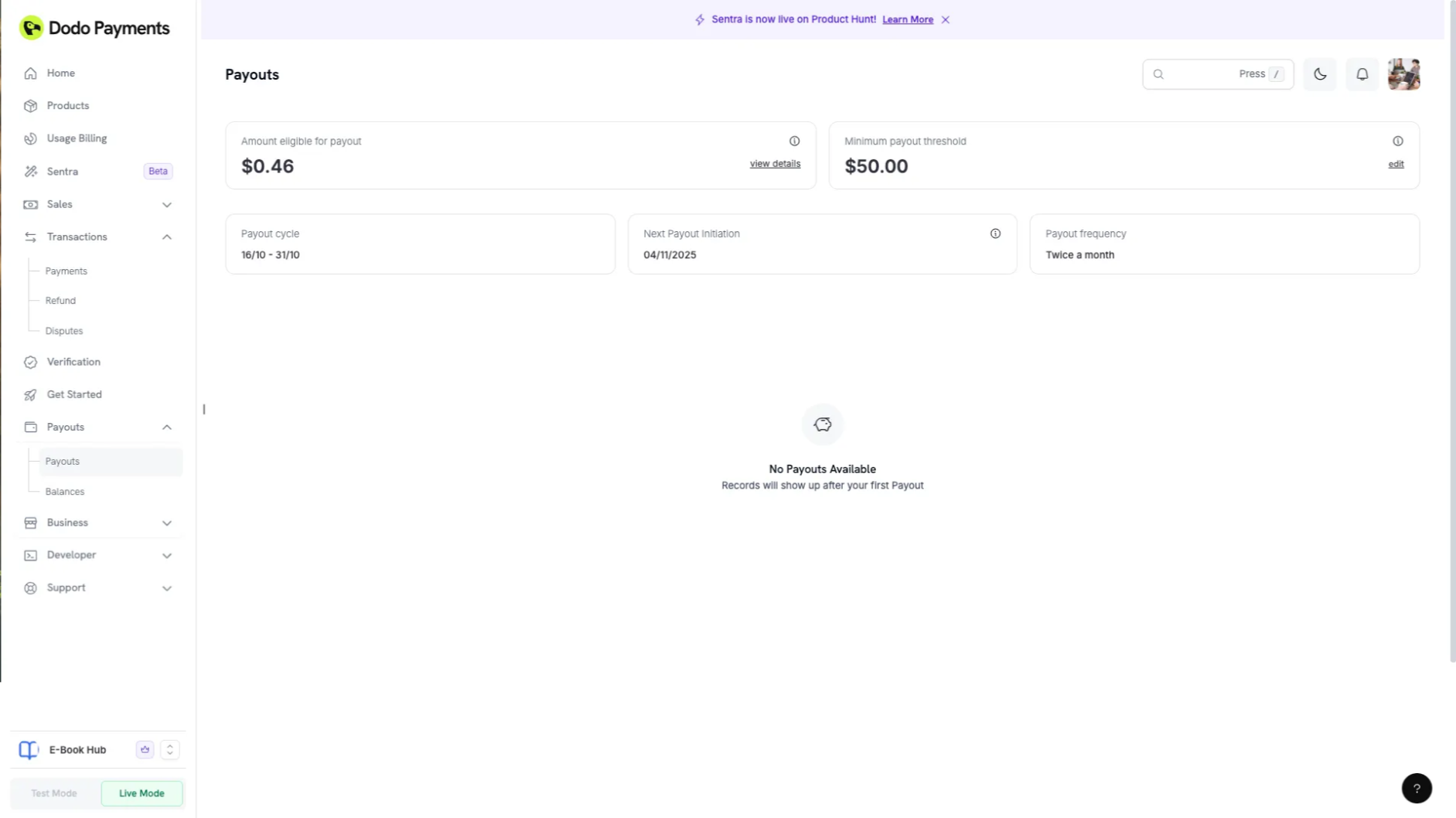
The **Payouts Section** consolidates all eligible earnings that can be disbursed in the next payout cycle. It provides transparency on the net available balance after accounting for all fees, refunds, and taxes.
 ## Key Features
* Displays the total balance eligible for payout in the upcoming cycle in USD
* Automatically applies FX conversion for non-USD currencies
* Lets businesses **set or modify their payout threshold** directly from the wallet settings
The displayed amount is **for reference only**. Final payout amounts may vary based on the actual exchange rate at the time of transfer.
## Payout Cycles
We support the following payout cycles:
**Billing Period 1:** 1st to 15th of the month\
**Payout Date 1:** 18th of the same month
**Billing Period 2:** 16th to the end of the month\
**Payout Date 2:** 4th of the following month
**Billing Period 1:** 1st to 7th\
**Payout Date 1:** 11th of the same month
**Billing Period 2:** 8th to 14th\
**Payout Date 2:** 18th of the same month
**Billing Period 3:** 15th to 21st\
**Payout Date 3:** 25th of the same month
**Billing Period 4:** 22nd to the end of the month\
**Payout Date 4:** 4th of the following month
**Billing Period:** 1st to the end of the month\
**Payout Date:** 11th of the following month
**Note:**
* Payouts will only be initiated if all verifications are successful and Payout Threshold is crossed in the billing period.
* The default payout cycle for all businesses is **bi-monthly**.
* Businesses with higher transaction volumes may request **weekly** payouts by contacting [support@dodopayments.com](mailto:support@dodopayments.com).
* Certain high-risk businesses may be placed on a **monthly** payout cycle at our discretion.
## Payout Processing and Bank Timelines
1. The dates provided above are the **initiation dates** for payouts.
2. It typically takes **1-2 business days** for the amount to appear in your bank account.
3. Delays may occur if payout processing dates fall on weekends or bank holidays.
## Minimum Payout Threshold
| 通貨 | 最低しきい値 |
| --- | ------ |
| USD | \$50 |
If your balance does not meet the threshold, it will carry forward to the next payout cycle.
**INRネイティブウォレット廃止:** INRネイティブウォレットおよびINR建ての支払いは廃止されました。 支払いは現在USD/GBP/EURウォレットを通じてのみ統合されています。 INRはUPI、RuPay、およびインドのカードサブスクリプションの取引通貨としてサポートされています。
支払いは、すべての通貨におけるウォレットの合計残高が\*\*\$50 USD\*\*(相当額)を超えた場合にのみ開始されます。 個々のウォレットがその通貨固有のしきい値を満たしていても、合計残高が\$50を超えない限り支払いは処理されません。
## 柔軟な最低支払いしきい値
Dodo Paymentsが支払いを開始する前に、USDウォレットに積み上げるべき残高をカスタマイズできます。
**設定:**
* **許可される値:** \$50またはそれ以上の金額
* **開始日:** 現在の支払いサイクルから
* **注意:** すでにスケジュールされた支払い(支払い表にエントリが作成されている場合)は変更されません
### しきい値を編集する方法
## Key Features
* Displays the total balance eligible for payout in the upcoming cycle in USD
* Automatically applies FX conversion for non-USD currencies
* Lets businesses **set or modify their payout threshold** directly from the wallet settings
The displayed amount is **for reference only**. Final payout amounts may vary based on the actual exchange rate at the time of transfer.
## Payout Cycles
We support the following payout cycles:
**Billing Period 1:** 1st to 15th of the month\
**Payout Date 1:** 18th of the same month
**Billing Period 2:** 16th to the end of the month\
**Payout Date 2:** 4th of the following month
**Billing Period 1:** 1st to 7th\
**Payout Date 1:** 11th of the same month
**Billing Period 2:** 8th to 14th\
**Payout Date 2:** 18th of the same month
**Billing Period 3:** 15th to 21st\
**Payout Date 3:** 25th of the same month
**Billing Period 4:** 22nd to the end of the month\
**Payout Date 4:** 4th of the following month
**Billing Period:** 1st to the end of the month\
**Payout Date:** 11th of the following month
**Note:**
* Payouts will only be initiated if all verifications are successful and Payout Threshold is crossed in the billing period.
* The default payout cycle for all businesses is **bi-monthly**.
* Businesses with higher transaction volumes may request **weekly** payouts by contacting [support@dodopayments.com](mailto:support@dodopayments.com).
* Certain high-risk businesses may be placed on a **monthly** payout cycle at our discretion.
## Payout Processing and Bank Timelines
1. The dates provided above are the **initiation dates** for payouts.
2. It typically takes **1-2 business days** for the amount to appear in your bank account.
3. Delays may occur if payout processing dates fall on weekends or bank holidays.
## Minimum Payout Threshold
| 通貨 | 最低しきい値 |
| --- | ------ |
| USD | \$50 |
If your balance does not meet the threshold, it will carry forward to the next payout cycle.
**INRネイティブウォレット廃止:** INRネイティブウォレットおよびINR建ての支払いは廃止されました。 支払いは現在USD/GBP/EURウォレットを通じてのみ統合されています。 INRはUPI、RuPay、およびインドのカードサブスクリプションの取引通貨としてサポートされています。
支払いは、すべての通貨におけるウォレットの合計残高が\*\*\$50 USD\*\*(相当額)を超えた場合にのみ開始されます。 個々のウォレットがその通貨固有のしきい値を満たしていても、合計残高が\$50を超えない限り支払いは処理されません。
## 柔軟な最低支払いしきい値
Dodo Paymentsが支払いを開始する前に、USDウォレットに積み上げるべき残高をカスタマイズできます。
**設定:**
* **許可される値:** \$50またはそれ以上の金額
* **開始日:** 現在の支払いサイクルから
* **注意:** すでにスケジュールされた支払い(支払い表にエントリが作成されている場合)は変更されません
### しきい値を編集する方法
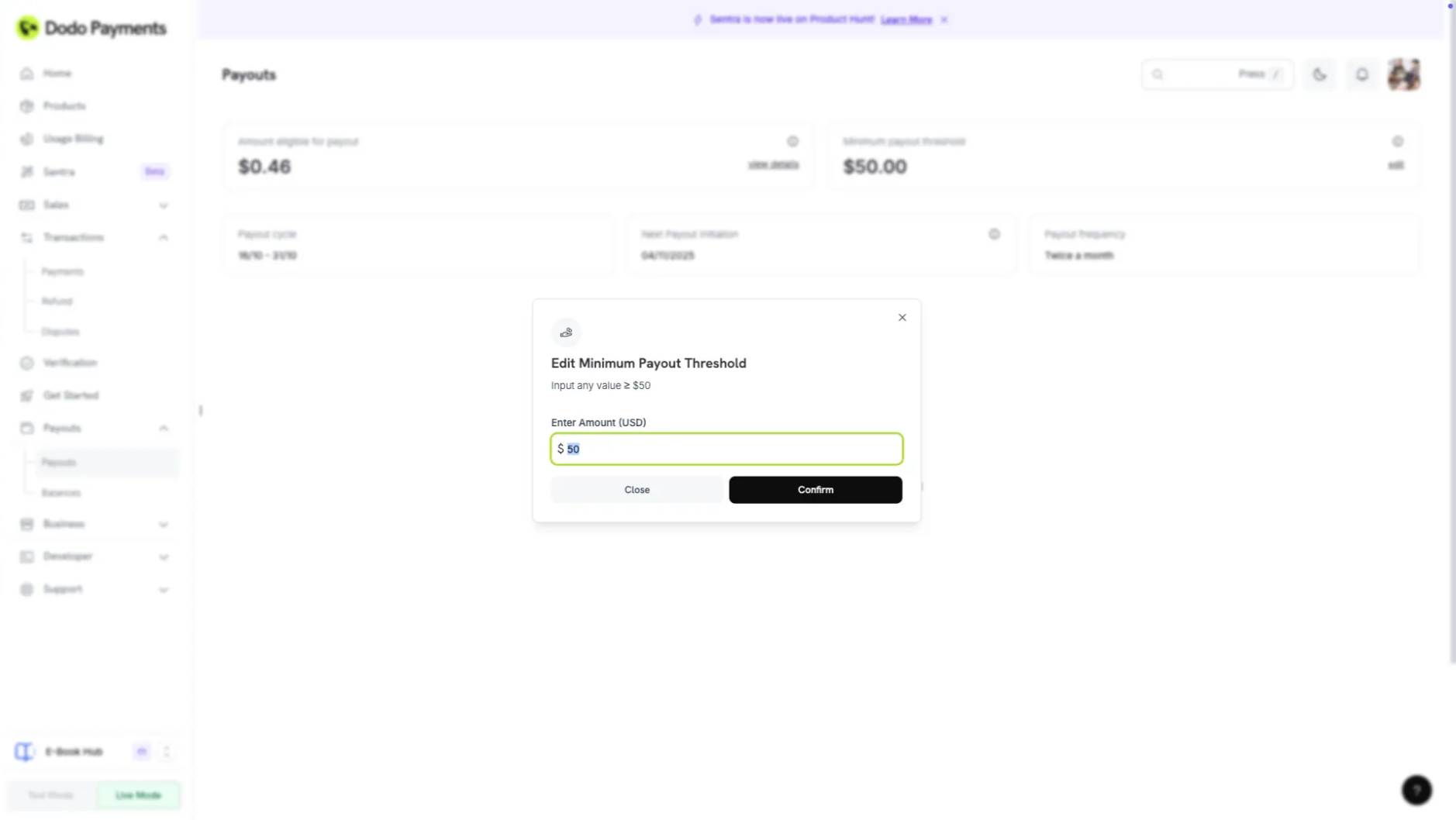 **支払い → 支払いページ → 最低しきい値**に移動
しきい値を編集して、**≥ 50** の数値を入力(例:「250」)
新しいしきい値を保存するには**確認**をクリック
最低支払いしきい値フィールドに更新された金額が表示されます
この機能はUSD/EUR/GBPウォレットに適用されます。
## 支払い控除
支払い前に売上から控除される金額は以下の通りです:
**税金:**
税計算機に基づくすべての適用可能な税金は、支払い前に売上金額から控除されます。
**手数料:**
Dodo Payment FeesおよびPayout Feesは、支払いを送信する前に控除されます。
詳細な料金情報は、私たちの[Pricing Page](https://dodopayments.com/pricing)をご覧ください。
## 支払いステータス
支払いの進捗状況を以下のステータスインジケータで追跡します:
| ステータス | 説明 |
| -------- | ----------------------------------------------------- |
| 開始されていない | 支払期日が到来していないため、開始されていません |
| 進行中 | 支払期日が到来し、支払いが進行中です |
| 保留中 | 支払いは支払いチームによって保留されています(管理ダッシュボードが利用可能になるまでバックエンドによって) |
| 成功 | ビジネスアカウントへの支払いが正常に処理された |
| 失敗 | ビジネスアカウントへの支払いが失敗しました |
## 支払い請求書
Dodo Paymentsがビジネスに支払った金額を示す逆請求書が生成されます。
### 請求書の構造
**支払い → 支払いページ → 最低しきい値**に移動
しきい値を編集して、**≥ 50** の数値を入力(例:「250」)
新しいしきい値を保存するには**確認**をクリック
最低支払いしきい値フィールドに更新された金額が表示されます
この機能はUSD/EUR/GBPウォレットに適用されます。
## 支払い控除
支払い前に売上から控除される金額は以下の通りです:
**税金:**
税計算機に基づくすべての適用可能な税金は、支払い前に売上金額から控除されます。
**手数料:**
Dodo Payment FeesおよびPayout Feesは、支払いを送信する前に控除されます。
詳細な料金情報は、私たちの[Pricing Page](https://dodopayments.com/pricing)をご覧ください。
## 支払いステータス
支払いの進捗状況を以下のステータスインジケータで追跡します:
| ステータス | 説明 |
| -------- | ----------------------------------------------------- |
| 開始されていない | 支払期日が到来していないため、開始されていません |
| 進行中 | 支払期日が到来し、支払いが進行中です |
| 保留中 | 支払いは支払いチームによって保留されています(管理ダッシュボードが利用可能になるまでバックエンドによって) |
| 成功 | ビジネスアカウントへの支払いが正常に処理された |
| 失敗 | ビジネスアカウントへの支払いが失敗しました |
## 支払い請求書
Dodo Paymentsがビジネスに支払った金額を示す逆請求書が生成されます。
### 請求書の構造
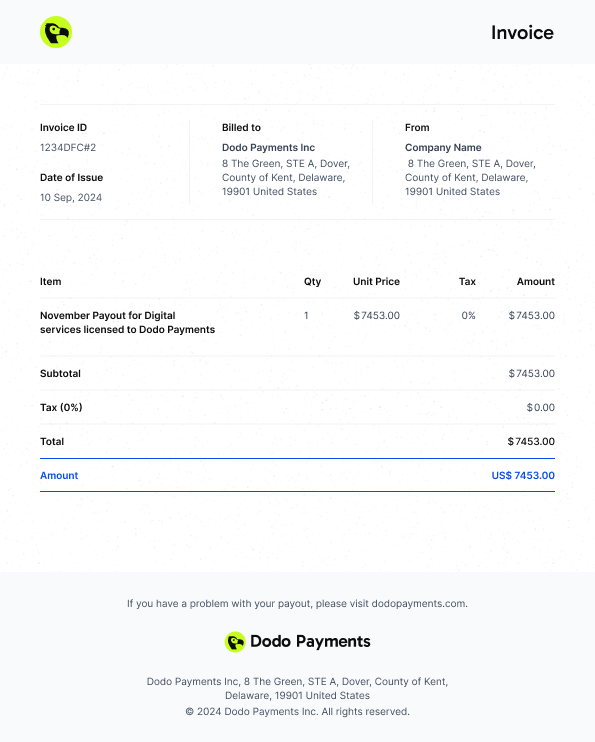 USD、GBP、およびEURウォレットのすべての残高、取引台帳、および支払い関連の財務活動の包括的な概要を取得します。