> ## Documentation Index
> Fetch the complete documentation index at: https://docs.dodopayments.com/llms.txt
> Use this file to discover all available pages before exploring further.
# Customer Management
> Manage customer relationships, track purchase history, and provide self-service options through the Dodo Payments dashboard and API.
## Overview
Dodo PaymentsのCustomers機能は、すべての顧客関係を管理するための集中ハブを提供します。すべての顧客とのやり取りを追跡し、購入履歴を表示し、サブスクリプションを管理し、ウォレットの取引台帳にアクセスし、セルフサービスオプションを有効にすることが、すべて単一のダッシュボードから行えます。
View and manage all customers in one place with search and filtering capabilities.
プリペイドの金銭残高を管理し、ウォレットに資金を追加し、取引履歴を追跡します。
Empower customers to self-manage subscriptions, invoices, and license keys.
Programmatically create, update, and retrieve customer data via API.
## Accessing the Customers Page
From the dashboard, click on **Sales > Customers** in the navigation menu.
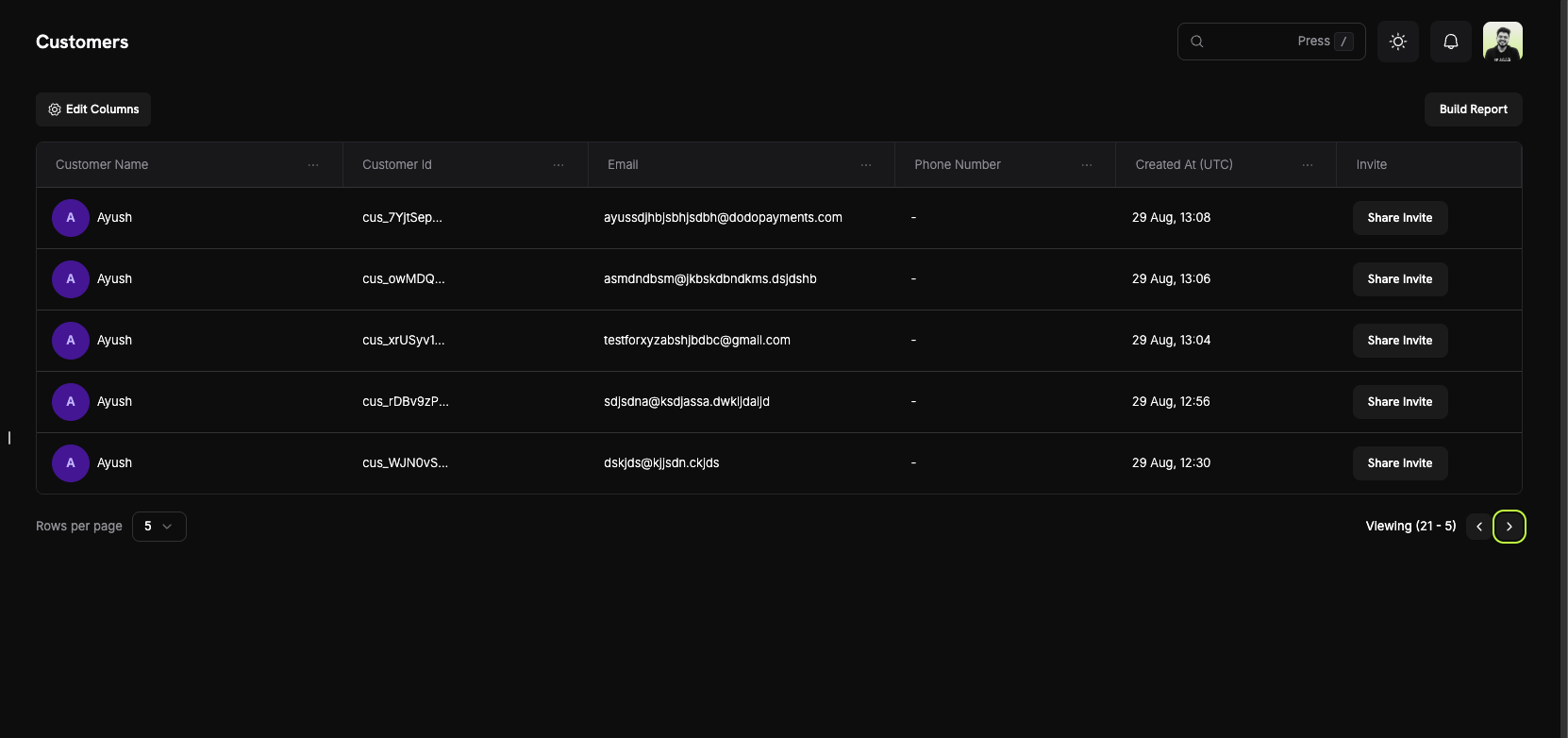
The Customers Page will display a list of all current and past customers who have interacted with your business.
 ## Customer Information
On the **Customers Page**, you can see a comprehensive overview of your entire customer base. The table displays all customers with the following information:
### Customer List Columns
* **Customer Name**: The full name of the customer with an avatar indicator.
* **Customer Id**: A unique identifier (e.g., `cus_5fpsWAa...`) for each customer.
* **Email**: The customer's email address for communication and portal access.
* **Phone Number**: The customer's phone number (if provided).
* **Created At (UTC)**: The date and time when the customer account was created.
* **Invite**: Quick action button to share Customer Portal invites.
### Page Features
* **Edit Columns**: Customize which columns are displayed in the customer table.
* **Build Report**: Generate custom reports based on your customer data.
* **Search**: Quickly find specific customers by name, email, or customer ID.
* **Pagination**: Navigate through your customer list with adjustable rows per page.
Use the "Edit Columns" feature to customize your view and show only the information most relevant to your workflow.
## Customer Details Page
Click on any customer to view their detailed information page, which includes:
## Customer Information
On the **Customers Page**, you can see a comprehensive overview of your entire customer base. The table displays all customers with the following information:
### Customer List Columns
* **Customer Name**: The full name of the customer with an avatar indicator.
* **Customer Id**: A unique identifier (e.g., `cus_5fpsWAa...`) for each customer.
* **Email**: The customer's email address for communication and portal access.
* **Phone Number**: The customer's phone number (if provided).
* **Created At (UTC)**: The date and time when the customer account was created.
* **Invite**: Quick action button to share Customer Portal invites.
### Page Features
* **Edit Columns**: Customize which columns are displayed in the customer table.
* **Build Report**: Generate custom reports based on your customer data.
* **Search**: Quickly find specific customers by name, email, or customer ID.
* **Pagination**: Navigate through your customer list with adjustable rows per page.
Use the "Edit Columns" feature to customize your view and show only the information most relevant to your workflow.
## Customer Details Page
Click on any customer to view their detailed information page, which includes:
 ### About Section
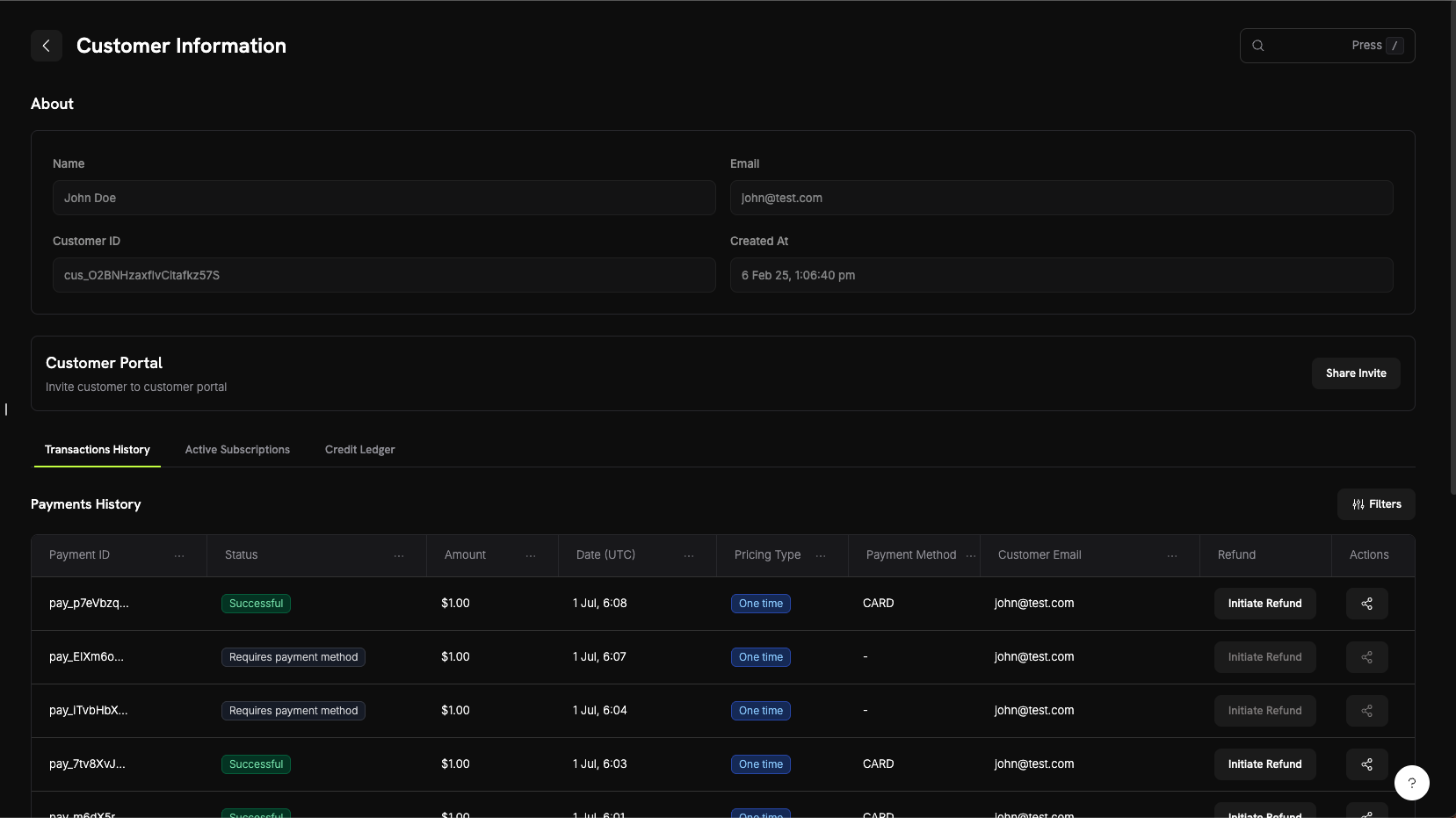
The About section displays core customer information:
* **Name**: Customer's full name
* **Email**: Customer's email address
* **Customer ID**: Unique identifier for API and tracking purposes
* **Created At**: Timestamp of when the customer account was created
### Customer Activity Tabs
The customer details page includes three tabs for viewing different aspects of customer activity:
View all payment transactions for this customer including:
* **Payment ID**: Unique transaction identifier
* **Status**: Payment status (Successful, Failed, Pending, Refunded)
* **Amount**: Transaction amount
* **Date (UTC)**: When the transaction occurred
* **Pricing Type**: Whether it's a one-time purchase or subscription
* **Payment Method**: Payment method used (Card, UPI, etc.)
* **Customer Email**: Email associated with the transaction
* **Refund**: Quick action to initiate refunds
* **Actions**: Additional options for managing the transaction
View all active subscriptions for this customer:
* Subscription plan details
* Billing cycle and next renewal date
* Subscription status
* Options to manage or cancel subscriptions
顧客のウォレット取引台帳を表示し、以下を確認できます:
* すべての資金追加および差引
* 各通貨(USD、INR)ごとの現在のウォレット残高
* 取引理由とタイムスタンプ
* 照合のための詳細な取引履歴
顧客のウォレットクレジット台帳を表示し、以下を確認できます:
* すべてのクレジットおよびデビット取引
* 各通貨ごとの現在のウォレット残高
* 取引理由とタイムスタンプ
* 照合のための詳細な取引履歴
ウォレット台帳タブは、顧客ウォレット取引に関する完全な透明性を提供し、資金の追加、差引、現在の金銭残高の追跡を容易にします。
## カスタマーポータル
カスタマーポータルは、安全にホストされたセルフサービス領域であり、顧客がサポートに連絡することなく、サブスクリプションを管理し、請求履歴を確認し、ライセンスキーにアクセスし、プロファイルを更新できます。
### ポータルの機能
顧客はポータルにアクセスして以下を行えます:
* **請求履歴を見る**:過去のすべての取引を確認し、請求書をダウンロードできます。
* **サブスクリプションを管理する**:サブスクリプションをキャンセルしたり、詳細を確認したりできます。
* **ライセンスキーを取得する**:購入に紐づくライセンスキーすべてにアクセスできます。
* **プロファイルを更新する**:名前、メールアドレス、電話番号を変更できます。
ポータル機能、アクセス方法、統合例に関する詳細なドキュメントを確認してください。
## カスタマーウォレット
カスタマーウォレットは、顧客のプリペイド金銭残高アカウントです。各顧客には自動的にウォレットが提供され、USDおよびINRなど複数の通貨で実際の資金を保有できます。これらはサブスクリプション請求書に充当したり、返金残高として使用したり、プロモーションボーナスで資金を追加したりできます。
### 主な機能
* **複数通貨対応**:USDとINRの金銭残高を個別に追跡します。
* **プリペイド残高**:顧客は将来の請求書やサブスクリプション支払いに充当される資金を保有できます。
* **取引履歴**:すべての資金追加および差引の完全な台帳を表示できます。
* **APIファースト設計**:プログラムからウォレット残高を追加、差引、確認できます。
* **クレジットベースの請求**:顧客が事前にクレジットを購入し、サービスに費やせるようにします。
* **取引履歴**:すべてのクレジットおよびデビットの完全な台帳を表示できます。
* **APIファースト設計**:プログラムからウォレット残高を追加、削除、確認できます。
カスタマーウォレット残高の管理に関する詳細なドキュメント、コード例、およびベストプラクティスを確認してください。
## API管理
Dodo Paymentsは、プログラム的な顧客管理のための包括的なREST APIを提供します。APIを通じて顧客の作成、取得、更新、管理を完全に行えます。
### 利用可能なAPIエンドポイント
顧客の情報を使ってDodo Paymentsアカウントに新しい顧客を作成します。
アカウントに関連付けられたすべての顧客のページネーションされたリストを取得します。
IDによって特定の顧客の詳細情報を取得します。
顧客の名前、メール、メタデータなどの情報を更新します。
顧客のアカウントから保存された支払い方法を削除します。
特定の顧客のために安全なカスタマーポータルセッションリンクを生成します。
すべてのAPIエンドポイントには、APIキーを使用した認証が必要です。常にサーバーサイドで秘密キーを使用し、クライアントサイドコードで公開しないでください。
### About Section
The About section displays core customer information:
* **Name**: Customer's full name
* **Email**: Customer's email address
* **Customer ID**: Unique identifier for API and tracking purposes
* **Created At**: Timestamp of when the customer account was created
### Customer Activity Tabs
The customer details page includes three tabs for viewing different aspects of customer activity:
View all payment transactions for this customer including:
* **Payment ID**: Unique transaction identifier
* **Status**: Payment status (Successful, Failed, Pending, Refunded)
* **Amount**: Transaction amount
* **Date (UTC)**: When the transaction occurred
* **Pricing Type**: Whether it's a one-time purchase or subscription
* **Payment Method**: Payment method used (Card, UPI, etc.)
* **Customer Email**: Email associated with the transaction
* **Refund**: Quick action to initiate refunds
* **Actions**: Additional options for managing the transaction
View all active subscriptions for this customer:
* Subscription plan details
* Billing cycle and next renewal date
* Subscription status
* Options to manage or cancel subscriptions
顧客のウォレット取引台帳を表示し、以下を確認できます:
* すべての資金追加および差引
* 各通貨(USD、INR)ごとの現在のウォレット残高
* 取引理由とタイムスタンプ
* 照合のための詳細な取引履歴
顧客のウォレットクレジット台帳を表示し、以下を確認できます:
* すべてのクレジットおよびデビット取引
* 各通貨ごとの現在のウォレット残高
* 取引理由とタイムスタンプ
* 照合のための詳細な取引履歴
ウォレット台帳タブは、顧客ウォレット取引に関する完全な透明性を提供し、資金の追加、差引、現在の金銭残高の追跡を容易にします。
## カスタマーポータル
カスタマーポータルは、安全にホストされたセルフサービス領域であり、顧客がサポートに連絡することなく、サブスクリプションを管理し、請求履歴を確認し、ライセンスキーにアクセスし、プロファイルを更新できます。
### ポータルの機能
顧客はポータルにアクセスして以下を行えます:
* **請求履歴を見る**:過去のすべての取引を確認し、請求書をダウンロードできます。
* **サブスクリプションを管理する**:サブスクリプションをキャンセルしたり、詳細を確認したりできます。
* **ライセンスキーを取得する**:購入に紐づくライセンスキーすべてにアクセスできます。
* **プロファイルを更新する**:名前、メールアドレス、電話番号を変更できます。
ポータル機能、アクセス方法、統合例に関する詳細なドキュメントを確認してください。
## カスタマーウォレット
カスタマーウォレットは、顧客のプリペイド金銭残高アカウントです。各顧客には自動的にウォレットが提供され、USDおよびINRなど複数の通貨で実際の資金を保有できます。これらはサブスクリプション請求書に充当したり、返金残高として使用したり、プロモーションボーナスで資金を追加したりできます。
### 主な機能
* **複数通貨対応**:USDとINRの金銭残高を個別に追跡します。
* **プリペイド残高**:顧客は将来の請求書やサブスクリプション支払いに充当される資金を保有できます。
* **取引履歴**:すべての資金追加および差引の完全な台帳を表示できます。
* **APIファースト設計**:プログラムからウォレット残高を追加、差引、確認できます。
* **クレジットベースの請求**:顧客が事前にクレジットを購入し、サービスに費やせるようにします。
* **取引履歴**:すべてのクレジットおよびデビットの完全な台帳を表示できます。
* **APIファースト設計**:プログラムからウォレット残高を追加、削除、確認できます。
カスタマーウォレット残高の管理に関する詳細なドキュメント、コード例、およびベストプラクティスを確認してください。
## API管理
Dodo Paymentsは、プログラム的な顧客管理のための包括的なREST APIを提供します。APIを通じて顧客の作成、取得、更新、管理を完全に行えます。
### 利用可能なAPIエンドポイント
顧客の情報を使ってDodo Paymentsアカウントに新しい顧客を作成します。
アカウントに関連付けられたすべての顧客のページネーションされたリストを取得します。
IDによって特定の顧客の詳細情報を取得します。
顧客の名前、メール、メタデータなどの情報を更新します。
顧客のアカウントから保存された支払い方法を削除します。
特定の顧客のために安全なカスタマーポータルセッションリンクを生成します。
すべてのAPIエンドポイントには、APIキーを使用した認証が必要です。常にサーバーサイドで秘密キーを使用し、クライアントサイドコードで公開しないでください。