> ## Documentation Index
> Fetch the complete documentation index at: https://docs.dodopayments.com/llms.txt
> Use this file to discover all available pages before exploring further.
# Customer Wallets
> 顧客の前払い金残高を管理します。ウォレットに資金を追加し、残高をサブスクリプション請求書に適用し、払い戻しをウォレットの資金として処理し、取引履歴を追跡します。
顧客の通貨ごとの金銭残高を確認します。
顧客のウォレットに資金を追加または差し引きします。
View complete transaction history with pagination.
## What are Customer Wallets?
カスタマーウォレットはユーザーの実際の資金を保持する金銭残高アカウントです。顧客のアカウントを作成すると自動的に1つ付与されます。これらのウォレットを次の用途に利用できます:
* 将来のサブスクリプション支払いのために**前払い資金を保管**する
* **払い戻し**をカードではなくウォレット残高として処理する
* **ウェルカムボーナスやロイヤリティ報酬**のようなプロモーション残高を発行する
* 請求時にウォレット資金を**自動的に請求書へ適用**する
* 詳細な台帳履歴で**金銭取引を追跡**する
顧客のアカウントを作成すると、Dodo Payments は残高ゼロのウォレットを自動で作成します。API を通じてすぐに資金を受け取れる状態です。
**カスタマーウォレット ≠ クレジットベース課金**
カスタマーウォレットには請求書やサブスクリプションの支払いに適用できる**実際の金銭残高**(USD、INR)が保持されます。
仮想の使用単位(API コール、トークン、コンピュート時間)を追跡したい場合は、代わりに[Credit-Based Billing](/features/credit-based-billing)をご覧ください。
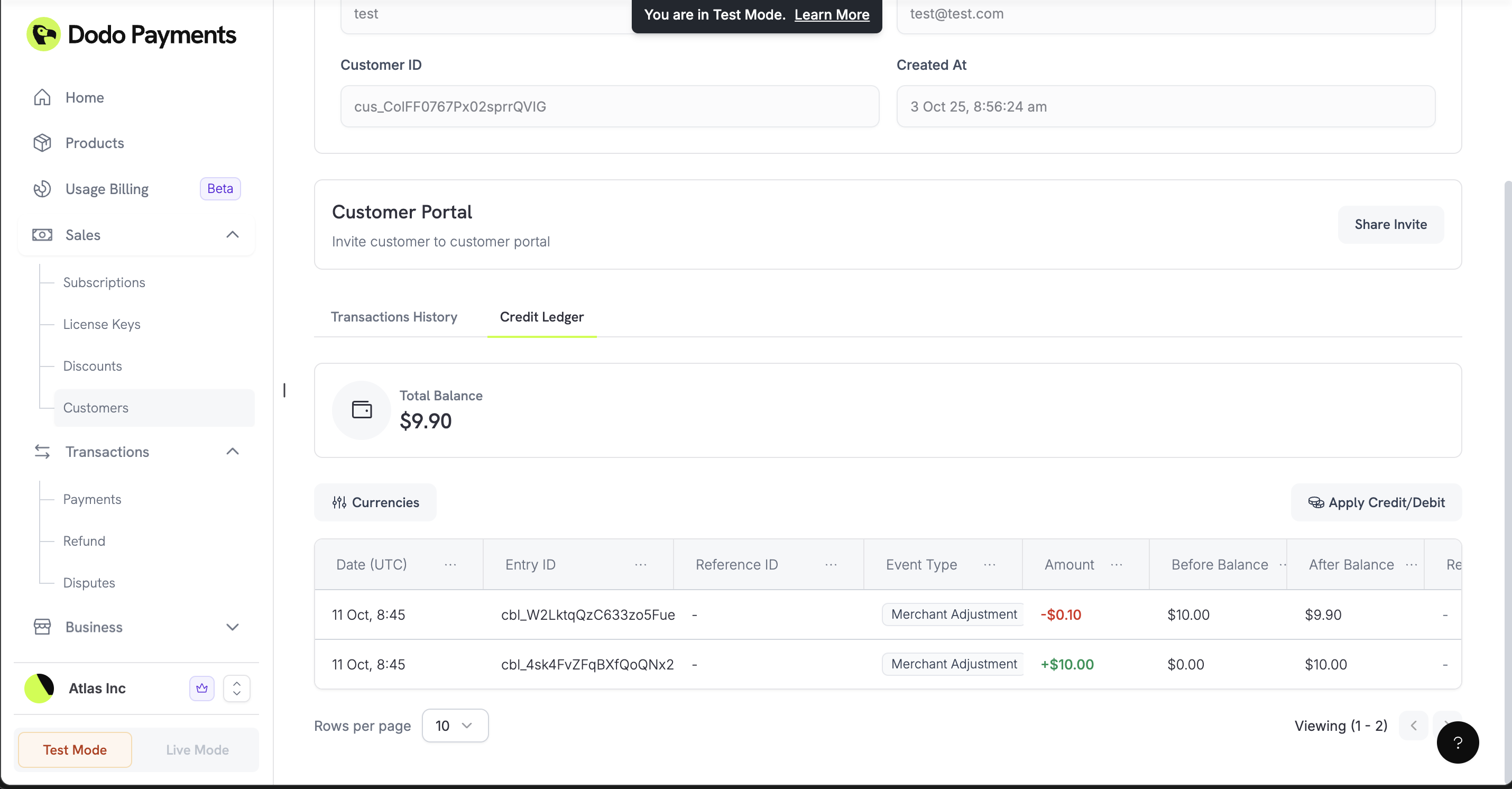 ## 仕組み
カスタマーウォレットには、顧客が購入に適用できる資金が保持されます。顧客に請求書や定期課金が発生すると、最初にウォレット残高が確認されます。利用可能な資金があれば、主要な支払い方法に請求する前に自動的に請求書に適用されます。
### 自動セットアップ
新しい顧客を作成すると、Dodo Payments は自動で残高ゼロのウォレットを作成します。API ですぐに資金を受け取る準備が整います。
### マルチ通貨対応
各ウォレットは異なる通貨で残高を保持できます:
米ドルでの残高(セント単位で保存)
インドルピーでの残高(パイサ単位で保存)
現在、利用可能なのは**USD**と**INR**残高のみです。今後さらなる通貨を追加予定です。
## ウォレットの操作
### 顧客残高の確認
各通貨で顧客がどれだけ資金を持っているかを確認します。購入処理前の残高確認やアプリケーション UI で残高を表示する際に役立ちます。
顧客のウォレットがサポートするすべての通貨で金銭残高を確認します。
### 資金の追加または差し引き
顧客ウォレットに資金を追加(ウェルカムボーナスや払い戻し残高など)したり、資金を差し引いたり(サブスクリプション料金など)。各取引に理由を添えることで明確な監査証跡を維持できます。
`entry_type` フィールドは `'credit'` を使用してウォレットに資金を追加し、`'debit'` を使用してウォレットから資金を差し引きます。
顧客のウォレットに資金を追加または差し引きします。
### 取引履歴の表示
顧客の全ての入出金取引を確認します。この詳細な台帳はアカウントの調整に役立ち、顧客に対して透明性を提供します。
顧客の金銭取引をすべて表示します。
## 実践的な例
### ウォレットへの払い戻し
顧客が払い戻しを要求した場合、従来のカード払い戻しの代わりに金額をウォレット残高へ追加できます。これにより将来の購入のために資金を自社エコシステム内に留めておけます。
```javascript theme={null}
async function refundToWallet(customerId, refundAmount, originalPaymentId) {
await client.customers.wallets.ledgerEntries.create(customerId, {
amount: refundAmount, // Amount in cents
currency: 'USD',
entry_type: 'credit',
reason: `Refund for payment ${originalPaymentId}`,
idempotency_key: `refund_${originalPaymentId}`
});
}
```
### ウェルカムボーナス/プロモーション残高
新規顧客に最初の購入を促すための金銭的ウェルカムボーナスを提供します。
```javascript theme={null}
async function addWelcomeBonus(customerId) {
await client.customers.wallets.ledgerEntries.create(customerId, {
amount: 1000, // $10.00 promotional balance
currency: 'USD',
entry_type: 'credit',
reason: 'Welcome bonus - $10 promotional balance',
idempotency_key: `welcome_${customerId}`
});
}
```
### ウォレットからのサブスクリプション支払い
サブスクリプション料金や手動購入を補うためにウォレットから資金を差し引きます。
```javascript theme={null}
async function deductForPurchase(customerId, purchaseAmount, purchaseId) {
try {
await client.customers.wallets.ledgerEntries.create(customerId, {
amount: purchaseAmount,
currency: 'USD',
entry_type: 'debit',
reason: `Subscription charge - monthly billing`,
idempotency_key: `charge_${purchaseId}`
});
} catch (error) {
if (error.status === 400) {
console.log('Insufficient wallet balance');
}
}
}
```
### プリペイド課金システム
顧客が事前にアカウントに資金を入金し、その残高から時間をかけて引き落とせるようにします。
入金時に顧客のウォレットへ資金を追加します。
```javascript theme={null}
await client.customers.wallets.ledgerEntries.create(customerId, {
amount: 5000, // $50.00 deposit
currency: 'USD',
entry_type: 'credit',
reason: 'Account funding - prepaid deposit',
idempotency_key: `deposit_${paymentId}`
});
```
顧客がサービスを利用したりサブスクリプションを更新したりする際に残高から差し引きます。
```javascript theme={null}
await client.customers.wallets.ledgerEntries.create(customerId, {
amount: 1500, // $15.00 charge
currency: 'USD',
entry_type: 'debit',
reason: 'Service purchase - monthly subscription',
idempotency_key: `purchase_${purchaseId}`
});
```
資金が不足していないか確認し、追加入金を促すことができます。
```javascript theme={null}
const wallets = await client.customers.wallets.list(customerId);
const usdWallet = wallets.items.find(w => w.currency === 'USD');
const balance = usdWallet.balance;
if (balance < 1000) { // Less than $10.00
// Send low balance notification
await sendLowBalanceNotification(customerId, balance);
}
```
### マルチ通貨対応
異なる地域の顧客向けに別々の金銭残高を管理します。
米国拠点の顧客向けにUSD資金を管理します。
```javascript theme={null}
await client.customers.wallets.ledgerEntries.create(customerId, {
amount: 20000, // $200.00 in cents
currency: 'USD',
entry_type: 'credit',
reason: 'USD account funding',
idempotency_key: `usd_deposit_${paymentId}`
});
```
インドの顧客向けにINR資金を管理します。
```javascript theme={null}
await client.customers.wallets.ledgerEntries.create(customerId, {
amount: 1500000, // Rs 15,000 in paise
currency: 'INR',
entry_type: 'credit',
reason: 'INR account funding',
idempotency_key: `inr_deposit_${paymentId}`
});
```
## ベストプラクティス
### 重複取引の防止
冪等キーを使用して、同じイベントで資金を二重に追加または差し引きしないようにします。
```javascript theme={null}
async function addFundsSafely(customerId, amount, reason) {
const idempotencyKey = `${reason}_${customerId}_${Date.now()}`;
try {
const result = await client.customers.wallets.ledgerEntries.create(customerId, {
amount: amount,
currency: 'USD',
entry_type: 'credit',
reason: reason,
idempotency_key: idempotencyKey
});
return { success: true, wallet: result };
} catch (error) {
if (error.status === 409) {
// Transaction already processed
return { success: true, wallet: null, duplicate: true };
}
throw error;
}
}
```
### 課金前の残高確認
ウォレットから大きな取引を試みる前に、顧客に十分な資金があることを確認します。
```javascript theme={null}
async function checkBalanceBeforeOperation(customerId, requiredAmount) {
const wallets = await client.customers.wallets.list(customerId);
const usdWallet = wallets.items.find(w => w.currency === 'USD');
if (!usdWallet || usdWallet.balance < requiredAmount) {
throw new Error('Insufficient funds for this operation');
}
return usdWallet.balance;
}
```
## 今後の予定
次のリリースで予定されている機能:
* **残高の有効期限**:一定期間後に資金を失効させる
* **高度な分析**:詳細な支出レポートおよび残高の動向
* **さらに多くの Webhook**:残高変動や低残高アラートのリアルタイム通知
基本的な資金追加および差し引き操作から始め、ビジネスの成長に合わせてより複雑な自動課金ワークフローを統合してください。
## 仕組み
カスタマーウォレットには、顧客が購入に適用できる資金が保持されます。顧客に請求書や定期課金が発生すると、最初にウォレット残高が確認されます。利用可能な資金があれば、主要な支払い方法に請求する前に自動的に請求書に適用されます。
### 自動セットアップ
新しい顧客を作成すると、Dodo Payments は自動で残高ゼロのウォレットを作成します。API ですぐに資金を受け取る準備が整います。
### マルチ通貨対応
各ウォレットは異なる通貨で残高を保持できます:
米ドルでの残高(セント単位で保存)
インドルピーでの残高(パイサ単位で保存)
現在、利用可能なのは**USD**と**INR**残高のみです。今後さらなる通貨を追加予定です。
## ウォレットの操作
### 顧客残高の確認
各通貨で顧客がどれだけ資金を持っているかを確認します。購入処理前の残高確認やアプリケーション UI で残高を表示する際に役立ちます。
顧客のウォレットがサポートするすべての通貨で金銭残高を確認します。
### 資金の追加または差し引き
顧客ウォレットに資金を追加(ウェルカムボーナスや払い戻し残高など)したり、資金を差し引いたり(サブスクリプション料金など)。各取引に理由を添えることで明確な監査証跡を維持できます。
`entry_type` フィールドは `'credit'` を使用してウォレットに資金を追加し、`'debit'` を使用してウォレットから資金を差し引きます。
顧客のウォレットに資金を追加または差し引きします。
### 取引履歴の表示
顧客の全ての入出金取引を確認します。この詳細な台帳はアカウントの調整に役立ち、顧客に対して透明性を提供します。
顧客の金銭取引をすべて表示します。
## 実践的な例
### ウォレットへの払い戻し
顧客が払い戻しを要求した場合、従来のカード払い戻しの代わりに金額をウォレット残高へ追加できます。これにより将来の購入のために資金を自社エコシステム内に留めておけます。
```javascript theme={null}
async function refundToWallet(customerId, refundAmount, originalPaymentId) {
await client.customers.wallets.ledgerEntries.create(customerId, {
amount: refundAmount, // Amount in cents
currency: 'USD',
entry_type: 'credit',
reason: `Refund for payment ${originalPaymentId}`,
idempotency_key: `refund_${originalPaymentId}`
});
}
```
### ウェルカムボーナス/プロモーション残高
新規顧客に最初の購入を促すための金銭的ウェルカムボーナスを提供します。
```javascript theme={null}
async function addWelcomeBonus(customerId) {
await client.customers.wallets.ledgerEntries.create(customerId, {
amount: 1000, // $10.00 promotional balance
currency: 'USD',
entry_type: 'credit',
reason: 'Welcome bonus - $10 promotional balance',
idempotency_key: `welcome_${customerId}`
});
}
```
### ウォレットからのサブスクリプション支払い
サブスクリプション料金や手動購入を補うためにウォレットから資金を差し引きます。
```javascript theme={null}
async function deductForPurchase(customerId, purchaseAmount, purchaseId) {
try {
await client.customers.wallets.ledgerEntries.create(customerId, {
amount: purchaseAmount,
currency: 'USD',
entry_type: 'debit',
reason: `Subscription charge - monthly billing`,
idempotency_key: `charge_${purchaseId}`
});
} catch (error) {
if (error.status === 400) {
console.log('Insufficient wallet balance');
}
}
}
```
### プリペイド課金システム
顧客が事前にアカウントに資金を入金し、その残高から時間をかけて引き落とせるようにします。
入金時に顧客のウォレットへ資金を追加します。
```javascript theme={null}
await client.customers.wallets.ledgerEntries.create(customerId, {
amount: 5000, // $50.00 deposit
currency: 'USD',
entry_type: 'credit',
reason: 'Account funding - prepaid deposit',
idempotency_key: `deposit_${paymentId}`
});
```
顧客がサービスを利用したりサブスクリプションを更新したりする際に残高から差し引きます。
```javascript theme={null}
await client.customers.wallets.ledgerEntries.create(customerId, {
amount: 1500, // $15.00 charge
currency: 'USD',
entry_type: 'debit',
reason: 'Service purchase - monthly subscription',
idempotency_key: `purchase_${purchaseId}`
});
```
資金が不足していないか確認し、追加入金を促すことができます。
```javascript theme={null}
const wallets = await client.customers.wallets.list(customerId);
const usdWallet = wallets.items.find(w => w.currency === 'USD');
const balance = usdWallet.balance;
if (balance < 1000) { // Less than $10.00
// Send low balance notification
await sendLowBalanceNotification(customerId, balance);
}
```
### マルチ通貨対応
異なる地域の顧客向けに別々の金銭残高を管理します。
米国拠点の顧客向けにUSD資金を管理します。
```javascript theme={null}
await client.customers.wallets.ledgerEntries.create(customerId, {
amount: 20000, // $200.00 in cents
currency: 'USD',
entry_type: 'credit',
reason: 'USD account funding',
idempotency_key: `usd_deposit_${paymentId}`
});
```
インドの顧客向けにINR資金を管理します。
```javascript theme={null}
await client.customers.wallets.ledgerEntries.create(customerId, {
amount: 1500000, // Rs 15,000 in paise
currency: 'INR',
entry_type: 'credit',
reason: 'INR account funding',
idempotency_key: `inr_deposit_${paymentId}`
});
```
## ベストプラクティス
### 重複取引の防止
冪等キーを使用して、同じイベントで資金を二重に追加または差し引きしないようにします。
```javascript theme={null}
async function addFundsSafely(customerId, amount, reason) {
const idempotencyKey = `${reason}_${customerId}_${Date.now()}`;
try {
const result = await client.customers.wallets.ledgerEntries.create(customerId, {
amount: amount,
currency: 'USD',
entry_type: 'credit',
reason: reason,
idempotency_key: idempotencyKey
});
return { success: true, wallet: result };
} catch (error) {
if (error.status === 409) {
// Transaction already processed
return { success: true, wallet: null, duplicate: true };
}
throw error;
}
}
```
### 課金前の残高確認
ウォレットから大きな取引を試みる前に、顧客に十分な資金があることを確認します。
```javascript theme={null}
async function checkBalanceBeforeOperation(customerId, requiredAmount) {
const wallets = await client.customers.wallets.list(customerId);
const usdWallet = wallets.items.find(w => w.currency === 'USD');
if (!usdWallet || usdWallet.balance < requiredAmount) {
throw new Error('Insufficient funds for this operation');
}
return usdWallet.balance;
}
```
## 今後の予定
次のリリースで予定されている機能:
* **残高の有効期限**:一定期間後に資金を失効させる
* **高度な分析**:詳細な支出レポートおよび残高の動向
* **さらに多くの Webhook**:残高変動や低残高アラートのリアルタイム通知
基本的な資金追加および差し引き操作から始め、ビジネスの成長に合わせてより複雑な自動課金ワークフローを統合してください。